Page 179 of 242
2003 VOLVO XC90
D - Parking light - P21 4W
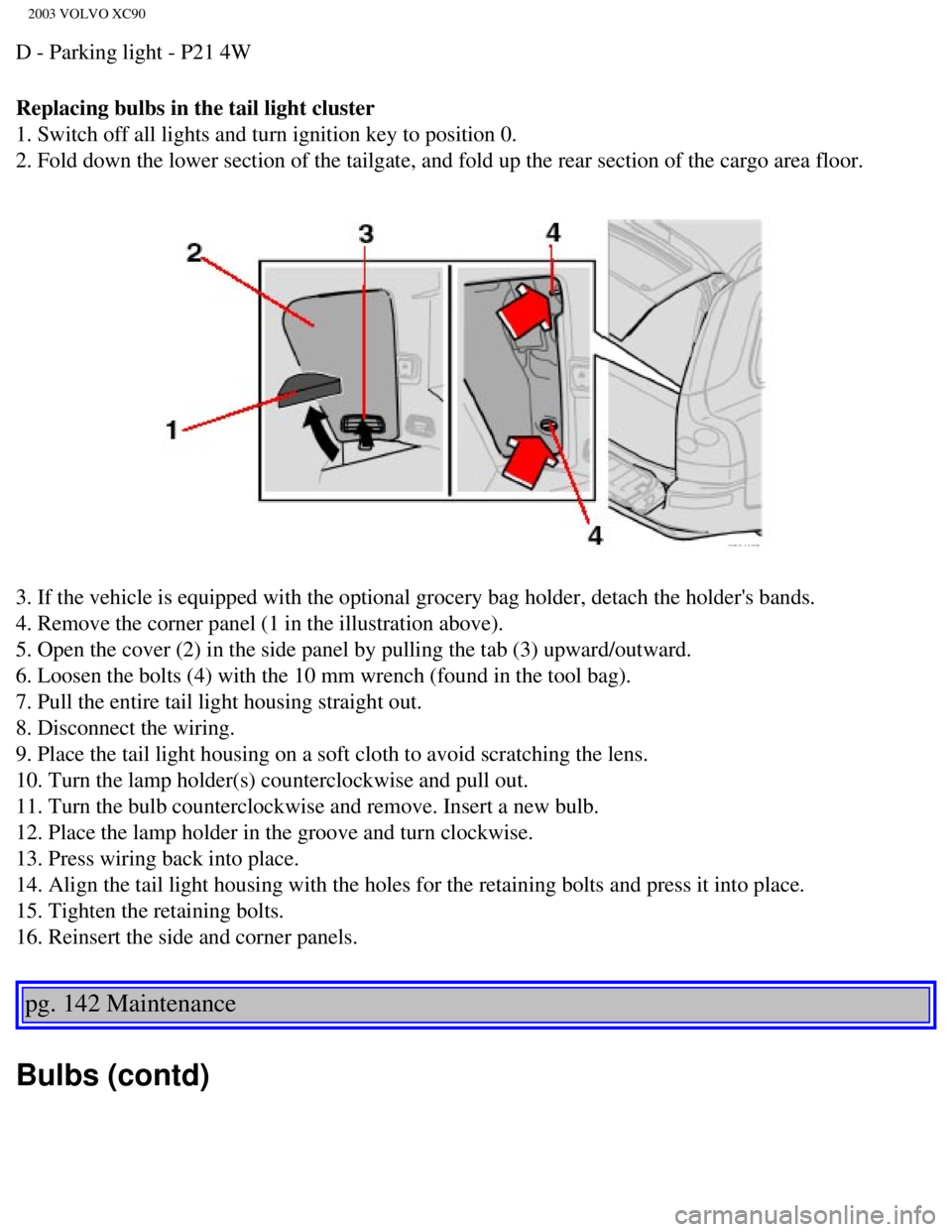
Replacing bulbs in the tail light cluster
1. Switch off all lights and turn ignition key to position 0.
2. Fold down the lower section of the tailgate, and fold up the rear sec\
tion of the cargo area floor.
3. If the vehicle is equipped with the optional grocery bag holder, deta\
ch the holder's bands.
4. Remove the corner panel (1 in the illustration above).
5. Open the cover (2) in the side panel by pulling the tab (3) upwar\
d/outward.
6. Loosen the bolts (4) with the 10 mm wrench (found in the tool bag)\
.
7. Pull the entire tail light housing straight out.
8. Disconnect the wiring.
9. Place the tail light housing on a soft cloth to avoid scratching the \
lens.
10. Turn the lamp holder(s) counterclockwise and pull out.
11. Turn the bulb counterclockwise and remove. Insert a new bulb.
12. Place the lamp holder in the groove and turn clockwise.
13. Press wiring back into place.
14. Align the tail light housing with the holes for the retaining bolts \
and press it into place.
15. Tighten the retaining bolts.
16. Reinsert the side and corner panels.
pg. 142 Maintenance
Bulbs (contd)
file:///K|/ownersdocs/2003/2003_XC90/03xc90_09b.htm (12 of 23)12/30/20\
06 4:19:04 PM
Page 180 of 242
2003 VOLVO XC90
Rear fog light
1. Switch off the ignition.
2. Carefully insert a small screwdriver (see illustration above)
3. Pry out the lamp housing.
4. Turn the bulb holder counterclockwise and pull out the bulb.
5. Insert a new bulb and press the lamp housing back into place.
Door step courtesy lights
The door step courtesy lights are located under the dashboard on the dri\
ver's and passenger's sides. To
replace a bulb:
1. Carefully insert a screwdriver and pry out the lens.
2. Replace the defective bulb.
3. Reinstall the lens.
file:///K|/ownersdocs/2003/2003_XC90/03xc90_09b.htm (13 of 23)12/30/20\
06 4:19:04 PM
Page 183 of 242
2003 VOLVO XC90
Bulbs (contd)
License plaste lights
1. Switch off the ignition.
2. Loosen the screws with a Torx screwdriver.
3. Turn the bulb holder counterclockwise and pull it out.
4. Pull out the defective bulb and insert a new one.
5. Reinsert the bulb holder into the housing and turn it clockwise.
6. Reinstall the housing and screw it into place.
pg. 145 Maintenance
Fuses
file:///K|/ownersdocs/2003/2003_XC90/03xc90_09b.htm (16 of 23)12/30/20\
06 4:19:04 PM
Page 187 of 242
2003 VOLVO XC90
Fuses in the passenger compartment
Fuses are located inside the access panel on the end face of the dashboa\
rd. There are also a number of
spare fuses. No. Amperage
1. Blower - climate system 30
2. Audio amplifier 30
3. Power driver's seat 30
4. Power passenger's seat (option) 30
5. Driver's door - central locking, power windows, door mirror 25
6. Front passenger's door - central locking, power windows, door mirror \
25
7. Rear side doors - power windows, child safety locks 30
8. -
9. -
10. Power passenger's seat 5
11. Electric socket 12V 15
12. Ignition switch (30-feed), central electronic module, starter moto\
r relay, SRS, antenna
ring, engine management system 10
13. -
14. Electronic module (ceiling), courtesy lighting (ceiling) 10
15. -
16. Speed-sensitive power steering (T6 only) 5
17. ABS/DSTC 5
18. Heated driver's seat (option) 15
file:///K|/ownersdocs/2003/2003_XC90/03xc90_09b.htm (20 of 23)12/30/20\
06 4:19:04 PM
Page 189 of 242
2003 VOLVO XC90
Fuses in the cargo compartment No. Amperage
1. Rear electrical module, cargo compartment lighting 10
2. Rear fog light 10
3. Brake lights 15
4. Backup lights 10
5. Rear window defroster, relay 15I - accessories (rear) 5
6. Tailgate release 10
7. Electric socket 12V in cargo compartment 15
8. Central locking rear doors/tailgate, fuel filler door 20
9. Trailer hitch (30 feed) 15
10. Antenna 5
11. Accessory control module (AEM) 15
12. Washer - tailgate window 15
13. Subwoofer/rear A/C (option) 15
14. Brake lights 7.5
15. Trailer hitch (15I feed), reverse warning system
(option) 20
16. -
17. All Wheel Drive control module 7.5
file:///K|/ownersdocs/2003/2003_XC90/03xc90_09b.htm (22 of 23)12/30/20\
06 4:19:04 PM
Page 197 of 242

2003 VOLVO XC90
Three-way catalytic converter cautions
l Keep your engine properly tuned. Certain engine malfunctions, particular\
ly involving the electrical,
fuel or distributor ignition systems, may cause unusually high three-way\
catalytic converter
temperatures. Do not continue to operate your vehicle if you detect engi\
ne misfire, noticeable loss of
power or other unusual operating conditions, such as engine overheating \
or backfiring. A properly tuned
engine will help avoid malfunctions that could damage the three-way cata\
lytic converter.
l Do not park your vehicle over combustible materials, such as grass or le\
aves, which can come into
contact with the hot exhaust system and cause such materials to ignite u\
nder certain wind and weather
conditions.
l Excessive starter cranking (in excess of one minute), or an intermitte\
ntly firing or flooded engine can
cause three-way catalytic converter or exhaust system overheating.
l Remember that tampering or unauthorized modifications to the engine, the\
Electronic Control
Module, or the vehicle may be illegal and can cause three-way catalytic \
converter or exhaust system
overheating. This includes:
- Altering fuel injection setting or components.
- Altering emission system components or location or removing components\
.
- Repeated use of leaded fuel.
NOTE: Unleaded fuel is required for vehicles with three-way catalytic converte\
rs.
pg. 155 Specifications
Electrical system
12-volt system with voltage controlled generator. Single wire system in \
which the chassis and engine
block are used as conductors, grounded on the chassis. Battery 2.5TT6
Voltage 12 V12 V
file:///K|/ownersdocs/2003/2003_XC90/03xc90_10.htm (7 of 10)12/30/2006\
4:19:05 PM
Page 207 of 242
 clockwise or counterclockwise to raise or lower the \
volume. The volume control is
electronic and has no end position. Volume can also be raised (+")
2003 VOLVO XC90
Volume control
Turn the knob (2) clockwise or counterclockwise to raise or lower the \
volume. The volume control is
electronic and has no end position. Volume can also be raised (+) or l\
owered (-) using the optional
steering wheel keypad.
Pause mode
If the volume is turned off, the CD player will go into pause mode. Re-a\
ctivate the player by turning up
the volume.
Selecting a sound source
A sound source can be selected either with the the function buttons (3)\
- CD, AM/FM, or with the
SELECTOR control (4). To select a sound source:
l Turn the SELECTOR control to choose FM1, FM2, AM, CD, CD changer (optio\
n)
l Press the AM/FM button repeatedly to choose between FM1, FM2, AM
l Press the CD button to change to the CD player or optional CD changer
The selected sound source will be shown in the display.
pg. 165 Audio
Sound settings
1. Press the SOUND button (1) repeatedly until you come to the setting\
that you wish to change. Choose
BASS, TREBLE, FADER, BALANCE, SUBWOOFER (option), CENTER (option) or\
SURROUND
(option).
2. Use the SELECTOR control (2) to adjust the level of the setting you\
have selected. The display shows
a scale from min. to max. position. The center indicates the normal posi\
tion.
file:///K|/ownersdocs/2003/2003_XC90/03xc90_11a.htm (7 of 17)12/30/200\
6 4:19:06 PM
Page 225 of 242

2003 VOLVO XC90
HomeLink® Universal Transceiver
Hand-held transmitter
HomeLink® Universal Transceiver
HomeLink® is an advanced system that can be programmed to learn the c\
odes of three different remote
controlled-devices (e.g., garage door openers, remote lighting, entry d\
oor lock). HomeLink®'s sun visor-
mounted transceiver, powered by your vehicle's electrical system, may th\
en be used in place of your
hand-held remote controls.
NOTE: For your security, the HomeLink® Universal Transceiver is designed to\
not function if you lock
your vehicle from the outside.
Programming the transceiver
1. The ignition switch must be turned to the "accessory" position (II)\
before programming the
HomeLink® Universal Transceiver.
2. Begin by erasing all 3 factory default channels. Hold down the two ou\
tside buttons (buttons 1 and 3 in
the illustration) on the HomeLink® Universal Transceiver for about 2\
0 seconds, until HomeLink®'s
indicator light begins to flash. Then release the buttons.
3. Hold your hand-held transmitter (garage door opener, for example) 2\
to 5 in. (5 to 12 cm) away from
the HomeLink® surface, keeping the indicator light in view. For place\
ment questions, contact
HomeLink® toll-free 1-800-355-3515 (Internet:
www.HomeLink.com).
4. Using two hands, push and hold both your hand-held transmitter's butt\
on and the transceiver button
you wish to program. The indicator light will flash first slowly, then r\
apidly. Rapid flashing tells you the
HomeLink® button has been successfully programmed. Release both butto\
ns.
file:///K|/ownersdocs/2003/2003_XC90/03xc90_11b.htm (8 of 11)12/30/200\
6 4:19:07 PM


