Page 98 of 242
2003 VOLVO XC90
Replacing the battery in the remote control
If the range of the transmitter is noticeably reduced, this indicates th\
at the battery is weak and should be
replaced.
To replace the battery
l Remove the screw on the transmitter cover with a small screwdriver.
l Remove the cover carefully pressing it rearward/upward.
l Replace the battery with a new 3-volt, CR 2032 battery. The battery shou\
ld be inserted with the minus
side upward. Avoid touching the contact surfaces of the battery with you\
r fingers.
l Reinstall the cover and tighten the screw to help protect the transmitte\
r.
pg. 77 Locks and Alarm
Locking and unlocking
Locking and unlocking the vehicle from the inside
The switch on the driver's door armrest can be used to lock or unlock al\
l doors and the tailgate, and to
file:///K|/ownersdocs/2003/2003_XC90/03xc90_05.htm (6 of 11)12/30/2006\
4:18:56 PM
Page 99 of 242
2003 VOLVO XC90
set the alarm.
Locking the glove compartment
The glove compartment can be locked with the master key.
pg. 78 Locks and Alarm
Locking and unlocking (contd)
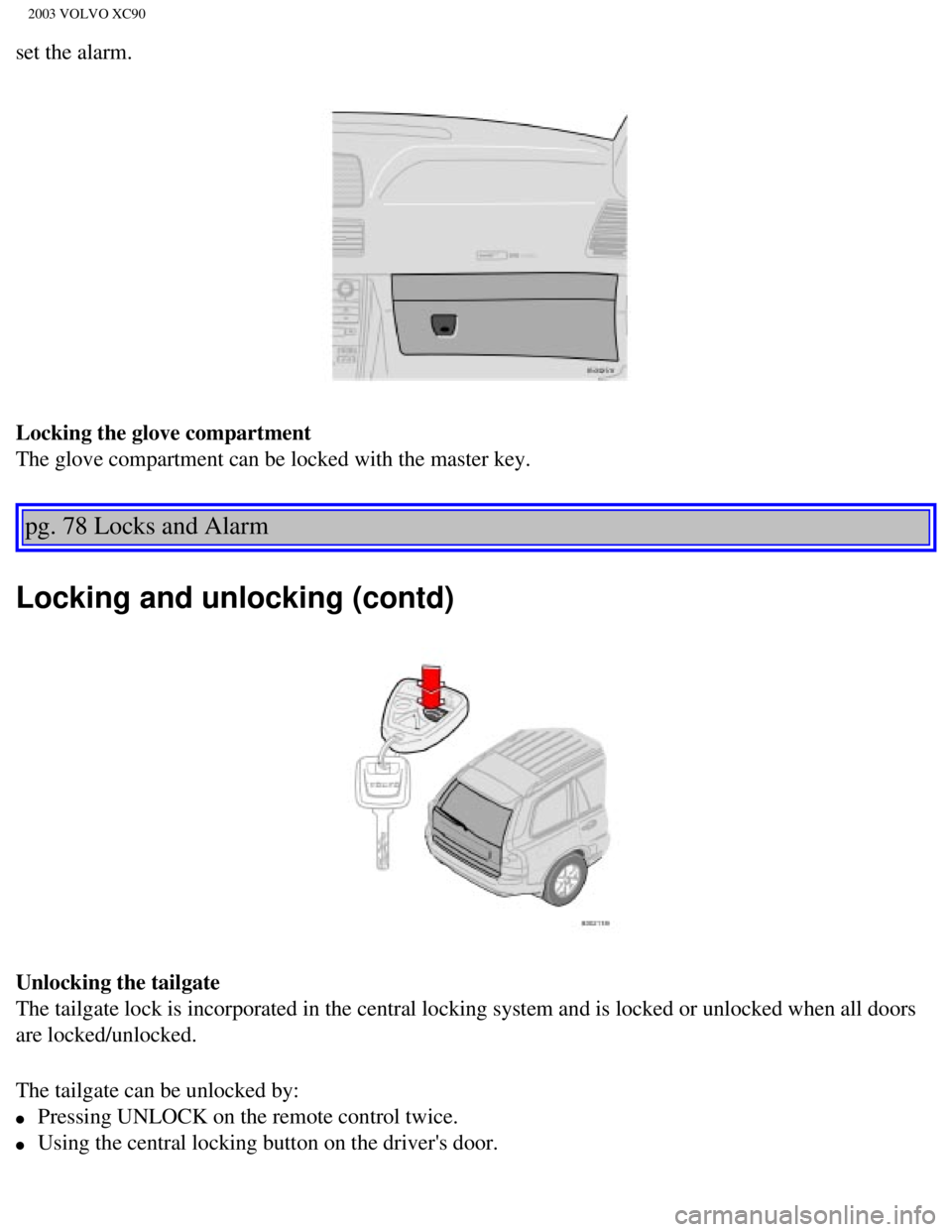
Unlocking the tailgate
The tailgate lock is incorporated in the central locking system and is l\
ocked or unlocked when all doors
are locked/unlocked.
The tailgate can be unlocked by:
l Pressing UNLOCK on the remote control twice.
l Using the central locking button on the driver's door.
file:///K|/ownersdocs/2003/2003_XC90/03xc90_05.htm (7 of 11)12/30/2006\
4:18:56 PM
Page 100 of 242
.
Automatic relocking:
l If you use the tailgate unlock button to unlock the tailgat")
2003 VOLVO XC90
l Pressing twice on the remote control's tailgate unlock button (see illustration above\
).
Automatic relocking:
l If you use the tailgate unlock button to unlock the tailgate without ope\
ning it, it will automatically
relock after approximately 2 minutes.
l However, if you open the tailgate and close it again, it will remain unl\
ocked and the alarm will not be
rearmed. Press the lock button on the remote control to relock the tailg\
ate and rearm the alarm.
pg. 79 Locks and Alarm
Child safety locks
Manual child safety locks - rear doors/tailgate
The controls are located on the rear door jambs and at the lower edge of\
the tailgate. Use a screwdriver
to adjust these controls.
A The door/tailgate cannot be opened from the inside. Normal operation fr\
om the outside.
B The door/tailgate locks function normally.
WARNING!
Remember, in the event of an accident, the rear seat passengers cannot o\
pen the doors from the inside
with the buttons in position A.
pg. 80 Locks and Alarm
file:///K|/ownersdocs/2003/2003_XC90/03xc90_05.htm (8 of 11)12/30/2006\
4:18:56 PM
Page 101 of 242

2003 VOLVO XC90
Alarm
Alarm
The alarm is automatically armed whenever you lock your vehicle.
When armed, the alarm continuously monitors a number of points on the ve\
hicle. The following
conditions will set off the alarm:
l The hood is forced open.
l The tailgate is forced open.
l A door is forced open.
l The ignition switch is tampered with.
l If there is movement in the passenger compartment (if the vehicle is eq\
uipped with the optional
movement sensor).
l The vehicle is lifted or towed (if the vehicle is equipped with the opt\
ional inclination sensor).
l The battery is disconnected (while the alarm is armed).
l The siren is disconnected when the alarm is disarmed.
Arming the alarm
Press the LOCK button on the remote control, lock the vehicle using the \
key in the driver's door or press
the central lock button on one of the front doors with the door open. On\
e long flash of the turn signals
will confirm that the alarm is armed.
Disarming the alarm
Press the UNLOCK button on the remote control or unlock the doors with t\
he key.
Turning off (stopping) the alarm
If the alarm is sounding, it can be stopped by pressing the UNLOCK butto\
n on the remote control or by
unlocking the driver's door with the key.
Audible/visual alarm signal
An audible alarm signal is given by a battery powered siren. The alarm c\
ycle lasts for 25 seconds.
The visual alarm signal is given by flashing all turn signals and turnin\
g on the interior lighting for
approximately 5 minutes.
"Panic" button
In an emergency situation, this feature can be used to attract attention\
.
Activate the "panic" button by pressing the red button on the remote con\
trol (see illustration on
page 75)
for at least 3 seconds or by pressing this button twice within 3 seconds\
. The turn signals will flash, the
interior lights will go on and the vehicle's horn will sound.
file:///K|/ownersdocs/2003/2003_XC90/03xc90_05.htm (9 of 11)12/30/2006\
4:18:56 PM
Page 172 of 242
2003 VOLVO XC90
locking system's remote control to reactivate such features as the power\
windows, moonroof, courtesy
lighting, etc.
WARNING!
PROPOSITION 65 WARNING!
Battery posts, terminals, and related accessories contain lead and lead \
compounds, chemicals known
to the state of California to cause cancer and reproductive harm. Wash h\
ands after handling.
pg. 137 Maintenance
Bulbs
The following bulbs are used in the vehicle:
1. Low beam/high beam - 55W H7
2. Bi-Xenon headlight (option) - 35W D2R
3. Backup light - 21 W BA15
4. Brake light - 21W BA15
5. Turn signals, rear - PY21W(amber bulb)
6. Turn signals, front - H21W
7. Door step courtesy light/cargo area lighting - W5W
8. Vanity mirror - 1,2W
9. License plate lighting/parking light in headlight/side marker light, \
rear W5W
Side turn signal - W5W (amber bulb)
10. Fog lights, front - 55W H1
11. Fog light, rear - 21W BA5
file:///K|/ownersdocs/2003/2003_XC90/03xc90_09b.htm (5 of 23)12/30/200\
6 4:19:04 PM
Page 205 of 242

2003 VOLVO XC90
for 3.5 mm contacts and are located under the lower edge of the socket.
All headphones are automatically turned off when the ignition is switche\
d off. They must be manually
restarted when the ignition is switched on again.
Headphones - limitations
l The headphones will only work when the ignition key is in position I or \
higher.
l If a set of headphones is connected to the same source that is being sen\
t through the speakers, the
headphone controls cannot be used to change track or station. This is to\
prevent the driver from being
distracted by an unexpected change in music.
l If the driver selects the same sound source as someone listening to this\
source through headphones,
the driver takes control of the sound source.
l Only one disc in the optional CD changer, and one track on the CD can be\
played at a time.
l Headphone users can choose from among the preset radio stations (AM, FM\
1, FM2) previously set by
the driver.
l If FM is played in the speakers, AM is not available and vice versa.
pg. 163 Audio
Remote control (option)
1. Memory - stores radio stations that have been found by a search
To store a station: - Press the memory button (1). The preset station number will flash 4\
times in the
display
- While the preset number is flashing, use the + or - buttons (5) to s\
elect a position at which to store the
station
- Press button 1 again to store the station
file:///K|/ownersdocs/2003/2003_XC90/03xc90_11a.htm (5 of 17)12/30/200\
6 4:19:06 PM
Page 206 of 242
2003 VOLVO XC90
2. Volume
3. Forward/back - fast forward or back
4. Source - step between sound sources
5. Preset/disc - selects among CD's (in the optional CD changer) or pr\
eset radio stations
6. Auto store - searches for and stores the strongest radio stations
7. Not in use
8. Not in use
9. Power - off/on
Point the remote control toward the IR port on the radio panel (see the\
illustration on
page 160).
NOTE: If the remote control does not function properly, check the batteries (\
AAA or R03).
pg. 164 Audio
Audio functions
On/Off button
To activate the system:
1. Turn the ignition key to position I.
2. Press the POWER button (1) to switch the audio system on or off.
NOTE: If you switch off the ignition while the audio system is on, the system \
will be on when the
ignition is switched on again.
file:///K|/ownersdocs/2003/2003_XC90/03xc90_11a.htm (6 of 17)12/30/200\
6 4:19:06 PM
Page 225 of 242

2003 VOLVO XC90
HomeLink® Universal Transceiver
Hand-held transmitter
HomeLink® Universal Transceiver
HomeLink® is an advanced system that can be programmed to learn the c\
odes of three different remote
controlled-devices (e.g., garage door openers, remote lighting, entry d\
oor lock). HomeLink®'s sun visor-
mounted transceiver, powered by your vehicle's electrical system, may th\
en be used in place of your
hand-held remote controls.
NOTE: For your security, the HomeLink® Universal Transceiver is designed to\
not function if you lock
your vehicle from the outside.
Programming the transceiver
1. The ignition switch must be turned to the "accessory" position (II)\
before programming the
HomeLink® Universal Transceiver.
2. Begin by erasing all 3 factory default channels. Hold down the two ou\
tside buttons (buttons 1 and 3 in
the illustration) on the HomeLink® Universal Transceiver for about 2\
0 seconds, until HomeLink®'s
indicator light begins to flash. Then release the buttons.
3. Hold your hand-held transmitter (garage door opener, for example) 2\
to 5 in. (5 to 12 cm) away from
the HomeLink® surface, keeping the indicator light in view. For place\
ment questions, contact
HomeLink® toll-free 1-800-355-3515 (Internet:
www.HomeLink.com).
4. Using two hands, push and hold both your hand-held transmitter's butt\
on and the transceiver button
you wish to program. The indicator light will flash first slowly, then r\
apidly. Rapid flashing tells you the
HomeLink® button has been successfully programmed. Release both butto\
ns.
file:///K|/ownersdocs/2003/2003_XC90/03xc90_11b.htm (8 of 11)12/30/200\
6 4:19:07 PM


 or pr\
eset radio stations")