2003 VOLVO V70 light
[x] Cancel search: lightPage 67 of 117

1 Make sure that the load carriers are placed in the right direction. See the mark on the decal under the cover.
2 Press the guide lugs into the holes (1).
3 Carefully lower the opposite side of the load carrier to the roof.
4 Loosen the tightening wheel slightly. Slide the hook on the load carrier attachment into the attachment bracket under
the roof molding.
5 Turn the tightening wheel to secure the load carrier in the attachment bracket.
6 Repeat this procedure for the other load carrier attachments.
7 Check that the hooks on all four load carrier attachments are securely tightened in the respective attachment brackets
on the roof of the car.
8 Press down the covers.
Check periodically that the load carriers and load are properly secured.
Reducing wind noise and improving fuel economy
To maximize fuel efficiency and minimize wind noise, Volvo recommends that load carriers be removed when not in
use.
pg. 98 Load carriers (models with rails)
Position of load carriers
Make sure that the wing-shaped load carriers are installed on the roof rails with the rounded edge forward (see the
inset illustration above). The load carriers are identical and can be placed anywhere along the roof rails.
Reducing wind noise and improving fuel economy
To maximize fuel efficiency and minimize wind noise, Volvo recommends that load carriers be removed when not in
use.
ProCarManuals.com
Page 70 of 117

Tires with less than 1/16" (1.6 mm) tread have very poor grip in rain or snow.
To improve tire economy:
Maintain correct tire pressure. See the tire pressure label on the inside of the fuel filler door.
Drive smoothly: avoid fast starts, hard braking and tire screeching.
Tire wear increases with speed.
Correct front wheel alignment is very important.
Unbalanced wheels impair tire economy and driving comfort.
Volvo does not recommend rotating the tires. However, if tires are rotated, they must be kept on the same side of the
car so that they revolve in the same direction as before rotation.
Hitting curbs or potholes can damage the tires and/or wheels permanently.
Flat spots
All tires become warm during use. After cooling, when the vehicle is parked, the tires have a tendency to distort
slightly, forming flat spots. These flat spots can cause vibrations similar to the vibrations caused by unbalanced wheels.
They do, however, disappear when the tire warms up. The degree to which flat spots form depends on the type of cord
used in the tire. Remember that, in cold weather, it takes longer for the tire to warm up and consequently longer for the
flat spot to disappear.
CAUTION: The car must not be driven with wheels of different dimensions/specifications or with a spare tire other
than the one that came with the car. The use of different size wheels can seriously damage your car's transmission or
driveline.
pg. 109 Wheels and tires
Snow chains
Snow chains can be used on your Volvo with the following restrictions:
Snow chains should be installed on front wheels only. Use only Volvo approved snow chains.
Special snow chains must be mounted on 215/55 R16. Consult your Volvo retailer.
If accessory, aftermarket or "custom" tires and wheels are installed and are of a size different than the original tires
and wheels, chains in some cases CANNOT be used. Sufficient clearances between chains and brakes, suspension and
body components must be maintained. Snow chains cannot be used on 17" wheels.
Some strap -on type chains will interfere with brake components and therefore CANNOT be used.
All Wheel Drive models: Snow chains should only be installed on the front wheels. Only chains adapted for AWD
models should be used.
Consult your Volvo retailer for additional snow chain information.
CAUTION:
Check local regulations regarding the use of snow chains before installing.
Always follow the chain manufacturer's installation instructions carefully. Install chains as tightly as possible and
retighten periodically.
Never exceed the chain manufacturer's specified maximum speed limit. In no case should you exceed 31 mph (50
km/h).
Avoid bumps, holes or sharp turns when driving with snow chains.
Vehicle handling can be adversely affected when driving with chains. Avoid fast maneuvering and hard braking.
ProCarManuals.com
Page 77 of 117

2 0 0 3
VOLVO V70
HomeLink® Universal Transceiver (option)
pg. 167 HomeLink® Universal Transceiver (option)
HomeLink® Universal Transceiver
HomeLink® is an advanced system that can be programmed to learn the codes of three different remote controlled-
devices (e.g., garage door openers, remote lighting, entry door lock). HomeLink®'s sun visor-mounted transceiver,
powered by your car's electrical system, may then be used in place of your hand -held remote controls.
NOTE: For your security, the HomeLink® Universal Transceiver is designed to not function if you lock your car
from the outside .
Programming the transceiver
1. The ignition switch must be turned to the "accessory" position (II) before programming the HomeLink® Universal
Transceiver.
2. Begin by erasing all 3 factory default channels. Hold down the two outside buttons (buttons 1 and 3 in the
illustration) on the HomeLink® Universal Transceiver for about 20 seconds, until HomeLink®'s indicator light begins
to flash. Then release the buttons.
3. Hold your hand -held transmitter (garage door opener, for example) 2 to 5 in. (5 to 12 cm) away from the
HomeLink® surface, keeping the indicator light in view. For placement questions, contact HomeLink® toll-free 1-
800-355-3515 (Internet: www.HomeLink.com
).
4. Using two hands, push and hold both your hand -held transmitter's button and the transceiver button you wish to
program. The indicator light will flash first slowly, then rapidly. Rapid flashing tells you the HomeLink® button has
ProCarManuals.com
Page 78 of 117

been successfully programmed. Release both buttons.
5. If you are programming a rolling code-equipped device (e.g., garage door opener or entry door lock), refer to
"Programming rolling codes" on the next page to complete the programming process.
Repeat steps 3 and 4 to program the other two transceiver buttons.
If, after several attempts, you are unable to successfully train the HomeLink® Universal Transceiver to learn your
hand -held transmitter's signal, contact HomeLink® toll-free 1-800-355-3515 (Internet: www.HomeLink.com
).
WARNING!
If you use HomeLink® to open a garage door or gate, be sure no one is near the gate or door while it is in motion.
Do not use the HomeLink® Universal Transceiver with any garage door opener that lacks safety "stop" and
"reverse" features as required by federal safety standards. (This includes any garage door opener model
manufactured before April 1, 1982) A garage door opener that cannot "detect" an object, signalling the door to
"stop" and "reverse" does not meet current federal safety standards. Using a garage door opener without these
features increases the risk of serious injury or death. For more information on this matter, call toll-free 1-800-355-
3515 (Internet: www.HomeLink.com
).
pg. 168 HomeLink® Universal Transceiver (option)
NOTE - Canadian residents:
During programming, your hand -held transmitter may automatically stop transmitting. To successfully train
HomeLink®, continue to hold the HomeLink® button. At the same time, repeatedly press and hold your hand -held
transmitter's button at two-second intervals until HomeLink® has learned your transmitter's code. The HomeLink®
indicator light will flash first slowly, and then rapidly to indicate that the button has been successfully programmed.
Determining if your garage door uses a rolling code
Determine, in one of the following ways, if your garage door uses a rolling code system and is manufactured after
1996:
Refer to the garage door opener owner's manual for verification.
If your hand -held transmitter appears to program the HomeLink® Universal Transceiver but the programmed button
does not activate the garage door, your garage door opener may have a rolling code.
Press the programmed HomeLink® button. If the garage door opener has the rolling code feature, the HomeLink®
indicator light flashes rapidly and then glows steadily after approximately 2 seconds.
To train a rolling code garage door opener, follow these instructions after programming the desired transceiver
button according to "Programming the transceiver." The help of a second person may make training easier.
1. Locate the training button on the garage door opener motor head unit . The location and color of the training button
may vary. If you encounter difficulty, refer to the garage door opener owner's manual or call toll-free 1-800-355-3515
(Internet: www.HomeLink.com
).
2. Press the "training" button on the garage door opener motor head unit until the "training" light comes on.
3. Press and release the programmed HomeLink® button. Press and release the programmed HomeLink® button a
second time to complete the training process. Some garage door openers may require you to do this procedure a third
time to complete the training.
The programmed button on your HomeLink® Universal Transceiver should now operate your garage door opener. The
ProCarManuals.com
Page 79 of 117

original hand -held transmitter can also be used, as desired, to operate the garage door.
The remaining two HomeLink® buttons can be programmed in the same way. In the event of any problems in
programming the HomeLink® Universal Transceiver, call toll-free 1-800-355-3515 (Internet: www.HomeLink.com
).
Operating the HomeLink® Universal Transceiver
Once programmed, the HomeLink® Universal Transceiver can be used in place of your hand -held transmitters.
To operate, the key must be turned to the "accessory" position (II) or the engine must be running. Press the
programmed HomeLink® button to activate the garage door, driveway gate, security lighting, home security system,
etc.
Your original hand -held transmitters may, of course, be used at any time.
Erasing programmed buttons
Individual buttons cannot be erased. To erase all three programmed buttons:
1. Turn the ignition key to the "accessory" position (II).
2. Hold down the two outside buttons on the HomeLink® Universal Transceiver for about 20 seconds, until
HomeLink®'s indicator light begins to flash.
3. Release both buttons.
The HomeLink® buttons can be reprogrammed using the procedures described on the previous page.
(HomeLink® information continues on the next page)
pg. 169 HomeLink® Universal Transceiver (option)
Reprogramming a single HomeLink® button
1. Press and hold the desired HomeLink® button. Do not release the button until step 3 has been completed.
2. When the indicator light begins to flash slowly (after approximately 20 seconds), position your hand -held
transmitter 2 to 5 in. (5 to 12 cm) away from the HomeLink® surface.
3. Press and hold the hand -held transmitter button. The HomeLink® indicator light will flash first slowly, then rapidly.
When the indicator light flashes rapidly, release both buttons.
The previously programmed device has now been erased and the new device can be activated by pressing the
HomeLink® button that has just been programmed. This procedure will not affect any other programmed HomeLink®
buttons.
NOTE:
Retain the original transmitter(s) for future programming procedures (e.g., if you purchase a new car).
For your own security, erase all programmed buttons on the HomeLink® Universal Transceiver when you sell your
car.
Metallic sun protection films should not be used on any windows in a car equipped with HomeLink® Universal
Transceiver. This could interfere with the transceiver's function.
ProCarManuals.com
Page 83 of 117

Ordinary fuses
LocationAmperage
1 Accessories 25A
2 Auxiliary lamps (option) 20A
3 Vacuum pump 15A
4 Oxygen sensors 20A
5 Crankcase ventilation heater, solenoid valves 10A
6 Mass airflow sensor, engine control module, injectors 15A
7 Throttle module 10A
8 AC compressor, accelerator pedal position sensor, E-box fan 10A
9 Horn 15A
10 Tailgate wiper 10A
11 AC compressor, ignition coils 20A
12 Brake light switch 5A
13 Windshield wipers 25A
14 ABS/STC/DSTC 30A
15 -
16 Windshield washers, headlight wiper/washers (certain models) 15A
17 Low beam, right 10A
18 Low beam, left 10A
19 ABS/STC/DSTC 30A
20 High beam, left 15A
21 High beam, right 15A
22 Starter motor 25A
23 Engine control module 5A
24 -
pg. 118 Fuses in the passenger compartment
Fuse box in the passenger compartment
This fuse box is located at the far left side of the instrument panel. Extra fuses and the fuse removal tool are also stored
here. When replacing a blown fuse, be sure to replace it with a new one of the same color and amperage (written on
the fuse).
ProCarManuals.com
Page 84 of 117
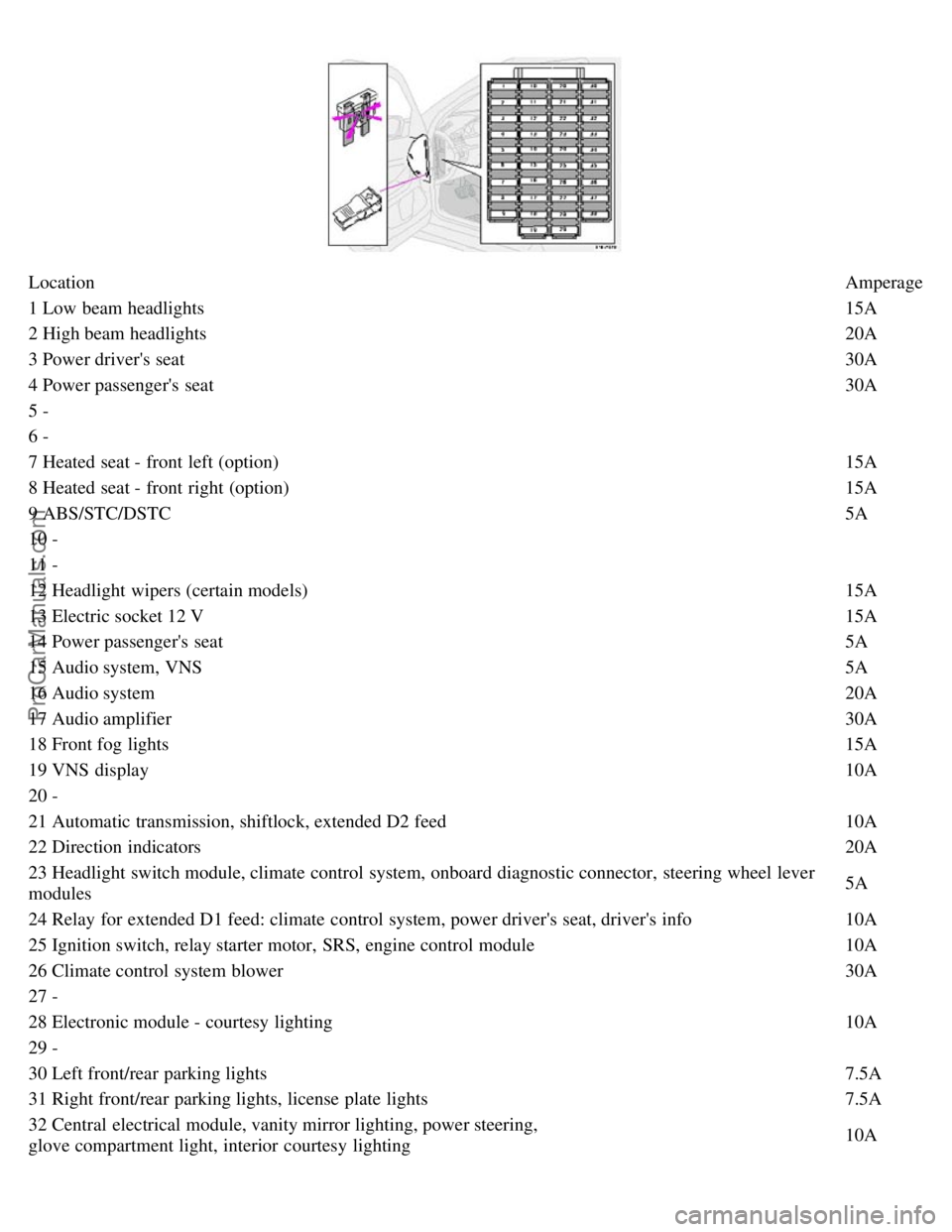
LocationAmperage
1 Low beam headlights 15A
2 High beam headlights 20A
3 Power driver's seat 30A
4 Power passenger's seat 30A
5 -
6 -
7 Heated seat - front left (option) 15A
8 Heated seat - front right (option) 15A
9 ABS/STC/DSTC 5A
10 -
11 -
12 Headlight wipers (certain models) 15A
13 Electric socket 12 V 15A
14 Power passenger's seat 5A
15 Audio system, VNS 5A
16 Audio system 20A
17 Audio amplifier 30A
18 Front fog lights 15A
19 VNS display 10A
20 -
21 Automatic transmission, shiftlock, extended D2 feed 10A
22 Direction indicators 20A
23 Headlight switch module, climate control system, onboard diagnostic connector, steering wheel lever
modules 5A
24 Relay for extended D1 feed: climate control system, power driver's seat, driver's info 10A
25 Ignition switch, relay starter motor, SRS, engine control module 10A
26 Climate control system blower 30A
27 -
28 Electronic module - courtesy lighting 10A
29 -
30 Left front/rear parking lights 7.5A
31 Right front/rear parking lights, license plate lights 7.5A
32 Central electrical module, vanity mirror lighting, power steering,
glove compartment light, interior courtesy lighting 10A
ProCarManuals.com
Page 85 of 117

33 Fuel pump15A
34 Power sun roof15A
35 Central locking system, power windows - left door mirror 25A
36 Central locking system, power windows - right door mirror 25A
37 Rear power windows, power child safety 30A
38 Alarm siren 5A
* Please be aware that if this fuse is not intact, or if it is removed, the alarm will sound.
pg. 119 Fuses in the cargo area
Fuses in the cargo area
The fuses in the cargo area are located on the trim on the left-hand side. When replacing a blown fuse, be sure to
replace it with a new one of the same color and amperage (written on the fuse).
Ordinary fuses
Location Amperage
1 Rear electrical module, cargo area lighting 10A
2 Rear fog light 10A
3 Brake lights 15A
4 Backup lights 10A
5 Rear window defroster, relay 15I - accessories 5A
6 Unlocking tailgate 10A
7 Auxiliary 12 volt socket in cargo area (option) 15A
8 Central locking rear doors/fuel filler door 20A
9 Trailer (30 feed) 15A
10 CD changer, VNS 10A
11 Accessory control module (AEM) 15A
12 Tailgate wiper 15A
13 Loudspeaker (subwoofer) cargo area - option 15A
14 Brake lights 7.5A
15 Trailer (15I feed) 20A
16 -
17 All Wheel Drive control module 7.5A
ProCarManuals.com