Page 165 of 307
’03Camry_U (L/O 0301)
161
2003 CAMRY from Jan. ’03 Prod. (OM33593U)
“AUTO” button
For automatic operation of the air condi-
tioning, press the “AUTO” button. “AUTO”
will appear on the display to show that
the automatic operation mode has been
selected.
In the automatic operation mode, the air
conditioning selects the most suitable fan
speed, air flow, air intake and onoff of
the air conditioning according to the tem-
perature.
When you press the “AUTO” button with
the air intake mode at FRESH, internal
circulation may be applied for maximum
cooling.
You may use manual controls if you want
to select your own settings.
To turn off the automatic operation, press
the “OFF” button.
Fan speed selector
Push the “�” (increase) or “ �” (decrease)
side of the button to adjust the fan speed.
In automatic operation, you do not have
to adjust the fan speed unless you desire
another fan speed mode. Temperature selector
To increase the temperature, press the
“
� ” side, to decrease it, press the “ �”
side.
“MAX. COLD” appears when you adjust to
maximum cooling, and “MAX. HOT” when
you adjust to maximum warming.
“OFF” button
Push the button to turn off the air condi-
tioning system.
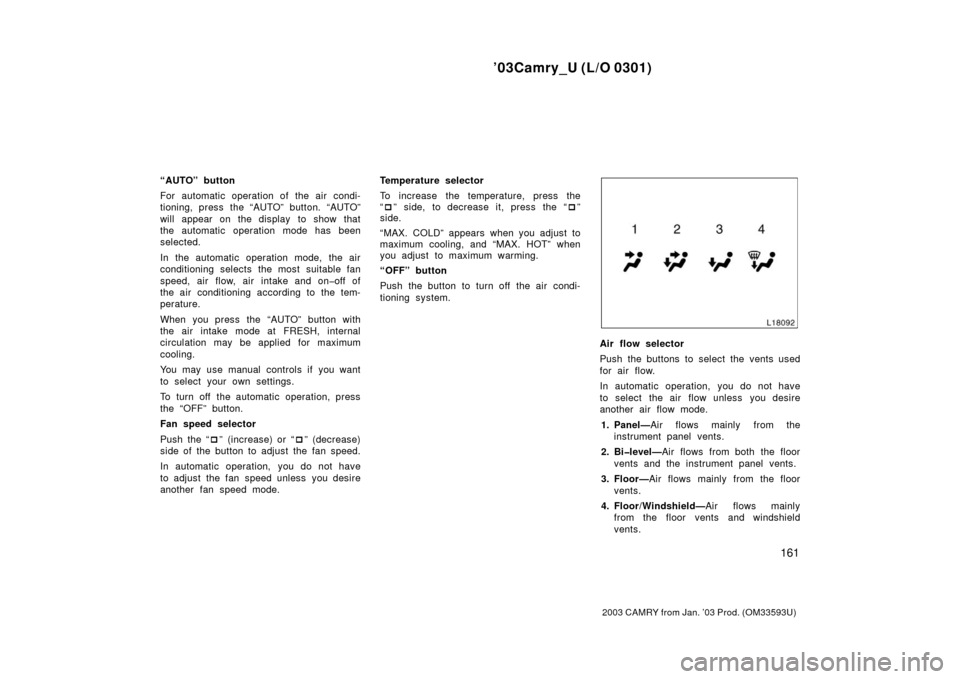
Air flow selector
Push the buttons to select the vents used
for air flow.
In automatic operation, you do not have
to select the air flow unless you desire
another air flow mode.
1. Panel— Air flows mainly from the
instrument panel vents.
2. Bilevel— Air flows from both the floor
vents and the instrument panel vents.
3. Floor— Air flows mainly from the floor
vents.
4. Floor/Windshield— Air flows mainly
from the floor vents and windshield
vents.
Page 185 of 307

’03Camry_U (L/O 0301)
181
2003 CAMRY from Jan. ’03 Prod. (OM33593U)
The garage door opener (HomeLink�
Universal Transceiver) is manufactured
under license from HomeLink� and can
be programmed to operate garage
doors, gates, entry doors, door locks,
home lighting systems, and security
systems, etc. (a) Programming the HomeLink
�
The HomeLink� in your vehicle has 3
buttons and you can store one program
for each button.
To ensure correct programming into the
HomeLink
�, install a new battery in the
handheld transmitter prior to program-
ming.
The battery side of the handheld trans-
mitter must be pointed away from the
HomeLink
� during the programming pro-
cess.
For Canadian users, follow the procedure
in “Programming an entrance gate/Pro-
gramming all devices in the Canadian
market”.
1. Decide which of 3 HomeLink
� buttons
you want to program.
2. Place your handheld garage transmit- ter 25 to 75 mm (1 to 3 in.) away from
the surface of the HomeLink
�.
Keep the indicator light on the HomeLink
�
in view while programming. 3. Simultaneously press and hold the
handheld garage transmitter button
along with the selected HomeLink
� but-
ton.
4. When the indicator light on the HomeLink
� changes from a slow to a
rapid flash after 20 seconds, you can
release both buttons.
5. Test the operation of the HomeLink
� by
pressing the newly programmed button.
If programming a garage door opener,
check to see if the garage door opens
and closes.
If the garage door does not operate, iden-
tify if your garage transmitter is of the
“Rolling C ode” type. Press and hold the
programmed HomeLink
� button. The ga-
rage door has the rolling code feature if
the indicator light (on the HomeLink
�)
flashes rapidly and then remains lit after
2 seconds. If your garage transmitter is
the “Rolling Code” type, proceed to the
heading “Programming a rolling code sys-
tem”.
6. Repeat steps 2 through 5 for each re- maining HomeLink
� button to program
another device.
Garage door opener
Page 186 of 307

’03Camry_U (L/O 0301)
182
2003 CAMRY from Jan. ’03 Prod. (OM33593U)
Programming a rolling code system
If your device is “Rolling Code”
equipped, it is necessary to follow
steps 1 through 4 under the heading
“Programming the HomeLink
�” before
proceeding with the steps listed below.
1. Locate the “training” button on the ceil- ing mounted garage door opener motor.
The exact location and color of the
button may vary by brand of garage
door opener. Refer to the owner ’s
guide supplied by the garage door
opener manufacturer for the location of
this “training” button.
2. Press the “training” button on the ceil- ing mounted garage door opener motor.
Following this step, you have 30 seconds
in which to initiate step 3 below. 3. Press and release the vehicle’s pro- grammed HomeLink
� button twice. The
garage door may open. If the door
does open, the programming process is
complete. If the door does not open,
press and release the button a third
time. This third press and release will
complete the programming process by
opening the garage door. The ceiling m
ounted garage door opener
motor should now recognize the
HomeLink
� unit and be able activate the
garage door up/down.
4. Repeat steps 1 through 3 for each re- maining HomeLink
� button to program
another rolling code system.
Programming an entrance gate/Program-
ming all devices in the Canadian market 1. Decide which of the 3 HomeLink
� but-
tons you want to program.
2. Place your handheld gate/device transmitter 25 to 75 mm (1 to 3 in.)
away from the surface of the
HomeLink
�.
Keep the indicator light on the HomeLink
�
in view while programming. 3. Press and hold the selected HomeLink
� button.
4. Continuously press and release ( cycle)
the handheld gate/device transmitter
button every two seconds until step 5
is complete.
5. When the indicator light on the HomeLink
� changes from a slow to a
rapid flash after 20 seconds, you can
release both buttons. 6. Test the operation of the HomeLink
� by
pressing the newly programmed button.
Check to see if the gate/device oper-
ates correctly.
7. Repeat steps 1 through 6 for each re- maining HomeLink
� button to program
another device.
Programming other devices
To program other devices such as home
security systems, home door locks or
lighting, contact your authorized Toyota
dealer for assistance.
Reprogramming a button
Individual HomeLink
� buttons cannot be
erased, however, to reprogram a single
button, follow the procedure “Programming
the HomeLink
�”.
(b) Operating the HomeLink
�
To operate the HomeLink�, press the
appropriate HomeLink� button to activate
the programmed device. The HomeLink�
indicator light should come on. The
HomeLink� continues to send the signal
for up to 20 seconds as long as the
button is pressed.
Page 187 of 307

’03Camry_U (L/O 0301)
183
2003 CAMRY from Jan. ’03 Prod. (OM33593U)
(c) Erasing the entire HomeLink�
memory (all three programs)
To erase all previously programmed codes
at one time, press and hold down the 2
outside buttons for 20 seconds until the
indicator light flashes.
If you sell your vehicle, be sure to erase
the programs stored in the HomeLink
�
memory.
CAUTION
�When programming the HomeLink�
Universal Transceiver, you may be
operating a garage door or other
device. Make sure people and ob-
jects are out of the way of the ga-
rage door or other device to pre-
vent potential harm or damage.
�Do not use this HomeLink� Univer-
sal Transceiver with any garage
door opener that lacks the safety
stop and reverse feature as re-
quired by federal safety standards.
(This includes any garage door
opener model manufactured before
April 1, 1982.) A garage door open-
er which cannot detect an object
(signaling the door to stop and re-
verse), does not meet current feder-
al safety standards. Using a garage
door opener without these features
increases risk of serious injury or
death.
FCC ID: CB2300NHL3
CANADA: 2791032088
This device complies with FCC Rules
Part 15. Operation is subject to the fol-
lowing two conditions: (1) This device
may not cause harmful interference, and
(2) this device must accept any interfer-
ence that may be received, including
interference that may cause undesired
operation.
WARNING: This transmitter has been
tested and complies with FCC and
DOC/MPAC rules. Changes or modifi-
cations not expressly approved by the
partly responsible for compliance
could void the user’s authority to op-
erate the device.