Page 84 of 183
10-02-2003
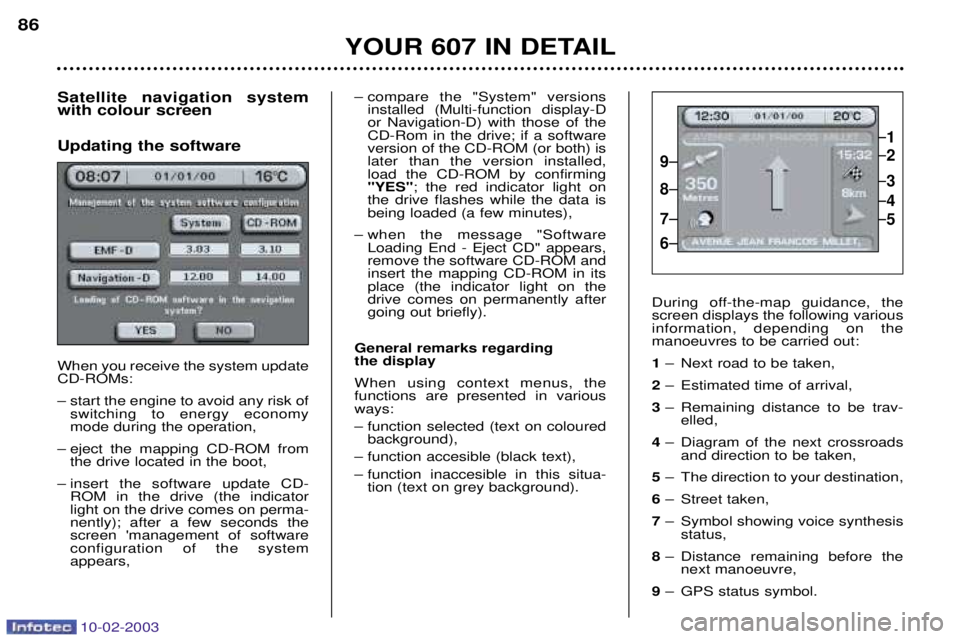
Satellite navigation system with colour screen Updating the software When you receive the system update CD-ROMs:
Ð start the engine to avoid any risk ofswitching to energy economy mode during the operation,
Ð eject the mapping CD-ROM from the drive located in the boot,
Ð insert the software update CD- ROM in the drive (the indicatorlight on the drive comes on perma-nently); after a few seconds thescreen 'management of softwareconfiguration of the systemappears,
YOUR 607 IN DETAIL
86
Ð compare the "System" versionsinstalled (Multi-function display-D or Navigation-D) with those of theCD-Rom in the drive; if a softwareversion of the CD-ROM (or both) islater than the version installed,load the CD-ROM by confirming"YES" ; the red indicator light on
the drive flashes while the data isbeing loaded (a few minutes),
Ð when the message "Software Loading End - Eject CD" appears,remove the software CD-ROM andinsert the mapping CD-ROM in itsplace (the indicator light on thedrive comes on permanently aftergoing out briefly).
General remarks regarding the display When using context menus, the functions are presented in variousways:
Ð function selected (text on coloured background),
Ð function accesible (black text),
Ð function inaccesible in this situa- tion (text on grey background). During off-the-map guidance, the screen displays the following variousinformation, depending on themanoeuvres to be carried out: 1
Ð Next road to be taken,
2 Ð Estimated time of arrival,
3 Ð Remaining distance to be trav-
elled,
4 Ð Diagram of the next crossroads
and direction to be taken,
5 Ð The direction to your destination,
6 Ð Street taken,
7 Ð Symbol showing voice synthesis
status,
8 Ð Distance remaining before the
next manoeuvre,
9 Ð GPS status symbol.
1
2
3
5
4
9
8
7
6
Page 132 of 183
10-02-2003
Specific features of the colour screen
'Trip computer' context menu Briefly press the 'MODE' button to
select one of the following functions:Ð Route 1,Ð Route 2,
Ð Enter the distance to the destina- tion (when guidance is not activat- ed; otherwise the information isgiven by the navigation),
Ð Change the units (¡C or ¡F, km andlitres or miles and gallons).
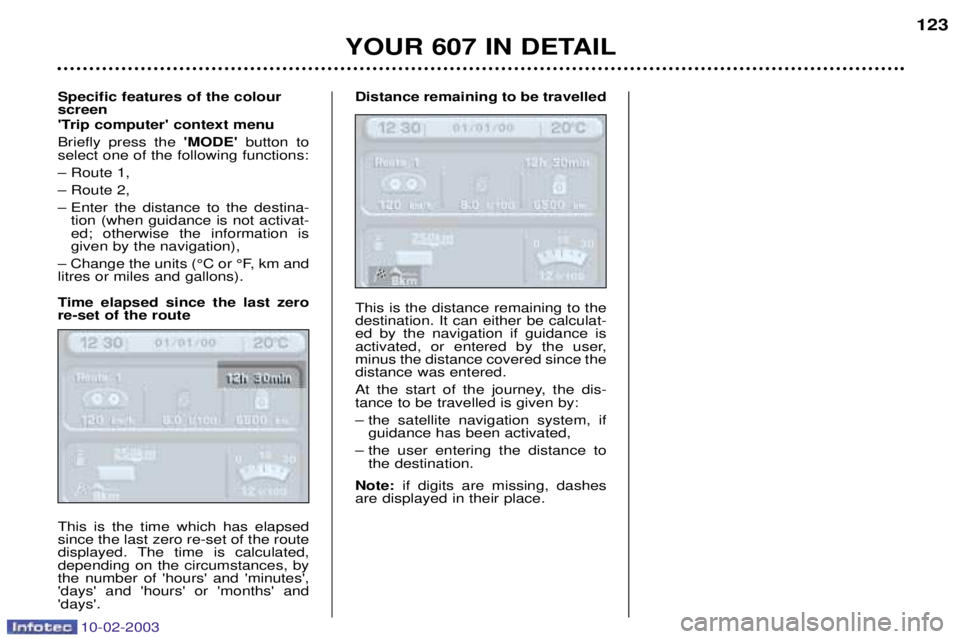
Time elapsed since the last zero re-set of the route This is the time which has elapsed since the last zero re-set of the route
displayed. The time is calculated,depending on the circumstances, bythe number of 'hours' and 'minutes','days' and 'hours' or 'months' and'days'. Distance remaining to be travelled This is the distance remaining to the destination. It can either be calculat-ed by the navigation if guidance is
activated, or entered by the user,minus the distance covered since thedistance was entered.
At the start of the journey, the dis- tance to be travelled is given by:
Ð the satellite navigation system, if
guidance has been activated,
Ð the user entering the distance to the destination.
Note: if digits are missing, dashes
are displayed in their place.
YOUR 607 IN DETAIL 123
Page 177 of 183
PRACTICAL INFORMATION
164
ACCESSORIES FOR YOUR 607
For your PEUGEOT only use accessories and original parts approved by the manufacturer.
These accessories and parts are all adapted to your PEUGEOT, after being tested and approved for reliability and safe-
ty, which PEUGEOT cannot guarantee for other products.
A wide choice of original accessories, approved by PEUGEOT, is available through the dealer network. They all carry
the PEUGEOT guarantee:
Ð Security :
Anti-theft alarms (pre-wired function), window engraving, wheel anti-theft devices, first aid kit, warning triangle, etc.
Ð Protection : Covers compatible with side air bags, mats, boot tray, styling mud flaps.
Ð Communication : Telephone, hands-free kits, satellite navigation, CD changer, speakers.
Ð Customising : Alloy wheels, wheel trims, spoiler, leather gear lever knob.
Ð Comfort : Telephone console.
Ð Leisure pursuits : Trailer tow bar (maximum towable load: 1800 kg), roof bars (maximum load: 75 kg), trans-
portation accessories (bicycle carrier, ski carrier), roof box, snow chains etc.
Ð Children : Booster seats and child seats, rear blind.
Ð Maintenance products : Windscreen wash fluid, interior and exterior cleaning and maintenance products.
Before fitting any electrical accessory to your vehicle, consult a PEUGEOT dealer.
10-02-2003