Page 70 of 177
17-02-2003
YOUR 406 IN DETAIL
92
406 Estate AUDIO SYSTEM (RM2 and RD3) Presentation
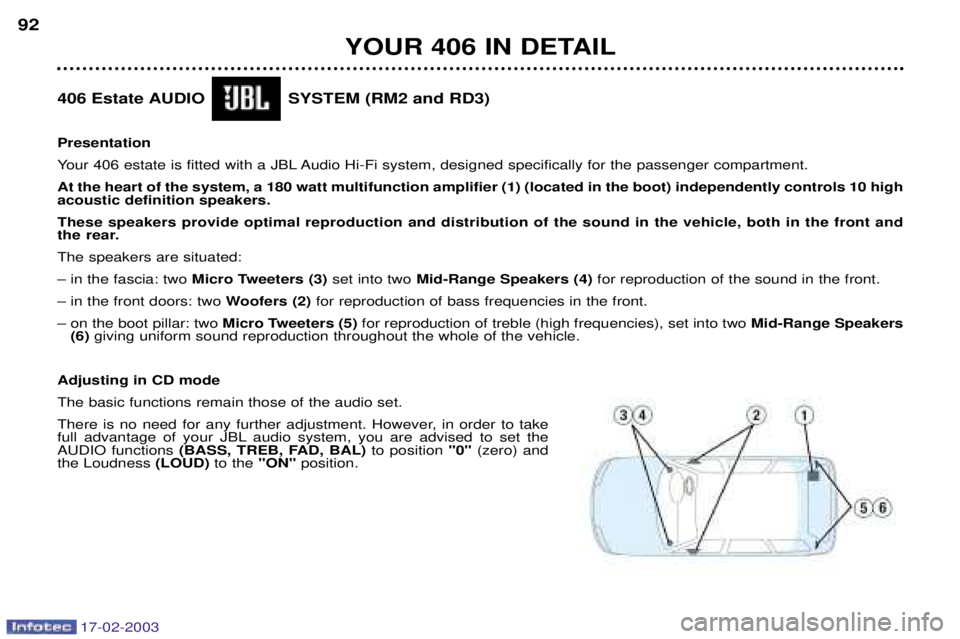
Your 406 estate is fitted with a JBL Audio Hi-Fi system, designed specifically for the passenger compartment.At the heart of the system, a 180 watt multifunction amplifier (1) (located in the boot) independently controls 10 high acoustic definition speakers. These speakers provide optimal reproduction and distribution of the sound in the vehicle, both in the front and
the rear. The speakers are situated:Ð in the fascia: two Micro Tweeters (3) set into two Mid-Range Speakers (4) for reproduction of the sound in the front.
Ð in the front doors: two Woofers (2)for reproduction of bass frequencies in the front.
Ð on the boot pillar: two Micro Tweeters (5)for reproduction of treble (high frequencies), set into two Mid-Range Speakers
(6) giving uniform sound reproduction throughout the whole of the vehicle.
Adjusting in CD modeThe basic functions remain those of the audio set.
There is no need for any further adjustment. However, in order to take
full advantage of your JBL audio system, you are advised to set theAUDIO functions (BASS, TREB, FAD, BAL) to position"0"(zero) and
the Loudness (LOUD)to the "ON"position.
Page 73 of 177
17-02-2003
The control unit This is located in the boot on the right hand side. In the estate, open the panel to access it. 1. CD ROM eject button.
2. CD ROM compartment.
3. The ON indicator light indicates that the control unit is
supplied with power.
4. The CD indicator light indicates that there is a CDROM in the control unit.The last voice message recall control
Pressing the button briefly on the end of the lightsstalk repeats the last voicemessage.
The CD Rom This contains all the mappingdata. It must be inserted with the printed face upwards.
Use only CD ROMs approved by PEUGEOT. The satellite navigation system is active once the globe appears in bold.
YOUR 406 IN DETAIL 95
The use of copied CDs can cause malfunctions.
Page 82 of 177
17-02-2003
VENTILATION 1 -Windscreen de-icing or demisting vents.
2 - Front window de-icing or demisting vents.
3 - Side vents.
4 - Central vents.
5 - Air outlet to the front passengers' feet.
6 - Air outlet to the rear passengers' feet.
Recommendations for use � Position the air flow control at a level which allows adequate air circulation inside your vehicle.
� Select the air distribution which best suits your requirements and the climatic conditions.
� Select a temperature setting and only alter it gradually for your comfort.
For an even air distribution, make sure that you do not block the air inlet grille at the base of the windscreen, the vents, th e
air passages under the front seats and the air extractor in the boot.
YOUR 406 IN DETAIL 55
Page 90 of 177
17-02-2003
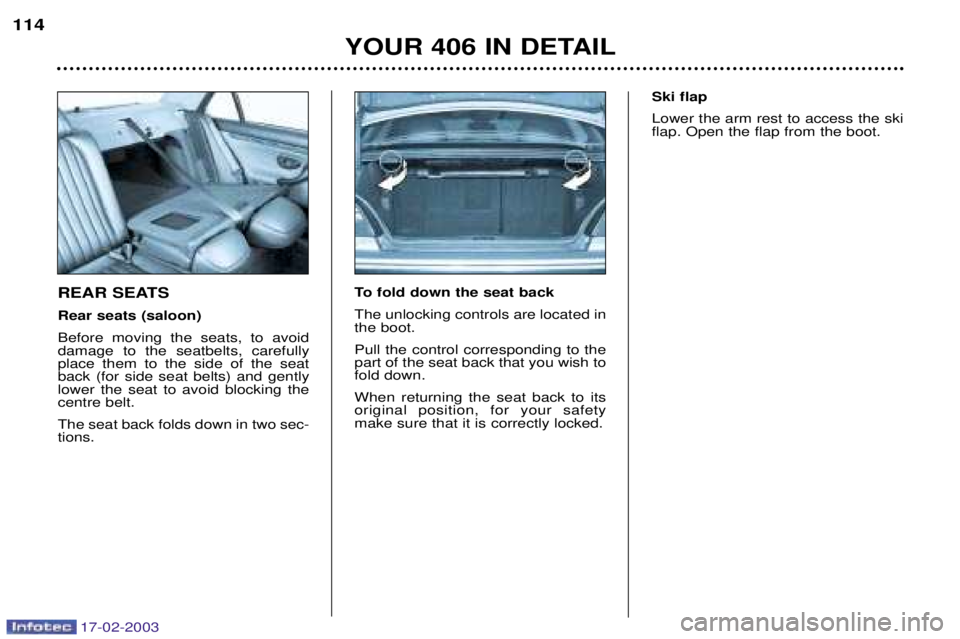
REAR SEATS Rear seats (saloon)Before moving the seats, to avoid damage to the seatbelts, carefullyplace them to the side of the seatback (for side seat belts) and gentlylower the seat to avoid blocking thecentre belt. The seat back folds down in two sec- tions.To fold down the seat back The unlocking controls are located in the boot. Pull the control corresponding to the part of the seat back that you wish tofold down. When returning the seat back to its original position, for your safetymake sure that it is correctly locked. Ski flap Lower the arm rest to access the ski flap. Open the flap from the boot.
YOUR 406 IN DETAIL
114
Page 92 of 177
17-02-2003
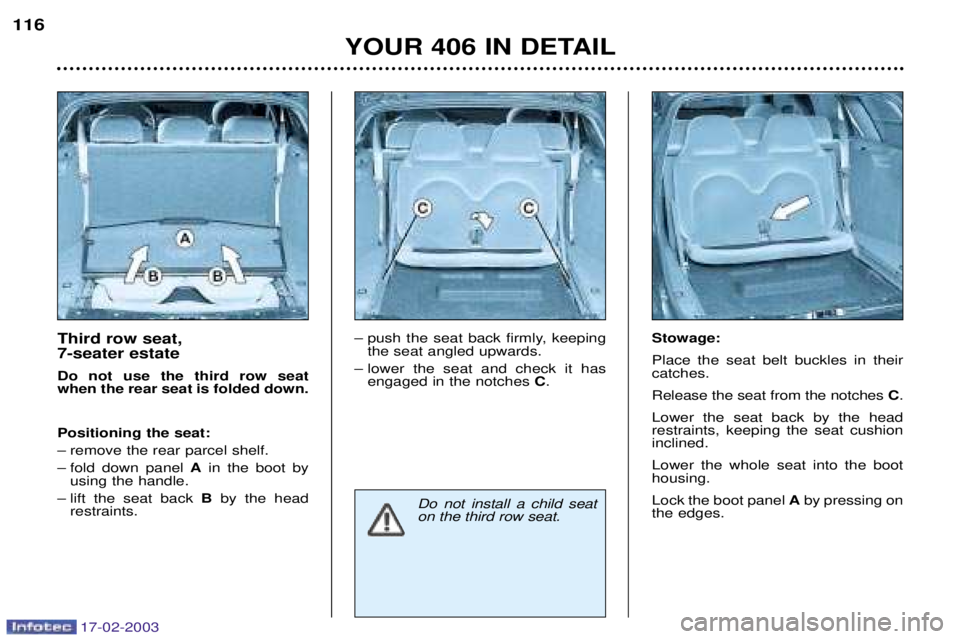
Third row seat, 7-seater estate Do not use the third row seat when the rear seat is folded down. Positioning the seat:
Ð remove the rear parcel shelf.
Ð fold down panel Ain the boot by
using the handle.
Ð lift the seat back Bby the head
restraints. Ð push the seat back firmly, keeping
the seat angled upwards.
Ð lower the seat and check it has engaged in the notches C. Stowage: Place the seat belt buckles in their catches. Release the seat from the notches
C.
Lower the seat back by the head restraints, keeping the seat cushioninclined. Lower the whole seat into the boot housing. Lock the boot panel Aby pressing on
the edges.
YOUR 406 IN DETAIL
116
Do not install a child seat on the third row seat.
Page 99 of 177
17-02-2003
THE KEYS The keys allow you to switch on the ignition and to independently operate
the locks on the front door, the glovebox and the passenger air bag dis-arming switch. Central locking
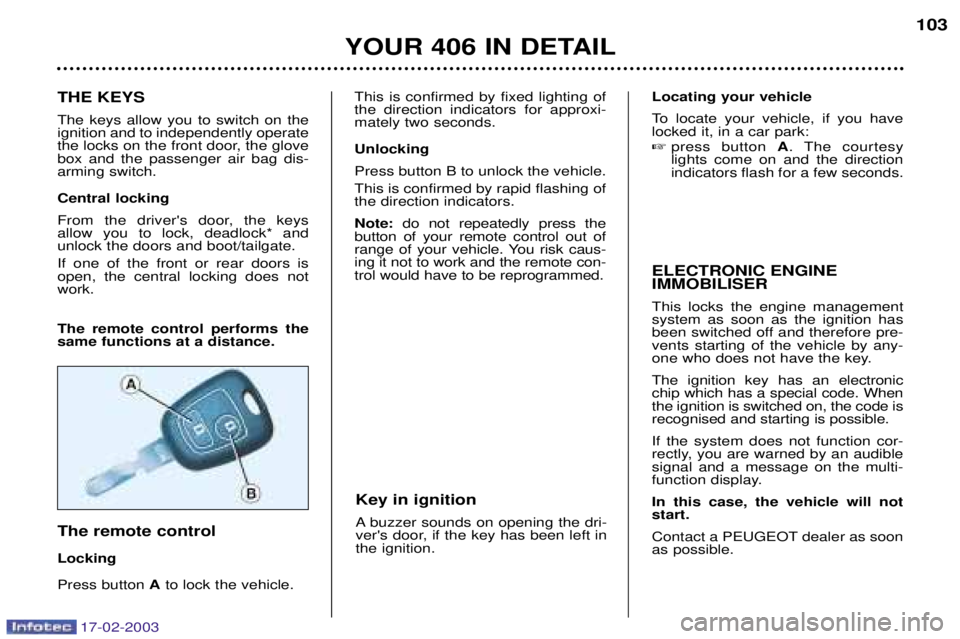
From the driver's door, the keys allow you to lock, deadlock* andunlock the doors and boot/tailgate. If one of the front or rear doors is open, the central locking does notwork. The remote control performs the same functions at a distance. The remote control LockingPress button Ato lock the vehicle.
YOUR 406 IN DETAIL 103
This is confirmed by fixed lighting of the direction indicators for approxi-mately two seconds. Unlocking Press button B to unlock the vehicle. This is confirmed by rapid flashing of the direction indicators. Note:
do not repeatedly press the
button of your remote control out of
range of your vehicle. You risk caus-ing it not to work and the remote con-trol would have to be reprogrammed. ELECTRONIC ENGINE IMMOBILISER This locks the engine management system as soon as the ignition has
been switched off and therefore pre-vents starting of the vehicle by any-
one who does not have the key. The ignition key has an electronic chip which has a special code. Whenthe ignition is switched on, the code isrecognised and starting is possible. If the system does not function cor-
rectly, you are warned by an audiblesignal and a message on the multi-
function display. In this case, the vehicle will not start.
Contact a PEUGEOT dealer as soon as possible.
Locating your vehicle
To locate your vehicle, if you have locked it, in a car park: �
press button A. The courtesy
lights come on and the direction indicators flash for a few seconds.
Key in ignition
A buzzer sounds on opening the dri-
ver's door, if the key has been left inthe ignition.
Page 102 of 177
17-02-2003
THE KEYS The keys allow you to switch on the ignition and to independently operate
the locks on the front door, the glovebox and the passenger air bag dis-arming switch. Central locking
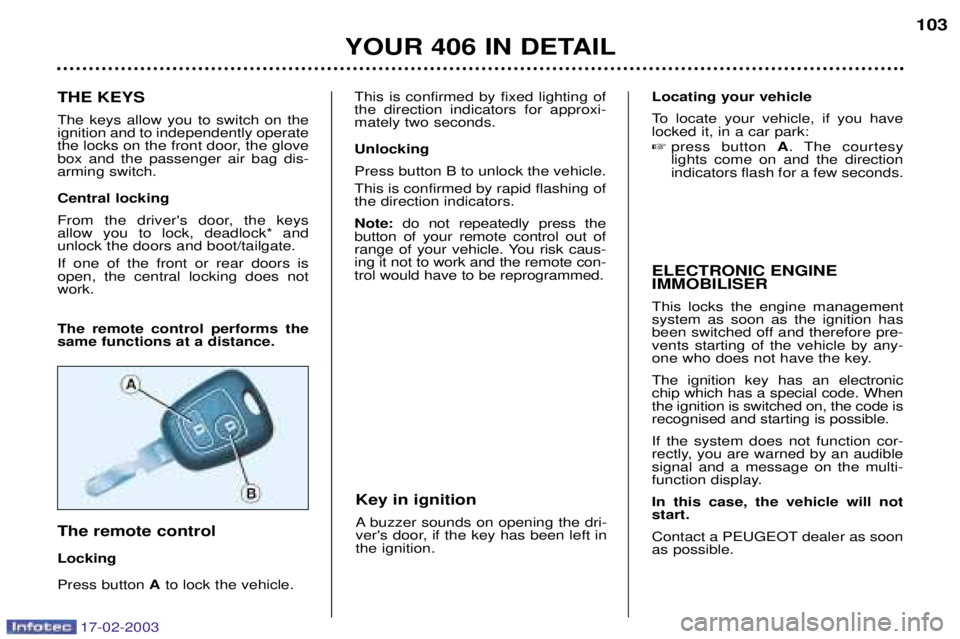
From the driver's door, the keys allow you to lock, deadlock* andunlock the doors and boot/tailgate. If one of the front or rear doors is open, the central locking does notwork. The remote control performs the same functions at a distance. The remote control LockingPress button Ato lock the vehicle.
YOUR 406 IN DETAIL 103
This is confirmed by fixed lighting of the direction indicators for approxi-mately two seconds. Unlocking Press button B to unlock the vehicle. This is confirmed by rapid flashing of the direction indicators. Note:
do not repeatedly press the
button of your remote control out of
range of your vehicle. You risk caus-ing it not to work and the remote con-trol would have to be reprogrammed. ELECTRONIC ENGINE IMMOBILISER This locks the engine management system as soon as the ignition has
been switched off and therefore pre-vents starting of the vehicle by any-
one who does not have the key. The ignition key has an electronic chip which has a special code. Whenthe ignition is switched on, the code isrecognised and starting is possible. If the system does not function cor-
rectly, you are warned by an audiblesignal and a message on the multi-
function display. In this case, the vehicle will not start.
Contact a PEUGEOT dealer as soon as possible.
Locating your vehicle
To locate your vehicle, if you have locked it, in a car park: �
press button A. The courtesy
lights come on and the direction indicators flash for a few seconds.
Key in ignition
A buzzer sounds on opening the dri-
ver's door, if the key has been left inthe ignition.
Page 103 of 177

17-02-2003
THE ALARM SYSTEM*
This offers two types of protection: ¥external , it sounds if a door, the
bonnet or the boot is opened.
¥ internal , it sounds if there is air
movement in the passenger compartment (a broken windowor movement inside the vehicle) .
Note: it also has an anti-tamper
function; if there is an attempt to tam-per with the wires to the siren, the
control unit or the battery, the sirensounds and the direction indicatorslight. Setting
Switch the ignition off and get out of the vehicle. Set the alarm within five minutes fol- lowing your exit from the vehicle bylocking using the remote control (thered light on the switch, visible fromthe outside, flashes every secondand the direction indicators come onpermanently for two seconds).
5 seconds later, internal protection is set.
45 seconds later, external protection is set. When the alarm is triggered, the siren sounds for thirty seconds. After it has been triggered, the alarm is operational again. Note:
if you wish to lock your vehicle
without setting the alarm, lock it using the key in the lock.
Warning
When the alarm is triggered, if a door, the boot or the bonnet are not closed
correctly, the siren sounds for amoment. Close the vehicle correctlyto set the alarm. Disarming Unlock the vehicle using the remote
control key, (the direction indicatorsflash for two seconds and the redlight on the switch goes out). Note:
if the red warning light flashes,
it is a sign that the alarm has been triggered during your absence.
To stop it, switch on the ignition.Note: when the alarm is set, but the
remote control no longer works:
¥ unlock the doors using the key and open the door; the alarm is trig- gered;
¥ switch the ignition on within ten seconds;
¥ press the internal protection button 1 immediately. The alarm is dis-
armed.
* According to destination.
YOUR 406 IN DETAIL
106