2003 Oldsmobile Bravada mirror
[x] Cancel search: mirrorPage 113 of 410
Two personalized exit positions can be set by first
recalling the driver’s position (by pressing
1 or 2), then
positioning the seat in the desired exit position for
that driver. Press and hold the button with the exit
symbol for three seconds. A double chime will sound
to
let you know that the position has been stored. With
the vehicle in PARK (P), the exit position for that driver
can be recalled by pressing the exit button. The
mirrors, power lumbar and recline positions will not be
stored or recalled for the exit positions.
If no exit position
is stored, the default is all the way rearward. Further
programming for automatic seat and mirror
movement can be done through the Driver Information
Center (DIC). You may choose
to either select or
not select the following:
Automatic seat and mirror movement when the
vehicle is unlocked with the remote keyless entry,
automatic seat and mirror movement when a key is
placed in the ignition, and
automatic seat movement to the exit position when
the vehicle is in
PARK (P).
2-48
Page 120 of 410
Turn Signal/Multifunction Lever Turn and Lane Change Signals
The turn signal has two upward (for right) and two
downward (for left) positions. These positions allow you
to signal a turn or a lane change.
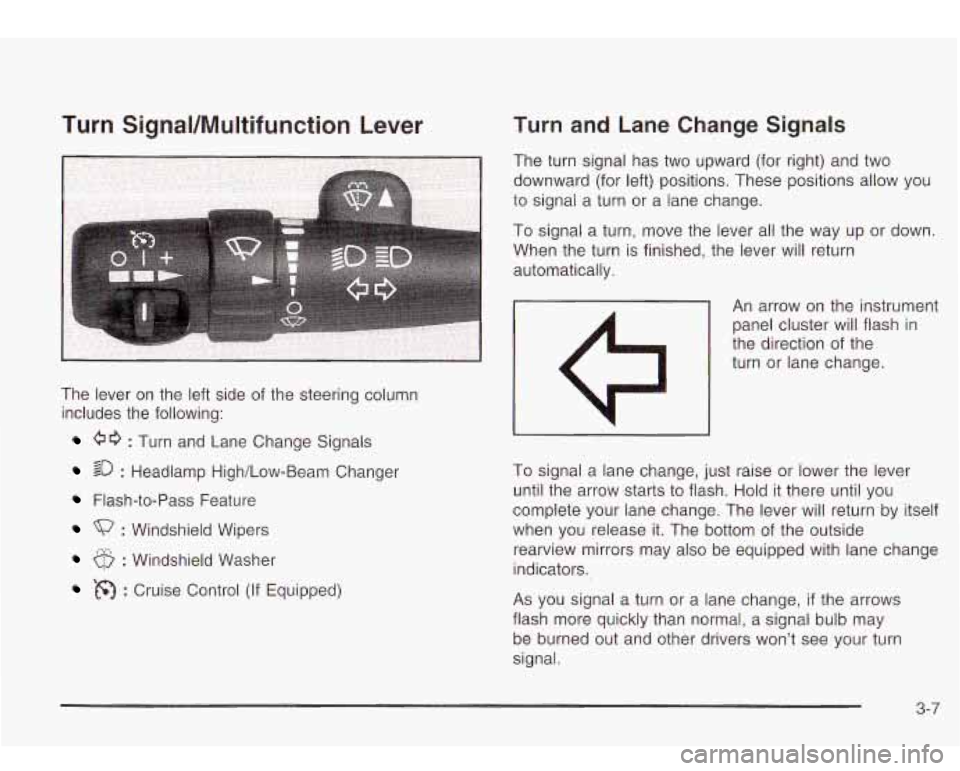
The lever on the left side of the steering column
includes the following:
60 : Turn and Lane Change Signals
20 : Headlamp High/Low-Beam Changer
Flash-to-Pass Feature
: Windshield Wipers
6 : Windshield Washer
: Cruise Control (If Equipped) To
signal a lane change, just raise or lower the lever
until the arrow starts to flash. Hold
it there until you
complete your lane change. The lever will return by itself
when you release it. The bottom of the outside
rearview mirrors may also be equipped with lane change
indicators.
As you signal a turn or a lane change, if the arrows
flash more quickly than normal,
a signal bulb may
be burned out and other drivers won’t see your turn
signal.
3-7
Page 122 of 410

Windshield Wipers
(Mist): For a single wiping cycle, turn the band to
mist. Hold it there until the wipers start. Then let go.
The wipers will stop after one wipe. If you want
more wipes, hold the band on mist longer.
0 (Off): To stop the wipers, move the band to off.
(Windshield Wipers): Turn the band to control i
windshield wipers. :he
You can set the wiper speed for a long or short delay
between wipes. This can be very useful in light rain
or snow. Turn the band
to choose the delay time. The
closer
to the top of the lever, the shorter the delay.
For steady wiping at low speed, turn the band away from
you
to the first solid band past the delay settings. For
high-speed wiping, turn the band further,
to the second
solid band past the delay settings. To stop the wipers,
move the band
to off.
Be sure to clear ice and snow from the wiper blades
before using them. If they’re frozen
to the windshield,
carefully loosen or thaw them. If your blades do become
worn or damaged, get new blades or blade inserts.
RainsenseTM Wipers
Your vehicle may be equipped with
RainsenseTM windshield wipers. When active, these
wipers are able
to detect moisture on the windshield and
automatically turn on the wipers.
The moisture sensor is located next to the inside
rearview mirror and is mounted on the windshield.
To turn on the RainsenseTM feature, the wipers must be set
to one of the five delay settings on the multifunction
lever. Each of the five settings adjusts the sensitivity
of the rainsensor. For more wipes, select the higher
settings; for fewer wipes, select the lower settings
located closer
to off on the multifunction lever.
The rainsensor will automatically control the frequency
of the wipes from
off to high speed according to the
weather conditions. The wipers can be left in a
rainsense mode even when it
is not raining.
Notice: Turn the windshield wiper band on the
multifunction lever
to off to avoid wiper damage
when going through an automatic car wash.
3-9
Page 159 of 410

Personalization
You can program certain features to a preferred setting
for up to two people. Press the personalization button
to scroll through the following personalization features.
All of the personalization options may not be available
on your vehicle. Only the options available will be
displayed on your DIC.
ALARM WARNING TYPE
AUTOMATIC LOCKING
AUTOMATIC UNLOCKING
SEAT POSITION RECALL
PERIMETER LIGHTING
REMOTE LOCK FEEDBACK
REMOTE UNLOCK FEEDBACK
HEADLAMPS ON AT EXIT
MIRROR CURB VIEW ASSIST
EASY EXIT DRIVER SEAT
DISPLAY UNITS (E/M)
DISPLAY LANGUAGE
The driver’s preferences are recalled by pressing the
unlock button on the remote keyless entry transmitter or
by pressing the appropriate memory button
1 or 2
located on the driver’s door.
Alarm Warning Type
Press the personalization button until ALARM
WARNING TYPE appears in the display. To select your
personalization for alarm warning type, press the
select button while ALARM WARNING TYPE is
displayed on the DIC. Pressing the select button will
scroll through the following choices:
ALARM WARNING: BOTH (default)
ALARM WARNING: OFF
ALARM WARNING: HORN
ALARM WARNING: LAMPS
If you choose BOTH, the headlamps will flash and the
horn will chirp when the alarm is active.
If you choose OFF, there will be no alarm warning on
activation.
If you choose HORN, the horn will chirp when the alarm
is active.
If you choose LAMPS, the headlamps will flash when
the alarm is active.
Choose one of the four options and press the
personalization button while it is displayed
on the DIC to
select it and move on to the next feature. For more
information on alarm warning type, see
Content
Theft-Deterrent on page
2- 16.
3-46
Page 163 of 410

If you choose horn, the horn will chirp the second time
you press the button with the unlock symbol on the
remote keyless entry transmitter.
Choose one of the four options and press the
personalization button while it is displayed on the DIC
to
select it and move on to the next feature.
Headlamps on at Exit
Press the personalization button until HEADLAMPS ON
AT EXIT appears in the display. To select your
personalization for how long the headlamps will stay on
when you turn
off the vehicle, press the select button
while HEADLAMPS
ON AT EXIT is displayed on
the DIC. Pressing the select button will scroll through
the following choices:
HEADLAMP DELAY: 10 SEC (default)
HEADLAMP DELAY: 20 SEC
HEADLAMP DELAY: 40 SEC
HEADLAMP DELAY: 60 SEC
HEADLAMP DELAY: 120 SEC
0 HEADLAMP DELAY: 180 SEC
HEADLAMP DELAY OFF
The amount of time you choose will be the amount of
time that the headlamps stay on after you turn
off
the vehicle. If you choose off, the headlamps will turn
off as soon as you turn off the vehicle.
Choose one of the seven options and press the
personalization button while
it is displayed on the DIC to
select it and move on to the next feature.
Mirror Curbview Assist
Press the personalization button until MIRROR
CURBVIEW ASSIST appears in the display.
To select
your personalization for tilt mirror in reverse, press
the select button while MIRROR CURBVIEW ASSIST is
displayed on the DIC. Pressing the select button will
scroll through the following choices:
CURB VIEW: OFF (default)
CURB VIEW: PASSENGER
CURB VIEW: DRIVER
CURB VIEW: BOTH
If you choose off, neither outside mirror will be tilted
down when the vehicle is shifted into REVERSE (R).
If you choose passenger, the passenger’s outside mirror
will be tilted down when the vehicle is shifted into
REVERSE (R).
3-50
Page 164 of 410
If you choose driver, the driver’s outside mirror will be
tilted down when the vehicle is shifted into
REVERSE
(R).
If you choose both, the driver’s and passenger’s outside
mirror will be tilted down when the vehicle is shifted
into REVERSE (R).
Choose one of the four options and press the
personalization button while it is displayed on the DIC to
select it and move on to the next feature.
Easy Exit Driver Seat
Press the personalization button until EASY EXIT
DRIVER SEAT appears in the display. To select your
personalization for seat position exit, press the
select button while EASY EXIT DRIVER SEAT is
displayed on the DIC. Pressing the select button will
scroll through the following choices:
0 EASY EXIT SEAT: OFF (default)
0 EASY EXIT SEAT: ON
If you choose for the easy exit seat feature to be on, the
driver’s seat will move
to the exit position when the
key is removed from the ignition. If you choose for this
feature to be
off, no seat exit recall will occur.
Choose one of the two options and press the
personalization button while it is displayed on the DIC to
select it and move on to the next feature.
Display Units (ENG/MET)
Press the personalization button until DISPLAY UNITS
appears in the display.
To select English or metric,
press the select button while DISPLAY UNITS is
displayed on the DIC. Pressing the select button will
scroll through the following choices:
0 UNITS: ENGLISH
0 UNITS: METRIC KM/L
UNITS: METRIC UlOOKM
If you choose English, all information will be displayed
in English units. For example, distance in miles and fuel
economy in miles per gallon is displayed.
If you choose metric KM/L, all information will be
displayed in metric units. For example, distance in
kilometers and fuel economy in KM/L is displayed.
If you choose metric L/lOOKM, all information will be
displayed in metric units. For example, distance in
kilometers and fuel economy in L/lOOKM is displayed.
Choose one of the three options and press the
personalization button while it is displayed on the DIC to
select it and end out
of the personalization options.
3-51
Page 219 of 410

Check your mirrors, glance over your shoulder, and
start your left lane change signal before moving out
of the right lane to pass. When you are far
enough ahead of the passed vehicle to see its front
in your inside mirror, activate your right lane
change signal and move back into the right lane.
(Remember that your right outside mirror is convex.
The vehicle you just passed may seem to be
farther away from you than it really is.)
Try not to pass more than one vehicle at a time on
two-lane roads. Reconsider before passing the
next vehicle.
Don’t overtake a slowly moving vehicle too rapidly.
Even though the brake lamps are not flashing, it
may be slowing down or starting to turn.
If you’re being passed, make it easy for the
following driver to get ahead of you. Perhaps you
can ease a little to the right.
LOSS of Control
Let’s review what driving experts say about what
happens when the three control systems (brakes,
steering and acceleration) don’t have enough friction
where the tires meet the road to do what the driver
has
asked.
In any emergency, don’t give
up. Keep trying to steer
and constantly seek an escape route or area of
less danger.
Skidding
In a skid, a driver can lose control of the vehicle.
Defensive drivers avoid most skids by taking reasonable
care suited to existing conditions, and by not
“overdriving” those conditions. But skids are always
possible.
The three types of skids correspond to your vehicle’s
three control systems. In the braking skid, your wheels
aren’t rolling. In the steering or cornering skid, too much
speed or steering in a curve causes tires to slip and lose
cornering force. And in the acceleration skid, too much
throttle causes the driving wheels to spin.
A cornering skid is best handled by easing your foot off
the accelerator pedal.
If you have the Traction Assist System, remember: It
helps avoid only the acceleration skid.
If you do not have
this system, or
if the system is off, then an acceleration
skid
is also best handled by easing your foot off the
accelerator pedal.
If your vehicle starts to slide, ease your foot off the
accelerator pedal and quickly steer the way you want
the vehicle to
go. If you start steering quickly enough,
your vehicle may straighten out. Always be ready
for a second skid
if it occurs.
4-1 4
Page 220 of 410

Of course, traction is reduced when water, snow, ice,
gravel or other material
is on the road. For safety, you’ll
want to slow down and adjust your driving
to these
conditions.
It is important to slow down on slippery
surfaces because stopping distance will be longer and
vehicle control more limited.
While driving on a surface with reduced traction, try
your best
to avoid sudden steering, acceleration
or braking (including engine braking by shifting
to a
lower gear). Any sudden changes could cause the tires
to slide. You may not realize the surface is slippery
until your vehicle is skidding. Learn
to recognize warning
clues
- such as enough water, ice or packed snow
on the road
to make a “mirrored surface” - and slow
down when you have any doubt.
Remember: Any anti-lock brake system (ABS) helps
avoid only the braking skid.
Operating Your All-Wheel-Drive
Vehicle
Off Paved Roads
Many of the same design features that help make your
vehicle responsive on paved roads during poor
weather conditions
- features like the locking rear axle
and all-wheel drive
- help make it much better suited
for off-road use than a conventional passenger
car. Its higher ground clearance also helps your vehicle
step over some off-road obstacles. But your vehicle
doesn’t have features like special underbody shielding and a transfer case low gear range, things that are
usually thought necessary for extended or severe
off-road service. This guide is for operating your vehicle
off paved roads.
Also, see
Braking on page 4-6.
Off-road driving can be great fun. But it does have
some definite hazards. The greatest
of these is
the terrain itself.
“Off-roading” means you’ve left the
North American road
system behind. Traffic lanes aren’t marked. Curves
aren’t banked. There are no road signs. Surfaces can
be slippery, rough, uphill or downhill. In short, you’ve
gone right back
to nature.
Off-road driving involves some new skills. And that’s
why it’s very important that you read this guide.
You’ll find many driving tips and suggestions. These will
help make your off-road driving safer and more
enjoyable.
4-1 5