2003 NISSAN SENTRA lock
[x] Cancel search: lockPage 46 of 224

1. Headlight and turn signal switch
(P. 2-16)
2. Meters/gauges (P. 2-3)
3. Windshield wiper/washer switch
(P. 2-15)
4. Heater/air conditioner control (P. 4-2)
5. Storage compartment (P. 2-23)
6. Hazard warning flasher switch (P. 2-19)
7. Center ventilators (P. 4-2)
8. Passenger supplemental air bag (P. 1-6)
9. Glove box (P. 2-22)
10. Pocket
11. 12 volt DC/cigarette lighter (accessory)
(P. 2-20)
12. 12 volt DC/cigarette lighter (accessory)
(if so equipped) (P. 2-20)
13. Radio/CD player/CD changer (P. 4-10)
14. Cruise control and main set switch
(P. 5-13)
15. Tilt steering lock lever (P. 3-13)
16. Trunk release Type B (P. 3-9)
17. Fuel filler lid opening lever (P. 3-12)
18. Driver supplemental air bag (P. 1-6)
19. Hood release lever (P. 3-9)
20. Fuse box cover/coin holder
(P. 8-31, 2-22)
21. Trunk release Type A (P. 3-9)
22. Instrument brightness control switch
(P. 2-18)
23. Outside mirror control switch (P. 3-15)
WIC0433
INSTRUMENT PANEL
2-2Instruments and controls
ZREVIEW COPY:Ð2003 Sentra(b15)
Owners Manual(owners)ÐUSA English(nna)
12/10/02Ðdebbie
X
Page 51 of 224

orAnti-lock brake warning light (if
so equipped)Low fuel warning lightCruise SET switch indicator light (if so
equipped)
orBrake warning lightLow washer fluid warning light (if so equipped)High beam indicator light (Blue)
Charge warning lightSeat belt warning light and chimeMalfunction indicator lamp (MIL)
Door open warning lightSupplemental air bag warning lightOverdrive off indicator light (automatic trans-
mission models only)
Engine oil pressure warning lightCRUISE main switch indicator light (if so
equipped)Turn signal/hazard indicator lights
CHECKING BULBS
With all doors closed, apply the parking brake
and turn the ignition key to the ON position
without starting the engine. The following lights
will come on:
,,or,,,
If equipped, the following lights come on briefly
and then go off:
or
If any light fails to come on, it may indicate
a burned-out bulb or an open circuit in the
electrical system. Have the system repaired
promptly.
WARNING LIGHTS
orAnti-lock brake
warning light (if so
equipped)
If the light comes on while the engine is running,
it may indicate the anti-lock brake system is not
functioning properly. Have the system checked
by a NISSAN dealer.
Turn off the engine, and start it again by
slowly turning the ignition key (quickly do-
ing so may cause the ABS light to stay on
when there is nothing wrong) . If the light
stays on, have the system checked by a
NISSAN dealer.If an abnormality occurs in the system, the anti-
lock function ceases, but the regular braking
system continues to operate.
If the light comes on while you are driving,
contact a NISSAN dealer for repair.orBrake warning light
This light functions for both the parking brake and
the foot brake systems.
WARNING/INDICATOR LIGHTS AND
AUDIBLE REMINDERS
Instruments and controls2-7
ZREVIEW COPY:Ð2003 Sentra(b15)
Owners Manual(owners)ÐUSA English(nna)
12/10/02Ðdebbie
X
Page 55 of 224

Your vehicle has two types of security systems:
cNISSAN Vehicle Immobilizer System — NVIS
(if so equipped)
cVehicle security system (if so equipped)
NISSAN VEHICLE IMMOBILIZER
SYSTEM (NVIS) (if so equipped)
The NISSAN Vehicle Immobilizer System (NVIS)
will not allow the engine to start without the use of
a registered NVIS key.
If the engine fails to start using a registered NVIS
key (for example, when interference is caused by
another NVIS key, an automated toll road deviceor automatic payment device on the key ring) ,
restart the engine using the following proce-
dures:
1. Leave the ignition switch in the ON position
for approximately 5 seconds.
2. Turn the ignition switch to the OFF or LOCK
position, and wait approximately 5 seconds.
3. Repeat steps 1 and 2.
4. Restart the engine while holding the device
(which may have caused the interference)
separate from the registered NVIS key.
If the no start condition re-occurs, NISSAN rec-
ommends placing the registered NVIS key on a
separate key ring to avoid interference from other
devices.
Statement related to Section 15 of FCC
Rules for NISSAN Vehicle Immobilizer Sys-
tem (CONT ASSY — IMMOBILIZER, ANT
ASSY — IMMOBILIZER)
This device complies with part 15 of the
FCC Rules and RSS-210 of Industry
Canada. Operation is subject to the follow-
ing two conditions;
(1) This device may not cause harmful in-
terference, and (2) this device must acceptany interference received, including inter-
ference that may cause undesired opera-
tion of the device.
CHANGES OR MODIFICATIONS NOT EX-
PRESSLY APPROVED BY THE MANUFAC-
TURER FOR COMPLIANCE COULD VOID
THE USER’S AUTHORITY TO OPERATE
THE EQUIPMENT.
LIC0301
SECURITY SYSTEMS
Instruments and controls2-11
ZREVIEW COPY:Ð2003 Sentra(b15)
Owners Manual(owners)ÐUSA English(nna)
12/10/02Ðdebbie
X
Page 56 of 224

Security indicator light (NISSAN Ve-
hicle Immobilizer System)
The security indicator lights1is located on the
instrument panel near the windshield.
The security indicator light blinks every 3 sec-
onds whenever the ignition switch is in the
LOCK, OFF or ACC position. This function indi-
cates the NISSAN Vehicle Immobilizer System
(NVIS) is operational.
If the NVIS is malfunctioning, the light will remain
on while the ignition key is in the ON position.
If the light still remains on and/or the en-
gine will not start, see a NISSAN dealer forNVIS service as soon as possible. Please
bring all NVIS keys that you have when
visiting your NISSAN dealer for service.
VEHICLE SECURITY SYSTEM (if so
equipped)
The vehicle security system provides visual and
audio alarm signals if parts of the vehicle are
disturbed.
Security indicator light (Vehicle secu-
rity system)
The security indicator lights1is located on the
instrument panel near the windshield.
The security indicator light shows the status of
the vehicle security system.
The light operates whenever the ignition switch is
in the LOCK, OFF, or ACC position.
The vehicle security system has four phases. For
each phase the operation of the security indicator
light is different.
WIC0237WIC0237
2-12Instruments and controls
ZREVIEW COPY:Ð2003 Sentra(b15)
Owners Manual(owners)ÐUSA English(nna)
12/10/02Ðdebbie
X
Page 57 of 224

How to arm the vehicle security sys-
tem
1. Close all windows.(The system can be
armed even if the windows are open.)
2. Remove the key from the ignition switch.3. Close the hood, trunk lid and all doors. Lock
all doors. The doors can be locked with the
key or with the keyfob.
Keyfob operation:
cPush the LOCK button on the keyfob. All
doors lock. The hazard lights flash twice
and the horn beeps once to indicate all
doors are locked.
cWhen the LOCK button is pushed with all
doors locked, the hazard lights flash twice
and the horn beeps once as a reminder
that the doors are already locked.
The horn may or may not beep once.
Refer to “Silencing the horn beep fea-
ture” later in this section.
cConfirm that the SECURITY indicator light
comes on. The SECURITY light stays on for
about 30 seconds. The vehicle security sys-
tem is now pre-armed. After about 30 seconds
the vehicle security system automatically shifts
into the armed phase. The SECURITY light
begins to flash once every 3 seconds. If, dur-
ing the 30-second pre-arm time period, the
door is unlocked by the key or the keyfob, or
the ignition key is turned to ACC or ON, the
system will not arm.
c
If the key is turned slowly when locking
the door, the system may not arm. Further-more, if the key is turned excessively to
the unlock position, the system may be
disarmed when the key is removed. If the
indicator light fails to glow for 30 seconds,
unlock the door once and lock it again.
cEven when the driver and/or passengers
are in the vehicle, the system will arm
with all doors, hood and trunk lid closed
and locked with the ignition key in the
OFF position.
Vehicle security system activation
The vehicle security system will give the following
alarm:
cThe headlights blink and the horn sounds in-
termittently.
cThe alarm automatically turns off after about
50 seconds. However, the alarm reactivates if
the vehicle is tampered with again. The alarm
can be shut off by unlocking a door or trunk lid
with the key, or by pressing the UNLOCK
button on the keyfob.
The alarm is activated by:
copening the door or trunk lid without using the
key or keyfob (even if the door is unlocked by
releasing the door inside lock switch) or open-
ing the trunk lid by operating the opener lever.
copen the hood.
LIC0053
Instruments and controls2-13
ZREVIEW COPY:Ð2003 Sentra(b15)
Owners Manual(owners)ÐUSA English(nna)
12/10/02Ðdebbie
X
Page 58 of 224

How to stop an activated alarm
The alarm stops only by unlocking a door or the
trunk lid with the key, or by pressing the UNLOCK
button on the keyfob.
The alarm does not stop if the ignition
switch is turned to ACC or ON.
Silencing the horn beep feature
If desired, the horn beep feature can be deacti-
vated using the keyfob. The instructions are on
the back of the keyfob.
To deactivate:Press and hold both the LOCK
and UNLOCK buttons at the same timefor at
least 3 seconds.
The hazard lights will quickly flash 3 times to
confirm that the horn beep feature has been
deactivated.
To activate:Press and hold both the LOCK and
UNLOCK buttons at the same timefor at least 3
seconds once more.The hazard lights will quickly flash once and the
horn will sound once to confirm that the horn
beep feature has been reactivated.
Deactivating the horn feature does not silence
the horn if the alarm is triggered.
If the system does not operate as described
above, have it checked by a NISSAN dealer.
WIC0238
2-14Instruments and controls
ZREVIEW COPY:Ð2003 Sentra(b15)
Owners Manual(owners)ÐUSA English(nna)
12/10/02Ðdebbie
X
Page 68 of 224
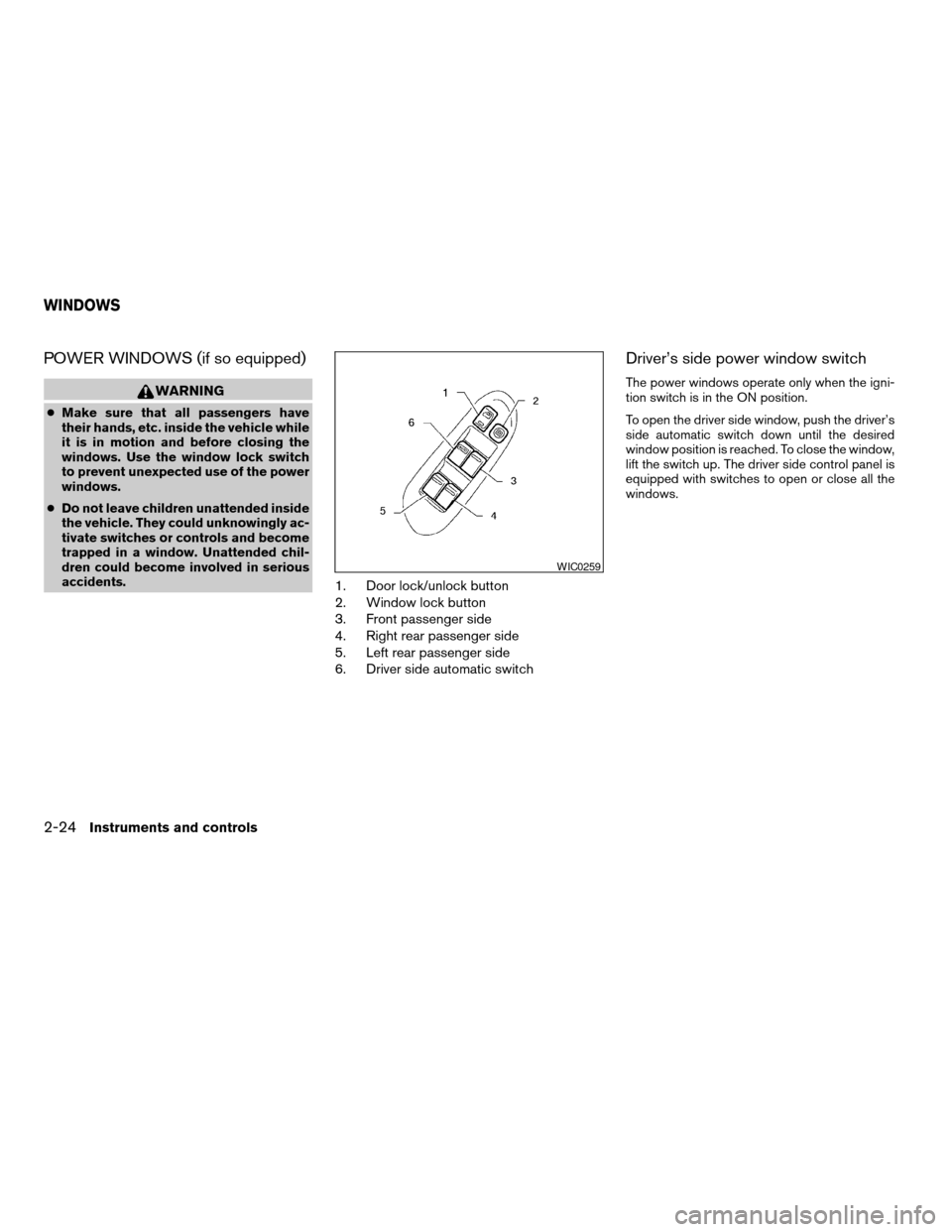
POWER WINDOWS (if so equipped)
WARNING
cMake sure that all passengers have
their hands, etc. inside the vehicle while
it is in motion and before closing the
windows. Use the window lock switch
to prevent unexpected use of the power
windows.
cDo not leave children unattended inside
the vehicle. They could unknowingly ac-
tivate switches or controls and become
trapped in a window. Unattended chil-
dren could become involved in serious
accidents.
1. Door lock/unlock button
2. Window lock button
3. Front passenger side
4. Right rear passenger side
5. Left rear passenger side
6. Driver side automatic switch
Driver’s side power window switch
The power windows operate only when the igni-
tion switch is in the ON position.
To open the driver side window, push the driver’s
side automatic switch down until the desired
window position is reached. To close the window,
lift the switch up. The driver side control panel is
equipped with switches to open or close all the
windows.
WIC0259
WINDOWS
2-24Instruments and controls
ZREVIEW COPY:Ð2003 Sentra(b15)
Owners Manual(owners)ÐUSA English(nna)
12/10/02Ðdebbie
X
Page 69 of 224

Front passenger power window switch
The passenger window switch operates only the
corresponding passenger window. To open the
window push the switch and hold it down
s1.To
close the window, pull the switch up
s2.
Rear power window switch
The rear passenger window switches open or
close only the corresponding passenger window.
To open the window, push the switch and hold it
down
s1. To close the window, pull the switch up
s2.
Locking passengers’ windows
When the window lock button is depressed, only
the driver side window can be opened or closed.
Push it again to cancel the window lock function.
Automatic operation
To fully open the driver window, press the driver
window switch down to the second detent and
release it; it need not be held. The window auto-
matically opens all the way. To stop the window,
lift the switch up while the window is opening.
WIC0260WIC0261WIC0262
Instruments and controls2-25
ZREVIEW COPY:Ð2003 Sentra(b15)
Owners Manual(owners)ÐUSA English(nna)
12/10/02Ðdebbie
X