Page 108 of 265
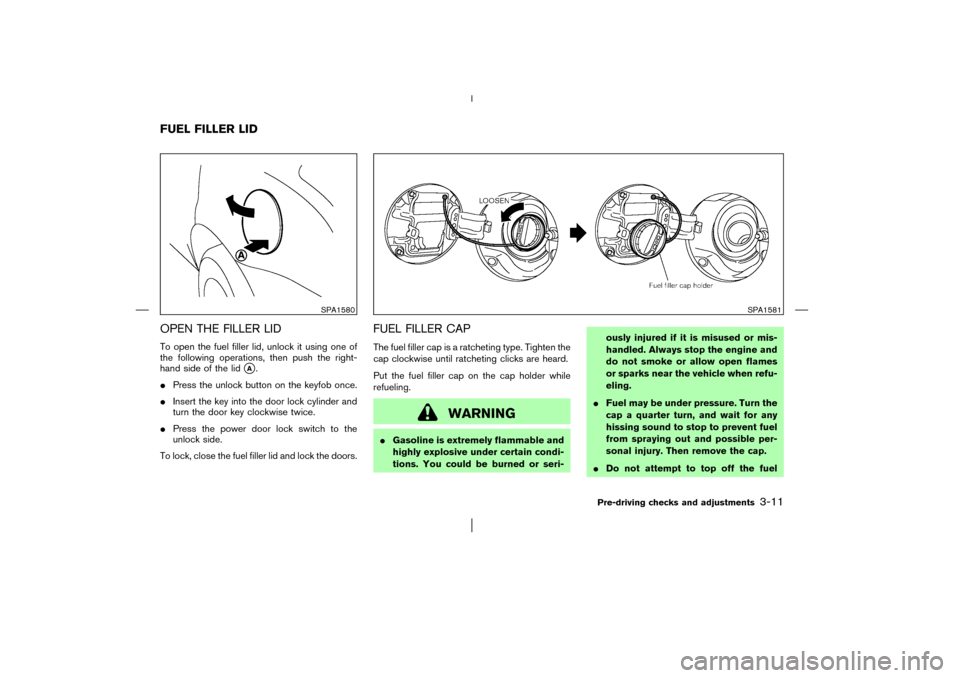
OPEN THE FILLER LIDTo open the fuel filler lid, unlock it using one of
the following operations, then push the right-
hand side of the lid
�A.
�Press the unlock button on the keyfob once.
�Insert the key into the door lock cylinder and
turn the door key clockwise twice.
�Press the power door lock switch to the
unlock side.
To lock, close the fuel filler lid and lock the doors.
FUEL FILLER CAPThe fuel filler cap is a ratcheting type. Tighten the
cap clockwise until ratcheting clicks are heard.
Put the fuel filler cap on the cap holder while
refueling.
WARNING
�Gasoline is extremely flammable and
highly explosive under certain condi-
tions. You could be burned or seri-ously injured if it is misused or mis-
handled. Always stop the engine and
do not smoke or allow open flames
or sparks near the vehicle when refu-
eling.
�Fuel may be under pressure. Turn the
cap a quarter turn, and wait for any
hissing sound to stop to prevent fuel
from spraying out and possible per-
sonal injury. Then remove the cap.
�Do not attempt to top off the fuel
SPA1580
SPA1581
FUEL FILLER LID
Pre-driving checks and adjustments
3-11
�
03.1.28/Z50-D/V5.0
�
Page 114 of 265

PROCEDURE FOR STORING
MEMORYTwo positions can be stored in the automatic
drive positioner memory.Follow these proce-
dures to use the memory system.
1. Set the selector lever to the P (Park)
position.
2. Turn the ignition ON.
3. Adjust the driver’s seat, outside mirrors and
pedals to the desired positions by manually
operating each adjusting switch. For addi-
tional information, see “Seats” in the “1.
Seats, restraints and supplemental air bag
systems” section and “Pedal position adjust-
ment” earlier in this section.
During this step, do not turn the ignition to
any positions other than ON.
4. Push the SET switch and, within 5 seconds,push the memory switch 1 or 2 fully for at
least 1 second.
The indicator light for the pushed memory
switch will come on and stay on for approxi-
mately 5 seconds after pushing the switch.
After the indicator light goes off, the selected
positions are stored in the selected memory
(1 or 2). Pushing the unlock button on the
keyfobwithin this 5 seconds, will link the
selected memory to the keyfob.
When the link is completed, the indicator light
of the selected memory switch will blink for
approximately 5 seconds.
When you unlock the door with the link
completed keyfob, the driver’s seat will move
back and move to the memorized position.
If memory is stored in the same memory
switch, the previous memory and the memory
which is linked to the keyfob, will be deleted.
Confirming memory storage�Turn the ignition ON and push the SET
switch. If the main memory has not been
stored, the indicator light will come on for
approximately 0.5 seconds. When the
memory has stored the position, the indicator
light will stay on for approximately 5 seconds.
�If the battery cable is disconnected, or if the
SPA1584
Pre-driving checks and adjustments
3-17
�
03.1.28/Z50-D/V5.0
�
Page 196 of 265

8 Maintenance and do-it-yourselfMaintenance requirements .................................................. 8-2
General maintenance ............................................................ 8-2
Explanation of general maintenance items ................ 8-2
Maintenance precautions ..................................................... 8-5
Engine compartment check locations ............................. 8-7
Engine cooling system.......................................................... 8-8
Checking engine coolant level...................................... 8-8
Changing engine coolant ............................................... 8-9
Engine oil ................................................................................. 8-9
Checking engine oil level ............................................... 8-9
Changing engine oil ...................................................... 8-10
Changing engine oil filter ............................................ 8-11
CVT fluid ................................................................................ 8-12
Power steering fluid ............................................................ 8-12
Brake fluid ............................................................................. 8-12
Window washer fluid.......................................................... 8-13
Battery .................................................................................... 8-14
Jump starting .................................................................. 8-15
Drive belts ............................................................................. 8-15
Spark plugs ........................................................................... 8-16
Replacing spark plugs.................................................. 8-16
Air cleaner ............................................................................. 8-16
Windshield wiper blades ................................................... 8-17
Cleaning ........................................................................... 8-17Replacing ......................................................................... 8-18
Rear window wiper blade ................................................. 8-19
Parking brake and brake pedal ........................................ 8-19
Checking parking brake ............................................... 8-19
Checking brake pedal .................................................. 8-20
Brake booster ................................................................. 8-20
Fuses ...................................................................................... 8-21
Engine compartment ..................................................... 8-21
Passenger compartment .............................................. 8-22
Keyfobbattery replacement .............................................. 8-22
Lights ..................................................................................... 8-24
Headlights ...................................................................... 8-25
Exterior and interior lights............................................ 8-26
Wheels and tires ................................................................. 8-27
Tire pressure ................................................................... 8-27
Types of tires .................................................................. 8-28
Tire chains ....................................................................... 8-29
Changing wheels and tires ......................................... 8-30
�
03.1.28/Z50-D/V5.0
�
Page 217 of 265
PASSENGER COMPARTMENTIf any electrical equipment does not operate,
check for an open fuse.
1. Be sure the ignition key and the headlight
switch are OFF.
2. Pull to open the fuse box lid
�1.
3. Pinch the fuse perpendicularly with the fuse
puller
�A
and pull it out.
4. If the fuse is open, replace it with a new fuse
�B.
5. If a new fuse also opens, have the electrical
system checked and repaired by yourNISSAN dealer.
Replace the battery as follows:
1. Open the lid using a suitable tool.
2. Replace the battery with a new one.
Recommended battery: Sanyo CR2025 or
equivalent
SDI1505
SPA1374
KEYFOB BATTERY
REPLACEMENT
8-22
Maintenance and do-it-yourself
�
03.1.28/Z50-D/V5.0
�
Page 218 of 265

Make sure that the
⊕
side faces the
bottom case.
3. Close the lid securely.
4. Push the keyfobbutton two or three times to
check its operation.
See your NISSAN dealer if you need any assis-
tance for replacement.
If the battery is removed for any reason
other than replacement, perform step 4
above.
�Be careful not to touch a circuit board
and a battery terminal.
�An improperly disposed battery can
harm the environment. Always confirm
local regulations for battery disposal.
�The keyfob is water-resistant; however,
if it does get wet, immediately wipe
completely dry.
�When changing batteries, do not let
dust or oil get on the keyfob.
FCC Notice:
Changes or modifications not expressly
approved by the manufacturer compliance
could void the user’s authority to operate
the equipment. This device complies with
Part 15 of the FCC Rules and RSS-210 ofIndustry Canada. Operation is subject to
the following two conditions: (1) This de-
vice may not cause harmful interference,
and (2) this device must accept any inter-
ference received, including interference
that may cause undesired operation of the
device.
Maintenance and do-it-yourself
8-23
�
03.1.28/Z50-D/V5.0
�