2003 NISSAN ALTIMA ignition
[x] Cancel search: ignitionPage 61 of 256

If the engine fails to start using a registered NVIS
key (for example, when interference is caused by
another NVIS key, an automated toll road device
or automatic payment device on the key ring) ,
restart the engine using the following proce-
dures:
1. Leave the ignition switch in the ON position
for approximately 5 seconds.
2. Turn the ignition switch to the OFF or LOCK
position, and wait approximately 5 seconds.
3. Repeat steps 1 and 2.
4. Restart the engine while holding the device
(which may have caused the interference)
separate from the registered NVIS key.
If the no start condition re-occurs, NISSAN rec-
ommends placing the registered NVIS key on a
separate key ring to avoid interference from other
devices.
Statement related to Section 15 of FCC
Rules for NISSAN Vehicle Immobilizer Sys-
tem (CONT ASSY — IMMOBILIZER, ANT
ASSY — IMMOBILIZER)This device complies with part 15 of the
FCC Rules and RSS-210 of Industry
Canada. Operation is subject to the follow-
ing two conditions;
(1) This device may not cause harmful in-
terference, and (2) this device must accept
any interference received, including inter-
ference that may cause undesired opera-
tion of the device.
CHANGES OR MODIFICATIONS NOT EX-
PRESSLY APPROVED BY THE MANUFAC-
TURER FOR COMPLIANCE COULD VOID
THE USER’S AUTHORITY TO OPERATE
THE EQUIPMENT.
Security indicator light (NISSAN Ve-
hicle Immobilizer System)
The security indicator lights1is located on the
instrument panel near the windshield.
The security indicator light blinks every 3 sec-
onds whenever the ignition switch is in the
LOCK, OFF or ACC position. This function indi-
cates the NISSAN Vehicle Immobilizer System
(NVIS) is operational.
If the NVIS is malfunctioning, the light will remain
on while the ignition key is in the ON position.
WIC0270
Instruments and controls2-13
ZREVIEW COPY:Ð2003 Altima(l30)
Owners Manual(owners)ÐUSA English(nna)
04/21/03Ðdebbie
X
Page 62 of 256

If the light still remains on and/or the en-
gine will not start, see a NISSAN dealer for
NVIS service as soon as possible. Please
bring all NVIS keys that you have when
visiting your NISSAN dealer for service.
VEHICLE SECURITY SYSTEM (if so
equipped)
The vehicle security system provides visual and
audio alarm signals if parts of the vehicle are
disturbed.
Security indicator light (Vehicle secu-
rity system)
The security indicator lights1is located on the
instrument panel near the windshield.
The security indicator light shows the status of
the vehicle security system.
The light operates whenever the ignition switch is
in the LOCK, OFF, or ACC position.
The vehicle security system has four phases. For
each phase the operation of the security indicator
light is different.
How to arm the vehicle security sys-
tem
1. Close all windows.(The system can be
armed even if the windows are open.)
2. Remove the key from the ignition switch.
WIC0270
LIC0053
2-14Instruments and controls
ZREVIEW COPY:Ð2003 Altima(l30)
Owners Manual(owners)ÐUSA English(nna)
04/21/03Ðdebbie
X
Page 63 of 256

3. Close the trunk lid and all doors. Lock all
doors. The doors can be locked with the key,
power door lock switch or with the keyfob.
Keyfob operation:
cPush the
button on the keyfob.
All doors lock. The hazard lights flash
twice and the horn beeps once to indicate
all doors are locked.
cWhen the
button is pushed with
all doors locked, the hazard lights flash
twice and the horn beeps once as a re-
minder that the doors are already locked.
The horn may or may not beep. Refer to
“Silencing the horn beep feature” later in this
section.
4. Confirm that the SECURITY indicator light
comes on. The SECURITY light stays on for
about 30 seconds. The vehicle security sys-
tem is now pre-armed. After about 30 sec-
onds the vehicle security system automati-
cally shifts into the armed phase. The
SECURITY light begins to flash once every 3
seconds. If, during the 30-second pre-arm
time period, the door is unlocked by the key
or the keyfob, or the ignition key is turned to
ACC or ON, the system will not arm.cIf the key is turned slowly when locking
the door, the system may not arm. Fur-
thermore, if the key is turned beyond
the vertical position toward the unlock
position to remove the key, the system
may be disarmed when the key is re-
moved. If the indicator light fails to
glow for 30 seconds, unlock the door
once and lock it again.
cEven when the driver and/or passen-
gers are in the vehicle, the system will
arm with all doors and trunk lid closed
and locked with the ignition key in the
OFF position.
Vehicle security system activation
The vehicle security system will give the following
alarm:
cThe headlights blink and the horn sounds
intermittently.
cThe alarm automatically turns off after ap-
proximately 1 minute. However, the alarm
reactivates if the vehicle is tampered with
again. The alarm can be shut off by unlocking
a door or trunk lid with the key, or by pressing
the
button on the keyfob.The alarm is activated by:
copening the door or trunk lid without using
the key or keyfob (even if the door is un-
locked by releasing the door inside lock
switch) or opening the trunk lid by operating
the opener lever.
How to stop an activated alarm
The alarm stops only by unlocking a door or the
trunk lid with the key, or by pressing the
button on the keyfob.
Instruments and controls2-15
ZREVIEW COPY:Ð2003 Altima(l30)
Owners Manual(owners)ÐUSA English(nna)
04/21/03Ðdebbie
X
Page 64 of 256

Silencing the horn beep feature
If desired, the horn beep feature can be deacti-
vated using the keyfob.
To deactivate:Press and hold both the
andbuttons at the same timefor at least
2 seconds.
The hazard lights will quickly flash 3 times to
confirm that the horn beep feature has been
deactivated.
To activate:Press and hold both the
andbuttons at the same timefor at least
2 seconds once more.The hazard lights will quickly flash once and the
horn will sound once to confirm that the horn
beep feature has been reactivated.
Deactivating the horn feature does not silence
the horn if the alarm is triggered.
If the system does not operate as described
above, have it checked by a NISSAN dealer.
1. Intermittent (if so equipped)
2. Low speed
3. High speed
4. Wash
5. Intermittent control (if so equipped)
6. Mist
SWITCH OPERATION
The ignition switch must be in the ON position for
the wipers or washer to be activated.
Push the lever down to operate the windshield
wipers. Pull the lever toward you to operate the
washer.
WIC0271WIC0311
WINDSHIELD WIPER AND WASHER
SWITCH
2-16Instruments and controls
ZREVIEW COPY:Ð2003 Altima(l30)
Owners Manual(owners)ÐUSA English(nna)
04/21/03Ðdebbie
X
Page 68 of 256

Autolight system (if so equipped)
The autolight sensors1is located on the instru-
ment panel.
The autolight system allows the headlights to be
set so they turn on and off automatically. The
autolight system can:
cTurn on the headlights automatically when it
is dark.
See your NISSAN dealer to have the
autolight activation sensitivity setting
adjusted.cTurn off the headlights when it is light.
cKeep the headlights on for up to 180 sec-
onds after you turn the key to OFF and all
doors are closed.
The default time delay for autolight
shutoff is 45 seconds. See your
NISSAN dealer to have the time delay
setting adjusted.
If the ignition switch is turned OFF and one of the
doors is opened, the headlights remain ON for 5
minutes.
To set the autolight system:
1. Make sure the headlight switch is in the
AUTO position.
2. Turn the ignition key to ON.
3. The autolight system automatically turns the
headlights on and off.
To turn the autolight system off, turn the switch to
the OFF,
,orposition.Be sure you do not put anything on top of
the autolight sensor located in the top
driver side of the instrument panel. The
autolight sensor controls the autolight; if it
is covered, the autolight sensor reacts as if
it is dark out and the headlights will illumi-
nate. If this occurs while parked with the
engine off and the key in the ON position,
your vehicle’s battery could become dis-
charged.
WIC0274
2-20Instruments and controls
ZREVIEW COPY:Ð2003 Altima(l30)
Owners Manual(owners)ÐUSA English(nna)
04/21/03Ðdebbie
X
Page 69 of 256
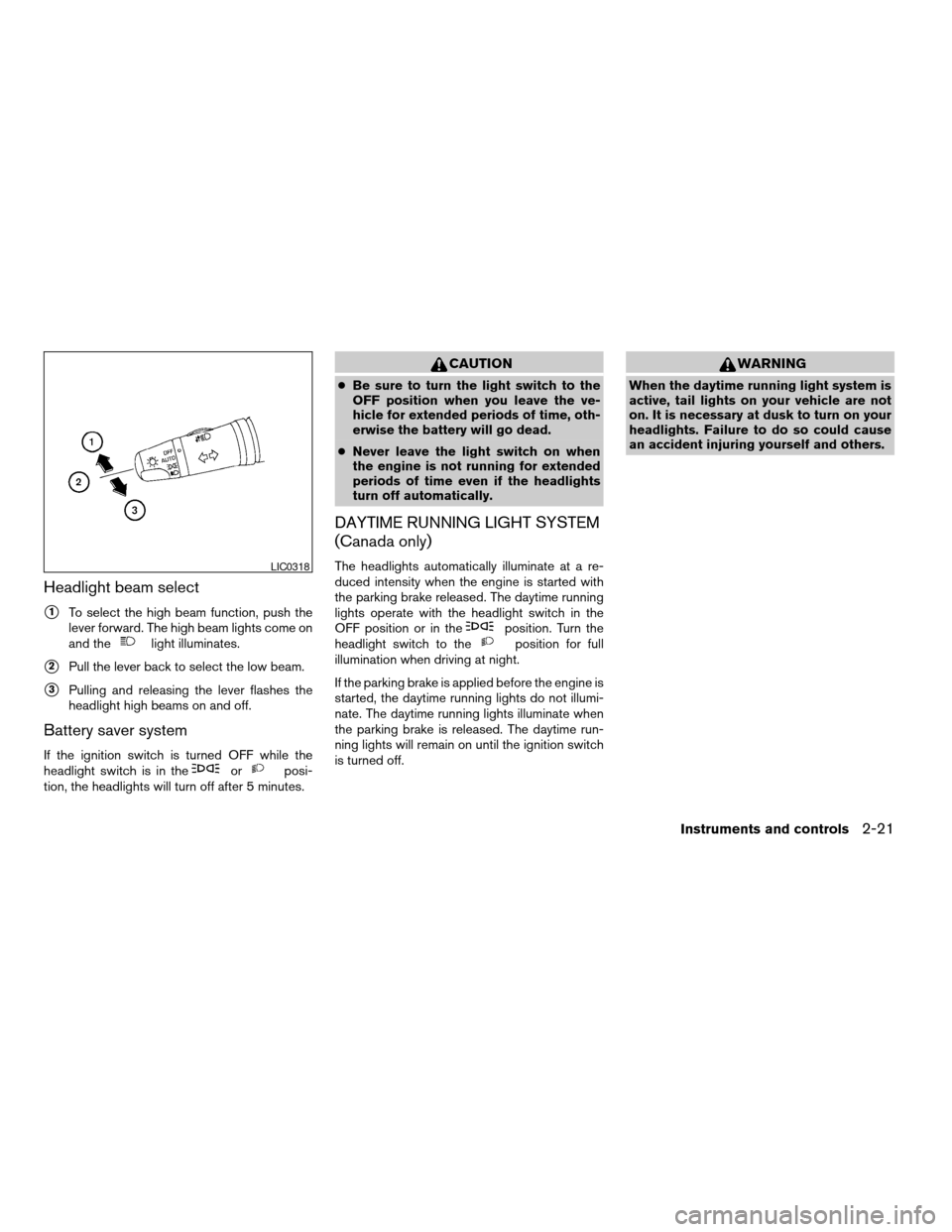
Headlight beam select
s1To select the high beam function, push the
lever forward. The high beam lights come on
and the
light illuminates.
s2Pull the lever back to select the low beam.
s3Pulling and releasing the lever flashes the
headlight high beams on and off.
Battery saver system
If the ignition switch is turned OFF while the
headlight switch is in theorposi-
tion, the headlights will turn off after 5 minutes.
CAUTION
cBe sure to turn the light switch to the
OFF position when you leave the ve-
hicle for extended periods of time, oth-
erwise the battery will go dead.
cNever leave the light switch on when
the engine is not running for extended
periods of time even if the headlights
turn off automatically.
DAYTIME RUNNING LIGHT SYSTEM
(Canada only)
The headlights automatically illuminate at a re-
duced intensity when the engine is started with
the parking brake released. The daytime running
lights operate with the headlight switch in the
OFF position or in the
position. Turn the
headlight switch to theposition for full
illumination when driving at night.
If the parking brake is applied before the engine is
started, the daytime running lights do not illumi-
nate. The daytime running lights illuminate when
the parking brake is released. The daytime run-
ning lights will remain on until the ignition switch
is turned off.
WARNING
When the daytime running light system is
active, tail lights on your vehicle are not
on. It is necessary at dusk to turn on your
headlights. Failure to do so could cause
an accident injuring yourself and others.
LIC0318
Instruments and controls2-21
ZREVIEW COPY:Ð2003 Altima(l30)
Owners Manual(owners)ÐUSA English(nna)
04/21/03Ðdebbie
X
Page 71 of 256

cIf the ignition switch is in the OFF position
with the fog lights turned ON, a warning
chime will sound indicating the fog lights
were left ON. The fog lights will be turned
OFF by the Battery Saver function approxi-
mately 5 minutes after the last door is
closed.
cIf the ignition switch is turned to the ON
position after the fog lights were turned OFF
by the Battery Saver function, the fog lights
will immediately come back ON.
Headlight switch in the AUTO position;
nighttime operation
cFog lights, marker and taillights come ON.
cHeadlights come ON.
The lights can be adjusted to turn ON in
brighter or dimmer environments. See
your NISSAN dealer to have the sensi-
tivity setting adjusted.
cDash readouts dim unless the dimmer
switch is on full bright.
cIf the ignition switch is in the OFF position
with the fog lights turned ON, the fog lights
will be turned OFF by the Twilight Sentinel
function approximately 45 seconds after the
last door is closed.The default setting is 45 seconds. See
your NISSAN dealer to have this time
adjusted up to 180 seconds.
cIf any door is opened when the ignition
switch is in the OFF position, the Twilight
Sentinel function operates for approximately
5 minutes. After approximately 5 minutes,
the lights will turn OFF due to the Battery
Saver function.
cIf the ignition switch is turned to the ON
position after the fog lights were turned OFF
by the Twilight Sentinel function, the fog
lights and the headlights will come ON to-
gether when the Auto Light Sensor deter-
mines it is dark enough. The fog lights will
now operate independently of the headlights
only if the headlight switch is turned OFF.
cWhen the high beams are turned ON, the
fog lights will turn OFF. The fog lights will
come back ON when the high beams are
turned OFF.
Headlights turned ON and OFF by the
driver (no AUTO headlight function) ; day or
nighttime operation
cSame operation as “Headlight switch in the
AUTO position; daytime operation” de-
scribed above.Some of the Battery Saver and Twilight
Sentinel functions can be turned ON and
OFF or adjusted. Please see your NISSAN
dealer if you have any questions.
To turn the fog lights OFF, turn the switch to the
OFF position.
The fog lights automatically turn off whenever the
high beam headlight function is selected.
Instruments and controls2-23
ZREVIEW COPY:Ð2003 Altima(l30)
Owners Manual(owners)ÐUSA English(nna)
04/21/03Ðdebbie
X
Page 72 of 256
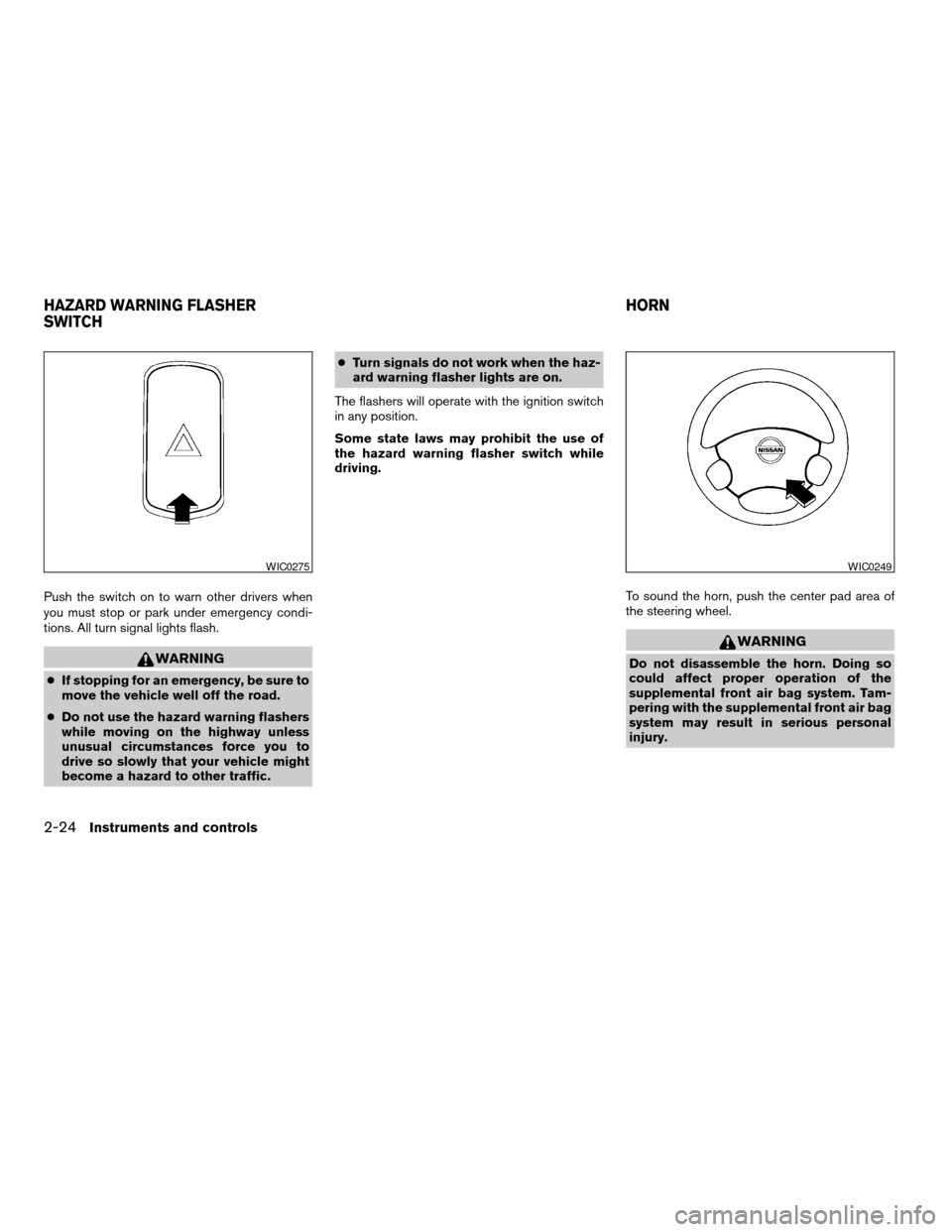
Push the switch on to warn other drivers when
you must stop or park under emergency condi-
tions. All turn signal lights flash.
WARNING
cIf stopping for an emergency, be sure to
move the vehicle well off the road.
cDo not use the hazard warning flashers
while moving on the highway unless
unusual circumstances force you to
drive so slowly that your vehicle might
become a hazard to other traffic.cTurn signals do not work when the haz-
ard warning flasher lights are on.
The flashers will operate with the ignition switch
in any position.
Some state laws may prohibit the use of
the hazard warning flasher switch while
driving.
To sound the horn, push the center pad area of
the steering wheel.
WARNING
Do not disassemble the horn. Doing so
could affect proper operation of the
supplemental front air bag system. Tam-
pering with the supplemental front air bag
system may result in serious personal
injury.
WIC0275WIC0249
HAZARD WARNING FLASHER
SWITCHHORN
2-24Instruments and controls
ZREVIEW COPY:Ð2003 Altima(l30)
Owners Manual(owners)ÐUSA English(nna)
04/21/03Ðdebbie
X