2003 NISSAN 350Z torque
[x] Cancel search: torquePage 130 of 227

light, shift to N (Neutral) and release
the clutch pedal with the foot brake
applied.
Up-shift indicatorThe manual transmission up-shift indicator is
situated in the tachometer and shows the driver
the time to shift into a higher gear by illuminating.
The engine speed in revolutions per minute
(rpm) for upshifting can be set on the trip
computer display. (See ªTrip computerº in the
ª2. Instruments and controlsº section for the
display setting information.) The use of the up-
shift indicator will help you to upshift at a
constant engine speed (rpm) from any gear.
The up-shift indicator will start flashing when the
engine speed is within about 500 rpm of the set
figure while driving, and then illuminate after theengine speed reaches the set figure.
For example, you can use the up-shift indicator
when driving as follows:
IIf the maximum engine speed is desired, set
the figure at 6,600 rpm. (The indicator starts
flashing from about 6,100 rpm and comes on
steady at 6,600 rpm.)
IIf the maximum engine torque is desired, set
the figure at 4,800 rpm. (The indicator starts
flashing from about 4,300 rpm and comes on
steady at 4,800 rpm.)
IIf you want to break in your vehicle, use of the
up-shift indicator with a rather low figure will
help you to avoid the high engine speed.
To make the up-shift indicator not come on, set
the figure at above 7,200 rpm.
NOTE:
There may be a lag between the timing of
the up-shift indicator illumination and the
tachometer indication.
SSD0278
Starting and driving
5-13
Z
02.9.13/Z33-D/V5.0
X
Page 139 of 227
On slippery surfaces such as wet asphalt roads,
vehicle wheels may spin when the vehicle is
accelerated. This wheel spin reduces accelera-
tion, or causes the vehicle to swerve, thus
decreasing vehicle stability.
When the vehicle drive wheels begin to spin, the
traction control system (TCS) controls the en-
gine torque using an electronic control system,
and it also controls automatic control shifting if
necessary (for automatic transmission models).
This reduces spinning of the drive wheels, and
result in improved vehicle acceleration perfor-
mance. It also improves the vehicle stability by
swerving motion.
IIndicator light
If a malfunction occurs in the traction control
system, the SLIP and
indicator lights
come on in the meter panel.
As long as these indicator lights are on, the
traction control function is canceled. The
vehicle will behaves like a model without the
traction control system.
To cancel the traction control system manu-
ally, turn off the traction control system off
switch. (The
indicator light illuminates.)
WARNING
The traction control system is designed
to prevent the wheels from spinning.
However, it does not prevent vehicle
slipping or spinning due to abrupt steer-
ing operation at high speeds or by care-
less or dangerous driving techniques.
Be especially careful when driving on
slippery surfaces and always drive
safely.When driving on slippery surfaces or suddenly
avoiding obstacles on roads, the vehicle might
swerve or slip. With the vehicle dynamic control
(VDC) system, sensors detect these movements
and control the braking and engine output to
help improve vehicle stability while driving.
IWhen the vehicle dynamic control system is
operating, the slip indicator light in the meter
panel blinks.
IWhen only the traction control system (TCS)
portion of the vehicle dynamic control system
is operating, the slip indicator light will also
blink.
IIf the slip indicator light blinks, the vehicle is
under slippery conditions. Be sure to drive
carefully. See ªSlip indicator lightº and ªVe-
hicle dynamic control off indicator lightº in the
ª2. Instruments and controlsº section.
IIndicator light
If a malfunction occurs in the system, the
SLIP and
indicator lights come on in
the meter panel.
As long as these indicator lights are on, the
traction control function is canceled.
The VDC system uses a Brake Limited Slip
Differential (LSD) system to improve vehicle
traction. The brake LSD system works when one
of the driving wheels is spinning on a slippery
TRACTION CONTROL SYSTEM
(TCS) (if so equipped)VEHICLE DYNAMIC CONTROL
(VDC) SYSTEM (if so equipped)5-22
Starting and driving
Z
02.9.13/Z33-D/V5.0
X
Page 148 of 227
IUse the correct jack up points; never
use any other part of the vehicle for
jack support.
INever jack up the vehicle more than
necessary.
INever use blocks on or under the
jack.
IDo not start or run engine while ve-
hicle is on the jack, as it may cause
the vehicle to move. This is especially
true for vehicles with limited slip dif-
ferential carriers.
IDo not allow passengers to stay in
the vehicle while it is on the jack.
Installing the spare tire1. Clean any mud or dirt from the surface
between the wheel and hub.
2. Carefully put the wheel on and tighten the
wheel nuts finger tight. When replacing a
front tire, make sure the hole in the spare tire
wheel is aligned with the pin on the brake
rotor.
3. With the wheel nut wrench, tighten wheel
nuts alternately and evenly until they are tight.
4. Lower the vehicle slowly until the tire touches
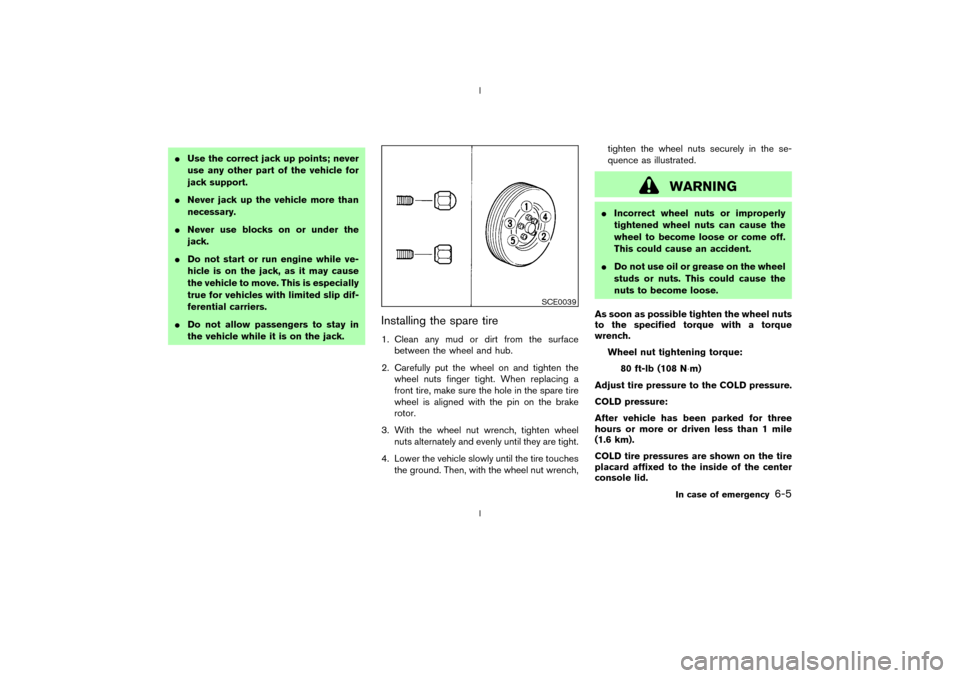
the ground. Then, with the wheel nut wrench,tighten the wheel nuts securely in the se-
quence as illustrated.
WARNING
IIncorrect wheel nuts or improperly
tightened wheel nuts can cause the
wheel to become loose or come off.
This could cause an accident.
IDo not use oil or grease on the wheel
studs or nuts. This could cause the
nuts to become loose.
As soon as possible tighten the wheel nuts
to the specified torque with a torque
wrench.
Wheel nut tightening torque:
80 ft-lb (108 N×m)
Adjust tire pressure to the COLD pressure.
COLD pressure:
After vehicle has been parked for three
hours or more or driven less than 1 mile
(1.6 km).
COLD tire pressures are shown on the tire
placard affixed to the inside of the center
console lid.
SCE0039
In case of emergency
6-5
Z
02.9.13/Z33-D/V5.0
X
Page 172 of 227
IA suitable adapter should be attached to the
jack stand saddle.
5. Remove the plastic engine undercover.
a. Remove the small plastic clip at the center
point of the undercover.
b. Then remove the other bolts that hold the
undercover in place.
CAUTION
Make sure the correct lifting and sup-
port points are used to avoid vehicle
damage.
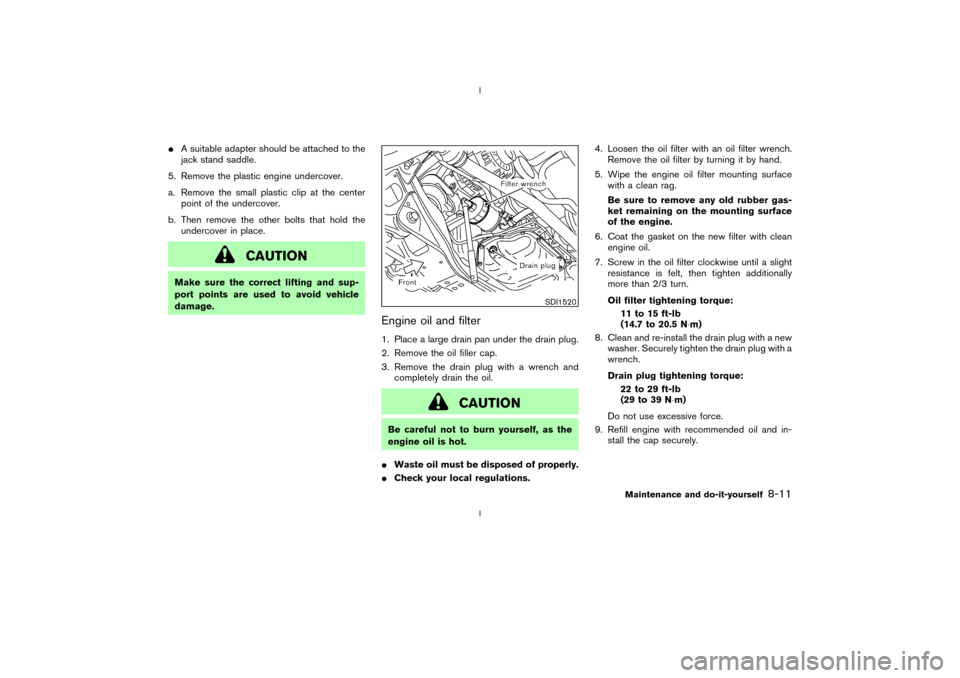
Engine oil and filter1. Place a large drain pan under the drain plug.
2. Remove the oil filler cap.
3. Remove the drain plug with a wrench and
completely drain the oil.
CAUTION
Be careful not to burn yourself, as the
engine oil is hot.
IWaste oil must be disposed of properly.
ICheck your local regulations.4. Loosen the oil filter with an oil filter wrench.
Remove the oil filter by turning it by hand.
5. Wipe the engine oil filter mounting surface
with a clean rag.
Be sure to remove any old rubber gas-
ket remaining on the mounting surface
of the engine.
6. Coat the gasket on the new filter with clean
engine oil.
7. Screw in the oil filter clockwise until a slight
resistance is felt, then tighten additionally
more than 2/3 turn.
Oil filter tightening torque:
11 to 15 ft-lb
(14.7 to 20.5 N×m)
8. Clean and re-install the drain plug with a new
washer. Securely tighten the drain plug with a
wrench.
Drain plug tightening torque:
22 to 29 ft-lb
(29 to 39 N×m)
Do not use excessive force.
9. Refill engine with recommended oil and in-
stall the cap securely.
SDI1520
Maintenance and do-it-yourself
8-11
Z
02.9.13/Z33-D/V5.0
X