2003 MINI COOPER light
[x] Cancel search: lightPage 40 of 148

38
SAFETY BELTS STEERING WHEEL Drive with your safety belt onEven though there is an airbag, always fasten
your seat belt before driving off, because air-
bags are designed to enhance the effective-
ness of the safety belts, not to replace them.To fastenMake sure you hear the lock engage in the
belt buckle.
The warning lamp – Fasten safety
belts – lights up for several seconds
or until after the safety belts are
fastened.To release1. Press the red button in the belt buckle
2. Hold the belt
3. Guide the belt back into its reel.
Safety belt height adjustmentUse the height adjustment mechanism to
adapt the safety belt to the ideal position
for your own body:
Press the button and at the same time push
the entire unit upwards or downwards.
Also observe the instructions on adjusting
the seats on page 33.
If the safety belts are damaged or
stretched in an accident: have the
safety belt system replaced by your MINI
Dealer and the belt anchors checked, other-
wise the safety function can no longer be
guaranteed. If a child-restraint system was
in the vehicle during an accident, consult
the manufacturer's instructions regarding
replacement.<
To adjust the steering wheel height1. Push the locking lever downward
2. Adjust the desired steering wheel posi-
tion
3. Pull the lever back in.
Do not adjust the steering wheel
while the vehicle is moving, other-
wise unexpected movement could increase
the risk of accident.<
ba.book Seite 38 Montag, 5. August 2002 8:09 20
ProCarManuals.com
Page 46 of 148

44
VEHICLE MEMORY How the system functionsNo doubt you have often reflected on how
great it would be if you could configure
your vehicle's various adjustment settings
to meet your own personal requirements.
In developing this vehicle, the manufac-
turer of the MINI has incorporated a num-
ber of options that your MINI Dealer can
program to reflect your individual prefer-
ences.
What the system can doYour MINI Dealer can provide you with
details on the capabilities of the Vehicle
Memory system.
Examples for Vehicle Memory:
>Automatic locking after starting to drive,
see page 26
>Selective central locking system, see
pages 24, 25
>Automatically opening the sliding/tilt
sunroof, see page 29
>Convenience opening, see pages 24,
25, 26
>Delayed lighting shut off, "Follow-me-
home" lamps, see page 52
>Daytime driving lamps, see page 52
>Speed-dependent windshield wipers, see
page 55
>Acoustic ignition key warning,
see page 45
>Fuel consumption display, see page 61
>Temperature display, see page 61
>Volume control PDC, see page 66
>Acoustic alarm for starting PDC
activation, see page 66This symbol alerts you to Vehicle
Memory functions in the Owner's
Manual<
ba.book Seite 44 Montag, 5. August 2002 8:09 20
ProCarManuals.com
Page 47 of 148

45
OVERVIEW REPAIRS OPERATIONCONTROLS DATA INDEX
IGNITION LOCK 0Steering locked
1Steering unlocked
2Ignition switched on
3Starting the engine0Steering locked The key can be inserted or removed in this
position only.
To lock the steering:
1. Remove the key
2. Turn the steering wheel slightly to the
left or right until the lock engages.
A sound alarm goes off if the key
remains in the ignition after opening
the driver's door.<
You can have this function activated/
deactivated by your MINI Dealer.<
Vehicles with Continuously Variable
automatic Transmission (CVT):
Do not move the selector lever from
position P until the engine is running.
Your vehicle is equipped with an interlock.
Therefore, the ignition key cannot be
turned to position 0 and removed until the
selector lever is in position P – Interlock.<
1Steering unlocked Individual electrical accessories are ready
for operation.
You will find that it is often easier to turn
the ignition key from position 0 to
position 1 when you move the steering
wheel slightly to help disengage the lock.2Ignition switched onAll electrical accessories are ready for oper-
ation.3Starting the engine
Vehicles with manual transmission:
Step on the clutch when starting the
vehicle. A lockout prevents the engine from
starting if the clutch is not depressed.<
ba.book Seite 45 Montag, 5. August 2002 8:09 20
ProCarManuals.com
Page 49 of 148

47
OVERVIEW REPAIRS OPERATIONCONTROLS DATA INDEX
SWITCHING OFF THE ENGINE PARKING BRAKE
You should never remove the ignition
key when the vehicle is in motion, as
the steering lock could engage.
When you leave the vehicle, always remove
the ignition key and engage the steering
lock.
When you park on downward slopes,
engage the parking brake.<
Manual transmissionTurn the ignition key to position 1 or 0.Continuously Variable automatic
Transmission (CVT)*Engage selector lever position P, turn the
ignition key to position 1 or 0.
The parking brake is designed primarily to
prevent the vehicle from rolling when it is
parked. It operates against the rear wheels.To engageLever automatically locks in position.
The warning lamp in the instrument cluster
comes on when the ignition key is in
position 2, see page 16.To release1. Pull up slightly
2. Press the button
3. Push the lever downwards.
If, in exceptional circumstances, it
should be necessary to engage the
parking brake while the vehicle is in
motion, do not pull the lever with excessive
pressure. Keep your thumb pressed against
the release button while carefully pulling
the lever up to apply moderate pressure.
Excessive pressure can lead to overbraking
and loss of traction, i.e. fishtailing, at the
rear axle.
The brake lamps do not come on when the
parking brake is engaged.
Vehicles with manual transmission:
Always engage the parking brake when
parking on hills and inclined surfaces, as
first gear or reverse may not provide ade-
quate resistance to rolling.
Vehicles with CVT:
Place the selector lever in P.<
ba.book Seite 47 Montag, 5. August 2002 8:09 20
ProCarManuals.com
Page 50 of 148

48
MANUAL TRANSMISSION The manual gearshift lever neutral plane
lies in the gear plane of the 3rd / 4th gear.
When shifting from each gear into Neutral,
the manual gearshift lever springs back
automatically into the gearshift lever neu-
tral plane.6-speed transmission*
When changing gear in the 5th/6th
gear plane, press the gearshift lever
to the right to prevent inadvertently shift-
ing to a gear of the 3rd/4th gear plane.<
Reverse Before selecting reverse gear, ensure the
vehicle is stationary; then, fully depress the
clutch pedal and pause briefly before mov-
ing the gearshift lever into position.
5-speed transmission:
Press the gearshift lever to the right and to
the back.
6-speed transmission:
Press the gearshift lever towards the left.
Thereby overcome the slight resistance and
press forward.
As you do this, the backup lamps will turn
on automatically when the ignition key is
in position 2.Do not hold the vehicle in place on
slopes by slipping or "riding" the
clutch. Use the parking brake instead.
Riding the clutch causes the clutch assem-
bly to wear out sooner.<
ba.book Seite 48 Montag, 5. August 2002 8:09 20
ProCarManuals.com
Page 54 of 148

52
PARKING LAMPS/LOW BEAMS SIGNAL/HEADLAMP FLASHER Switching on the parking lampsTurn to the first position. The front, rear
and side vehicle lighting is switched on.
Parking light on one side, see following
column.Switching on the low beamsTurn to the second position. With the low
beams on and with the ignition switched
off, only the parking lamps will remain on."Follow me home" lampsIf you switch off the engine with the low
beams on, and then switch off the low
beams, they remain lit for a set length of
time.
You can have this function set by
your MINI Dealer.<
Switching on the standing lampsFor parking, you can activate lights on one
side of the vehicle. Observe local laws.
In ignition key position 0:
Move the lever into the relevant turn signal
indicator position."Lights on" warningIf the lights have not been switched off and
the ignition key is in position 0, an acoustic
signal sounds for a few seconds when you
open the driver's door to remind you that
the lights have not been switched off.Daytime driving lamps*If you desire, the light switch can be left in
the second position:
When the ignition is switched off, the
external lighting is also switched off.
You can have this function set by
your MINI Dealer.<
1Turn signal indicator – green indicator
lamps and periodic clicking sound from
the relay
2High beams/Headlamp flasher – blue
indicator lampTo signal brieflyPress the lever up to but not beyond the
point of resistance.
If the blinking of the indicator lamp
and the clicking from the relay are
both faster than normal: one of the turn
signal indicators has failed.<
ba.book Seite 52 Montag, 5. August 2002 8:09 20
ProCarManuals.com
Page 55 of 148
53
OVERVIEW REPAIRS OPERATIONCONTROLS DATA INDEX
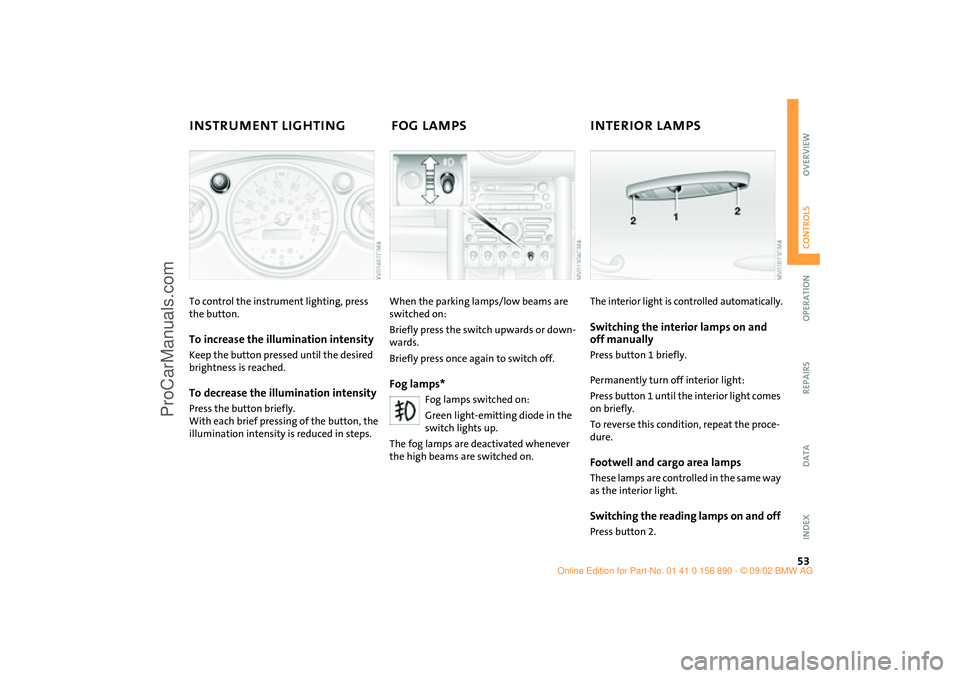
INSTRUMENT LIGHTING FOG LAMPS INTERIOR LAMPS To control the instrument lighting, press
the button.To increase the illumination intensityKeep the button pressed until the desired
brightness is reached.To decrease the illumination intensityPress the button briefly.
With each brief pressing of the button, the
illumination intensity is reduced in steps.
When the parking lamps/low beams are
switched on:
Briefly press the switch upwards or down-
wards.
Briefly press once again to switch off.Fog lamps*
Fog lamps switched on:
Green light-emitting diode in the
switch lights up.
The fog lamps are deactivated whenever
the high beams are switched on.
The interior light is controlled automatically.Switching the interior lamps on and
off manuallyPress button 1 briefly.
Permanently turn off interior light:
Press button 1 until the interior light comes
on briefly.
To reverse this condition, repeat the proce-
dure.Footwell and cargo area lampsThese lamps are controlled in the same way
as the interior light.Switching the reading lamps on and offPress button 2.
ba.book Seite 53 Montag, 5. August 2002 8:09 20
ProCarManuals.com
Page 56 of 148

54
LIGHT-EMITTING DIODES WASHER/WIPER SYSTEM Light-emitting diodes (LEDs) installed
behind translucent lenses serve as the light
source for many of the controls and dis-
plays in your vehicle. These light-emitting
diodes are related to conventional lasers,
and legislation defines them as light-emit-
ting diodes, Class 1.
Do not remove the protective lens
and avoid staring directly at the unfil-
tered beam for several hours, as inflamma-
tion of the iris could result.<
0Wipers parked
1Intermittent operation or rain sensor
2Normal wiper speed
3Fast wiper speed
4Brief wipe
5Clean windshield and headlampsIntermittent operation – Not on vehicles with rain sensor –
The interval time for the wipers is depen-
dent on the vehicle speed.
Rain sensor*The rain sensor is located on the wind-
shield, directly in front of the interior rear-
view mirror.
When the rain sensor is activated, the
windshield wipers are automatically con-
trolled depending on the amount of water
or snow landing on the windshield.
To activate the rain sensor:
From ignition key position 1:
Lever in position 1.
The wipers move across the windshield
once.
To deactivate the rain sensor:
Put lever in position 0.
Switch the rain sensor off when pass-
ing through an automatic car wash.
Failure to do so could result in damage
caused by undesired wiper activation.<
ba.book Seite 54 Montag, 5. August 2002 8:09 20
ProCarManuals.com