Page 74 of 360
74 Safety and SecurityDriving and safety systems4-ETS
The 4-ETS improves vehicle’s ability to uti-
lize available traction, especially under
slippery road conditions. The brakes are
applied to the spinning wheel and power is
allowed to flow to the wheel(s) with trac-
tion.
The 4-ETS function is available between ve-
hicle speeds of 0 mph (km/h) and 37 mph
(60 km/h).
The ESP warning lamp
v
in the instru-
ment cluster (
�page 24) lights up when
you turn the key to position2. It goes out
when the engine is running.
The ESP warning lamp
v
starts to flash
at any vehicle speed, as soon as the tires
lose traction and the wheels begin to spin.More information can be found in the
“Practical hints” section (
�page 238).
Warning!
G
When you see the ESP warning lamp
v
flashing in the speedometer dial, then pro-
ceed as follows:
�
While driving off, apply as little throttle
as possible.
�
While driving ease up on the accelera-
tor.
�
Adapt your speed and driving style to
the prevailing road conditions.
Failure to observe these guidelines could
cause the vehicle to skid.
The 4-ETS cannot prevent accidents result-
ing from excessive speed.
!The engine must be shut off when�
the parking brake is being tested on
a brake test dynamometer.
�
the vehicle is being towed with one
axle raised.
Otherwise, the 4-ETS will engage the
brakes and seriously damage the brake
system.
Page 75 of 360
75 Safety and Security
Driving and safety systems
EBB
The EBB enhances braking effectiveness
by allowing the rear brakes to supply a
greater proportion of the braking effort in
straight line braking circumstances with-
out a loss of vehicle stability.
ESP
The Electronic Stability Program (ESP)
monitors the vehicle's traction (force of
adhesive friction between the tires and the
road surface) and handling.
The ESP recognizes when a wheel is spin-
ning or if the vehicle starts to skid. By ap-
plying brakes to the appropriate wheel and
by limiting engine output, the ESP works to
stabilize the vehicle.
The ESP warning lamp
v
in the instru-
ment cluster (
�page 24) flashes when the
ESP is engaged.
The ESP warning lamp
v
l i g h t s u p w h e n
you turn the key to position2. It goes out
when the engine is running.
Warning!
G
Never switch off the ESP when you see the
ESP warning lamp
v
flashing in the
speedometer dial. In this case proceed as
follows:
�
While driving off, apply as little throttle
as possible.
�
While driving ease up on the accelera-
tor.
�
Adapt your speed and driving style to
the prevailing road conditions.
Failure to observe these guidelines could
cause the vehicle to skid.
The ESP cannot prevent accidents resulting
from excessive speed.
Page 76 of 360
76 Safety and SecurityDriving and safety systems
Switching off the ESP
To improve the vehicle's traction, turn off
the ESP in driving situations where it would
be advantageous to have the drive wheels
spin and thus cut into surfaces for better
grip such as:�
starting out on slippery surfaces and in
deep snow in conjunction with snow
chains.
�
sand or gravel.
�
when driving off-road.
When the ESP is turned off
�
engine torque is not limited.
�
the drive wheels can spin.
Warning!
G
The ESP cannot prevent the natural laws of
physics from acting on the vehicle, nor can
it increase the traction afforded. The ESP
cannot prevent accidents, including those
resulting from excessive speed in turns, fol-
lowing another vehicle too closely, or aqua-
planing. Only a safe, attentive, and skillful
driver can prevent accidents. The capabili-
ties of a ESP equipped vehicle must never be
exploited in a reckless or dangerous manner
which could jeopardize the user’s safety or
the safety of others.!Driving the vehicle with varied size tires
will cause the wheels to rotate at differ-
ent speeds, possibly causing the ESP to
activate. For this reason, all wheels, in-
cluding the spare wheel, must have the
same tire outside diameter.
!The engine must be shut off when�
the parking brake is being tested on
a brake test dynamometer.
�
the vehicle is being towed with one
axle raised.
Otherwise, the ESP will engage the
brakes and seriously damage the brake
system.
iThe ABS, BAS and ESP are automatical-
ly switched off when the differential
locks are switched on (
�page 145).
Warning!
G
The ESP should not be switched off during
normal driving other than in the circum-
stances described below. Disabling of the
system will reduce vehicle stability in stan-
dard driving maneuvers.
Page 77 of 360
77 Safety and Security
Driving and safety systems
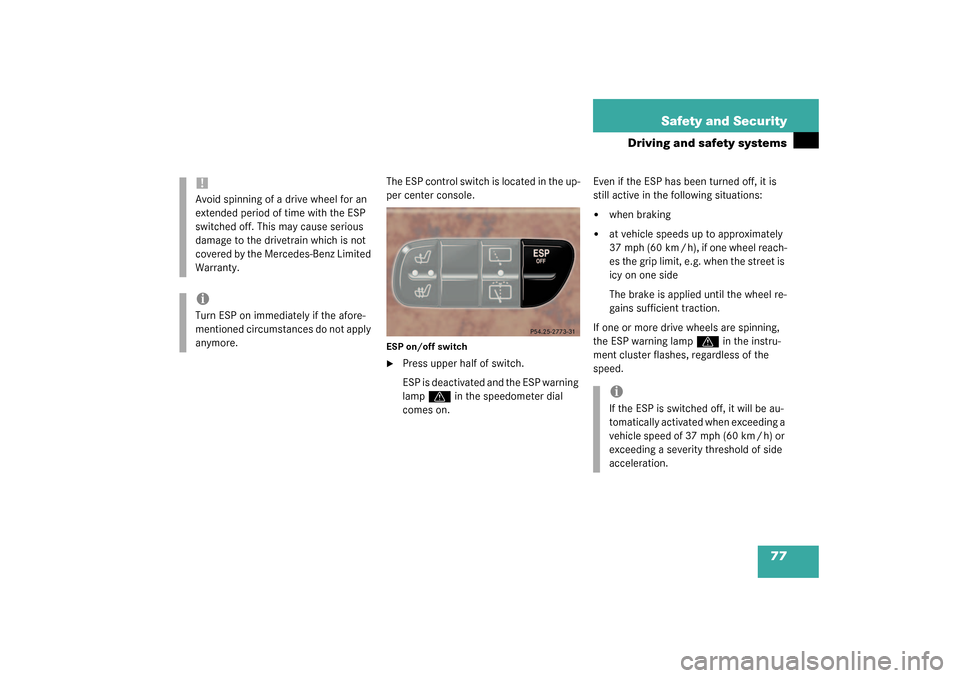
The ESP control switch is located in the up-
per center console.ESP on/off switch�
Press upper half of switch.
ESP is deactivated and the ESP warning
lamp
v
in the speedometer dial
comes on.Even if the ESP has been turned off, it is
still active in the following situations:
�
when braking
�
at vehicle speeds up to approximately
37 mph (60 km / h), if one wheel reach-
es the grip limit, e.g. when the street is
icy on one side
The brake is applied until the wheel re-
gains sufficient traction.
If one or more drive wheels are spinning,
the ESP warning lamp
v
in the instru-
ment cluster flashes, regardless of the
speed.
!Avoid spinning of a drive wheel for an
extended period of time with the ESP
switched off. This may cause serious
damage to the drivetrain which is not
covered by the Mercedes-Benz Limited
Warranty.iTurn ESP on immediately if the afore-
mentioned circumstances do not apply
anymore.
iIf the ESP is switched off, it will be au-
tomatically activated when exceeding a
vehicle speed of 37 mph (60 km / h) or
exceeding a severity threshold of side
acceleration.
Page 89 of 360
89 Controls in detail
Locking and unlocking
Automatic central locking
The doors and the tailgate automatically
lock when the ignition is switched on and
the wheels are turning at vehicle speeds of
approximately 9 mph (15 km/h) or more.
You can open a locked door from the in-
side. Open door only when conditions are
safe to do so.
You can deactivate the automatic locking
using the control system (
�page 127).
Locking and unlocking from the inside
You can lock or unlock the vehicle from in-
side using the central locking switches.
This can be useful, for example, if you want
to unlock the passenger door from the in-
side or want to lock the vehicle before
starting to drive.
The fuel filler flap cannot be locked or un-
locked with the central locking switch.
iThe doors unlock automatically after an
accident if the force of the impact ex-
ceeds a preset threshold.
The vehicle automatically locks when
the ignition is switched on and the
wheels are turning. You could therefore
lock yourself out when the vehicle�
is pushed
�
is on a test stand
Warning!
G
When leaving the vehicle, always remove the
key from the starter switch, and lock the ve-
hicle. Do not leave children unattended in
the vehicle, or with access to an unlocked
vehicle. Unsupervised use of vehicle equip-
ment may cause an accident and/or serious
personal injury.
Page 91 of 360
91 Controls in detail
Seats
Seats
Information on seat adjustment can be
found in the “Getting started” section
(�page 34).
Easy-entry/exit feature
With the easy-entry/exit feature activated
the steering wheel tilts upwards. This
allows easier entry into and exit from the
vehicle when the driver’s door is opened.
However, the engine must be turned off.The easy-entry/exit feature can be
switched on or off in the individual setting
menu
CONVENIENCE
- EASY-ENTRY FEATURE
ACTIVATE
(�page 128).
When the key is inserted in the starter
switch and the driver’s door is closed, the
steering wheel returns to the last position
set for it.
Warning!
G
You must ensure that no one can become
trapped or injured by the moving steering
wheel when the easy-entry/exit feature is
activated, the driver’s door is being opened
and the engine is turned off. Do not leave
children unattended in the vehicle, or with
access to an unlocked vehicle. Unsuper-
vised use of vehicle equipment may cause
an accident and/or serious personal injury.
iTo cancel the procedure, press the
steering wheel adjustment stalk
(�page 22) or the memory button
(�page 98).
Page 97 of 360
97 Controls in detail
Memory function
Memory function
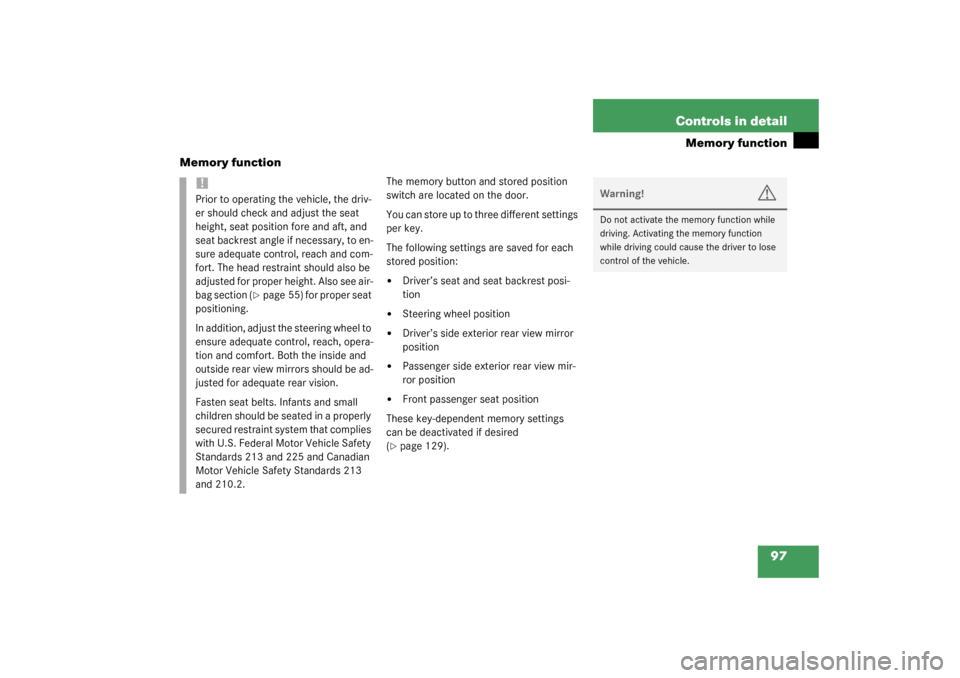
The memory button and stored position
switch are located on the door.
You can store up to three different settings
per key.
The following settings are saved for each
stored position:�
Driver’s seat and seat backrest posi-
tion
�
Steering wheel position
�
Driver’s side exterior rear view mirror
position
�
Passenger side exterior rear view mir-
ror position
�
Front passenger seat position
These key-dependent memory settings
can be deactivated if desired
(
�page 129).
!Prior to operating the vehicle, the driv-
er should check and adjust the seat
height, seat position fore and aft, and
seat backrest angle if necessary, to en-
sure adequate control, reach and com-
fort. The head restraint should also be
adjusted for proper height. Also see air-
bag section (
�page 55) for proper seat
positioning.
In addition, adjust the steering wheel to
ensure adequate control, reach, opera-
tion and comfort. Both the inside and
outside rear view mirrors should be ad-
justed for adequate rear vision.
Fasten seat belts. Infants and small
children should be seated in a properly
secured restraint system that complies
with U.S. Federal Motor Vehicle Safety
Standards 213 and 225 and Canadian
Motor Vehicle Safety Standards 213
and 210.2.
Warning!
G
Do not activate the memory function while
driving. Activating the memory function
while driving could cause the driver to lose
control of the vehicle.
Page 98 of 360
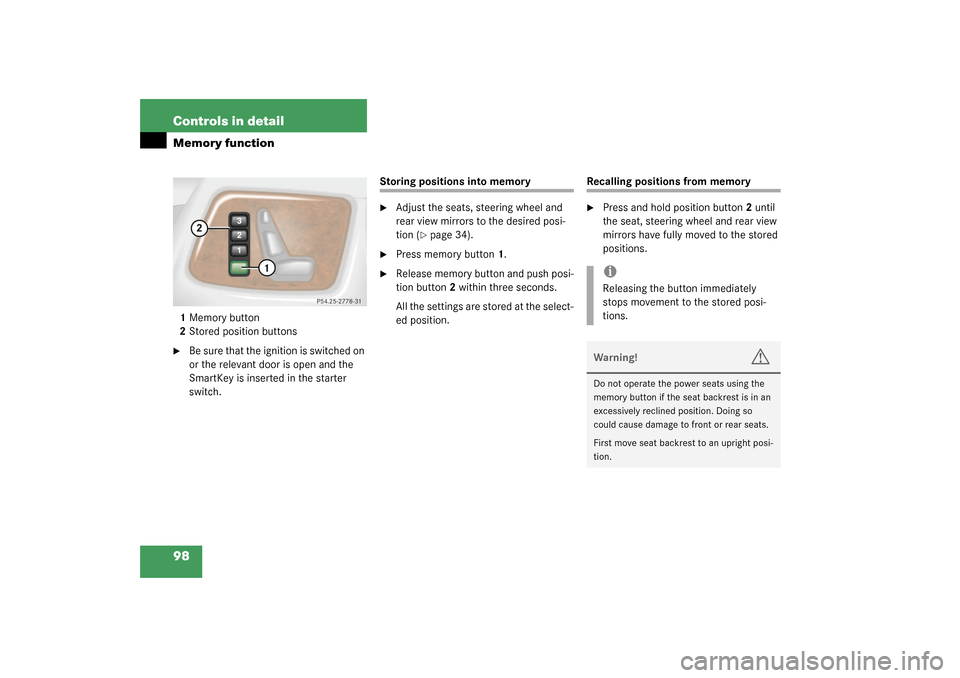
98 Controls in detailMemory function1Memory button
2Stored position buttons�
Be sure that the ignition is switched on
or the relevant door is open and the
SmartKey is inserted in the starter
switch.
Storing positions into memory�
Adjust the seats, steering wheel and
rear view mirrors to the desired posi-
tion (
�page 34).
�
Press memory button1.
�
Release memory button and push posi-
tion button2 within three seconds.
All the settings are stored at the select-
ed position.
Recalling positions from memory�
Press and hold position button2 until
the seat, steering wheel and rear view
mirrors have fully moved to the stored
positions.iReleasing the button immediately
stops movement to the stored posi-
tions.Warning!
G
Do not operate the power seats using the
memory button if the seat backrest is in an
excessively reclined position. Doing so
could cause damage to front or rear seats.
First move seat backrest to an upright posi-
tion.