Page 136 of 399

136 Controls in detailControl systemSelecting display (speed display or out-
side temperature) for basic display�
Move the selection marker with
theæ orç button to the
Instr.
cluster
submenu.
�
Press buttonj ork repeatedly
until you see this message in the dis-
play:
Basic display
.
The selection marker is on the current
setting.
�
Pressæ orç to select the dis-
play permanently shown in the multi-
function display.Tire pressure display*
Use this function to set the unit for the tire
pressure display.
�
Move the selection marker with the
æ or ç button to the
Instr,
cluster
submenu.
�
Press button jor k repeatedly
until you see this message in the dis-
play:
Display unit Tire pressure
.
The selection marker is on the current
setting.
�
Press æ or ç to select the de-
sired tire pressure unit.Time/Date submenu
Access the
Time/Date
submenu via the
Settings
menu. Use the
Time/Date
sub-
menu to change the time and date display
settings. The following functions are avail-
able:
Function
Page
Set time (hours)
137
Set time (minutes)
137
Set date (month)
137
Set date (day)
138
Set date (year)
138
Page 137 of 399
137 Controls in detail
Control system
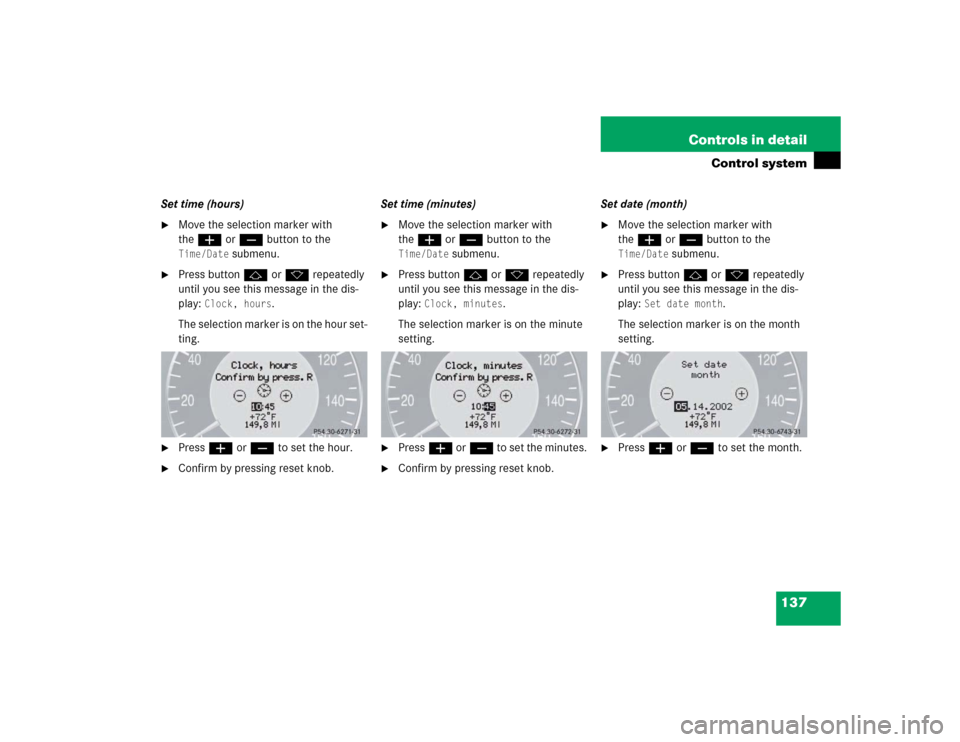
Set time (hours)�
Move the selection marker with
theæ orç button to the Time/Date
submenu.
�
Press buttonj ork repeatedly
until you see this message in the dis-
play:
Clock, hours
.
The selection marker is on the hour set-
ting.
�
Pressæ orç to set the hour.
�
Confirm by pressing reset knob.Set time (minutes)
�
Move the selection marker with
theæ orç button to the Time/Date
submenu.
�
Press buttonj ork repeatedly
until you see this message in the dis-
play:
Clock, minutes
.
The selection marker is on the minute
setting.
�
Pressæ orç to set the minutes.
�
Confirm by pressing reset knob.Set date (month)
�
Move the selection marker with
theæ orç button to the Time/Date
submenu.
�
Press buttonj ork repeatedly
until you see this message in the dis-
play:
Set date month
.
The selection marker is on the month
setting.
�
Pressæ orç to set the month.
Page 384 of 399

384 IndexClock 137
Closing
Glove box 226
Side windows 184
Side windows with KEYLESS-GO* 92
Sliding/pop-up roof* 187
Sliding/pop-up roof* with
KEYLESS-GO* 92
Sliding/pop-up roof* with
SmartKey 188, 192
Trunk lid 96
Windows 184
Windows with SmartKey 185
Cockpit 20, 375
COMAND* see separate operating instruc-
tions
Combination switch 115
High beam flasher 47
Turn signals 46
Windshield wipers 47
Consumer information 373
Control system 121, 376
AUDIO menu 126
Convenience submenu 143
Display digital speedometer 126
Distronic* menu 128Functions 125
Instrument cluster submenu 134,
136
Lighting submenu 138
Malfunction memory menu 129
Menus 124, 125, 378
Multifunction display 121
Multifunction steering wheel 122
Selecting radio system 127
Settings menu 130
Standard display menu 126
Submenus 123, 125
TEL* menu 147
Trip computer menu 145
Vehicle submenu 142
Convenience submenu 143
Activating easy-entry/exit
feature* 143
Setting key dependency 144
Setting parking position for exterior
rear view mirror 144
Coolant
Messages in display 311, 312
Temperature display 119
Warning lamp 292, 311
Cruise control 194, 376Canceling 195
Driving downhill 195
Driving uphill 195
Fine adjustment 196
Lever 201
Saving current speed 195
Setting speeds 196
Cruise control lever 194
Customer Assistance Center (CAC) 375
D
Daytime running lamp mode 114
Setting 139
Deactivating
Air conditioner 170
Air recirculation mode 168, 179, 180
Alarm 82
Anti-theft alarm system 82
Automatic climate control 169, 174
Central locking (control system) 142
Climate control 164
Cruise control 195
Defrost 167, 178
Distance warning function* 206
Distronic* 204
Engine with KEYLESS-GO* 53
Engine with the key 52
Page 394 of 399

394 Index
Easy entry/exit feature* 102
Heater* 107
Multicontour seat 104
Split rear bench seat 219
Ventilation 108
Securing cargo
Cargo tie-down rings 225
Selecting
Display 135
Selecting display 136
Selector lever
Lock 43
Position 151
Self-test
BabySmart
TM airbag deactivation
system 68
Tele Aid* 235
Service
Batteries 343
Calling up the service indicator 276
Overdue 276
When due 275
Service and warranty information 10
Service indicator 275
Clearing 275
Service System see FSS 275Setting
Convenience functions 132, 143
Cruise control 195
Daytime running lamp mode 139
Exterior rear view mirror parking
position 111
Higher speed in cruise control 196
Higher speed in Distronic* 202
Hours (clock) 137
Individual vehicle settings 130
Instrument lighting 118, 119
Interior lighting delayed
switch-off 141
Key dependent memory 144
Lamps and lighting (control
system) 138
Language, multifunction display 135
Locator lighting 139
Lower speed in cruise control 196
Lower speed in Distronic* 203
Miles/kilometers in
speedometer 134
Minutes (clock) 137, 138
Parking position for exterior rear view
mirrors 144
Slower speed in cruise control 196Slower speed in Distronic* 203
Speed in cruise control 196
Speed in Distronic* 202
Speedometer display mode 134
Temperature (interior) 165, 176
Temperature indicator 134
Tire inflation pressure 136
Units
Speedometer 134
Temperature 134
Tire inflation pressure 136
Vehicle level control 209
Settings
Calling up Distronic* 128, 200
Convenience functions 143
Factory, KEYLESS-GO* 91
Factory, SmartKey 87
Individual (SmartKey) 144
Lighting (control system) 138
Menus and submenus 123
Resetting all (control system) 131
Resetting in the submenu 131
Selective 87
Settings menu
Functions in 130
Individual vehicle settings 130
Page 397 of 399

397 Index
Dialing a number from the phone
book 149
Ending a call 149
Loading phone book* 149
Messages in display 309
Operating 147
Redialing 149
Temperature
Display mode 134
Sensor 27
Setting interior temperature 165,
176
Setting units in display 134
Tie-down rings (trunk) 225
Tightening torque 342, 379
Time
Setting hours 137
Setting minutes 137, 138
Tire inflation pressure
Setting units 136
Tire speed rating 379
Tires 373
Tools 326
Tow-away alarm 82
Arming 82
Disarming 82Disarming for transport 82
Towing eye bolt (vehicle tool kit)
Installing 350
Towing the vehicle 348
Tracking services
For stolen vehicle 242
Traction 155, 379
Trip computer 145
Trip odometer
Resetting 119
Trunk
Closing the lid 96
Lamp 117
Lock button, KEYLESS-GO* 92
Message in display 310
Opening 88, 96
Opening from inside vehicle 94
Separately locking 98
Tie-down rings 225
Trunk lid emergency release 97
Unlocking with KEYLESS-GO* 92
Trunk lid
Closing 96
Turn signals 46
Additional in mirrors 332
Front bulbs 332Turning off
Engine 51
U
Units
Setting speedometer units 134
Setting temperature units 134
Setting tire inflation pressure
units 136
Unlocking 30, 86, 327
Centrally from inside 100
Driver’s door in an emergency 327
Fuel filler flap 259
Global 87
Global with KEYLESS-GO* 91
Selective settings 87
Trunk lid with KEYLESS-GO* 92
Vehicle in an emergency 241
With KEYLESS-GO* 32
With the SmartKey 30
Upgrade signals
Tele Aid* 240
Uphill driving
Cruise control 195
Upshifting 152
Useful features 226
Ashtrays 231