Page 31 of 399

31 Getting started
Unlocking
Starter switch positionsStarter switch0For removing key
1Power supply to some electrical con-
sumers, such as seat adjustment
2Ignition (power supply for all electrical
consumers) and driving position
3Starting position
Warning!
G
When leaving the vehicle always remove the
key from the starter switch, take the Smart-
Key with KEYLESS-GO* (if so equipped) with
you and lock the vehicle. Do not leave chil-
dren unattended in the vehicle, or with ac-
cess to an unlocked vehicle. Unsupervised
use of vehicle equipment may cause serious
personal injury.iThe SmartKey can only be removed
from the starter switch with the gear
selector lever in position P.
!If the key is left in starter switch
position0 for an extended period of
time, it can no longer be turned in the
starter switch.
�
Remove the key from the starter
switch and reinsert.
If the key can still not be turned, the
battery may not be sufficiently
charged.
�
Check the battery and charge it
if necessary (
�page 266).
�
Get a jump start (
�page 346).
To prevent accelerated battery dis-
charge or a completely discharged bat-
tery, always remove the key from the
starter switch.
Page 33 of 399
33 Getting started
Unlocking
1KEYLESS-GO start/stop button
Before you press the KEYLESS-GO
start/stop button, the vehicle’s on-board
electronics have status 0 (as with key re-
moved).Make sure the gear selector lever is set
toP.
Do not depress the brake pedal.
Position 1
�
Press the KEYLESS-GO start/stop but-
ton once.
This supplies power to some electrical
consumers, such as seat adjustment.Ignition (or position 2)
�
Press the KEYLESS-GO start/stop but-
ton twice.
This supplies power to all electrical
consumers. All the lights in the instru-
ment cluster light up.
More information can be found in the
"Controls in detail" section (
�page 89).
For information on starting the engine us-
ing the KEYLESS-GO start/stop button,
see "Starting with KEYLESS-GO"
(
�page 44).
iIf you now press the KEYLESS-GO
start/stop button twice, the power
supply is again switched off.
iIf you now press the KEYLESS-GO
start/stop button once, the power sup-
ply is again switched off.
Page 48 of 399

48 Getting startedDrivingSingle wipe�
Press switch briefly in the direction of
arrow1.
The windshield wipers wipe one time
without washer fluid.
Wiping with windshield washer fluid
�
Push switch in the direction of arrow1
past the resistance point.
The windshield wiper operates with
washer fluid.
Information on filling up the washer reser-
voir can be found in the "Operation" sec-
tion (�page 267).
Problems while driving
The engine runs erratically and misfires�
An ignition cable may be damaged.
�
The engine electronics may not be op-
erating properly.
�
Unburned gasoline may have entered
the catalytic converter and damaged it.
�
Give very little gas.
�
Have the problem repaired by an au-
thorized Mercedes-Benz Center as
soon as possible.
!If leaves, snow, etc. block the wind-
shield wipers, switch off the wipers.�
For safety reasons, withdraw key
from starter switch. Remove block-
age.
�
Turn the windshield wipers on
again.
If windshield wipers fail to function at
all in switch positionI,
�
Set the combination switch to the
next highest wiper speed.
�
Have the windshield wipers
checked at the nearest authorized
Mercedes-Benz Center.
Page 83 of 399

83 Safety and Security
Anti-theft systems
Arming the tow-away alarm
When you lock your vehicle, the tow-away
alarm is automatically armed after about
30 seconds.
When you unlock your vehicle, the
tow-away protection disarms automatical-
ly.
Disarming the tow-away alarm
To prevent triggering the tow-away alarm
feature, switch off the tow-away alarm be-
fore towing the vehicle, or when parking on
a surface subject to movement, such as a
ferry or auto train.The button is located on the overhead con-
trol panel.
1Tow-away alarm off button
�
Turn off the ignition and remove the
key.
�
Press button1.
The indicator lamp in the button lights
up briefly.
�
Lock your vehicle with the key or (vehi-
cles with KEYLESS-GO*) the lock but-
ton at each door handle.
The tow-away alarm remains disarmed un-
til you lock your vehicle again.
Canceling the alarm
�
Insert the key in the starter switch.
or
�
Press the Œ or ‹ button on the
key.
iYou cannot disarm the tow-away alarm
if the ignition is turned on.
Page 99 of 399

99 Controls in detail
Locking and unlocking
Separately unlocking the trunk�
Pull the mechanical key out of the
SmartKey (
�page 329).
�
Insert the mechanical key in the trunk
lid lock.
�
Turn the key completely to the left to
position1, see above.
You can now open the trunk (
�page 96).
Automatic central locking
The doors and the trunk automatically lock
when the ignition is switched on and the
wheels are turning at vehicle speeds of ap-
proximately 9 mph (15 km/h) or more.
You can open a locked door from the in-
side. Open door only when conditions are
safe to do so.
You can deactivate the automatic locking
mode over the control system
(
�page 142).
iUnlocking the trunk with the mechani-
cal key will trigger the anti-theft alarm
system. To cancel the alarm, do one of
the following:�
Press button Œor ‹on the
SmartKey.
�
Insert the SmartKey in the starter
switch.
iThe doors unlock automatically after an
accident if the force of the impact ex-
ceeds a preset threshold.
The vehicle automatically locks when
the ignition is switched on and the
wheels are turning at vehicle speeds of
approximately 9 mph (15 km/h) or
more. You could therefore lock yourself
out when the vehicle�
is pushed
�
is on a test stand
Page 110 of 399

110 Controls in detailMemory functionThe memory button is located on the door.
MMemory button
1,2,3Stored positions�
Be sure that the ignition is switched on
or the relevant door is open and the
SmartKey is inserted in the starter
switch.
Storing positions into memory�
Adjust the seats, steering wheel and
rear view mirrors to the desired posi-
tion (
�page 34).
�
Press memory buttonM.
�
Release memory button and press
stored position button 1, 2 or 3 within
three seconds.
All the settings are stored at the select-
ed position.
Recalling positions from memory�
On memory button, press and hold
stored position button1, 2 or3 until
the seat, steering wheel and rear view
mirrors have fully moved to the stored
positions.iReleasing the button immediately
stops movement to the stored posi-
tions.Warning!
G
Do not operate the power seats using the
memory button if the backrest is in an ex-
cessively reclined position. Doing so could
cause damage to front or rear seats.
First move backrest to an upright position.
Page 111 of 399
111 Controls in detail
Memory function
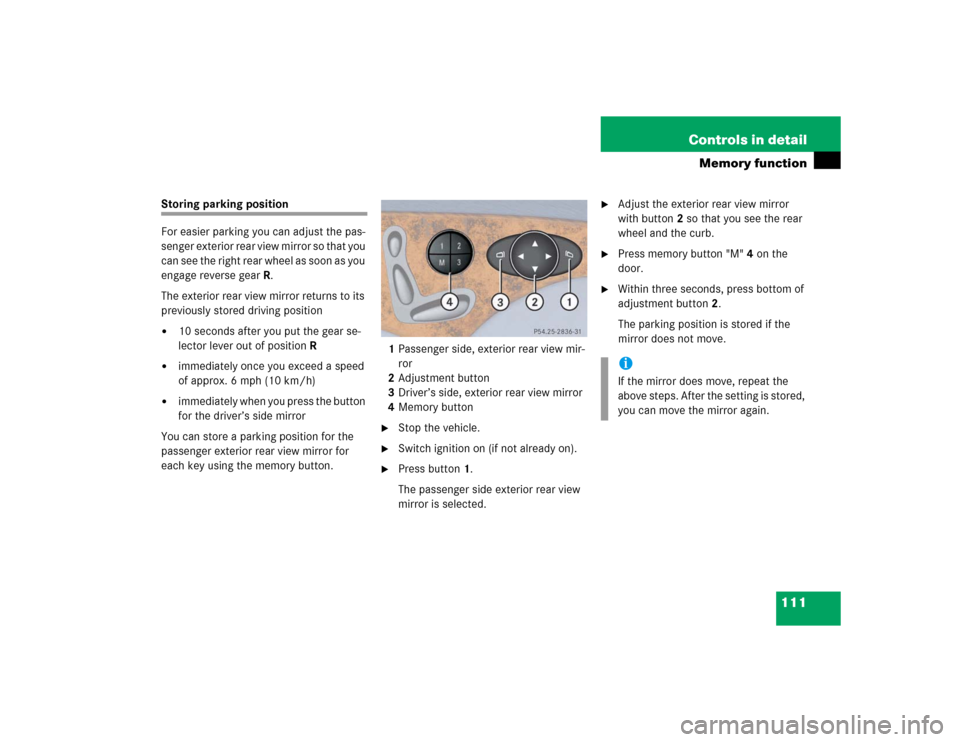
Storing parking position
For easier parking you can adjust the pas-
senger exterior rear view mirror so that you
can see the right rear wheel as soon as you
engage reverse gearR.
The exterior rear view mirror returns to its
previously stored driving position�
10 seconds after you put the gear se-
lector lever out of positionR
�
immediately once you exceed a speed
of approx. 6 mph (10 km/h)
�
immediately when you press the button
for the driver’s side mirror
You can store a parking position for the
passenger exterior rear view mirror for
each key using the memory button.1Passenger side, exterior rear view mir-
ror
2Adjustment button
3Driver’s side, exterior rear view mirror
4Memory button
�
Stop the vehicle.
�
Switch ignition on (if not already on).
�
Press button1.
The passenger side exterior rear view
mirror is selected.
�
Adjust the exterior rear view mirror
with button2 so that you see the rear
wheel and the curb.
�
Press memory button "M" 4 on the
door.
�
Within three seconds, press bottom of
adjustment button2.
The parking position is stored if the
mirror does not move.iIf the mirror does move, repeat the
above steps. After the setting is stored,
you can move the mirror again.
Page 115 of 399

115 Controls in detail
Lighting
Combination switch
The combination switch is located on the
left side of the steering column.
1High beam
2High beam flasher
Switching on high beams�
Turn exterior lamp switch to
positionB (
�page 112).
�
Push the combination switch in
direction1.
The high beam symbol is illuminated on
the instrument cluster.High beam flasher
�
Pull the combination switch briefly in
direction2.
Hazard warning flasher
The hazard warning flasher can be activat-
ed with the ignition switched on or off. It is
activated automatically when an airbag is
deployed.
The switch is located on the center con-
sole.
1Hazard warning flasher switchSwitching on the hazard warning
flasher
�
Press the hazard warning flasher
switch.
All turn signals will blink.
Switching off the hazard warning
flasher
�
Press hazard warning flasher switch
again.iWith the hazard warning flasher acti-
vated and the combination switch set
for either left or right turn, only the re-
spective left or right turn signals will
operate when the key in the starter
switch is in position1 or2.
