Page 277 of 399
277 Operation
Maintenance
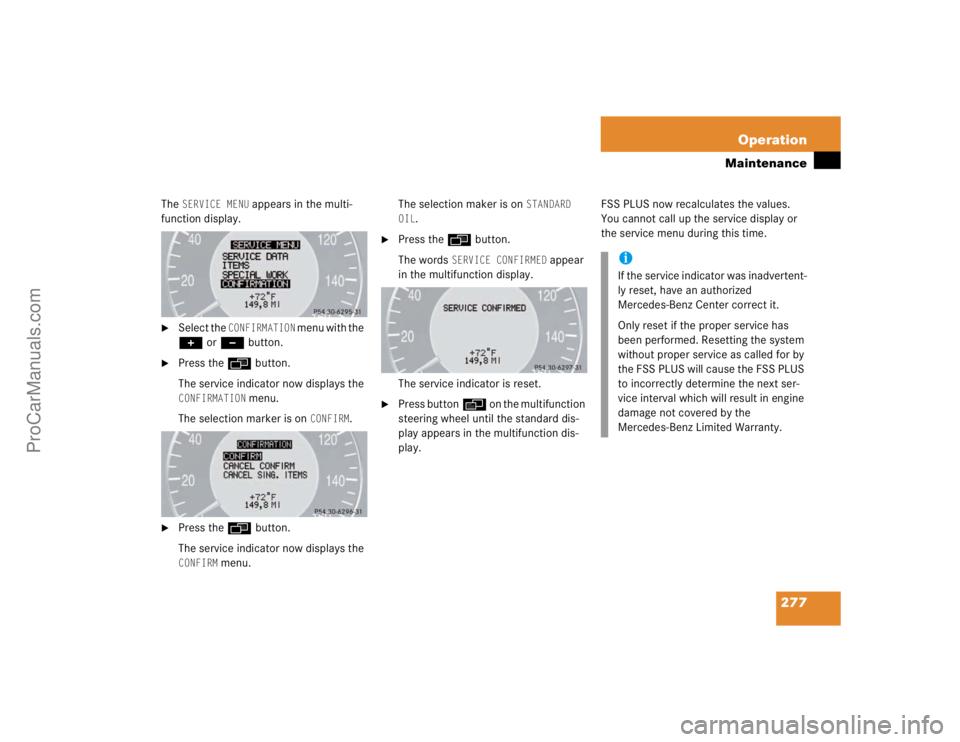
The
SERVICE MENU
appears in the multi-
function display.
�
Select the
CONFIRMATION
menu with the
+ or - button.
�
Press the ÿ button.
The service indicator now displays the CONFIRMATION
menu.
The selection marker is on
CONFIRM
.
�
Press the ÿbutton.
The service indicator now displays the CONFIRM
menu.The selection maker is on
STANDARD
OIL
.
�
Press the ÿ button.
The words
SERVICE CONFIRMED
appear
in the multifunction display.
The service indicator is reset.
�
Press buttonè on the multifunction
steering wheel until the standard dis-
play appears in the multifunction dis-
play.FSS PLUS now recalculates the values.
You cannot call up the service display or
the service menu during this time.
iIf the service indicator was inadvertent-
ly reset, have an authorized
Mercedes-Benz Center correct it.
Only reset if the proper service has
been performed. Resetting the system
without proper service as called for by
the FSS PLUS will cause the FSS PLUS
to incorrectly determine the next ser-
vice interval which will result in engine
damage not covered by the
Mercedes-Benz Limited Warranty.
ProCarManuals.com
Page 278 of 399
278 OperationMaintenanceSetting the date for special works
You can enter appointments for exhaust
gas analysis and general inspection over
FSS PLUS.�
Switch ignition on.
The standard display of the control sys-
tem appears (
�page 121).
�
Press buttonk orj on the mul-
tifunction steering wheel until the
FSS PLUS indicator appears in the mul-
tifunction display.
�
Press the reset knob (
�page 22) for
about five seconds.
The
SERVICE MENU
appears in the multi-
function display.
�
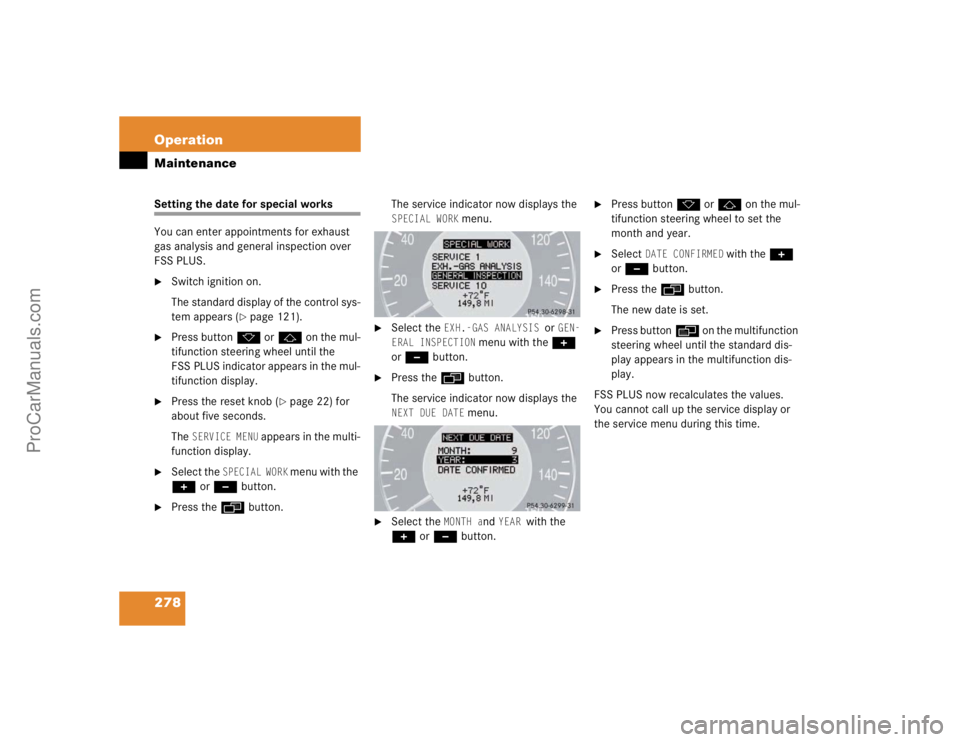
Select the
SPECIAL WORK
menu with the
+ or - button.
�
Press the ÿ button.The service indicator now displays the
SPECIAL WORK
menu.
�
Select the
EXH.-GAS ANALYSIS
or
GEN-
ERAL INSPECTION
menu with the +
or - button.
�
Press the ÿbutton.
The service indicator now displays the NEXT DUE DATE
menu.
�
Select the
MONTH a
nd
YEAR
with the
+ or - button.
�
Press buttonk orj on the mul-
tifunction steering wheel to set the
month and year.
�
Select
DATE CONFIRMED
with the +
or - button.
�
Press the ÿbutton.
The new date is set.
�
Press buttonè on the multifunction
steering wheel until the standard dis-
play appears in the multifunction dis-
play.
FSS PLUS now recalculates the values.
You cannot call up the service display or
the service menu during this time.
ProCarManuals.com
Page 301 of 399
301 Practical hints
What to do if …
P
Gear selector lever in P
You have turned off the engine with the
KEYLESS-GO* start/stop button* and
opened the driver’s door.
�
Place the selector lever in position P.
Cruise control
Visit workshop!
Cruise control or Distronic* is malfunction-
ing.
�
Have the cruise control or Distronic*
checked by an authorized
Mercedes-Benz Center.
1
Restraint system
malfunction
Visit workshop!
The system is malfunctioning.
�
Drive with added caution to the near-
est authorized Mercedes-Benz Cen-
ter.
@
Vehicle rising!
Your vehicle is adjusting to your level selec-
tion.
Level selec. canceled
The "Raised" level setting is canceled at ve-
hicle speeds of over 75 mph (120 km/h).
�
Reactivate the "Raised" level setting.
Display
Possible cause
Suggested solution
Warning!
G
In the event a malfunction of the SRS is indi-
cated as outlined above, the SRS may not be
operational. For your safety, we strongly
recommend that you visit an authorized
Mercedes-Benz Center immediately to have
the system checked; otherwise the
SRS may not be activated when needed in
an accident, which could result in serious or
fatal injury, or it might deploy unexpectedly
and unnecessarily which could also result in
injury.
ProCarManuals.com
Page 337 of 399
337 Practical hints
Replacing wiper blades
Replacing wiper blades
Replacing wiper blades
Removal �
Turn key in starter switch to position1.
�
Turn combination switch to wiper
settingII (
�page 47).
�
With wiper arm in the vertical position
(see above), turn key in starter switch
to position0.
�
Fold the wiper arm forward.You should hear it snap into place.
�
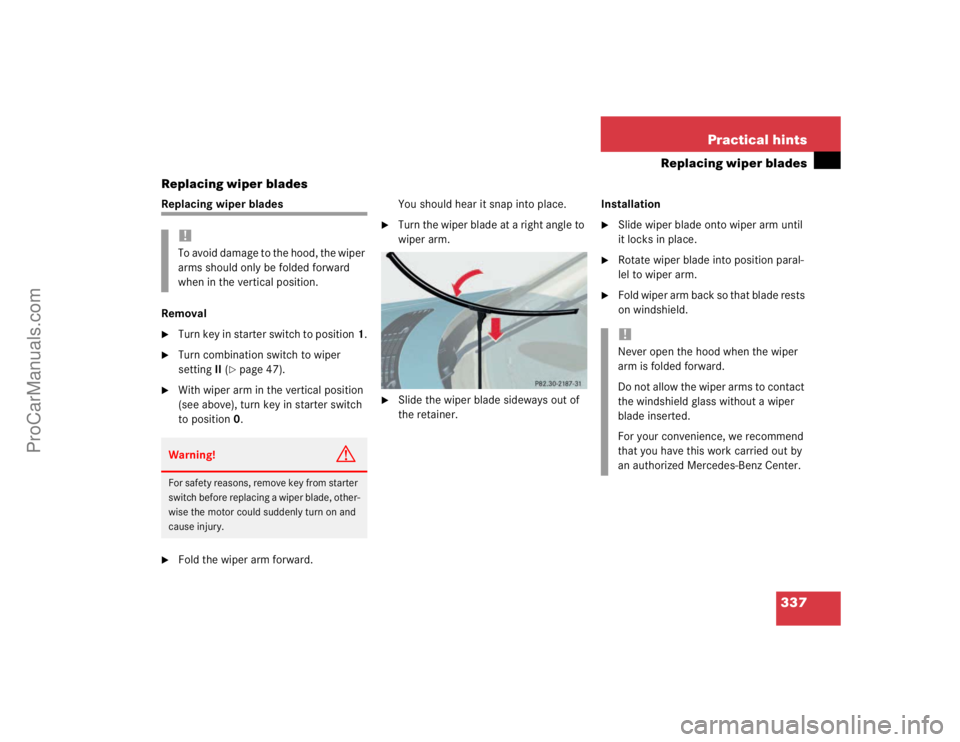
Turn the wiper blade at a right angle to
wiper arm.
�
Slide the wiper blade sideways out of
the retainer.Installation
�
Slide wiper blade onto wiper arm until
it locks in place.
�
Rotate wiper blade into position paral-
lel to wiper arm.
�
Fold wiper arm back so that blade rests
on windshield.
!To avoid damage to the hood, the wiper
arms should only be folded forward
when in the vertical position.Warning!
G
For safety reasons, remove key from starter
switch before replacing a wiper blade, other-
wise the motor could suddenly turn on and
cause injury.
!Never open the hood when the wiper
arm is folded forward.
Do not allow the wiper arms to contact
the windshield glass without a wiper
blade inserted.
For your convenience, we recommend
that you have this work carried out by
an authorized Mercedes-Benz Center.
ProCarManuals.com
Page 376 of 399

376 Technical termsControl system
The control system is used to call up
vehicle information and to change
component settings. Information and
messages appear in the multifunction
display. The driver uses the buttons on
the multifunction steering wheel to
navigate through the system and to ad-
just settings.
Cruise control
Driving convenience system for auto-
matically maintaining the vehicle speed
set by the driver.Distronic*
A driving convenience cruise control
system which helps the driver maintain
a pre-selected speed:
�
If there is no vehicle directly ahead,
the system operates in the same
way as conventional ->cruise con-
trol.
�
If a slower moving vehicle is ahead,
Distronic will reduce your vehicle
speed to the extent permitted by re-
duced throttle and up to 20% brak-
ing power to maintain the preset
minimum following distance.
DTR
(->Distronic*)Engine number
The number set by the manufacturer
and placed on the cylinder block to
uniquely identify each engine pro-
duced.
Engine oil viscosity
Measurement for the inner friction (vis-
cosity) of the oil at different tempera-
tures. The higher the temperature an
oil can tolerate without becoming thin,
or the lower the temperature it can tol-
erate without becoming viscous, the
better the viscosity.
ESP
(E
lectronic S
tability Pr
ogram)
Improves vehicle handling and direc-
tional stability.
ProCarManuals.com
Page 378 of 399

378 Technical termsMenu
The control system displays are ar-
ranged in menus. Each menu contains
a number of commands for particular
systems. In the Audio menu, for exam-
ple, you will find the commands
SELECT RADIO STATION or
OPERATE CD
PLAYER
. Using commands you can di-
rectly change the settings for your ve-
hicle.
MON
(M
otor O
ctane N
umber)
The Motor Octane Number for gasoline
as determined by a standardized meth-
od. It is an indication of a gasoline's
ability to resist undesired detonation
(knocking). The average of both the
MON (Motor Octane Number) and
->RON (Research Octane Number) is
posted at the pump, also known as
ANTI-KNOCK INDEX.Multifunction display
The display field in the instrument clus-
ter used to present information provid-
ed by the control system.
Multifunction steering wheel
Steering wheel with buttons for operat-
ing the control system.
Overspeed range
Engine speeds within the red marking
of the tachometer dial. Avoid this en-
gine speed range, as it may result in se-
rious engine damage that is not
covered by the Mercedes-Benz Limited
Warranty.
Poly-V-belt drive
Drives engine-components (alternator,
AC compressor, etc.) from the engine.Power train
Collective term designating all compo-
nents used to generate and transmit
motive power to the drive axles, includ-
ing:
�
Engine
�
Clutch/torque converter
�
Transmission
�
Transfer case*
�
Drive shaft
�
Axle shafts/axles
Program mode selector switch
Used to switch the automatic transmis-
sion between standard operationS and
winter operationW.
Remote Vehicle Diagnostics
Transmission of vehicle data and cur-
rent location to the Mercedes-Benz
Customer Assistance Center for sub-
scribers to the Tele Aid service.
ProCarManuals.com
Page 380 of 399
380Vehicle level control
The ground clearance of the vehicle is
automatically controlled according to a
selected setting and speed.The driver
can set the ground clearance manually
for example on very rough roads.VIN
(V
ehicle I
dentification N
umber)
The number set by the manufacturer
and placed on the body to uniquely
identify each vehicle produced.Voice recognition system*
Voice control system for car phones,
portable cell phones and audio sys-
tems (radio, CD, etc.).
ProCarManuals.com
Page 382 of 399

382 IndexAIRMATIC DC (Dual Control) 209
Alarm
Audible 72, 82
Canceling 82
Visual 82
Alarm system
Anti-theft 82
Alignment bolt (vehicle tool kit) 340, 375
Antiglare
Automatic 157
Antilock brake system (ABS) 375
Anti-theft alarm system
Arming 82
Canceling alarm 82
Disarming 82
Anti-theft systems 81
Anti-theft alarm system 82
Immobilizer 81
Tow-away alarm 82
Ashtray 231
AUDIO menu 126
Selecting radio station 127
Automatic antiglare for rear view
mirror 157Automatic central locking
Activating/deactivating (control
system) 142
Automatic climate control
Temperature sensor 27
Automatic climate control* 172
Adjusting air distribution 177
Adjusting air volume 166, 177
Air recirculation mode 178
Defrosting 178
Rear window defroster 169, 180
Residual heat utilization 182
Residual ventilation 182
Setting the temperature 176
Automatic headlamp mode 113
Automatic lighting control
Activating 116
Deactivating 116
Automatic locking when driving 99
Automatic transmission 151
Accelerator position 156
Emergency operation (Limp Home
Mode) 156
Gear ranges 153Gear selector lever position 154
Gear shifting malfunctions 156
Kickdown 156
One-touch gearshifting 152
Program mode selector switch 155
Selector lever position 151
Starting the engine 43
Winter program mode 155
B
BabySmart
TM
Compatible child seats 375
Self-test 68
BabySmart
TM airbag deactivation
system 67, 375
Backrest
Folding forward 220
Folding rearward 221
BAS 74, 375
Messages in display 297, 298
Batteries, SmartKey
Changing 329
Check lamp 87
Checking 88
ProCarManuals.com