Page 296 of 384

296 Practical hintsWhere will I find...?Vehicle jack
To prepare the vehicle jack for use�
Remove the vehicle jack from the spare
wheel well under the trunk floor.
�
Push the crank handle up.
�
Turn the crank handle clockwise until it
engages (operational position).
Storing the vehicle jack in the trunk
�
Retract the vehicle jack arm to the
base of the vehicle jack.
�
Push the crank handle up.
�
Turn the crank handle counterclock-
wise to the end of the stop (storage po-
sition).Spare wheel
Removing the spare wheel
�
Take out vehicle tool kit tray 2.
�
Turn the luggage bowl 3 counterclock-
wise.
�
Remove the spare wheel 4.
Storing the spare wheel
�
Place spare wheel 4 in wheel well and
secure it with luggage bowl 3.
�
Turn the luggage bowl 3 clockwise to
its stop.
�
Place vehicle tool kit tray 2 in luggage
bowl 3.
Warning!
G
The jack is designed exclusively for jacking
up the vehicle at the jack take-up brackets
built into both sides of the vehicle. To help
avoid personal injury, use the jack only to lift
the vehicle during a wheel change. Never
get beneath the vehicle while it is supported
by the jack. Keep hands and feet away from
the area under the lifted vehicle. Always
firmly set parking brake and block wheels
before raising vehicle with jack.
Do not disengage parking brake while the
vehicle is raised. Be certain that the jack is
always vertical (plumb line) when in use, es-
pecially on hills. Always try to use the jack
on level surface. Make sure that the jack
arm is fully seated in the jack take-up brack-
et. Always lower the vehicle onto sufficient
capacity jackstands before working under
the vehicle.
Page 306 of 384
306 Practical hintsReplacing bulbs�
Switch off the lights.
�
Open trunk.
�
Turn lock counterclockwise and move
the trim to the side.
�
Turn bulb socket counterclockwise and
pull out.
�
Gently twist bulb counterclockwise and
pull out of bulb holder.
�
Insert new bulb into the holder and turn
it clockwise.
�
Reinstall bulb socket.
The bulb socket should audibly click.
�
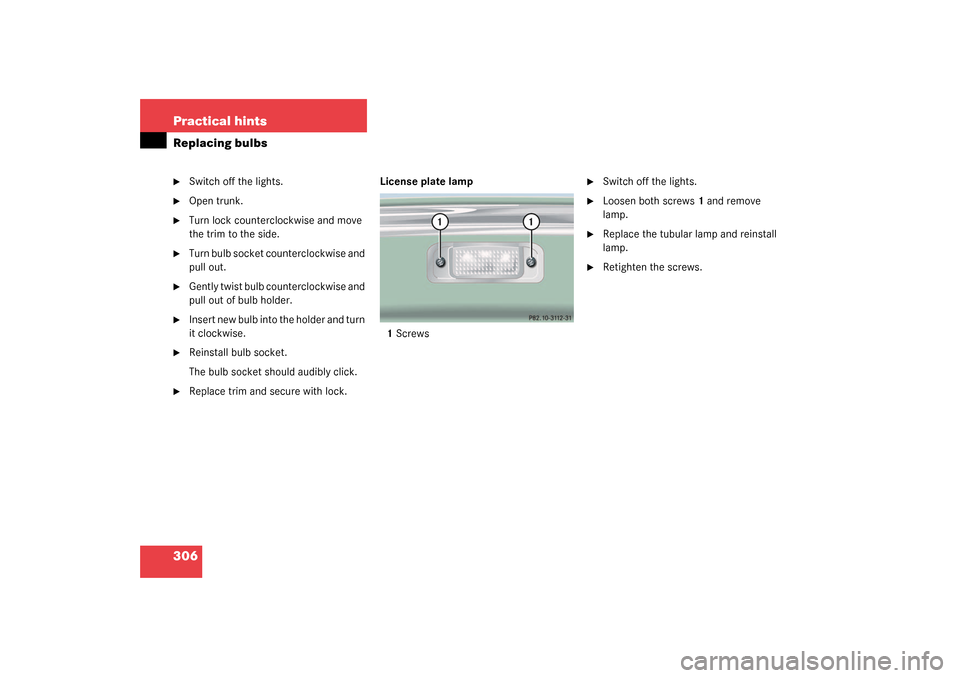
Replace trim and secure with lock. License plate lamp
1Screws
�
Switch off the lights.
�
Loosen both screws1 and remove
lamp.
�
Replace the tubular lamp and reinstall
lamp.
�
Retighten the screws.
Page 314 of 384

314 Practical hintsBatteryThe battery is located in the trunk under
the right hand wheel well cover panel.
1Battery cover
2Locking knob
3Negative terminal
4Cover over positive terminal
Disconnecting the battery�
Turn off all electrical consumers.
�
Depress the parking brake firmly or
move the gear selector lever to posi-
tion P.
�
Open the trunk lid (
�page 88) or
(
�page 89).
�
Turn locking knob 2 and remove bat-
tery cover 1.
�
Detach negative terminal 3 of the bat-
tery with the 10 mm open-end wrench
from the vehicle tool kit.
�
Remove cover 4 from the positive ter-
minal.
�
Disconnect the battery positive lead.
Removing the battery�
Remove the screw securing the bat-
tery.
�
Remove the battery support and brack-
et. Take out the battery.
Charging and reinstalling the battery�
Charge battery in accordance with the
instructions of the battery charger
manufacturer.
�
Reinstall the charged battery. Follow
the previously described steps in re-
verse order.Warning!
G
Never charge a battery while still installed in
the vehicle. Gases may escape during charg-
ing and cause explosions that may result in
paint damage, corrosion or personal injury.
Page 315 of 384
315 Practical hints
Battery
Reconnecting the battery�
Turn off all electrical consumers.
�
Connect the positive lead and fasten its
cover 4.
�
Connect negative lead 3.Batteries contain materials that can harm
the environment if disposed of improperly.
Large 12-volt storage batteries contain
lead. Recycling of batteries is the preferred
method of disposal. Many states require
sellers of batteries to accept old batteries
for recycling.!Never invert the terminal connections.!The battery, its filler caps and the vent
tube must always be securely installed
when the vehicle is in operation.
iThe following procedures must be car-
ried out following any interruption of
battery power (e.g. due to reconnect-
ing):�
Set the clock. Refer to the separate
COMAND operating instructions.
�
Resynchronize the ESP
(�page 283).
�
Resynchronize side windows
(�page 172).
�
Resynchronize sliding/pop-up roof
(�page 175).
Page 364 of 384
364 IndexKEYLESS-GO* card 83
Central locking 84
Changing the batteries 299
Checking the batteries 82, 85
Checking vehicle lock status 86
Factory setting 84
Locking the vehicle 86
Loss of 87
Messages in display 276
Reprogramming 84
Restoring to factory setting 81
Turning off the engine 51
Unlocking 83
Unlocking with 32
Keys 80
Kickdown 148, 349
Kilometers/miles in speedometer 134
Km/h or mph in speedometer 134
L
Lamp bulbs, exterior 302
Lamps, exterior
Front 302
Light sensor 285
Messages in display 287
Rear 303Lamps, indicator and warning
ABS 265
Battery (SmartKey) 81
Brakes 267
CHECK ENGINE 268
Coolant 277
Distronic*
DTR* 181, 265
Engine diagnostics 268
ESP 75, 264
Fuel reserve 268
Instrument cluster 264–268
PASSENGER AIRBAG OFF 65, 269
Seat belts 266
Service indicator 254
SRS 55
Tow-away alarm 78
Turn signals 23
Language
Multifunction display 135
Setting 135
LATCH child seat anchors 68
LATCH child seat mounts 68
Layout of poly-V-belt drive 329
Leather upholstery
Cleaning 261Lever
For cruise control 183
License plate lamps
Replacing bulbs 303, 306
Light alloy wheels
Cleaning 260
Light sensor 285
Lighter see Cigarette lighter 207
Lighting 108
Automatic headlamp mode 109
Combination switch 111
Daytime running lamp mode 110
Exterior lamp switch 108
Front fog lamps 110
High beam flasher 111
High beams 111
Instrument cluster illumination 114
Interior 112
Locator lighting 110
Low beam 108
Manual headlamp mode 109
Night security illumination 110
Parking lamps 108
Rear fog lamp 110
Settings (control system) 135
Limiting the gear range 145
Page 366 of 384

366 IndexMirrors
Activating exterior rear view mirror
parking position 152
Adjusting 38
Automatic antiglare for rear view
mirror 151
Exterior rear view mirror 38
Exterior rear view mirror parking
position 142
Exterior rear view mirror parking
positions 142
Inside rear view mirror 38
Storing exterior rear view mirror park-
ing position 107
MON (Motor Octane Number) 235, 350
Mph or km/h in speedometer 134
Multicontour seat* 99
Multifunction display 24, 117, 350
Selecting language 135
Standard display 121Multifunction display messages
ABC 271
ABS 272
BAS 273, 283
Brake fluid 275
Brake pads 275
Check engine 268
Coolant 278
Coolant level 277
Distronic* 280
Doors 280
Engine 268
Engine oil level 282
Entry position 294
Fuel reserve tank 284
Hood 284
Key 284
KEYLESS-GO* card 276
Lamps 287
Parking brake 288
Selector lever 280
Tele Aid 293
Telephone* 294
Tires 291
Trunk 294
Washer fluid 294Multifunction
steering wheel 24, 118, 350
Buttons 118
N
Navigation system
Operating 127
See separate COMAND* operating in-
structions
Night security illumination 110
O
Occupant safety 54
Airbags 55
Children and airbags 56
Children in the vehicle 63
Fastening the seat belt 40
Infant and child restraint systems 63
LATCH child seat mounts 68
Seat belts 40, 58
Odometer, main 23
Odometer, trip 23
Page 370 of 384

370 IndexS
Safety
Occupant 54
Safety belts see Seat belts 40
Safety defects
Reporting 18
Safety systems
Driving 71
Saving current speed 177
Screwdriver (vehicle tool kit) 295
Seat belt force limiter 63
Seat belts 60
Cleaning 261
Fastening 40
Proper use of 42, 62
Safety guidelines 58
Warning lamp 266
Seat cushion depth
Adjusting 99
Seat heater
Switching off 103
Switching on 103
Seat ventilation*
Switching off 102
Switching on 102Seats 96
Adjusting 34
Adjusting lumbar support 99
Adjusting shoulder support 99
Easy entry/exit feature 96
Heater 103
Massage function 100
Multicontour seat* 99
Securing cargo
Cargo tie-down hooks 198
Selector lever
Message in display 280
Position 143
Self-test
BabySmart
TM airbag deactivation
system 66
Tele Aid 210
Service
Calling up the service indicator 255
Major service (Service B) 254
Minor service (Service A) 254
Overdue 254
Types 254
When due 254
Service (maintenance) 254
Service and warranty information 10Service indicator 254
Calling up 255
Clearing 254, 255
Service life (tires) 247
Service System see FSS 254
Setting
Convenience functions 140
Cruise control 177
Daytime running lamp mode 136
Distronic* time interval 186
Exterior rear view mirror parking
position 142
Following distance in Distronic* 186
Higher speed in cruise control 178
Higher speed in Distronic* 184
Individual vehicle settings 131
Interior lighting delayed
switch-off 138
Lamps and lighting (control
system) 135
Language, multifunction display 135
Locator lighting 136
Lower speed in cruise control 178
Lower speed in Distronic* 185
Miles/kilometers in
speedometer 134