Page 245 of 370
251 Operation
Vehicle care
Wiper blades
Clean the wiper blade inserts with a clean
cloth and detergent solution.
Window cleaning
Use a window cleaning solution on all glass
surfaces. An automotive glass cleaner is
recommended.Light alloy wheels
Mercedes-Benz approved Wheel Care
should be used for regular cleaning of the
light alloy wheels.
If possible, clean wheels once a week with
Mercedes-Benz approved Wheel Care, us-
ing a soft bristle brush and a strong spray
of water.
Follow instructions on container.
Instrument cluster
Use a gentle dishwashing detergent or
mild detergent for delicate fabrics as a
washing solution. Wipe with a cloth moist-
ened in lukewarm solution. Do not use
scouring agents.Steering wheel and gear selector lever
Wipe with a damp cloth and dry thoroughly
or clean with Mercedes-Benz approved
Leather Care.
Cup holder
Use a gentle dishwashing detergent or
mild detergent for delicate fabrics as a
washing solution. Wipe with a cloth moist-
ened in lukewarm solution. Do not use
scouring agents.
iFor safety reasons, remove key from
starter switch before cleaning the wip-
er blades, otherwise the wiper motor
can suddenly turn on and cause injury.iFor safety reasons, switch off wipers
and remove key from starter switch be-
fore cleaning the windshield, otherwise
the wiper motor can suddenly turn on
and cause injury.
iUse only acid-free cleaning materials.
Acid could lead to corrosion.
S203 MY03_A.book Page 251 Tuesday, January 28, 2003 2:22 PM
Page 248 of 370

254 Practical hintsWhat to do if …
What to do if …Lamps in instrument clusterGeneral information:
If a bulb in the instrument cluster fails to
light up during the bulb self-check when turning the SmartKey in the starter switch
to position2, have it checked and replaced
if necessary.Problem
Possible cause
Suggested solution
v
The yellow ESP warning lamp
lights up while driving.
The ESP is deactivated. Risk of accident!
Adapt your speed and driving to the prevail-
ing road conditions.
�
Turn the ESP back on (
�page 77).
If the ESP cannot be turned back on, have
the system checked at an authorized
Mercedes-Benz Center as soon as possi-
ble.
v
The yellow ESP warning lamp
flashes while driving.
The ESP or traction control has come into op-
eration because of detected traction loss in
at least one tire.
�
When driving off apply as little throttle
as possible.
�
While driving ease up on the accelera-
tor.
�
Adapt your speed and driving to the
prevailing road and weather condi-
tions.
�
Do not deactivate the ESP.
Exceptions: (
�page 77).
Failure to follow these instructions in-
creases the risk of accidents.
S203 MY03_A.book Page 254 Tuesday, January 28, 2003 2:22 PM
Page 254 of 370
260 Practical hintsWhat to do if …Messages in the display
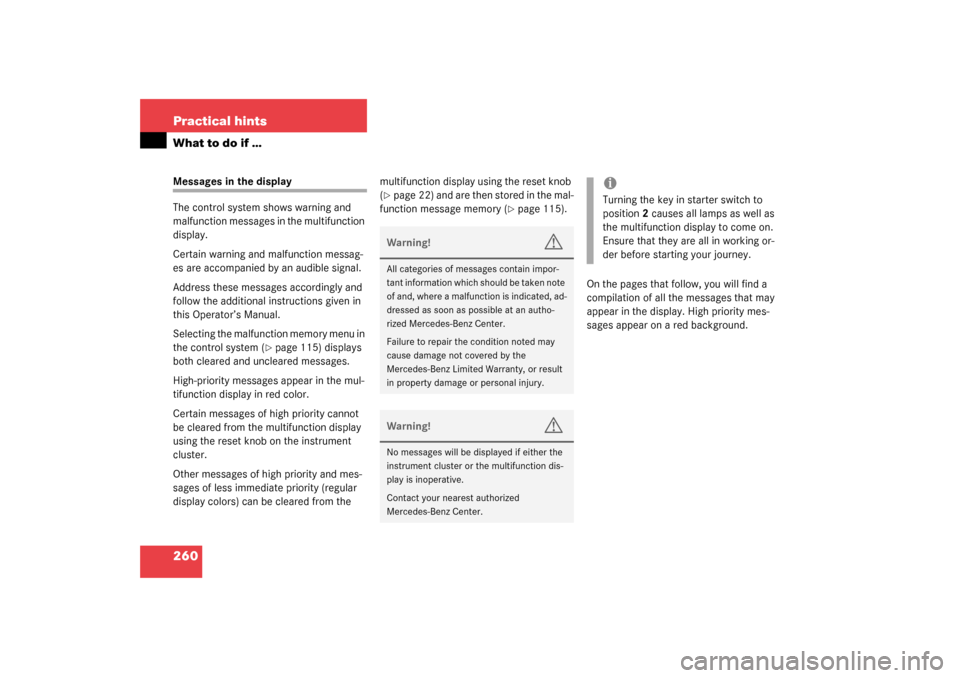
The control system shows warning and
malfunction messages in the multifunction
display.
Certain warning and malfunction messag-
es are accompanied by an audible signal.
Address these messages accordingly and
follow the additional instructions given in
this Operator’s Manual.
Selecting the malfunction memory menu in
the control system (
�page 115) displays
both cleared and uncleared messages.
High-priority messages appear in the mul-
tifunction display in red color.
Certain messages of high priority cannot
be cleared from the multifunction display
using the reset knob on the instrument
cluster.
Other messages of high priority and mes-
sages of less immediate priority (regular
display colors) can be cleared from the multifunction display using the reset knob
(
�page 22) and are then stored in the mal-
function message memory (
�page 115).
On the pages that follow, you will find a
compilation of all the messages that may
appear in the display. High priority mes-
sages appear on a red background.
Warning!
G
All categories of messages contain impor-
tant information which should be taken note
of and, where a malfunction is indicated, ad-
dressed as soon as possible at an autho-
rized Mercedes-Benz Center.
Failure to repair the condition noted may
cause damage not covered by the
Mercedes-Benz Limited Warranty, or result
in property damage or personal injury.Warning!
G
No messages will be displayed if either the
instrument cluster or the multifunction dis-
play is inoperative.
Contact your nearest authorized
Mercedes-Benz Center.
iTurning the key in starter switch to
position2 causes all lamps as well as
the multifunction display to come on.
Ensure that they are all in working or-
der before starting your journey.
S203 MY03_A.book Page 260 Tuesday, January 28, 2003 2:22 PM
Page 265 of 370
271 Practical hints
What to do if …
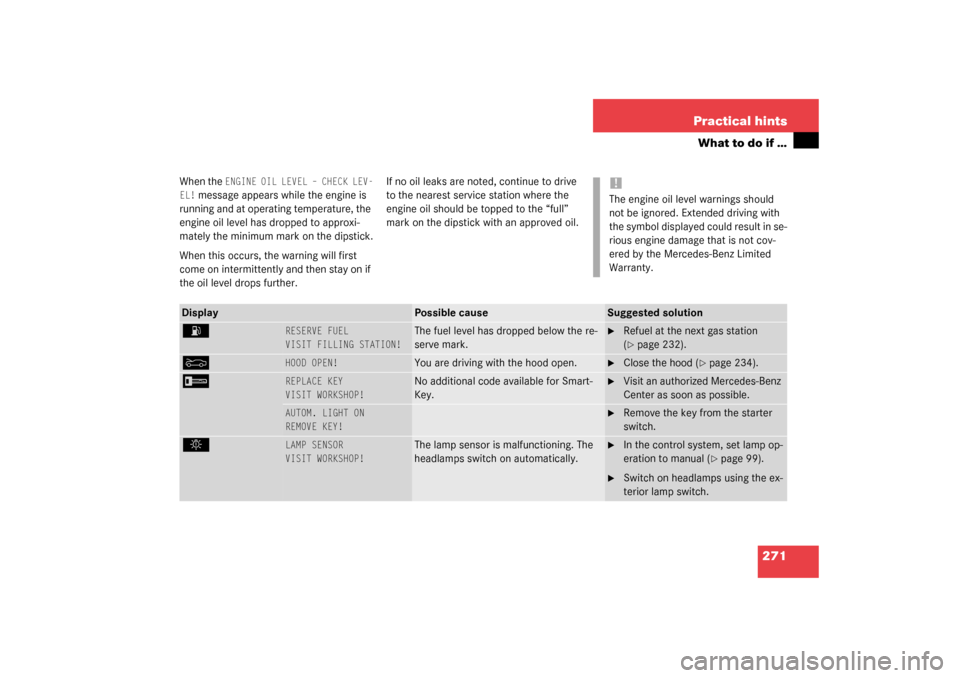
When the
ENGINE OIL LEVEL – CHECK LEV-
EL!
message appears while the engine is
running and at operating temperature, the
engine oil level has dropped to approxi-
mately the minimum mark on the dipstick.
When this occurs, the warning will first
come on intermittently and then stay on if
the oil level drops further.If no oil leaks are noted, continue to drive
to the nearest service station where the
engine oil should be topped to the “full”
mark on the dipstick with an approved oil.
!The engine oil level warnings should
not be ignored. Extended driving with
the symbol displayed could result in se-
rious engine damage that is not cov-
ered by the Mercedes-Benz Limited
Warranty.
Display
Possible cause
Suggested solution
A
RESERVE FUEL
VISIT FILLING STATION!
The fuel level has dropped below the re-
serve mark.
�
Refuel at the next gas station
(�page 232).
Y
HOOD OPEN!
You are driving with the hood open.
�
Close the hood (
�page 234).
I
REPLACE KEY
VISIT WORKSHOP!
No additional code available for Smart-
Key.
�
Visit an authorized Mercedes-Benz
Center as soon as possible.
AUTOM. LIGHT ON
REMOVE KEY!
�
Remove the key from the starter
switch.
.
LAMP SENSOR
VISIT WORKSHOP!
The lamp sensor is malfunctioning. The
headlamps switch on automatically.
�
In the control system, set lamp op-
eration to manual (
�page 99).
�
Switch on headlamps using the ex-
terior lamp switch.
S203 MY03_A.book Page 271 Tuesday, January 28, 2003 2:22 PM
Page 269 of 370
275 Practical hints
What to do if …
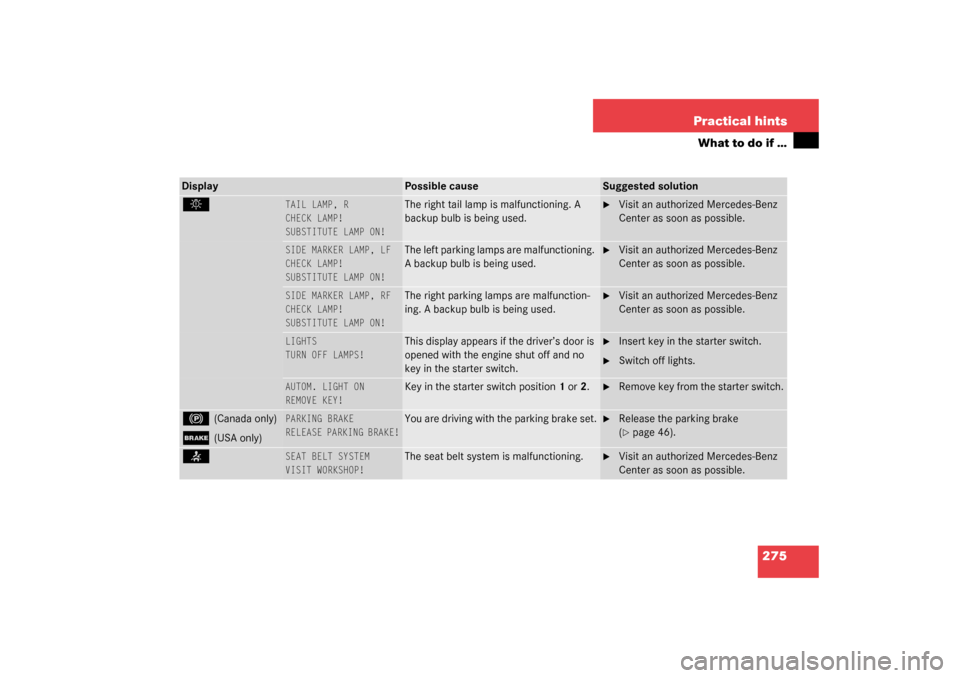
Display
Possible cause
Suggested solution
.
TAIL LAMP, R
CHECK LAMP!
SUBSTITUTE LAMP ON!
The right tail lamp is malfunctioning. A
backup bulb is being used.
�
Visit an authorized Mercedes-Benz
Center as soon as possible.
SIDE MARKER LAMP, LF
CHECK LAMP!
SUBSTITUTE LAMP ON!
The left parking lamps are malfunctioning.
A backup bulb is being used.
�
Visit an authorized Mercedes-Benz
Center as soon as possible.
SIDE MARKER LAMP, RF
CHECK LAMP!
SUBSTITUTE LAMP ON!
The right parking lamps are malfunction-
ing. A backup bulb is being used.
�
Visit an authorized Mercedes-Benz
Center as soon as possible.
LIGHTS
TURN OFF LAMPS!
This display appears if the driver’s door is
opened with the engine shut off and no
key in the starter switch.
�
Insert key in the starter switch.
�
Switch off lights.
AUTOM. LIGHT ON
REMOVE KEY!
Key in the starter switch position1 or2.
�
Remove key from the starter switch.
!
(Canada only)
;
(USA only)
PARKING BRAKE
RELEASE PARKING BRAKE!
You are driving with the parking brake set.
�
Release the parking brake
(�page 46).
<
SEAT BELT SYSTEM
VISIT WORKSHOP!
The seat belt system is malfunctioning.
�
Visit an authorized Mercedes-Benz
Center as soon as possible.
S203 MY03_A.book Page 275 Tuesday, January 28, 2003 2:22 PM
Page 279 of 370
285 Practical hints
Unlocking/locking in an emergency
Unlocking/locking in an emergency
Unlocking the vehicle
Unlocking the driver’s door
If you are unable to unlock the driver’s
door using the SmartKey, open the door
using the mechanical key.
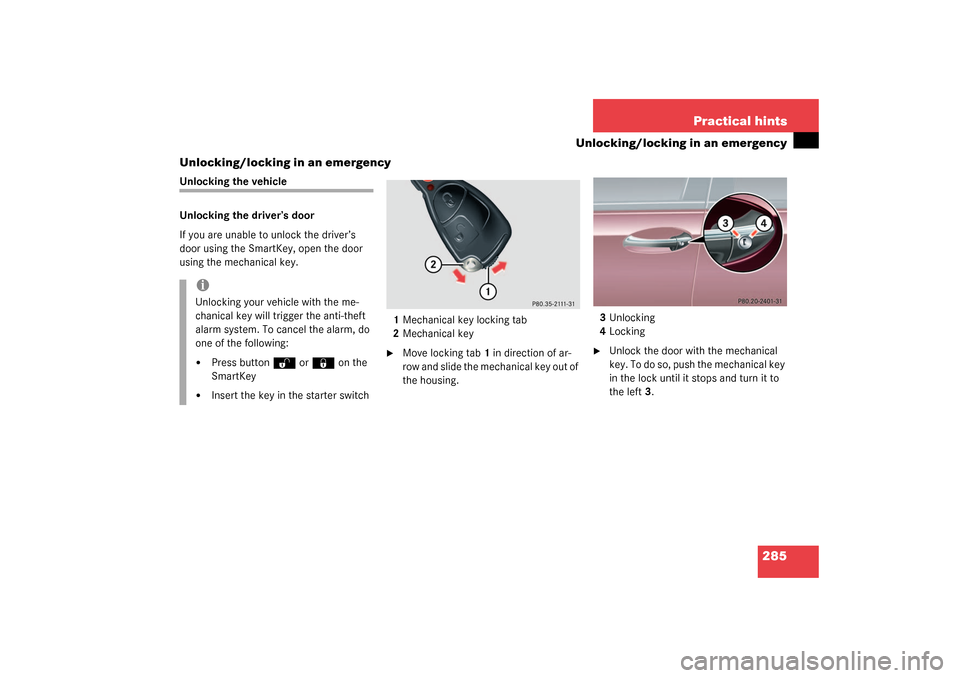
1Mechanical key locking tab
2Mechanical key
�
Move locking tab1 in direction of ar-
row and slide the mechanical key out of
the housing.3Unlocking
4Locking
�
Unlock the door with the mechanical
key. To do so, push the mechanical key
in the lock until it stops and turn it to
the left3.
iUnlocking your vehicle with the me-
chanical key will trigger the anti-theft
alarm system. To cancel the alarm, do
one of the following:�
Press button
Œ
or
‹
on the
SmartKey
�
Insert the key in the starter switch
S203 MY03_A.book Page 285 Tuesday, January 28, 2003 2:22 PM
Page 280 of 370
286 Practical hintsUnlocking/locking in an emergencyUnlocking the tailgate
If you are unable to unlock the tailgate with
the key, you can use the emergency re-
lease on the inside of the tailgate to unlock
it.
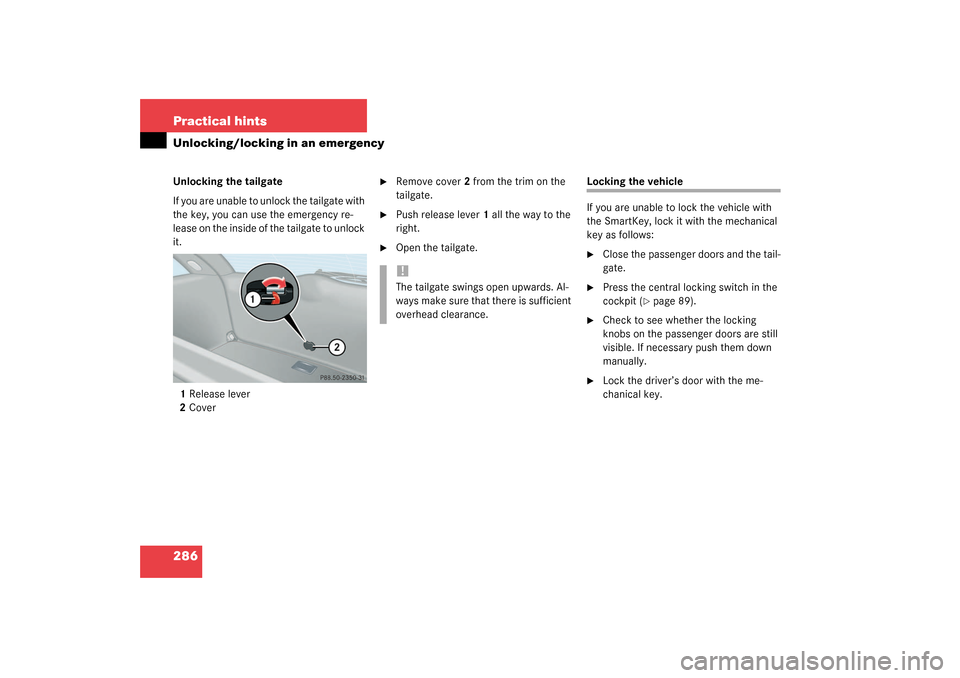
1 Release lever
2Cover
�
Remove cover2 from the trim on the
tailgate.
�
Push release lever1 all the way to the
right.
�
Open the tailgate.
Locking the vehicle
If you are unable to lock the vehicle with
the SmartKey, lock it with the mechanical
key as follows:�
Close the passenger doors and the tail-
gate.
�
Press the central locking switch in the
cockpit (
�page 89).
�
Check to see whether the locking
knobs on the passenger doors are still
visible. If necessary push them down
manually.
�
Lock the driver’s door with the me-
chanical key.
!The tailgate swings open upwards. Al-
ways make sure that there is sufficient
overhead clearance.
S203 MY03_A.book Page 286 Tuesday, January 28, 2003 2:22 PM
Page 281 of 370
287 Practical hints
Unlocking/locking in an emergency
Changing batteries
If the batteries in the SmartKey are dis-
charged, the vehicle can no longer be
locked or unlocked. It is recommended to
have the batteries replaced at an autho-
rized Mercedes-Benz Center.Batteries contain materials that can harm
the environment if disposed of improperly.
Recycling of batteries is the preferred
method of disposal. Many states require
sellers of batteries to accept old batteries
for recycling.SmartKey
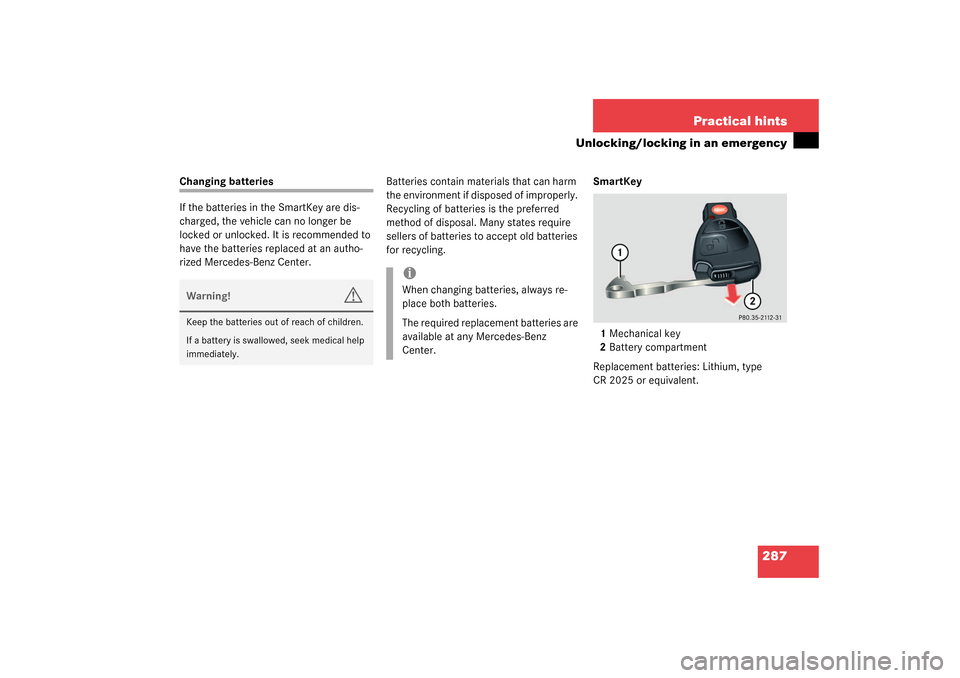
1Mechanical key
2Battery compartment
Replacement batteries: Lithium, type
CR 2025 or equivalent.Warning!
G
Keep the batteries out of reach of children.
If a battery is swallowed, seek medical help
immediately.
iWhen changing batteries, always re-
place both batteries.
The required replacement batteries are
available at any Mercedes-Benz
Center.
S203 MY03_A.book Page 287 Tuesday, January 28, 2003 2:22 PM