Page 225 of 349
CONTROLS AND EQUIPMENT1- 31
B260A01HP-E
B260A02HP-EAT INSTRUMENT CLUSTER (PETROL ENGINE)
1. Tachometer
2. Coolant Temperature Gauge
12 345
7
6
3. Fuel Gauge
4. Speedometer 5. Trip Odometer
6. Odometer
7. Trip odometer Reset Knob
Page 227 of 349
CONTROLS AND EQUIPMENT1- 33
B260A03HP-E
B262A02HP-GAT INSTRUMENT CLUSTER (DIESEL ENGINE)
1. Tachometer
2. Coolant Temperature Gauge 3. Fuel Gauge
4. Speedometer
12
34
5
6
7
5. Trip Odometer
6. Odometer
7. Trip Odometer Reset Knob
Page 233 of 349
CONTROLS AND EQUIPMENT1- 39
B300A01Y-EAT SPEEDOMETER Your Hyundai's speedometer is calibrated in
miles per hour or kilometers per hour. B300A03HP-EB290A02A-EAT COOLANT TEMPERATURE GAUGE WARNING: Never remove the radiator cap when the
engine is hot. The coolant is under pressure and could erupt and cause severe burns.Wait until the engine is cool before remov-ing the radiator cap.
The needle on the coolant temperature gauge
should stay in the normal range. If it movesacross the dial to "H" (Hot), pull over and stopas soon as possible and turn off the engine.Then open the bonnet and check the coolantlevel and the water pump drive belt. If yoususpect cooling system trouble, have your cool-ing system checked by Hyundai dealer as soonas possible.
B280A01A-AAT FUEL GAUGE The needle on the gauge indicates the approx-
imate fuel level in the fuel tank. The fuel capac- ity is given in Section 9.
B280A01HPB290A01HP
Petrol Engine
Reset Knob
B300A01HP-E
Diesel EngineReset Knob
Page 234 of 349
CONTROLS AND EQUIPMENT
1- 40 CAUTION: The engine should not be raced to such a speed that the needle enters the red zone onthe tachometer face. This can cause severeengine damage and may void your warranty.
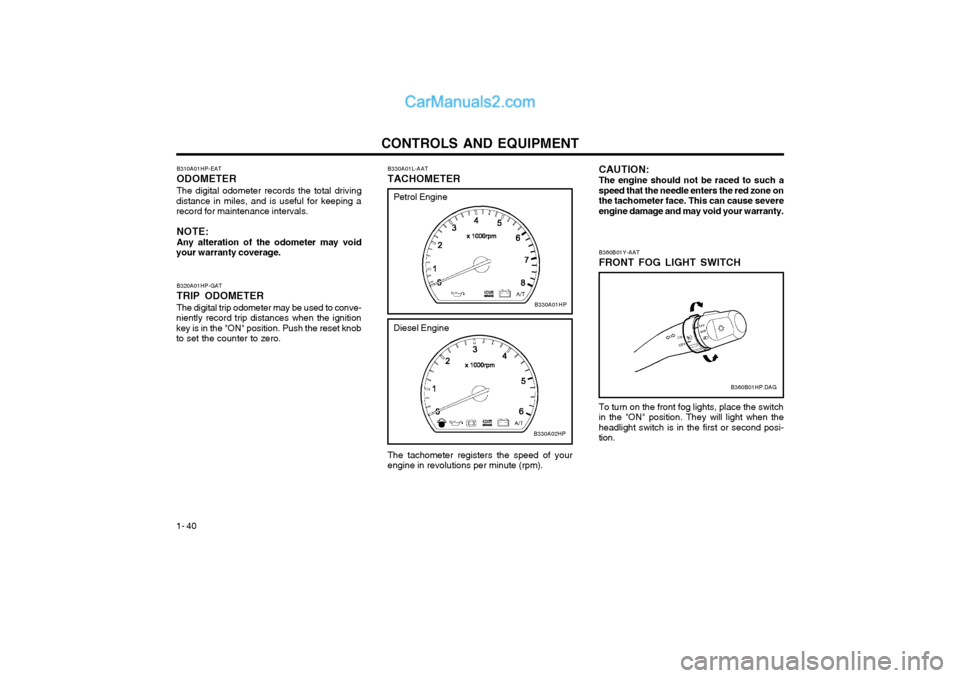
B330A01L-AAT TACHOMETER The tachometer registers the speed of your engine in revolutions per minute (rpm).
B310A01HP-EAT ODOMETERThe digital odometer records the total driving
distance in miles, and is useful for keeping a record for maintenance intervals.
NOTE: Any alteration of the odometer may void
your warranty coverage.
B320A01HP-GAT TRIP ODOMETERThe digital trip odometer may be used to conve-
niently record trip distances when the ignition key is in the "ON" position. Push the reset knobto set the counter to zero.
B330A01HP
Petrol Engine
Diesel Engine
B330A02HP
B360B01HP.DAG
B360B01Y-AAT FRONT FOG LIGHT SWITCH To turn on the front fog lights, place the switch in the "ON" position. They will light when theheadlight switch is in the first or second posi-tion.
Page 239 of 349

CONTROLS AND EQUIPMENT1- 45
SB250A1-E HEATED REAR WINDOW (Not all models)
B380A02HP
To operate the heated rear window depress the switch shown. The heated rear window willautomatically turn off after 20 minutes or whenthe ignition is turned off. The system may be turned off manually by depressing the switch again.
CAUTION:The inside of the rear windscreen shouldnever be cleaned with a hard or sharp imple-ment since damage to the heating elementmay occur. The glass should only be cleanedwith a soft cloth or chamois leather with theuse only of a mild detergent or proprietaryglass cleaner where necessary. Only hori-zontal movement of the cloth should be madewhen cleaning the glass and care should beexercised to ensure that the heating elements are not damaged by rings or jewellery whilstthe glass is being cleaned. NOTE: The ignition must be in the "ON" position forthe heated rear window to operate.
B400A01HP
B400A01HP-EAT DIGITAL CLOCK There are five control buttons for the digital
clock. Their functions are: 1. HOUR - Push "H" to advance the hour
indicated.
2. MIN - Push "M" to advance the minute
indicated.
3. RESET - Push "S" to reset minutes to ":00"
to facilitate resetting the clock to the correct time. When this is done: Pressing "S" between 10 : 30 and 11 : 29 changes the readout to 11 : 00. Pressing "S" between 11 : 31 and 12 : 29 changes the readout to 12 : 00.
4. MODE - Push "MODE" button to display a
12- or 24-hour clock. When the 12-hour clock is in use, the letters AM or PM appear with the time.
5. - The time is displayed on the LCD by pushing in on the switch and is turned off bypushing in on the switch again.
Type A
Type B
Page 254 of 349

CONTROLS AND EQUIPMENT
1- 60 B660A01S-EAT CRUISE CONTROL (Not all models)
B660C02L-EATTo Cancel the Cruise Speed
B660B02L-EATTo Set the Cruise Speed
The cruise control system provides a constant
speed hold function which may be determined at will. The system is most suited to use duringfreeway/motorway driving where constant speedmotoring at speeds in excess of 25 m.p.h. maybe undertaken.
B660A01HP.DAG
1. Push in the cruise control main switch. This turns the system on.
2. Accelerate to desired cruising speed above 25 mph (40 km/h).
3. Push the control switch "SET" (COAST) position. The "CRUISE" indicator light in the instrument cluster will illuminate after youhave set the vehicle speed at the desiredspeed.
4. Remove your foot from the accelerator pedal and the desired speed will automatically bemaintained.
5. To increase speed, depress the accelerator pedal enough for the vehicle to exceed thepreset speed. When you remove your footfrom the accelerator pedal, the vehicle willreturn to the speed you have set.
B660B01HP
NOTE: If the vehicle speed decreases more than 9mph (15 km/h) below the set speed or de-creases below 25 mph (40 km/h), the cruisecontrol system will automatically cancel theset speed.
Do one of the following:
o Push the control switch "CANCEL".
o Depress the brake pedal.
o Depress the clutch pedal (Manual transmission).
o Shift the selector lever in "P" or "N" position (Automatic transmission).
o Decrease the vehicle speed lower than memory speed by 9 mph (15 km/h).
o Decrease the vehicle speed approximately to less than 25 mph (40 km/h).
o Release the main switch.
B660C01HP
Page 255 of 349

CONTROLS AND EQUIPMENT1- 61
o Pay particular attention to the driving
conditions whenever using the cruise control system.
o During cruise-speed driving with manual transmission vehicle, do not shift intoneutral without depressing the clutchpedal, since the engine will be overrevved.If this happens, depress the clutch pedalor release the main switch.
o During normal cruise control operation, when the set button is activated or reac-tivated after applying the brakes, thecruise control will energize after approxi-mately 3 seconds. This delay is normal.
B660E01L-EAT To Reset at a Faster Speed
1. Push the control switch "RESUME (ACCEL)"
2. Accelerate to desired speed. Whilst the con- trol switch is held, the vehicle will gradually gain speed.
B660D01L-AAT To Resume the Preset Speed
The vehicle will automatically resume the speed
set prior to cancellation when you push the control switch "RESUME (ACCEL)" (when trav-elling above 25 mph).
B660D01HP
B660F01L-EAT To Reset at a Slower Speed
B660B01HP
1. Push the control button "SET (COAST)". The vehicle will decelerate.
2. When the desired speed is obtained, re- lease the control button. Whilst the control switch is pushed, the vehicle speed willgradually decrease.
WARNING:
o Keep the main switch off when not using the cruise control.
o Do not use the cruise control when it may not be safe to keep the car at a constant speed, for instance, driving inheavy or varying traffic, or on slippery(rainy, icy or snow-covered) or windingroads or over 6% up-hill or down-hillroads.
Page 264 of 349

CONTROLS AND EQUIPMENT
1- 70
B970C02L-EAT Automatic Operation
The FATC (Full Automatic Temperature Con- trol) system automatically controls the heatingand cooling by doing as follows:
1. Push the "AUTO" switch. The indicator light will come on confirming that the Face, Floorand/or Bi-Level modes as well as the blowerspeed and air conditioner will be controlledautomatically. Press the TEMP down ( ) button 3 seconds
or more with the AMB button held down.
The display shows that the unit of tempera-
ture is adjusted to centigrade or fahrenheit
(°C °F or °F °C).
photo sensor
HHP294B
2. Push the "TEMP" button to set the desired
temperature. The temperature will increase to the maxi- mum 90°F(32°C) by pushing on the bu-tton. Each push of the button will cause thetemperature to increase by 1°F(0.5°C). The temperature will decrease to the mini- mum 62°F(17°C) by pushing on the bu-tton. Each push of the button will cause thetemperature to decrease by 1°F(0.5°C).
NOTE: If the battery has been discharged or dis- connected, the temperature mode will resetto centigrade degree. This is a normal condition and you can adjust the temperature mode from centi-grade to fahrenheit as follows; NOTE: Never place anything over the sensor which is located in the car on the instrument panelto ensure better control of the heating andcooling system.
B970C01HP
B970C02HP
Page:
< prev 1-8 9-16 17-24