2003 Hyundai Santa Fe light
[x] Cancel search: lightPage 67 of 221
FEATURES OF YOUR HYUNDAI 1- 55
!
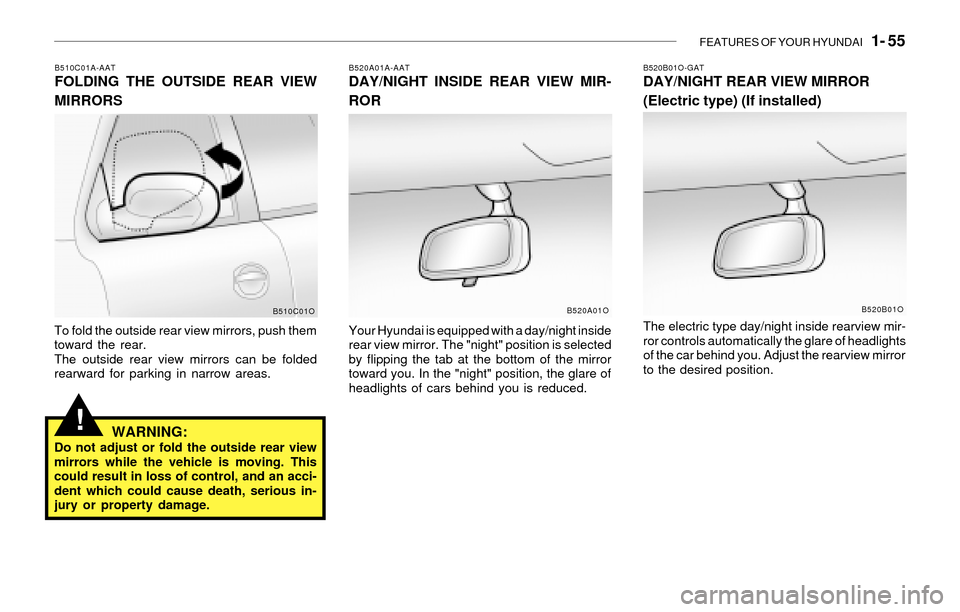
B510C01A-AATFOLDING THE OUTSIDE REAR VIEW
MIRRORS
To fold the outside rear view mirrors, push them
toward the rear.
The outside rear view mirrors can be folded
rearward for parking in narrow areas.
WARNING:Do not adjust or fold the outside rear view
mirrors while the vehicle is moving. This
could result in loss of control, and an acci-
dent which could cause death, serious in-
jury or property damage.
B520A01A-AATDAY/NIGHT INSIDE REAR VIEW MIR-
ROR
Your Hyundai is equipped with a day/night inside
rear view mirror. The "night" position is selected
by flipping the tab at the bottom of the mirror
toward you. In the "night" position, the glare of
headlights of cars behind you is reduced.
B510C01OB520A01O
B520B01O-GATDAY/NIGHT REAR VIEW MIRROR
(Electric type) (If installed)
The electric type day/night inside rearview mir-
ror controls automatically the glare of headlights
of the car behind you. Adjust the rearview mirror
to the desired position.
B520B01O
Page 68 of 221
1- 56 FEATURES OF YOUR HYUNDAI
!
!
HOMELINK PROGRAMMING
CAUTION:
o Make sure people and/or objects are out
of the way of any garage doors or gates
you may be operating during the pro-
gramming procedures.
o Keep original transmitters for potential
future programming needs, or in case
you sell the vehicle.
o In the event you do sell your vehicle, it's
recommended you erase your pro-
grammed HomeLink mirror buttons.
WARNING:Do not use HomeLink with any garage door
opener that lacks the safety stop and re-
verse feature as required by federal safety
standards (includes garage doors manu-
factured before April 1, 1982), as these
doors can increase the risk of serious injury
or death. Call 1-800-355-3515 or visit
www.homelink.com for more information.
NOTE:If programming a garage door opener or
gate, it is advised to unplug the device
during the "cycling" process to prevent
possible motor burnout.
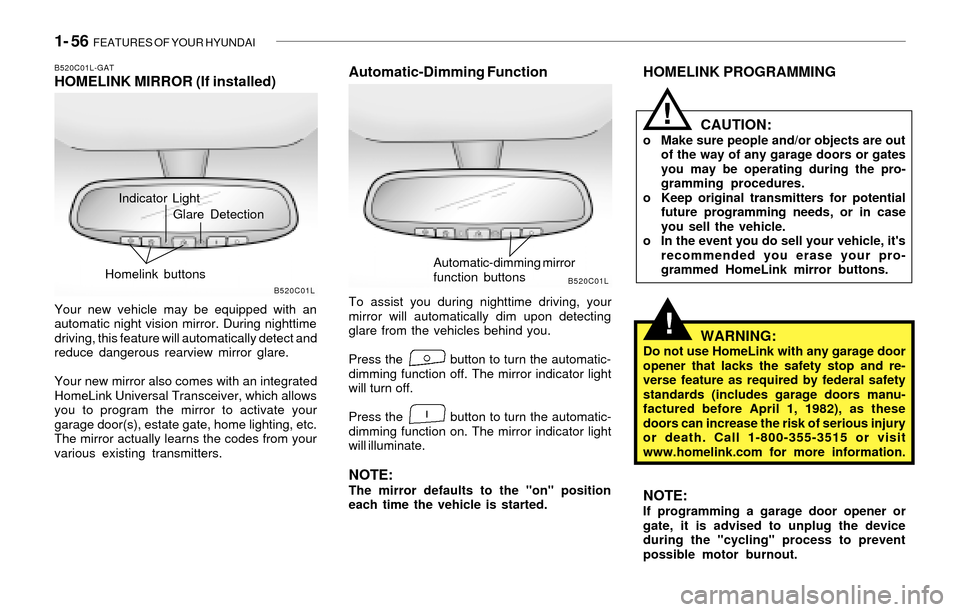
Indicator Light
B520C01L-GATHOMELINK MIRROR (If installed)
Your new vehicle may be equipped with an
automatic night vision mirror. During nighttime
driving, this feature will automatically detect and
reduce dangerous rearview mirror glare.
Your new mirror also comes with an integrated
HomeLink Universal Transceiver, which allows
you to program the mirror to activate your
garage door(s), estate gate, home lighting, etc.
The mirror actually learns the codes from your
various existing transmitters.
Automatic-Dimming Function
To assist you during nighttime driving, your
mirror will automatically dim upon detecting
glare from the vehicles behind you.
Press the button to turn the automatic-
dimming function off. The mirror indicator light
will turn off.
Press the button to turn the automatic-
dimming function on. The mirror indicator light
will illuminate.
NOTE:The mirror defaults to the "on" position
each time the vehicle is started.
B520C01LB520C01L
Glare Detection
Homelink buttons
Automatic-dimming mirror
function buttons
Page 69 of 221
FEATURES OF YOUR HYUNDAI 1- 57
Flashing
Programming
Your vehicle may require that the ignition switch
to be turned to the "ACC" position to program
and/or operate HomeLink system. It is also
recommended that a new battery be placed in
the handheld transmitter of the device being
programmed to HomeLink for quicker program-
ming and accurate transmission of the radio-
frequency.
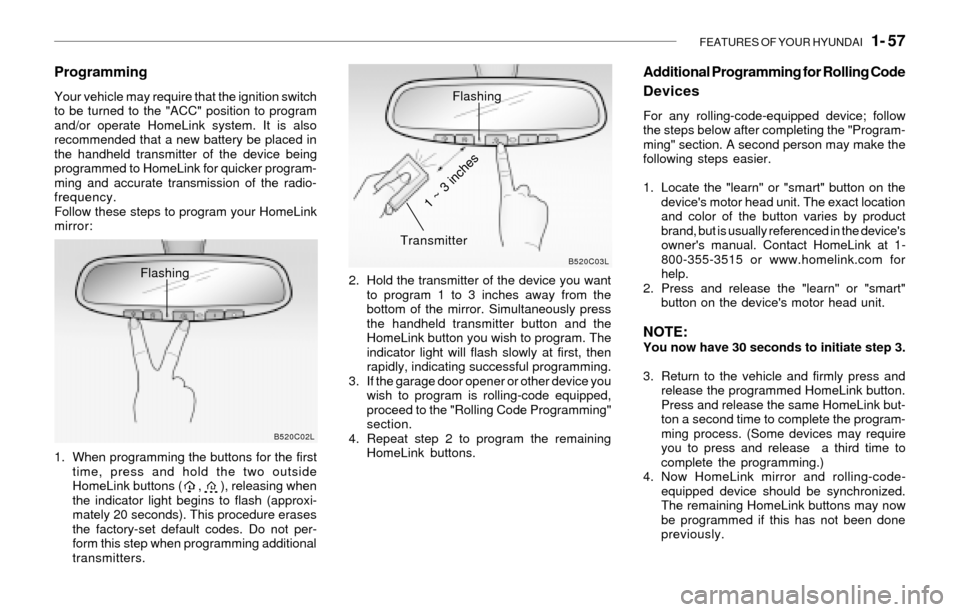
Follow these steps to program your HomeLink
mirror:
1. When programming the buttons for the first
time, press and hold the two outside
HomeLink buttons ( , ), releasing when
the indicator light begins to flash (approxi-
mately 20 seconds). This procedure erases
the factory-set default codes. Do not per-
form this step when programming additional
transmitters.2. Hold the transmitter of the device you want
to program 1 to 3 inches away from the
bottom of the mirror. Simultaneously press
the handheld transmitter button and the
HomeLink button you wish to program. The
indicator light will flash slowly at first, then
rapidly, indicating successful programming.
3. If the garage door opener or other device you
wish to program is rolling-code equipped,
proceed to the "Rolling Code Programming"
section.
4. Repeat step 2 to program the remaining
HomeLink buttons.
B520C02LB520C03L
Flashing
Transmitter
1 ~ 3 inches
Additional Programming for Rolling Code
Devices
For any rolling-code-equipped device; follow
the steps below after completing the "Program-
ming" section. A second person may make the
following steps easier.
1. Locate the "learn" or "smart" button on the
device's motor head unit. The exact location
and color of the button varies by product
brand, but is usually referenced in the device's
owner's manual. Contact HomeLink at 1-
800-355-3515 or www.homelink.com for
help.
2. Press and release the "learn" or "smart"
button on the device's motor head unit.
NOTE:You now have 30 seconds to initiate step 3.
3. Return to the vehicle and firmly press and
release the programmed HomeLink button.
Press and release the same HomeLink but-
ton a second time to complete the program-
ming process. (Some devices may require
you to press and release a third time to
complete the programming.)
4. Now HomeLink mirror and rolling-code-
equipped device should be synchronized.
The remaining HomeLink buttons may now
be programmed if this has not been done
previously.
Page 70 of 221
1- 58 FEATURES OF YOUR HYUNDAI
Gate Operator Programming & Cana-
dian Programming
During programming, your handheld transmit-
ter may automatically stop transmitting.
Continue to press and hold the HomeLink button
while you press and repress ("cycle") your
handheld transmitter every two seconds until
the frequency signal has been learned. The
indicator light will flash slowly at first and then
rapidly upon successful programming.
Accessories
For more information on HomeLink and
HomeLink-compatible products, or to purchase
HomeLink accessories, call 1-800-355-3515
or visit www.homeink.com.
Operating HomeLink
Simply press the appropriate HomeLink button
to activate the trained product (garage door,
security system, entry door lock, estate gate,
lighting, etc.). The original handheld transmit-
ters may also be used at any time.
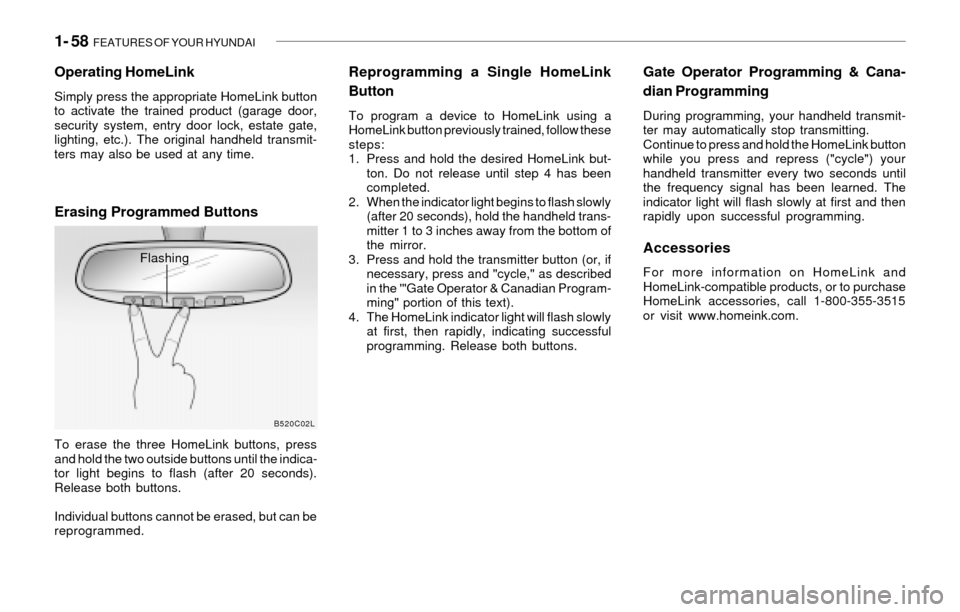
Erasing Programmed Buttons
To erase the three HomeLink buttons, press
and hold the two outside buttons until the indica-
tor light begins to flash (after 20 seconds).
Release both buttons.
Individual buttons cannot be erased, but can be
reprogrammed.
Reprogramming a Single HomeLink
Button
To program a device to HomeLink using a
HomeLink button previously trained, follow these
steps:
1. Press and hold the desired HomeLink but-
ton. Do not release until step 4 has been
completed.
2. When the indicator light begins to flash slowly
(after 20 seconds), hold the handheld trans-
mitter 1 to 3 inches away from the bottom of
the mirror.
3. Press and hold the transmitter button (or, if
necessary, press and "cycle," as described
in the '"Gate Operator & Canadian Program-
ming" portion of this text).
4. The HomeLink indicator light will flash slowly
at first, then rapidly, indicating successful
programming. Release both buttons.
B520C02L
Flashing
Page 71 of 221
FEATURES OF YOUR HYUNDAI 1- 59
!
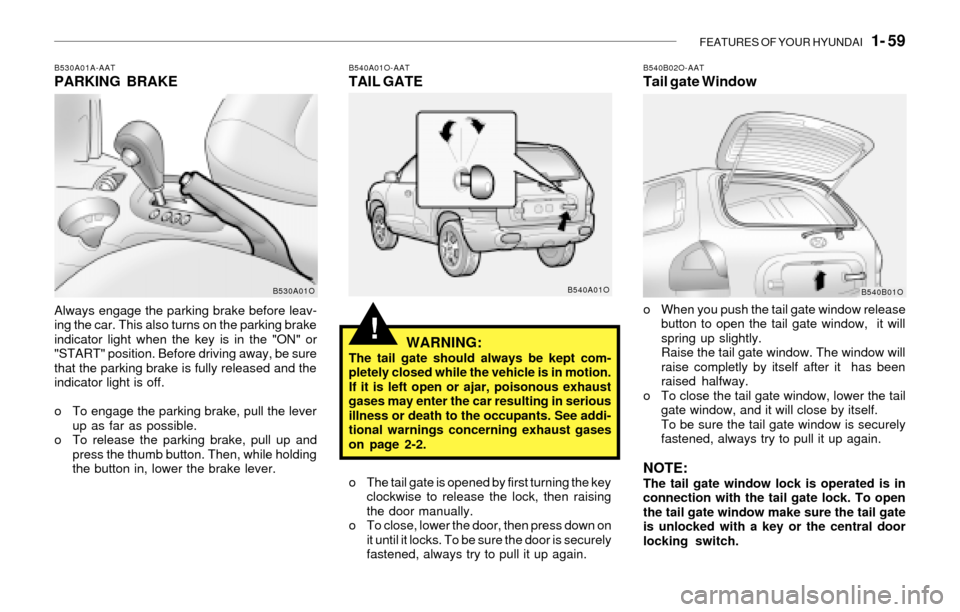
B530A01A-AATPARKING BRAKE
Always engage the parking brake before leav-
ing the car. This also turns on the parking brake
indicator light when the key is in the "ON" or
"START" position. Before driving away, be sure
that the parking brake is fully released and the
indicator light is off.
o To engage the parking brake, pull the lever
up as far as possible.
o To release the parking brake, pull up and
press the thumb button. Then, while holding
the button in, lower the brake lever.
B540A01O-AATTAIL GATE
WARNING:
The tail gate should always be kept com-
pletely closed while the vehicle is in motion.
If it is left open or ajar, poisonous exhaust
gases may enter the car resulting in serious
illness or death to the occupants. See addi-
tional warnings concerning exhaust gases
on page 2-2.
o The tail gate is opened by first turning the key
clockwise to release the lock, then raising
the door manually.
o To close, lower the door, then press down on
it until it locks. To be sure the door is securely
fastened, always try to pull it up again.
B530A01OB540A01O
B540B02O-AATTail gate Window
o When you push the tail gate window release
button to open the tail gate window, it will
spring up slightly.
Raise the tail gate window. The window will
raise completly by itself after it has been
raised halfway.
o To close the tail gate window, lower the tail
gate window, and it will close by itself.
To be sure the tail gate window is securely
fastened, always try to pull it up again.
NOTE:The tail gate window lock is operated is in
connection with the tail gate lock. To open
the tail gate window make sure the tail gate
is unlocked with a key or the central door
locking switch.
B540B01O
Page 73 of 221
FEATURES OF YOUR HYUNDAI 1- 61
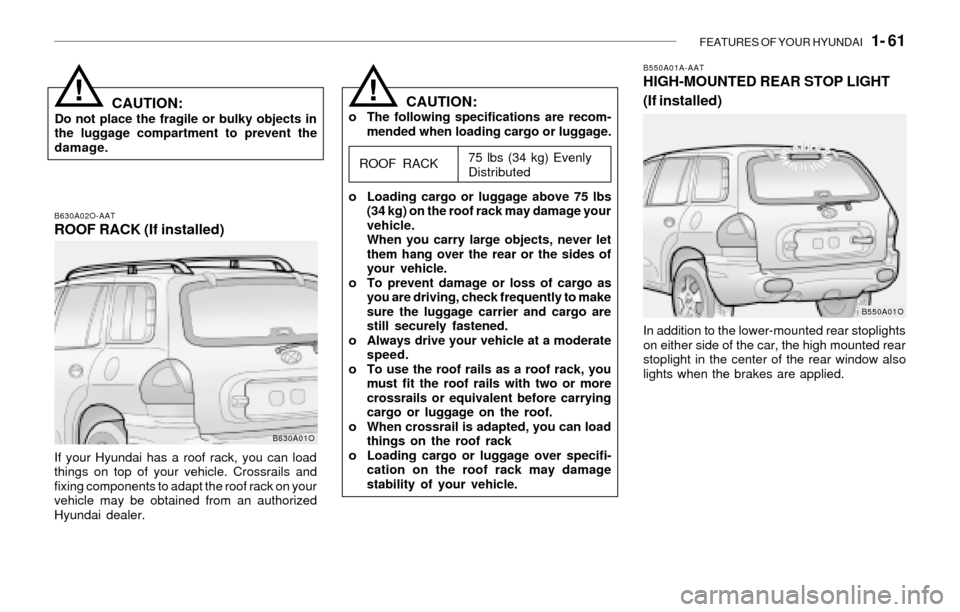
B630A02O-AATROOF RACK (If installed)
If your Hyundai has a roof rack, you can load
things on top of your vehicle. Crossrails and
fixing components to adapt the roof rack on your
vehicle may be obtained from an authorized
Hyundai dealer.
B630A01O
CAUTION:o The following specifications are recom-
mended when loading cargo or luggage.
75 lbs (34 kg) Evenly
Distributed
o Loading cargo or luggage above 75 lbs
(34 kg) on the roof rack may damage your
vehicle.
When you carry large objects, never let
them hang over the rear or the sides of
your vehicle.
o To prevent damage or loss of cargo as
you are driving, check frequently to make
sure the luggage carrier and cargo are
still securely fastened.
o Always drive your vehicle at a moderate
speed.
o To use the roof rails as a roof rack, you
must fit the roof rails with two or more
crossrails or equivalent before carrying
cargo or luggage on the roof.
o When crossrail is adapted, you can load
things on the roof rack
o Loading cargo or luggage over specifi-
cation on the roof rack may damage
stability of your vehicle.
ROOF RACK
!CAUTION:Do not place the fragile or bulky objects in
the luggage compartment to prevent the
damage.
!
B550A01A-AATHIGH-MOUNTED REAR STOP LIGHT
(If installed)
In addition to the lower-mounted rear stoplights
on either side of the car, the high mounted rear
stoplight in the center of the rear window also
lights when the brakes are applied.
B550A01O
Page 74 of 221
1- 62 FEATURES OF YOUR HYUNDAI
!WARNING:o The fuel cap must be tightened at least
3 clicks, otherwise " " light will
illuminate.
o Gasoline vapors are dangerous. Before
refueling, always stop the engine and
never allow sparks or open flames near
the filler area. If you need to replace the
filler cap, use a genuine Hyundai re-
placement part.
B560A02O
!
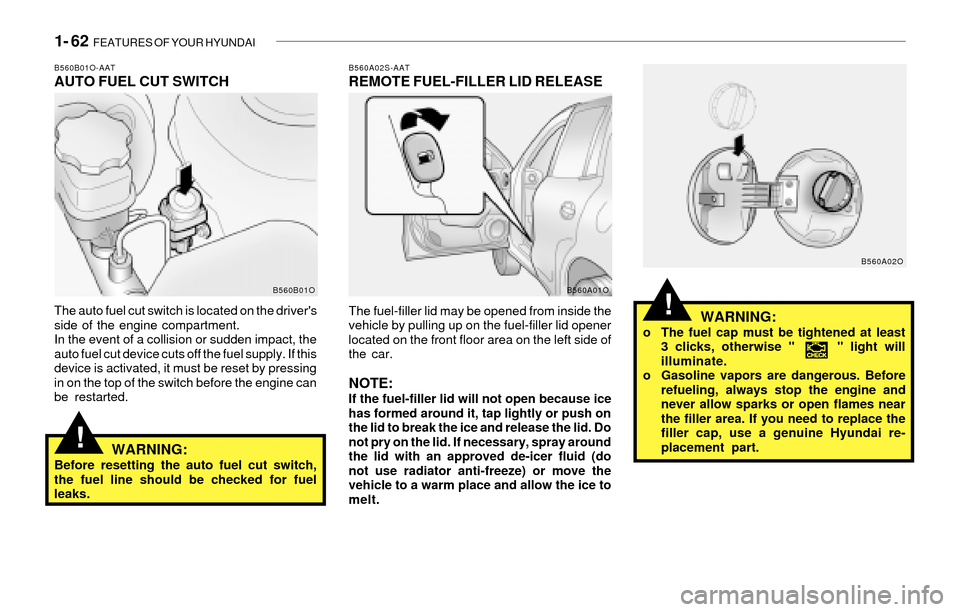
B560B01O-AATAUTO FUEL CUT SWITCH
The auto fuel cut switch is located on the driver's
side of the engine compartment.
In the event of a collision or sudden impact, the
auto fuel cut device cuts off the fuel supply. If this
device is activated, it must be reset by pressing
in on the top of the switch before the engine can
be restarted.
WARNING:Before resetting the auto fuel cut switch,
the fuel line should be checked for fuel
leaks.
B560A02S-AATREMOTE FUEL-FILLER LID RELEASE
The fuel-filler lid may be opened from inside the
vehicle by pulling up on the fuel-filler lid opener
located on the front floor area on the left side of
the car.
NOTE:If the fuel-filler lid will not open because ice
has formed around it, tap lightly or push on
the lid to break the ice and release the lid. Do
not pry on the lid. If necessary, spray around
the lid with an approved de-icer fluid (do
not use radiator anti-freeze) or move the
vehicle to a warm place and allow the ice to
melt.
B560B01OB560A01O
Page 75 of 221
FEATURES OF YOUR HYUNDAI 1- 63
!
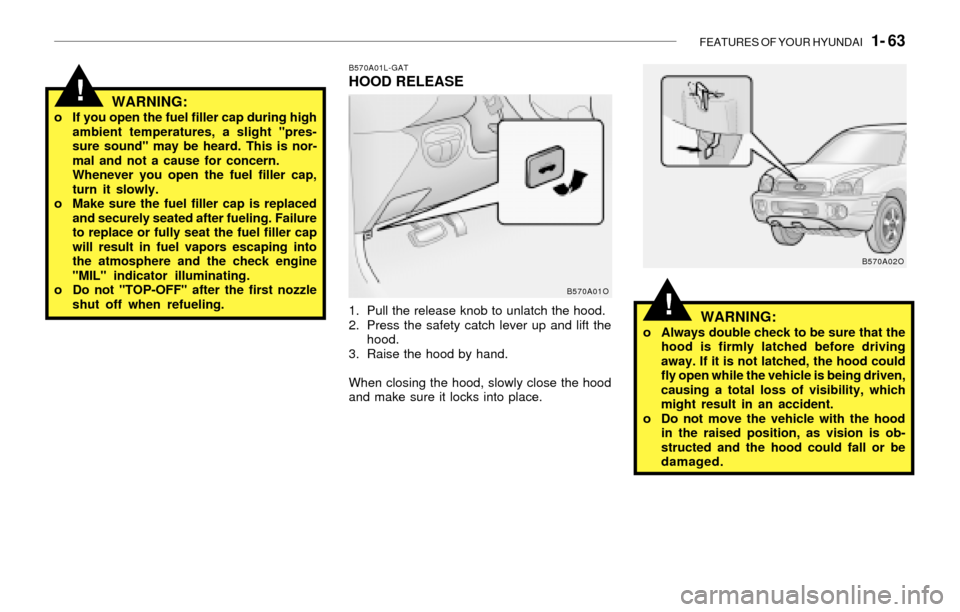
B570A01L-GATHOOD RELEASE
1. Pull the release knob to unlatch the hood.
2. Press the safety catch lever up and lift the
hood.
3. Raise the hood by hand.
When closing the hood, slowly close the hood
and make sure it locks into place.
WARNING:o If you open the fuel filler cap during high
ambient temperatures, a slight "pres-
sure sound" may be heard. This is nor-
mal and not a cause for concern.
Whenever you open the fuel filler cap,
turn it slowly.
o Make sure the fuel filler cap is replaced
and securely seated after fueling. Failure
to replace or fully seat the fuel filler cap
will result in fuel vapors escaping into
the atmosphere and the check engine
"MIL" indicator illuminating.
o Do not "TOP-OFF" after the first nozzle
shut off when refueling.
B570A01O
!WARNING:o Always double check to be sure that the
hood is firmly latched before driving
away. If it is not latched, the hood could
fly open while the vehicle is being driven,
causing a total loss of visibility, which
might result in an accident.
o Do not move the vehicle with the hood
in the raised position, as vision is ob-
structed and the hood could fall or be
damaged.
B570A02O