Page 91 of 280
This section covers how to set up the
system controls f or ventilation,
heating, cooling, dehumidif ying, and
def rosting.
The engine must be running f or the
heater and air conditioning to
generate hot and cold air. The heater
uses engine coolant to warm the air.
If the engine is cold, it will be several
minutes bef ore you f eel warm air
coming from the system.
The air conditioning does not rely on
engine temperature.
You can adjust the direction of the
air coming from the vents on both
sides of the instrument panel and at
the corner of the dashboard on the
passenger’s side. To adjust the air
flow up and down, move the tab in
the center of each vent up and down.
To adjust it lef t and right, turn the
dial under each vent lef t and right. You can shut off the air flow from
each vent by turning the dial all the
way toward the mark until it
clicks.
Heating and Cooling
Comf ort and Convenience Feat ures
Vent Controls
How to Use the System
88
CENTER VENTSIDE VENT
Page 116 of 280

Four controls f or the audio system
areontheleftsideof thedashboard
by the instrument panel. These let
you control basic f unctions without
distracting your attention f rom
driving.
Use the VOLUME lever to adjust the
volume. Push the lever up to
increase the volume and down to
decrease it. Hold the lever until the
volume reaches the desired level,
then release it.If you want to mute the sound
temporarily, push the MUTE button.
The indicator in the button will light
to indicate the mute f unction is on.
Press the button again to cancel
MUTE.
The AUDIO CONTROL button
changes the mode. Pressing the
button repeatedly selects AM, FM1,
FM2, or CD (if a CD is loaded).
The CHANNEL button has two
f unctions, depending on whether you
are listening to the radio, or playing a
CD.
If you are listening to the radio, use
the CHANNEL button to change
stations. Each time you press this
button, the system advances to the
next preset station on the band you
are listening to. You will see the
number of the selected Preset button
in the audio system display.
If youareplayingaCD,thesystem
skips to the beginning of the next
track each time you push the
CHANNEL button.
These controls work only with the
f actory-installed audio system. They
will not f unction if you install any
other system.
Comf ort and Convenience Feat ures
Remote Audio Controls
113
AUDIO CONTROL
BUTTON
CHANNEL
BUTTON
MUTE
BUTTON
VOLUME
LEVER
Page 119 of 280

Press and release the SET/decel
buttononthesteeringwheel.The
CRUISE CONTROL light on the
instrument panel comes on to
show the system is now activated.
Thecruisecontrolmaynothold
the set speed when you are going
up and down hills. If your speed
increases going down a hill, use
thebrakestoslowdowntothe
desired speed. This will cancel thecruise control. To resume the set
speed, press the RESUME/accel
button. The CRUISE CONTROL
light on the instrument panel
comes on.
Press and hold the RESUME/
accel button. The car will
accelerate. When you reach the
desired cruising speed, release the
button.
You can increase the set cruising
speed in any of these ways: You can decrease the set cruising
speed in any of these ways:
Press and hold the SET/decel
button. The car will decelerate.
Release the button when you
reach the desired speed.
To slow down in very small
amounts, tap the SET/decel
button repeatedly. Each time you
do this, your car will slow down
about 1 mph (1.6 km/h).
Tap the brake or clutch pedal
lightly with your f oot. The
CRUISE CONTROL light on the
instrument panel will go out.
When the car slows to the desired
speed, press the SET/decel button.
The car will then maintain the
desired speed.
Push on the accelerator pedal.
Accelerate to the desired cruising
speed and press the SET/decel
button.
To increase your speed in very
small amounts, tap the RESUME/
accel button repeatedly. Each time
you do this, your car will speed up
about 1 mph (1.6 km/h).
3.
Changing t he Set Speed
Cruise Control
Comf ort and Convenience Feat ures116
RESUME/accel
SET/decel
Page 120 of 280

Even with the cruise control turned
on, you can still use the accelerator
pedal to speed up f or passing. Af ter
completing the pass, take your foot
of f the accelerator pedal. The car
will return to the set cruising speed.
Resting your f oot on the brake or
clutch pedal will cause the cruise
control to cancel.Youcancancelthecruisecontrolin
any of these ways:
The system remembers the
previously-set cruising speed. To
return to that speed, accelerate to
above25mph(40km/h),thenpressthe RESUME/accel button. The
CRUISE CONTROL light comes on,
and the car will accelerate to the
same cruising speed as bef ore.
Pressing the Cruise Control Master
Switch turns the system completely
of f and erases the previous cruising
speed f rom memory. To use the
system again, ref er to
.
Press the Cruise Control Master
Switch. Press the SET/decel and
RESUME/accel buttons at the
same time. Tap the brake or clutch pedal.
When you tap the brake or clutch
pedal, or press the SET and
RESUME buttons at the same time,
the CRUISE CONTROL light on the
instrument panel will go out and the
car will begin to slow down. You can
use the accelerator pedal in the
normal way.Cancelling t he Cruise Cont rol
Using t he
Cruise Cont rol
Comf ort and Convenience Feat ures
Cruise Control
117
Page 123 of 280

During this period:Avoid full-throttle starts and rapid
acceleration. Do not exceed
5,500 rpm f or the f irst 600 miles
(1,000 km) of operation.
Help assure your car’s f uture
reliability and perf ormance by paying
extra attention to how you drive
during the f irst 600 miles (1,000 km).
Using gasoline containing lead will
damage your car’s emissions
controls. This contributes to air
pollution.
In Canada, some gasolines contain
an octane-enhancing additive called
MMT. If you use such gasolines,
your emission control system
perf ormance may deteriorate and
the Malf unction Indicator Lamp on
your instrument panel may turn on.
If this happens, contact your
authorized Honda dealer f or service.
We recommend gasolines containing
detergent additives that help prevent
f uel system and engine deposits. If you are unable to f ind premium
unleaded gasoline, you may substi-
tute an unleaded regular gasoline.
The engine will compensate f or the
lower octane, but you may notice a
slight decrease in power as a result. Your Honda is designed to operate
on premium unleaded gasoline with a
pump octane number of 91 or higher. Youshouldfollowthesesamere-
commendations with an overhauled
or exchanged engine, or when the
brakes are relined.
Avoidhardbraking.Newbrakes
need to be broken-in by moderate
use f or the f irst 200 miles (300
km).
Do not change the oil until the
recommended time or mileage
intervalshowninthemaintenance
schedule.
Break-in Period
Gasoline
Bef ore Driving
Break-in Period, Gasoline
120
Page 137 of 280
Make sure all windows, mirrors,
and outside lights are clean and
unobstructed. Remove f rost, snow,
or ice.Check that any items you may be
carrying with you inside are stored
properly or f astened down
securely.
Check the adjustment of the seat
(see page ).
Check the adjustment of the
inside and outside mirrors (see
page ).Fasten your seat belt. Check that
your passenger has f astened his or
her seat belt (see page ).
Turn the ignition switch ON (II).
Check the indicator lights in the
instrument panel.
Start the engine (see page ).
Check the gauges and indicator
lights in the instrument panel (see
page ).
Visually check the tires. If a tire
looks low, use a gauge to check its
pressure.
Youshoulddothefollowingchecks
and adjustments every day bef ore
you drive your car.
Check that the hood and trunk are
f ully closed. Make sure the doors are securely
closed and locked.
1.
2.
3. 4.
5.
6.
7.8.
9.
10.
11. 15
69
80 45135
Driving
Preparing to Drive
134
Page 142 of 280

Place any packages, valuables, etc.,
in the trunk or take them with you. Turn of f the lights.
Always use the parking brake when
you park your car. The indicator on
the instrument panel shows that the
parking brake is not f ully released; it
does not indicate that the parking
brakeisfirmlyset.Makesurethe
parking brake is set f irmly or your
car may roll if it is parked on an
incline. If the car is f acing uphill, turn the
f ront wheels away f rom the curb and
put the transmission in f irst gear.
If the car is f acing downhill, turn the
f ront wheels toward the curb and put
the transmission in reverse gear.
Make sure the parking brake is f ully
released bef ore driving away.
Driving with the parking brake
partially set can overheat or damage
the rear brakes. Make sure the convertible top and
the windows are closed.
Lockthedoorswiththekeyorthe
remote transmitter.
Never park over dry leaves, tall
grass, or other f lammable
materials. The three way catalytic
converter gets very hot, and could
cause these materials to catch on
fire.
Parking T ips
Parking
Driving139
Page 146 of 280
�Î
�Î
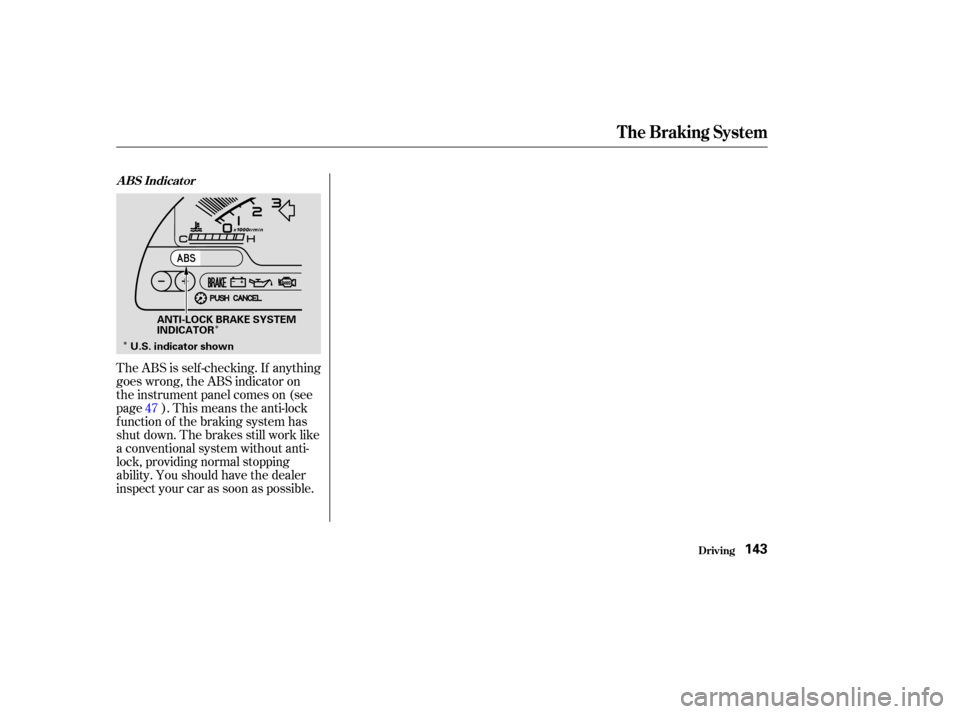
The ABS is self -checking. If anything
goes wrong, the ABS indicator on
the instrument panel comes on (see
page ). This means the anti-lock
f unction of the braking system has
shut down. The brakes still work like
a conventional system without anti-
lock, providing normal stopping
ability. You should have the dealer
inspect your car as soon as possible. 47
The Braking System
Driving
A BS Indicat or
143
ANTI-LOCK BRAKE SYSTEM
INDICATOR
U.S. indicator shown