Page 193 of 392

You will have to store your favorite
stations in the Preset buttons after
the system begins working. Your
original settings were lost when
power was disconnected.
If your vehicle’s battery is discon-
nected or goes dead, the audio
system will disable itself . If this
happens, you will see ‘‘Code’’ in the
frequencydisplaythenexttimeyou
turn on the system. Use the Preset
buttons to enter the five-digit code. If
it is entered correctly, the radio will
start playing.
If you make a mistake entering the
code, do not start over or try to
correct your mistake. Complete the
f ive-digit sequence, then enter the
correct code. You have ten tries to
enter the correct code. If you are
unsuccessful in ten attempts, you
must then leave the system on for
one hour bef ore trying again.
Your vehicle’s audio system will
disable itself if it is disconnected
f rom electrical power f or any reason.
To make it work again, the user
must enter a specif ic f ive-digit code
in the Preset buttons. Because there
are hundreds of number
combinations possible f rom f ive
digits, making the system work
without knowing the exact code is
nearly impossible.
Youshouldhavereceivedacardthat
lists your audio system’s code
number and serial number. It is best
tostorethiscardinasafeplaceat
home. In addition, you should write
the audio system’s serial number in
this Owner’s Manual. If you should
happen to lose the card, you must
obtain the code number f rom your
Honda dealer. To do this, you will
need the system’s serial number.
On EX model
Thef t Protection
Audio System
Comf ort and Convenience Feat ures189
Page 206 of 392

�Û
�Ý
Select the radio with the AM/FM
buttononthefrontpanel,therear
control panel, or the remote control.
From the front panel, after selecting
the rear system with the RR CTRL
knob, use the TUNE, SEEK, or
SCAN f unctions or the Preset
buttons to select a station.
From the rear control panel in the
ceiling, use the and buttons to select the stations
that are set into the Preset buttons.
Pressing the or button will
cause the system to search up or
down the band for a station with a
strong signal. You will see SEEK in
the display.
To change Preset stations with the
remote control, press the or button. To search for strong
stations, press the or button.
After loading the cassette, select the
cassette player with the TAPE
buttononthefrontpanel,therear
control panel, or the remote control.
On the rear control panel, use the
PROG/PLAY button to reverse the
tape’s direction. Use the and buttons to skip. Press the
button to skip forward to the
beginning of the next song or
passage. You will see FF f lashing in
the display. Press the button to
skip backward to the beginning of
the current song or passage. You will
seeREVflashinginthedisplay. On the remote control, use the
PROG/PLAY button to reverse the
tape’s direction. Press the FWD or
REW button to f ast f orward or
rewind the tape. Press either of
those buttons or the PROG/PLAY
button to return to playing the tape.
To skip to the beginning of the next
song or passage, press the
button. You will see FF
flashinginthedisplay.Toskiptothe
beginning of the current song or
passage, press the button. You
will see REV f lashing in the display.
To operate the cassette player from
the f ront panel, ref er to page .
Make sure you have selected the
rear system with the RR CTRL knob
first.
178
Playing the Radio With the Rear
Entertainment SystemPlaying a Cassette With the Rear
Entertainment System
Rear Entertainment System
Comf ort and Convenience Feat ures202
Page 210 of 392
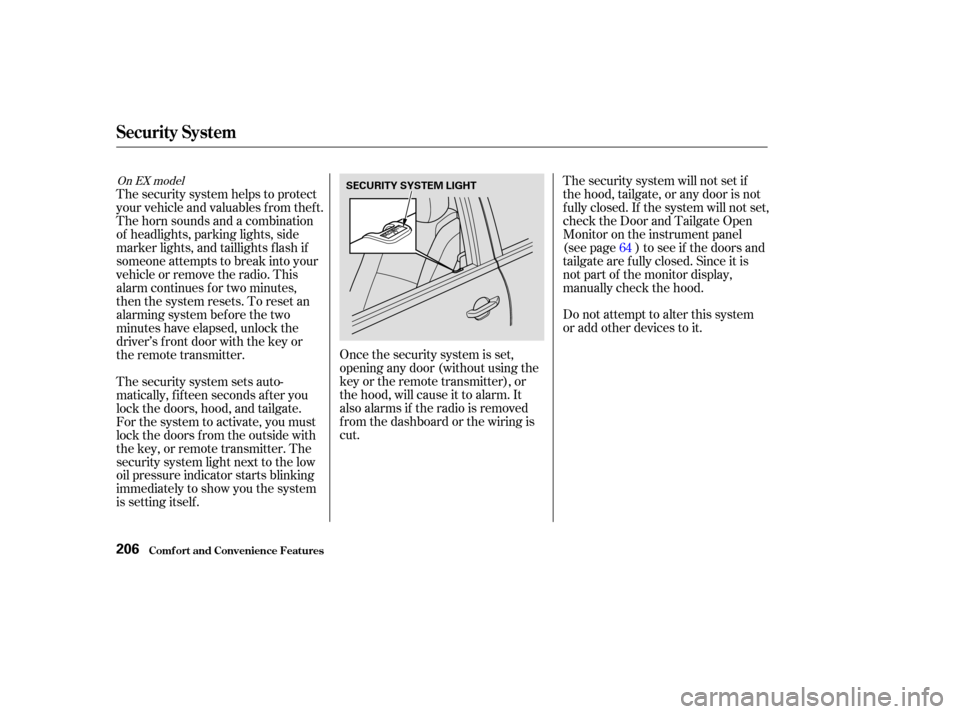
Once the security system is set,
opening any door (without using the
key or the remote transmitter), or
the hood, will cause it to alarm. It
also alarms if the radio is removed
f rom the dashboard or the wiring is
cut.Do not attempt to alter this system
or add other devices to it. The security system will not set if
the hood, tailgate, or any door is not
f ully closed. If the system will not set,
check the Door and Tailgate Open
Monitor on the instrument panel
(see page ) to see if the doors and
tailgate are f ully closed. Since it is
notpartofthemonitordisplay,
manually check the hood.
The security system helps to protect
your vehicle and valuables f rom thef t.
The horn sounds and a combination
of headlights, parking lights, side
marker lights, and taillights f lash if
someone attempts to break into your
vehicleorremovetheradio.This
alarm continues f or two minutes,
then the system resets. To reset an
alarming system before the two
minutes have elapsed, unlock the
driver’s f ront door with the key or
the remote transmitter.
The security system sets auto-
matically, f if teen seconds af ter you
lock the doors, hood, and tailgate.
For the system to activate, you must
lock the doors f rom the outside with
the key, or remote transmitter. The
security system light next to the low
oil pressure indicator starts blinking
immediately to show you the system
is setting itself . 64
On EX model
Security System
Comf ort and Convenience Feat ures206
SECURITY SYSTEM LIGHT
Page 307 of 392
If you need to connect the battery to
a charger, disconnect both cables to
prevent damage to the vehicle’s
electrical system.If your vehicle’s battery is
disconnected or goes dead, the
AUTO f unction of the driver’s
window will be disabled. You should
reset the AUTO f unction (see page
).
If your vehicle’s battery is
disconnected or goes dead, the audio
system will disable itself . The next
timeyouturnontheradioyouwill
see ‘‘ ’’ in the f requency
display. Use the Preset buttons to
enter the f ive-digit code (see page ).
189
101
On EX model
Battery
Maint enance303
The battery gives off explosive
hydrogen gas during normal
operation.
A spark or flame can cause the
battery to explode with enough
force to kill or seriously hurt you.
Wear protective clothing and a
face shield, or have a skilled
mechanic do the battery
maintenance.
Charging the battery with the cables
connected can seriously damage your
vehicle’s electronic controls. Detach
the battery cables bef ore connecting
the battery to a charger.
Page 359 of 392
If the replacement fuse of the
same rating blows in a short time,
there is probably a serious
electrical problem in your vehicle.
Leave the blown fuse in that
circuit and have your vehicle
checked by a qualif ied mechanic.
If you cannot drive the vehicle
without f ixing the problem, and you
do not have a spare fuse, take a fuse
of the same rating or a lower rating
f rom one of the other circuits. Make
sureyoucandowithoutthatcircuit
temporarily (such as the accessory
power socket or radio).
If you replace the blown f use with a
spare f use that has a lower rating, it
might blow out again. This does not
indicate anything wrong. Replace the
f use with one of the correct rating as
soon as you can.
If the radio f use is removed, the
audio system will disable itself . The
nexttimeyouturnontheradioyou
will see ‘‘ ’’ in the f requency
display. Use the Preset buttons to
enter the f ive-digit code (see page
).
6. 189
CONT INUED
On EX model
Fuses
T aking Care of t he Unexpect ed355
Replacing a f use with one that has a
higher rating greatly increases the
chances of damaging the electrical
system. If you do not have a replace-
ment f use with the proper rating f or the
circuit, install one with a lower rating.