Page 192 of 392
�Û�Ý
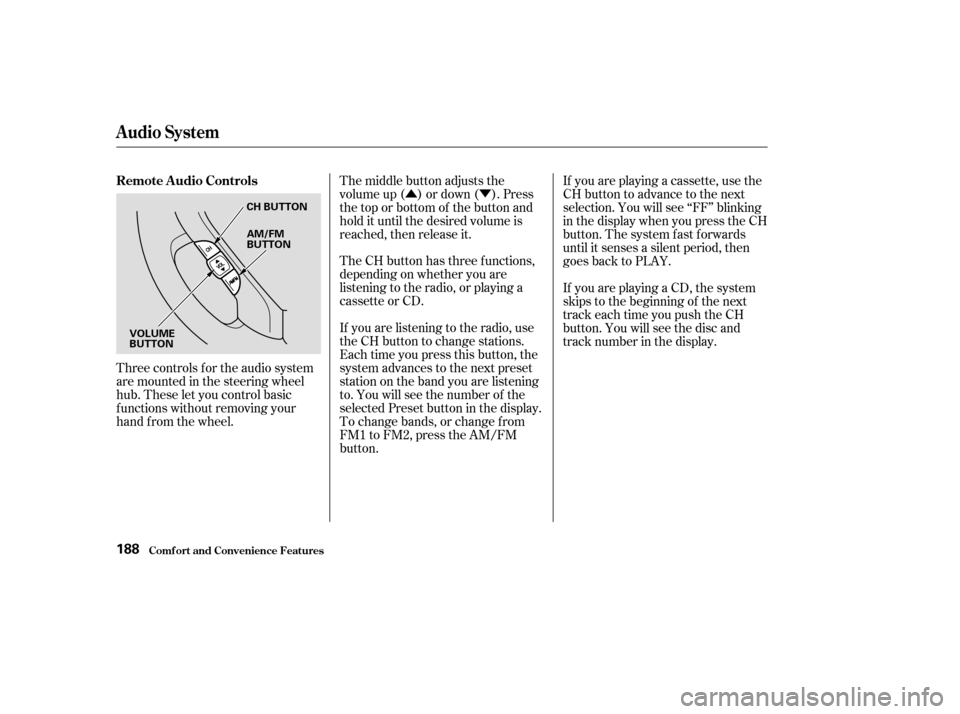
Three controls f or the audio system
are mounted in the steering wheel
hub. These let you control basic
f unctions without removing your
hand f rom the wheel. The middle button adjusts the
volume up ( ) or down ( ). Press
the top or bottom of the button and
hold it until the desired volume is
reached, then release it.
The CH button has three functions,
depending on whether you are
listening to the radio, or playing a
cassette or CD.
If you are listening to the radio, use
the CH button to change stations.
Each time you press this button, the
system advances to the next preset
station on the band you are listening
to. You will see the number of the
selected Preset button in the display.
To change bands, or change f rom
FM1 to FM2, press the AM/FM
button.If you are playing a cassette, use the
CH button to advance to the next
selection. You will see ‘‘FF’’ blinking
in the display when you press the CH
button. The system fast forwards
until it senses a silent period, then
goes back to PLAY.
If youareplayingaCD,thesystem
skips to the beginning of the next
track each time you push the CH
button. You will see the disc and
track number in the display.
Remote Audio Controls
Audio System
Comf ort and Convenience Feat ures188
CH BUTTON
AM/FM
BUTTON
VOLUME
BUTTON
Page 193 of 392

You will have to store your favorite
stations in the Preset buttons after
the system begins working. Your
original settings were lost when
power was disconnected.
If your vehicle’s battery is discon-
nected or goes dead, the audio
system will disable itself . If this
happens, you will see ‘‘Code’’ in the
frequencydisplaythenexttimeyou
turn on the system. Use the Preset
buttons to enter the five-digit code. If
it is entered correctly, the radio will
start playing.
If you make a mistake entering the
code, do not start over or try to
correct your mistake. Complete the
f ive-digit sequence, then enter the
correct code. You have ten tries to
enter the correct code. If you are
unsuccessful in ten attempts, you
must then leave the system on for
one hour bef ore trying again.
Your vehicle’s audio system will
disable itself if it is disconnected
f rom electrical power f or any reason.
To make it work again, the user
must enter a specif ic f ive-digit code
in the Preset buttons. Because there
are hundreds of number
combinations possible f rom f ive
digits, making the system work
without knowing the exact code is
nearly impossible.
Youshouldhavereceivedacardthat
lists your audio system’s code
number and serial number. It is best
tostorethiscardinasafeplaceat
home. In addition, you should write
the audio system’s serial number in
this Owner’s Manual. If you should
happen to lose the card, you must
obtain the code number f rom your
Honda dealer. To do this, you will
need the system’s serial number.
On EX model
Thef t Protection
Audio System
Comf ort and Convenience Feat ures189
Page 194 of 392
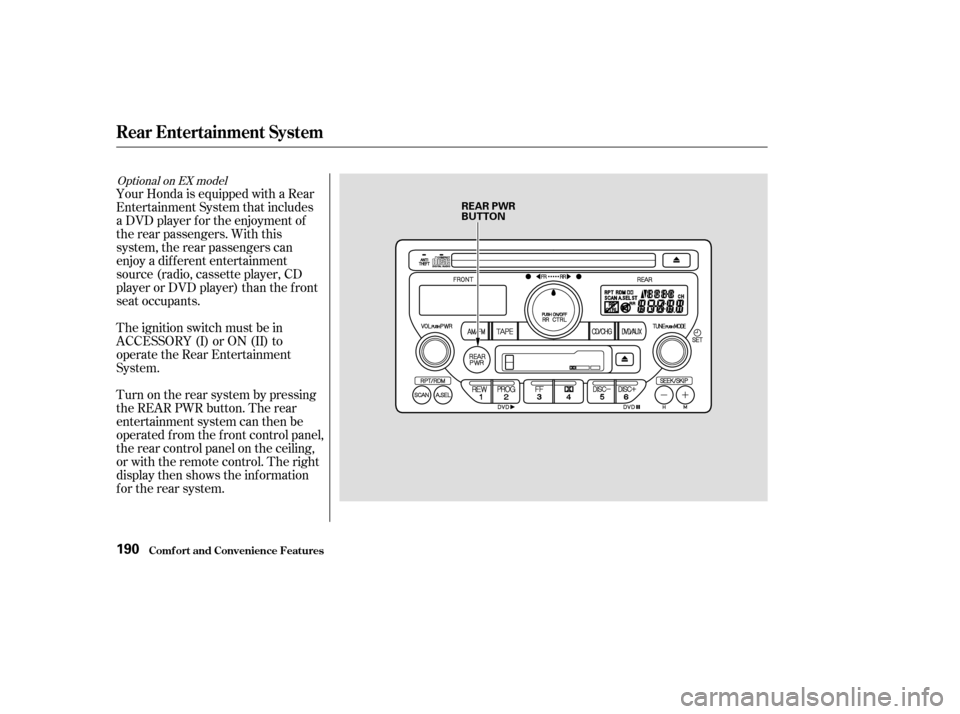
Your Honda is equipped with a Rear
Entertainment System that includes
a DVD player f or the enjoyment of
the rear passengers. With this
system, the rear passengers can
enjoy a dif f erent entertainment
source (radio, cassette player, CD
player or DVD player) than the f ront
seat occupants.
The ignition switch must be in
ACCESSORY (I) or ON (II) to
operate the Rear Entertainment
System.
Turn on the rear system by pressing
the REAR PWR button. The rear
entertainment system can then be
operated f rom the f ront control panel,
the rear control panel on the ceiling,
or with the remote control. The right
display then shows the inf ormation
f or the rear system.
Optional on EX model
Rear Entertainment System
Comf ort and Convenience Feat ures190
REAR PWR
BUTTON
Page 195 of 392
When the rear system is turned on, it
selects the entertainment source it
waslastsetto.Ifthatsourcehas
been removed (the DVD has been
ejected f rom the player, f or example),
youwillsee‘‘____’’inthedisplay.
You must select another source.
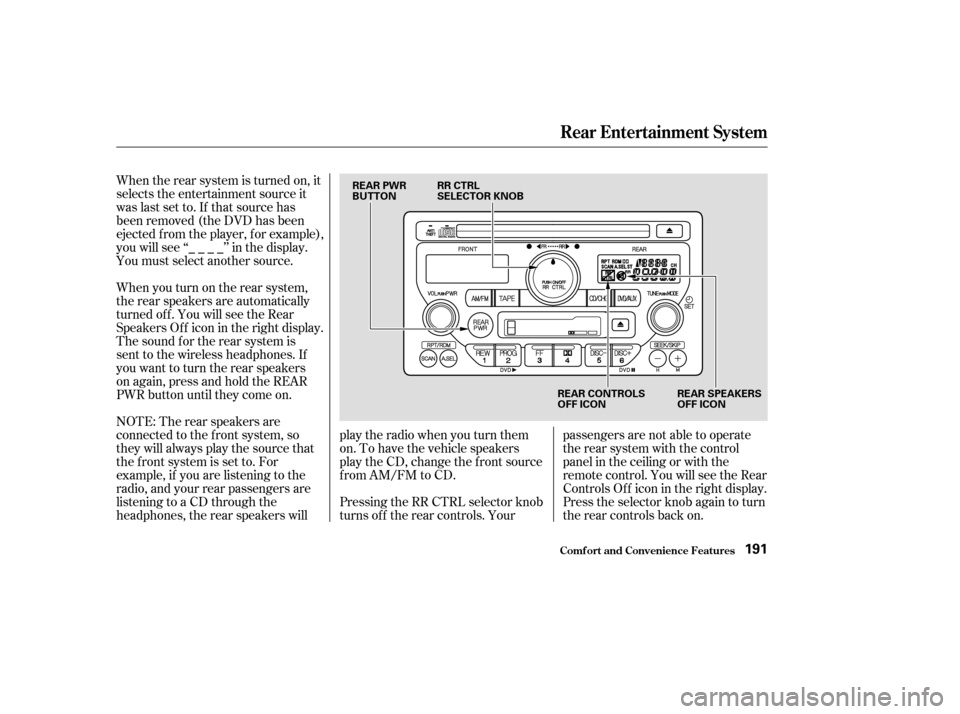
When you turn on the rear system,
the rear speakers are automatically
turned off. You will see the Rear
SpeakersOff iconintherightdisplay.
The sound f or the rear system is
sent to the wireless headphones. If
youwanttoturntherearspeakers
on again, press and hold the REAR
PWR button until they come on.
NOTE: The rear speakers are
connected to the f ront system, so
they will always play the source that
the f ront system is set to. For
example, if you are listening to the
radio, and your rear passengers are
listening to a CD through the
headphones, the rear speakers willplay the radio when you turn them
on. To have the vehicle speakers
play the CD, change the f ront source
f rom AM/FM to CD.
Pressing the RR CTRL selector knob
turns off the rear controls. Yourpassengers are not able to operate
the rear system with the control
panel in the ceiling or with the
remote control. You will see the Rear
ControlsOff iconintherightdisplay.
Press the selector knob again to turn
the rear controls back on.
Rear Entertainment System
Comf ort and Convenience Feat ures191
REAR PWR
BUTTON
RR CTRL
SELECTOR KNOB
REAR CONTROLS
OFF ICONREAR SPEAKERS
OFF ICON
Page 199 of 392
�Û�Ý
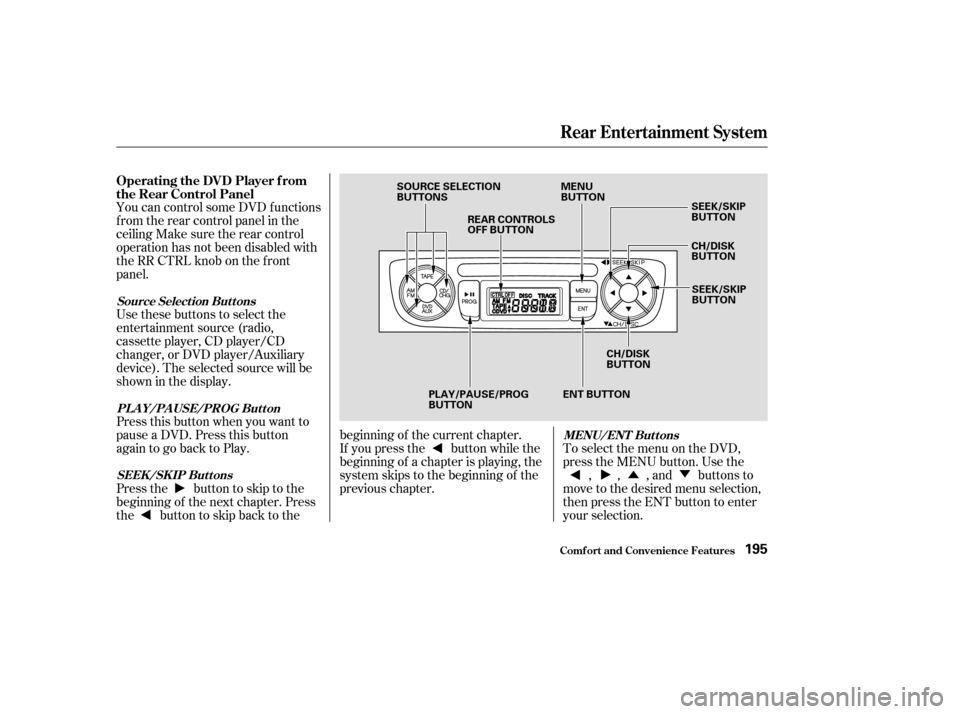
You can control some DVD f unctions
f rom the rear control panel in the
ceiling Make sure the rear control
operation has not been disabled with
theRRCTRLknobonthefront
panel.
Use these buttons to select the
entertainment source (radio,
cassette player, CD player/CD
changer, or DVD player/Auxiliary
device). The selected source will be
showninthedisplay.
Press this button when you want to
pause a DVD. Press this button
again to go back to Play.
To select the menu on the DVD,
press the MENU button. Use the
, , , and buttons to
move to the desired menu selection,
then press the ENT button to enter
your selection.
Pressthe buttontoskiptothe
beginning of the next chapter. Press
the buttontoskipbacktothe beginning of the current chapter.
If you press the button while the
beginning of a chapter is playing, the
system skips to the beginning of the
previous chapter.
Operating the DVD Player f rom
the Rear Control Panel
Source Select ion But t ons
PL A Y/PA USE/PROG But t on MENU/ENT But t ons
SEEK /SK IP But t ons
Rear Entertainment System
Comf ort and Convenience Feat ures195
SOURCE SELECTION
BUTTONS REAR CONTROLS
OFF BUTTON MENU
BUTTON
SEEK/SKIP
BUTTON
CH/DISK
BUTTON
SEEK/SKIP
BUTTON
CH/DISK
BUTTON
ENT BUTTON
PLAY/PAUSE/PROG
BUTTON
Page 200 of 392
You can control all of the DVD
functions with the remote control.
Make sure the rear control operation
has not been disabled with the RR
CTRL knob on the f ront panel.
When using the remote control,
point it at the rear control panel in
the ceiling.
Press this button to start playing a
DVD. Use these buttons to select the
entertainment source (radio,
cassette player, CD player/CD
changer, or DVD player/Auxiliary
device). The selected source will be
showninthedisplay. Operating the DVD Player with
the Remote Control
Source Select ion But t onsPL A Y/PROG Button
Rear Entertainment System
Comf ort and Convenience Feat ures196
SOURCE SELECTION
BUTTONS
REW/FWD BUTTONS STOP BUTTON PAUSE BUTTON
PLAY/PROG BUTTON
MENU BUTTON
SUBTITLE BUTTON
AUDIO BUTTON
ANGLE BUTTON
TITLE BUTTON SEEK/SKIP BUTTONS
DISP BUTTON RETURN (T/C) BUTTON
Page 206 of 392

�Û
�Ý
Select the radio with the AM/FM
buttononthefrontpanel,therear
control panel, or the remote control.
From the front panel, after selecting
the rear system with the RR CTRL
knob, use the TUNE, SEEK, or
SCAN f unctions or the Preset
buttons to select a station.
From the rear control panel in the
ceiling, use the and buttons to select the stations
that are set into the Preset buttons.
Pressing the or button will
cause the system to search up or
down the band for a station with a
strong signal. You will see SEEK in
the display.
To change Preset stations with the
remote control, press the or button. To search for strong
stations, press the or button.
After loading the cassette, select the
cassette player with the TAPE
buttononthefrontpanel,therear
control panel, or the remote control.
On the rear control panel, use the
PROG/PLAY button to reverse the
tape’s direction. Use the and buttons to skip. Press the
button to skip forward to the
beginning of the next song or
passage. You will see FF f lashing in
the display. Press the button to
skip backward to the beginning of
the current song or passage. You will
seeREVflashinginthedisplay. On the remote control, use the
PROG/PLAY button to reverse the
tape’s direction. Press the FWD or
REW button to f ast f orward or
rewind the tape. Press either of
those buttons or the PROG/PLAY
button to return to playing the tape.
To skip to the beginning of the next
song or passage, press the
button. You will see FF
flashinginthedisplay.Toskiptothe
beginning of the current song or
passage, press the button. You
will see REV f lashing in the display.
To operate the cassette player from
the f ront panel, ref er to page .
Make sure you have selected the
rear system with the RR CTRL knob
first.
178
Playing the Radio With the Rear
Entertainment SystemPlaying a Cassette With the Rear
Entertainment System
Rear Entertainment System
Comf ort and Convenience Feat ures202
Page 210 of 392
Once the security system is set,
opening any door (without using the
key or the remote transmitter), or
the hood, will cause it to alarm. It
also alarms if the radio is removed
f rom the dashboard or the wiring is
cut.Do not attempt to alter this system
or add other devices to it. The security system will not set if
the hood, tailgate, or any door is not
f ully closed. If the system will not set,
check the Door and Tailgate Open
Monitor on the instrument panel
(see page ) to see if the doors and
tailgate are f ully closed. Since it is
notpartofthemonitordisplay,
manually check the hood.
The security system helps to protect
your vehicle and valuables f rom thef t.
The horn sounds and a combination
of headlights, parking lights, side
marker lights, and taillights f lash if
someone attempts to break into your
vehicleorremovetheradio.This
alarm continues f or two minutes,
then the system resets. To reset an
alarming system before the two
minutes have elapsed, unlock the
driver’s f ront door with the key or
the remote transmitter.
The security system sets auto-
matically, f if teen seconds af ter you
lock the doors, hood, and tailgate.
For the system to activate, you must
lock the doors f rom the outside with
the key, or remote transmitter. The
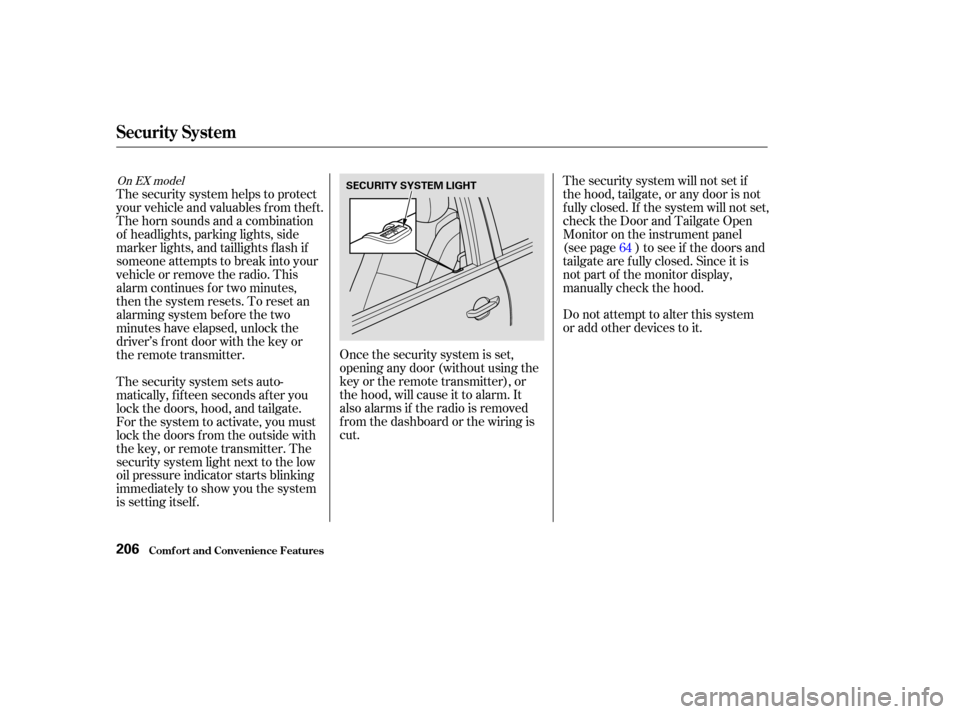
security system light next to the low
oil pressure indicator starts blinking
immediately to show you the system
is setting itself . 64
On EX model
Security System
Comf ort and Convenience Feat ures206
SECURITY SYSTEM LIGHT