Page 6 of 415
�Î
�Î
To use the horn, press the pad around the ‘‘H’’ logo.
:
Your Vehicle at a Glance
3
TRACTION CONTROL SYSTEM
POWER SLIDING
DOOR SWITCHES HEADLIGHTS/
TURN SIGNALS
HAZARD WARNING
LIGHTSDIGITAL CLOCK
REAR WINDOW
DEFOGGERLIGHT CONTROL
SWITCH
WINDSHIELD
WIPERS/WASHERS
CRUISE
CONTROL
HORN
STEERING WHEEL
ADJUSTMENT
REMOTE AUDIO
CONTROLS
CRUISE
CONTROL MIRROR
CONTROLS
PASSENGER
AIRBAG CUTOFF
INDICATOR
(P. 62)
(P.269)
(P.103) (P.82/
84)
(P.128) (P.199) (P.88) (P.84/
86) (P.139)
(P.
87)
(P.130)
(P.87)
(P.235)
(P.235)
Page 74 of 415
�Î
�Î
�Î
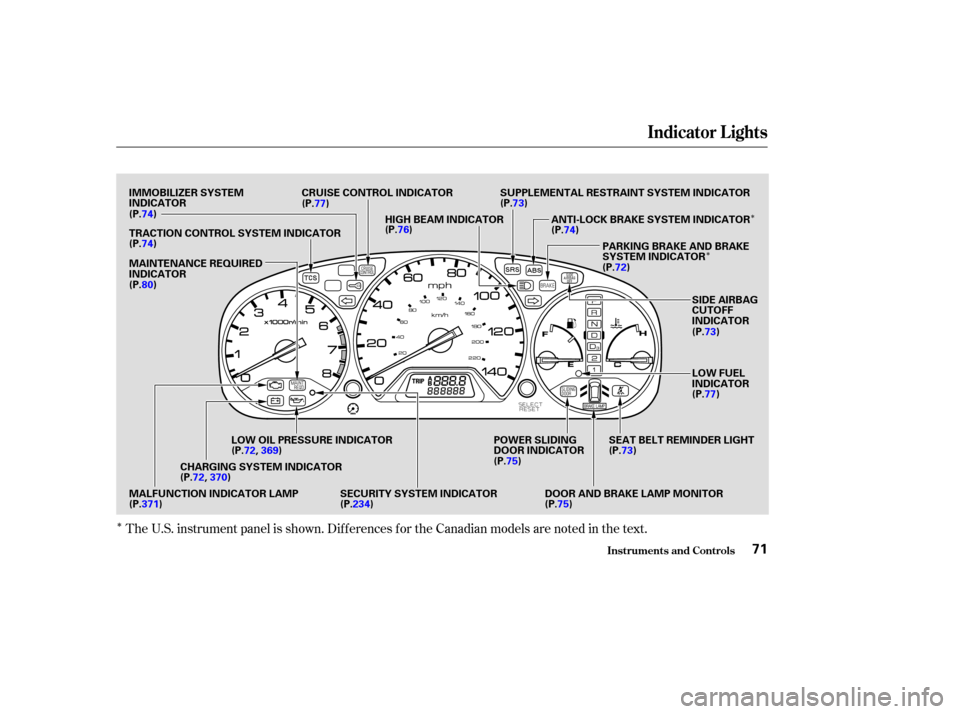
The U.S. instrument panel is shown. Dif f erences f or the Canadian models are noted in the text.
Indicator L ights
Inst rument s and Cont rols71
IMMOBILIZER SYSTEM
INDICATOR CRUISE CONTROL INDICATOR
HIGH BEAM INDICATOR SUPPLEMENTAL RESTRAINT SYSTEM INDICATOR
ANTI-LOCK BRAKE SYSTEM INDICATORPARKING BRAKE AND BRAKE
SYSTEM INDICATOR
SIDE AIRBAG
CUTOFF
INDICATOR
LOW FUEL
INDICATOR
SEAT BELT REMINDER LIGHT
DOOR AND BRAKE LAMP MONITOR
POWER SLIDING
DOOR INDICATOR
SECURITY SYSTEM INDICATOR
LOW OIL PRESSURE INDICATOR
CHARGING SYSTEM INDICATOR
MALFUNCTION INDICATOR LAMP MAINTENANCE REQUIRED
INDICATOR TRACTION CONTROL SYSTEM INDICATOR (P.74)
(P.74)
(P.80) (P.77)
(P.76) (P.73)
(P.74)
(P.72)
(P.73)
(P.77)
(P.73)
(P. 75)
(P.75)
(P.371) (P.72,
369)
(P.72, 370)
(P.234)
Page 80 of 415
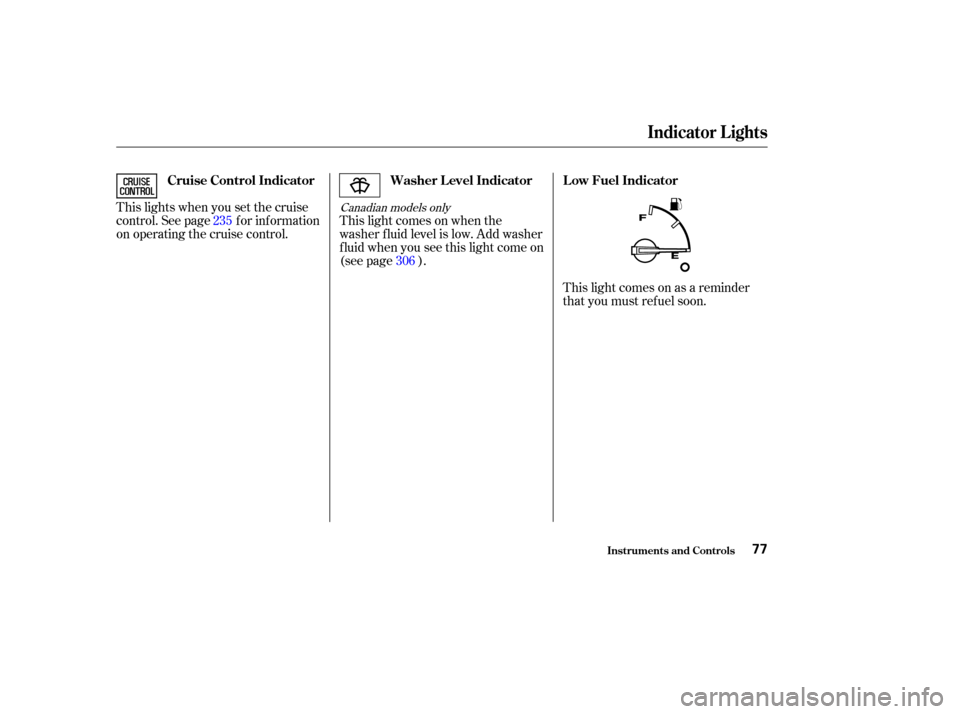
This lights when you set the cruise
control. See page f or inf ormation
on operating the cruise control.This light comes on when the
washer f luid level is low. Add washer
f luid when you see this light come on
(see page ).
This light comes on as a reminder
that you must ref uel soon.
306
235Canadian models only
Indicator L ights
Inst rument s and Cont rols
Cruise Control Indicator
Washer L evel Indicator L ow Fuel Indicator
77
Page 84 of 415
�Î
�Î
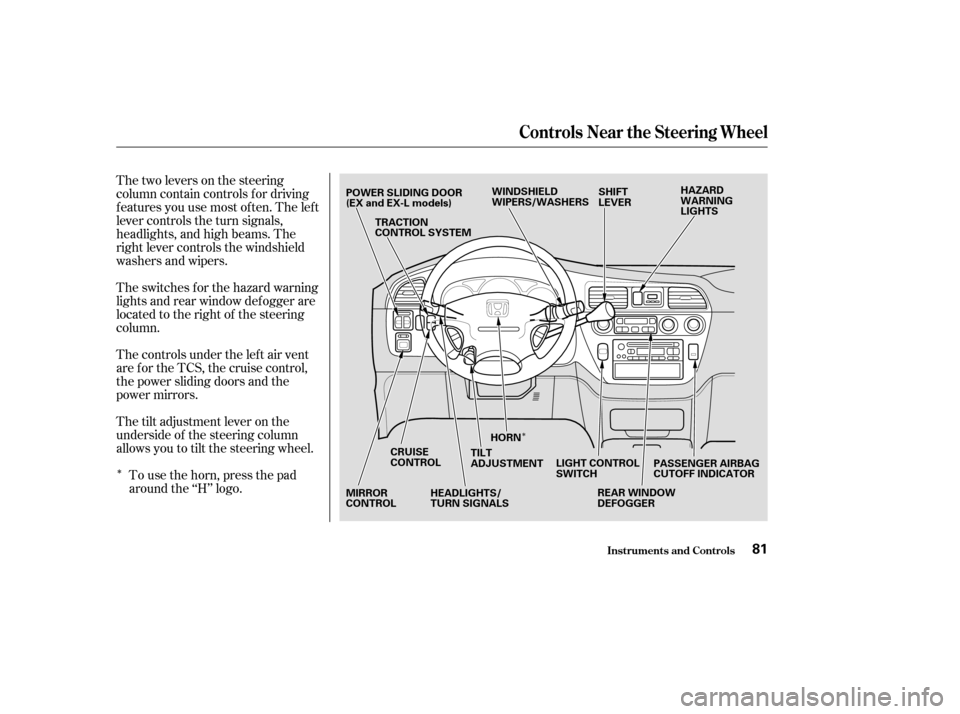
Thetwoleversonthesteering
column contain controls f or driving
f eatures you use most of ten. The lef t
lever controls the turn signals,
headlights, and high beams. The
right lever controls the windshield
washers and wipers.
The switches for the hazard warning
lights and rear window def ogger are
located to the right of the steering
column.
The controls under the lef t air vent
arefortheTCS,thecruisecontrol,
the power sliding doors and the
power mirrors.
The tilt adjustment lever on the
underside of the steering column
allows you to tilt the steering wheel.To use the horn, press the pad
around the ‘‘H’’ logo.
Inst rument s and Cont rols
Controls Near the Steering Wheel
81
POWER SLIDING DOOR
(EX and EX-L models) TRACTION
CONTROL SYSTEM HAZARD
WARNING
LIGHTS
PASSENGER AIRBAG
CUTOFF INDICATOR
WINDSHIELD
WIPERS/WASHERS
SHIFT
LEVER
REAR WINDOW
DEFOGGER
LIGHT CONTROL
SWITCH
HORN
TILT
ADJUSTMENT
HEADLIGHTS/
TURN SIGNALS
CRUISE
CONTROL
MIRROR
CONTROL
Page 146 of 415

.....................
Heating and Cooling .144
.........
What Each Control Does . 144
............
How to Use the System . 147
..........
To Turn Everything Of f . 151
...............
Climate Control System . 152
(EX model and EX-L model without Navigation System) .......
Fully-automatic Operation . 154
.......
Semi-automatic Operation . 156
(EX-L model with Navigation System) .......
Fully-automatic Operation . 160
.......
Semi-automatic Operation . 161
Sunlight Sensor/ ............
Temperature Sensor . 165
...........................
Rear A/C Unit .166
.......................
Audio System (LX) .169
AM/FM/Cassette Stereo ........................
Audio System .169
.................
Operating the Radio . 170
.................
Adjusting the Sound . 173
............
Audio System Lighting . 174
Operating the Cassette .....................................
Player .174
............
Tape Search Functions . 174Operating the Optional CD
....................
Player/Changer .177
CD Changer Error .............................
Indications .180
............
Audio System (EX, EX-L) . 181
....
AM/FM/CD Audio System . 181
.................
Operating the Radio . 182
.................
Adjusting the Sound . 186
............
Audio System Lighting . 187
....................
Radio Frequencies . 187
........................
Radio Reception .187
.........
Operating the CD Player . 189
.....
Operating the CD Changer . 191
.......
Protecting Compact Discs . 192
....
CD Player Error Indications . 193
CD Changer Error .............................
Indications .194
Operating the Cassette .....................................
Player .195
............
Tape Search Functions . 196
Caring f or the Cassette .....................................
Player .198
...........
Remote Audio Controls . 199
.......................
Thef t Protection .200 Audio System (Optional on
..................
U.S. EX-L model) . 201
AM/FM/CD/DVD Audio ....................................
System .201
.................
Operating the Radio . 203
.................
Adjusting the Sound . 207
............
Audio System Lighting . 208
Operating the Cassette .....................................
Player .209
.........
Operating the CD Player . 212
.....
Operating the CD Changer . 214
....
CD Player Error Indications . 215
CD Changer Error .............................
Indications .216
........
Rear Entertainment System . 217
............................
Security System .234
...............................
Cruise Control .235
HomeLink Universal ................................
Transceiver .238
Comf ort and Convenience Features
Comf ort and Convenience Feat ures143
Page 238 of 415
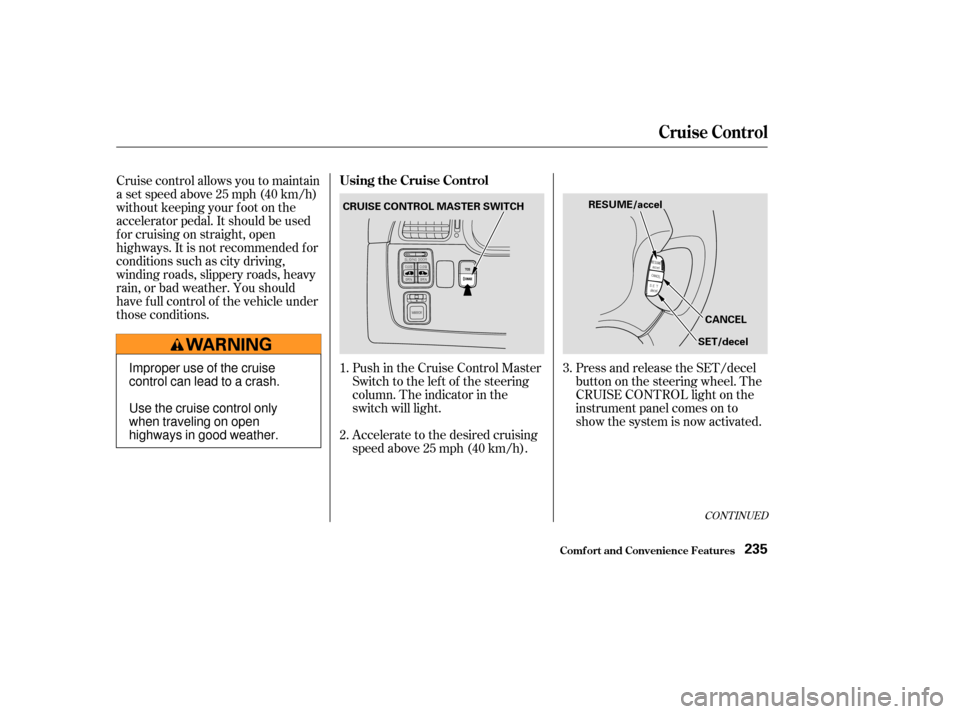
Push in the Cruise Control Master
Switch to the lef t of the steering
column. The indicator in the
switch will light.
Accelerate to the desired cruising
speedabove25mph(40km/h).Press and release the SET/decel
buttononthesteeringwheel.The
CRUISE CONTROL light on the
instrument panel comes on to
show the system is now activated.
Cruise control allows you to maintain
asetspeedabove25mph(40km/h)
without keeping your f oot on the
accelerator pedal. It should be used
f or cruising on straight, open
highways. It is not recommended f or
conditions such as city driving,
winding roads, slippery roads, heavy
rain, or bad weather. You should
have f ull control of the vehicle under
those conditions.
1.
2.3.
CONT INUED
Using the Cruise Control
Cruise Control
Comf ort and Convenience Feat ures235
CRUISE CONTROL MASTER SWITCH
RESUME/accel
CANCEL
SET/decel
Improper use of the cruise
control can lead to a crash.
Use the cruise control only
when traveling on open
highways in good weather.
Page 239 of 415

You can decrease the set cruising
speed in any of these ways:Press and hold the SET/decel
button. The vehicle will decelerate.
Release the button when you
reach the desired speed.
Tap the brake pedal lightly with
your f oot. The CRUISE
CONTROL light on the instru-
ment panel will go out. When the
vehicle slows to the desired speed,
press the SET/decel button. The
vehicle will then maintain the
desired speed.
You can increase the set cruising
speed in any of these ways:
Press and hold the RESUME/
accel button. The vehicle will
accelerate. When you reach the
desired cruising speed, release the
button.
Push on the accelerator pedal. Ac-
celerate to the desired cruising
speed and press the SET/decel
button.
Thecruisecontrolmaynotholdthe
set speed when you are going up and
down hills. If your speed increases
going down a hill, use the brakes to
slow down to the desired speed. This
will cancel the cruise control. To
resume the set speed, press the
RESUME/accel button. The
CRUISE CONTROL light on the
instrument panel comes on.
When climbing a steep hill, the
automatic transmission may
downshif t to hold the set speed.
To increase your speed in very
small amounts, tap the RESUME/
accel button repeatedly. Each time
you do this, your vehicle will speed
up about 1 mph (1.6 km/h).To slow down in very small
amounts, tap the SET/decel
button repeatedly. Each time you
do this, your vehicle will slow
down about 1 mph (1.6 km/h).
Changing the Set Speed
Cruise Control
Comf ort and Convenience Feat ures236
Page 240 of 415
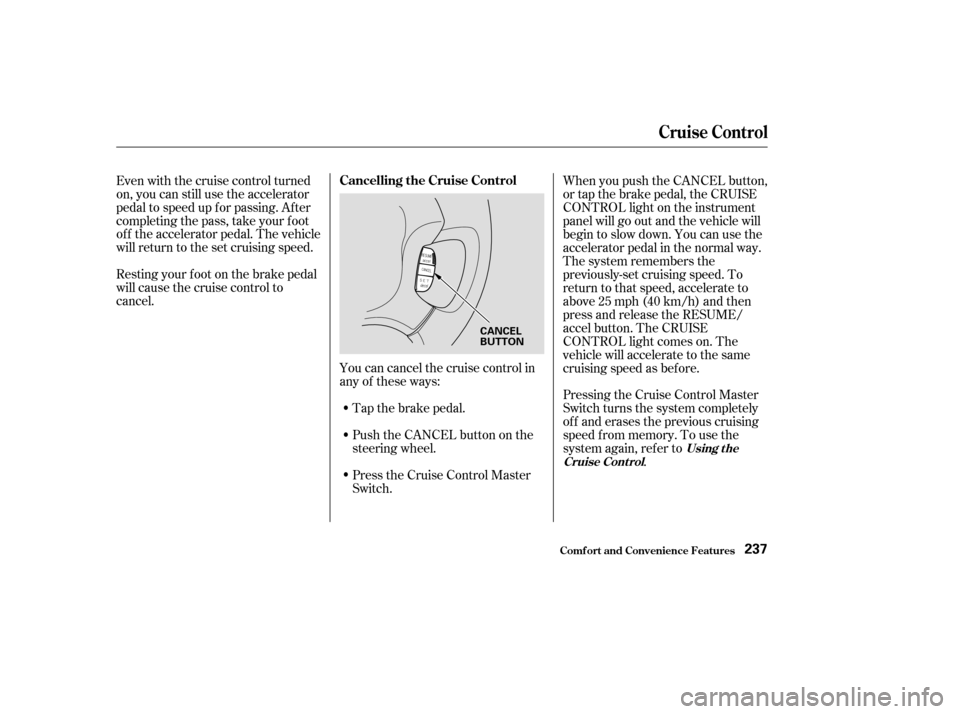
Youcancancelthecruisecontrolin
any of these ways:Push the CANCEL button on the
steering wheel.
Press the Cruise Control Master
Switch.
Even with the cruise control turned
on, you can still use the accelerator
pedal to speed up f or passing. Af ter
completing the pass, take your foot
of f the accelerator pedal. The vehicle
will return to the set cruising speed.
Resting your f oot on the brake pedal
will cause the cruise control to
cancel.
Tap the brake pedal.When you push the CANCEL button,
or tap the brake pedal, the CRUISE
CONTROL light on the instrument
panel will go out and the vehicle will
begin to slow down. You can use the
accelerator pedal in the normal way.
The system remembers the
previously-set cruising speed. To
return to that speed, accelerate to
above25mph(40km/h)andthen
press and release the RESUME/
accel button. The CRUISE
CONTROL light comes on. The
vehicle will accelerate to the same
cruising speed as bef ore.
Pressing the Cruise Control Master
Switch turns the system completely
of f and erases the previous cruising
speed f rom memory. To use the
system again, ref er to
.
Using t he
Cruise Cont rol
Cancelling the Cruise Control
Cruise Control
Comf ort and Convenience Feat ures237
CANCEL
BUTTON