Page 192 of 415
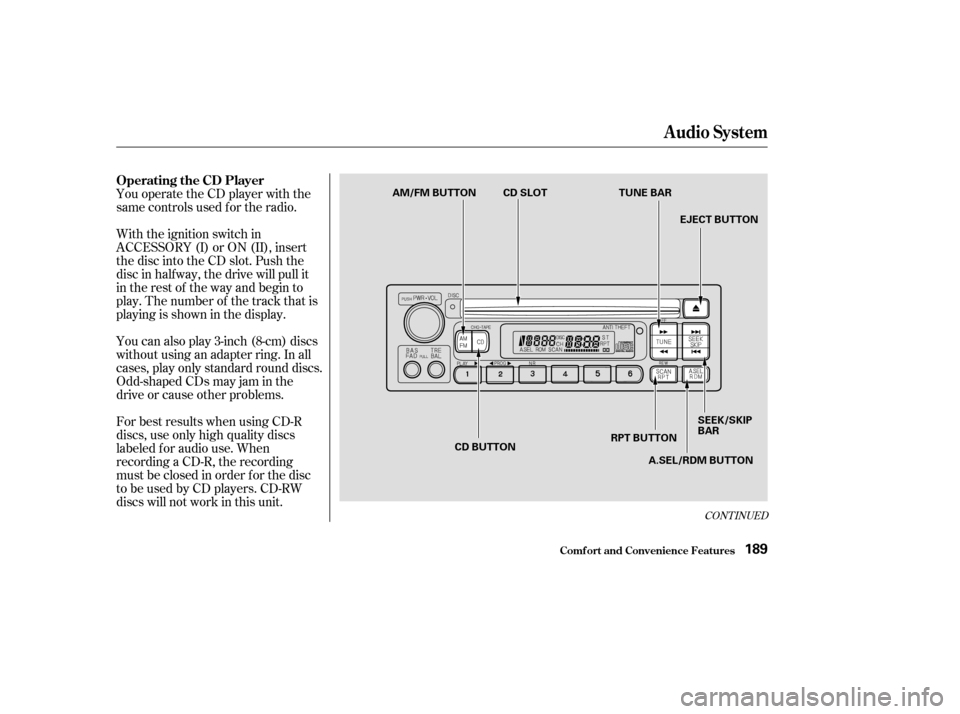
You operate the CD player with the
same controls used f or the radio.
With the ignition switch in
ACCESSORY (I) or ON (II), insert
the disc into the CD slot. Push the
disc in half way, the drive will pull it
in the rest of the way and begin to
play. The number of the track that is
playing is shown in the display.
You can also play 3-inch (8-cm) discs
without using an adapter ring. In all
cases, play only standard round discs.
Odd-shaped CDs may jam in the
driveorcauseotherproblems.
For best results when using CD-R
discs, use only high quality discs
labeled f or audio use. When
recording a CD-R, the recording
must be closed in order f or the disc
to be used by CD players. CD-RW
discs will not work in this unit.
CONT INUED
Audio System
Comf ort and Convenience Feat ures
Operating the CD Player
189
AM/FM BUTTON CD SLOTTUNE BAR
EJECT BUTTON
SEEK/SKIP
BAR
A.SEL/RDM BUTTON
RPT BUTTON
CD BUTTON
Page 193 of 415

�µ�µ
You can use the TUNE and SEEK/
SKIP bars while a disc is playing to
select passages and change tracks.
To move rapidly within a track, press
andholdtheTUNEbar.Pressthe
side to move forward. You will
seeCUEinthedisplay.Pressthe side to move backward. You
will see REW displayed. Release the
bar when the system reaches the
point you want.
Each time you press and release the side of the SEEK/SKIP bar,
the system skips forward to the
beginning of the next track. Press
the sidetoskipbackwardtothe
beginning of the current track. Press
it again to skip to the beginning of
the previous track. To activate the Repeat
f eature, press and release the RPT
button. You will see RPT in the
display. The system continuously
replays the current track. Press the
RPT button again to turn it off.
This feature,
when activated, plays the tracks on
the CD in random order, rather than
in the order they are recorded on the
CD. To activate Random Play, press
and release the A. SEL/RDM button.
You will see RDM in the display. The
system will then select and play
tracks randomly. This continues
until you deactivate Random Play by
pressing A. SEL/RDM again.
If the system is in Repeat mode, you
must turn it of f by pressing the RPT
button bef ore selecting Random Play.
When the system reaches the end of
the disc, it will return to the begin-
ning and play the disc again.
You can switch to the radio while a
CD is playing by pressing the AM/
FM button. Press the CD button to
return to playing the CD. The CD
will begin playing where it lef t of f .
If you turn the system of f while a CD
is playing, either with the PWR/VOL
knob or by turning off the ignition,
the disc will stay in the drive. When
youturnthesystembackon,theCD
will begin playing where it lef t of f .
Press the eject button to remove the
disc f rom the drive.
If you eject the disc, but do not
remove it from the slot, the system
will automatically reload the disc
af ter 15 seconds and put the CD
player in pause mode. To begin
playing the disc, press the CD button.
Audio System
Comf ort and Convenience Feat ures
REPEAT
RANDOM PLAY
190
Page 199 of 415

�Û�µ
The tape direction indicator will light
to show you which side of the
cassette is playing. The indicates
thesideyouinsertedfacingupward
is now playing. If you want to play
the other side, press the PROG
button.
Dolby noise reduction turns on when
you insert a cassette. If the tape was
not recorded with Dolby noise
reduction, turn it of f by pressing the
NR button. With a cassette playing, you can use
the FF, REW, SKIP, or REPEAT
f unction to f ind a desired program.
If you turn the system of f while a
tape is playing, either with the PWR/
VOL knob or by turning of f the
ignition, the cassette will remain in
the drive. When you turn the system
back on, the cassette player will be in
pause mode. To begin playing, press
the PLAY button.
To switch to the radio or CD player
while a tape is playing, press the
AM/FM, or CD button. To change
back to the cassette player, push the
CD button. Fast Forward and
Rewind move the tape rapidly. Press
and release the side of the
TUNE bar to fast forward the tape,
or the side to rewind. You
will see FF or REW f lashing in the
display. To stop f ast f orward or
rewind, press either side of the
TUNE bar or the PLAY button. If the
system reaches the end of the tape
while in f ast f orward or rewind, it
automatically stops that function,
reverses direction, and begins to play.
Noise reduction remains of f until you
turn it on by pressing the button
again.
When the system reaches the end of
the tape, it will automatically reverse
direction and play the other side. If
you want to remove the cassette
f rom the drive, press the EJECT
button on the cassette player.
Audio System
Comf ort and Convenience Feat ures
T ape Search Functions
FF/REW
196
Page 206 of 415
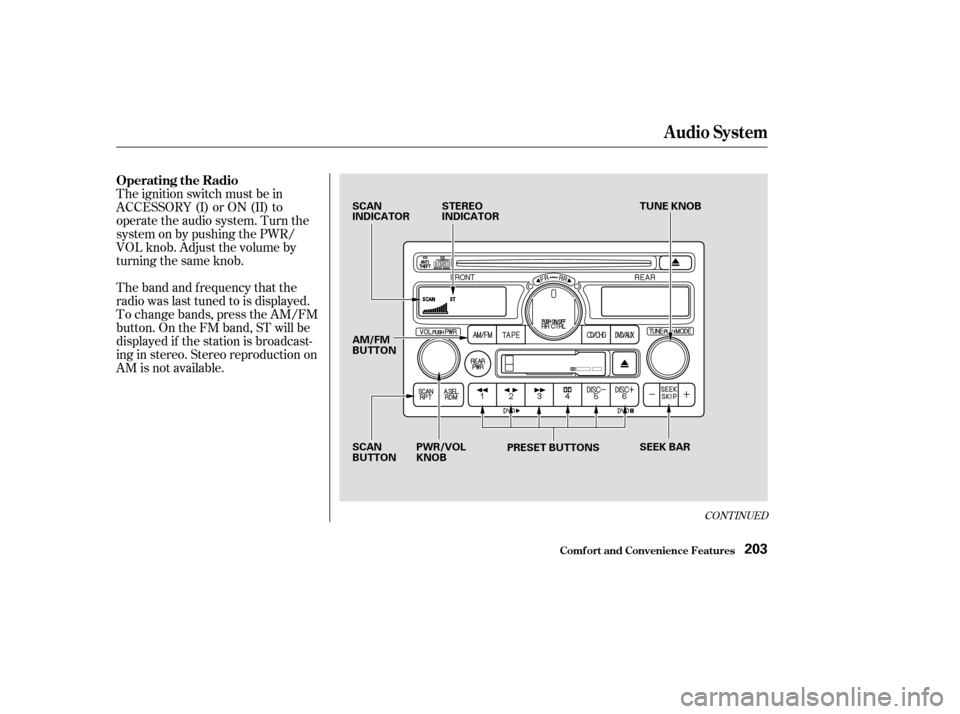
The ignition switch must be in
ACCESSORY (I) or ON (II) to
operate the audio system. Turn the
system on by pushing the PWR/
VOL knob. Adjust the volume by
turning the same knob.
The band and f requency that the
radio was last tuned to is displayed.
To change bands, press the AM/FM
button. On the FM band, ST will be
displayed if the station is broadcast-
ing in stereo. Stereo reproduction on
AM is not available.
CONT INUED
Operating the Radio
Audio System
Comf ort and Convenience Feat ures203
SCAN
INDICATORSTEREO
INDICATOR TUNE KNOB
SEEK BAR
PRESET BUTTONS
SCAN
BUTTON PWR/VOL
KNOB
AM/FM
BUTTON
Page 212 of 415
�Û
CONT INUED
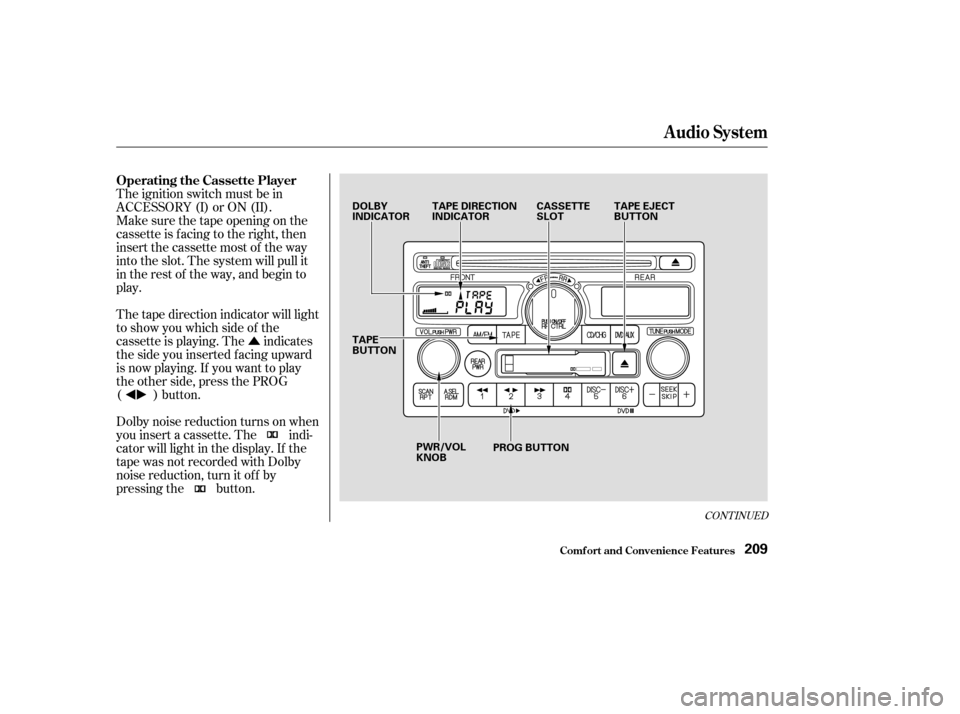
The ignition switch must be in
ACCESSORY (I) or ON (II).
Make sure the tape opening on the
cassette is facing to the right, then
insert the cassette most of the way
into the slot. The system will pull it
in the rest of the way, and begin to
play.
The tape direction indicator will light
to show you which side of the
cassette is playing. The indicates
thesideyouinsertedfacingupward
is now playing. If you want to play
the other side, press the PROG
( ) button.
Dolby noise reduction turns on when
you insert a cassette. The indi-
cator will light in the display. If the
tape was not recorded with Dolby
noise reduction, turn it of f by
pressing the button.
Audio System
Comf ort and Convenience Feat ures
Operating the Cassette Player
209
DOLBY
INDICATORTAPE DIRECTION
INDICATOR CASSETTE
SLOTTAPE EJECT
BUTTON
TAPE
BUTTON PWR/VOL
KNOB PROG BUTTON
Page 213 of 415
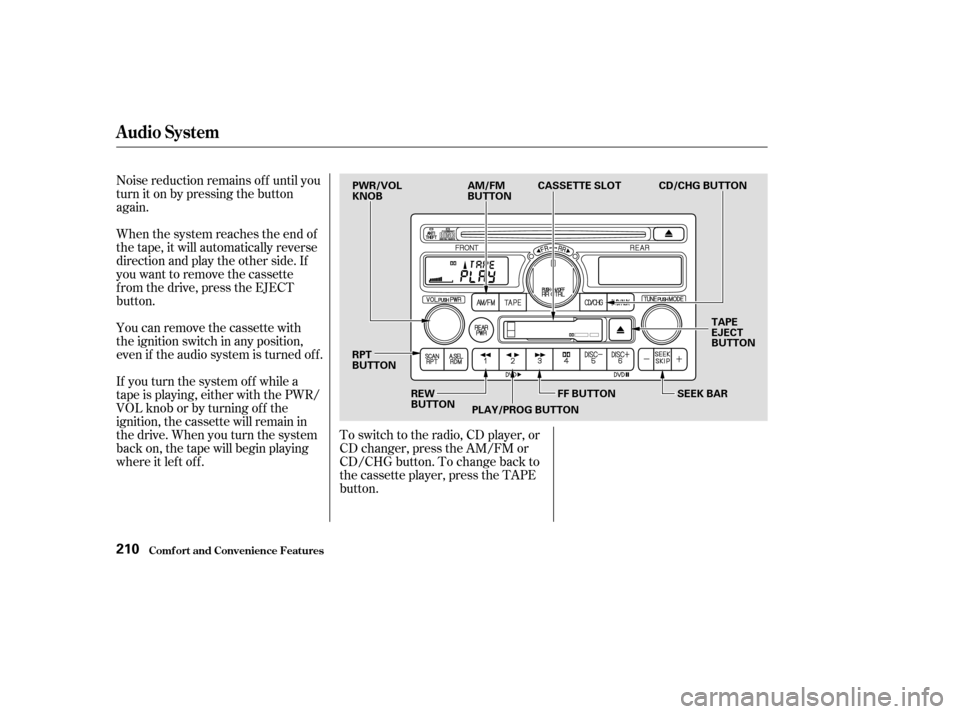
Noise reduction remains of f until you
turn it on by pressing the button
again.
When the system reaches the end of
the tape, it will automatically reverse
direction and play the other side. If
you want to remove the cassette
f rom the drive, press the EJECT
button.
You can remove the cassette with
the ignition switch in any position,
even if the audio system is turned of f .
If you turn the system of f while a
tape is playing, either with the PWR/
VOL knob or by turning of f the
ignition, the cassette will remain in
the drive. When you turn the system
back on, the tape will begin playing
where it lef t of f .To switch to the radio, CD player, or
CD changer, press the AM/FM or
CD/CHG button. To change back to
the cassette player, press the TAPE
button.
Audio System
Comf ort and Convenience Feat ures210
PWR/VOL
KNOB
AM/FM
BUTTONCASSETTE SLOT
TAPE
EJECT
BUTTON
SEEK BAR
FF BUTTON
PLAY/PROG BUTTON
REW
BUTTON
RPT
BUTTON CD/CHG BUTTON
Page 215 of 415
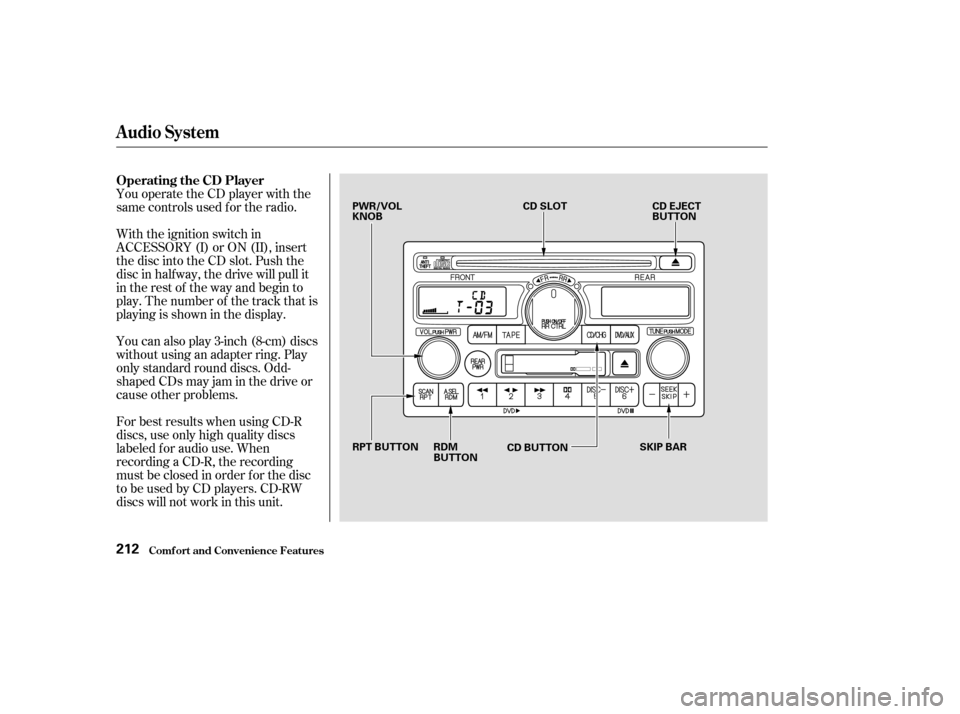
You operate the CD player with the
same controls used f or the radio.
With the ignition switch in
ACCESSORY (I) or ON (II), insert
the disc into the CD slot. Push the
disc in half way, the drive will pull it
in the rest of the way and begin to
play. The number of the track that is
playing is shown in the display.
You can also play 3-inch (8-cm) discs
without using an adapter ring. Play
only standard round discs. Odd-
shaped CDs may jam in the drive or
cause other problems.
For best results when using CD-R
discs, use only high quality discs
labeled f or audio use. When
recording a CD-R, the recording
must be closed in order f or the disc
to be used by CD players. CD-RW
discs will not work in this unit.
Audio System
Comf ort and Convenience Feat ures
Operating the CD Player
212
PWR/VOL
KNOBCD SLOT
CD EJECT
BUTTON
SKIP BAR
CD BUTTON
RDM
BUTTON
RPT BUTTON
Page 216 of 415

�µ�µ
�´
�µ
�´ �µ
When the system reaches the end of
the disc, it will return to the begin-
ning and play the disc again.
You can switch to the radio while a
CD is playing by pressing the AM/
FM button. Press the CD button to
return to playing the CD. The CD
will begin playing where it lef t of f .
If you turn the system of f while a CD
is playing, either with the PWR/VOL
knob or by turning off the ignition,
the disc will stay in the drive. When
youturnthesystembackon,theCD
will begin playing where it lef t of f .
Press the eject button to remove the
disc f rom the drive.
If you eject the disc, but do not
remove it from the slot, the system
will automatically reload the disc
af ter 15 seconds and put the CD
player in pause mode. To begin
playing the disc, press the CD button. You can use the SEEK/SKIP bar
while a disc is playing to select
passages and change tracks.
To move rapidly within a track, press
andholdtheSEEK/SKIPbar.Press
the side to move f orward. You
will see CUE in the display. Press the
side to move backward. You
will see REW displayed. Release the
bar when the system reaches the
point you want.
Each time you press and release the side of the SEEK/SKIP bar,
the system skips forward to the
beginning of the next track. Press
and release the side to skip
backward to the beginning of the
current track. Press it again to skip
to the beginning of the previous
track. To activate the Repeat
f eature, press and release the RPT
button. You will see RPT in the
display. The system continuously
replays the current track. Press the
RPT button again to turn it off.
This feature,
when activated, plays the tracks on
the CD in random order, rather than
in the order they are recorded on the
CD. To activate Random Play, press
and release the A. SEL/RDM button.
You will see RDM in the display. The
system will then select and play
tracks randomly. This continues
until you deactivate Random Play by
pressing A. SEL/RDM again.
Audio System
Comf ort and Convenience Feat ures
REPEAT
RANDOM PLAY
213