Page 220 of 415
CONT INUED
Your Honda is equipped with a Rear
Entertainment System that includes
a DVD player f or the enjoyment of
the rear passengers. With this
system, the rear passengers can
enjoy a dif f erent entertainment
source (radio, cassette player, CD
player or DVD player) than the f ront
seat occupants.
The ignition switch must be in
ACCESSORY (I) or ON (II) to
operate the Rear Entertainment
System.
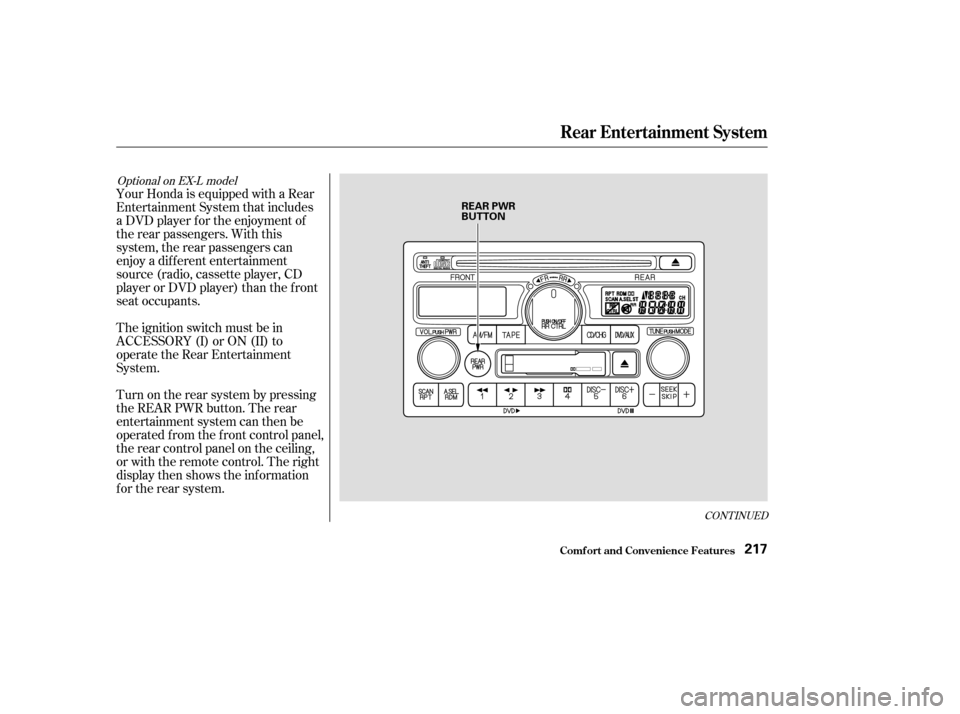
Turn on the rear system by pressing
the REAR PWR button. The rear
entertainment system can then be
operated f rom the f ront control panel,
the rear control panel on the ceiling,
or with the remote control. The right
display then shows the inf ormation
f or the rear system.
Optional on EX-L model
Comf ort and Convenience Feat ures
Rear Entertainment System
217
REAR PWR
BUTTON
Page 221 of 415
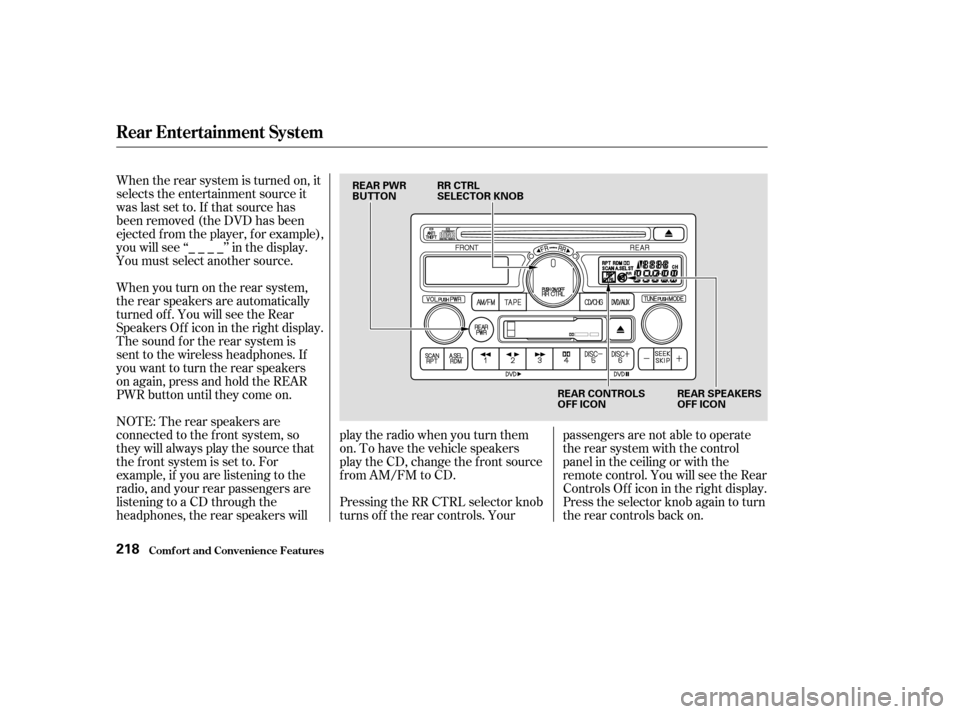
When the rear system is turned on, it
selects the entertainment source it
waslastsetto.Ifthatsourcehas
been removed (the DVD has been
ejected f rom the player, f or example),
youwillsee‘‘____’’inthedisplay.
You must select another source.
When you turn on the rear system,
the rear speakers are automatically
turned off. You will see the Rear
SpeakersOff iconintherightdisplay.
The sound f or the rear system is
sent to the wireless headphones. If
youwanttoturntherearspeakers
on again, press and hold the REAR
PWR button until they come on.
NOTE: The rear speakers are
connected to the f ront system, so
they will always play the source that
the f ront system is set to. For
example, if you are listening to the
radio, and your rear passengers are
listening to a CD through the
headphones, the rear speakers willplay the radio when you turn them
on. To have the vehicle speakers
play the CD, change the f ront source
f rom AM/FM to CD.
Pressing the RR CTRL selector knob
turns off the rear controls. Yourpassengers are not able to operate
the rear system with the control
panel in the ceiling or with the
remote control. You will see the Rear
ControlsOff iconintherightdisplay.
Press the selector knob again to turn
the rear controls back on.
Comf ort and Convenience Feat ures
Rear Entertainment System
218
REAR PWR
BUTTON
RR CTRL
SELECTOR KNOB
REAR CONTROLS
OFF ICONREAR SPEAKERS
OFF ICON
Page 222 of 415
�Î
�Î
The DVD player in your Rear
Entertainment System can play DVD
video discs and CDs. It features
Dolby noise reduction. The video
screen is designed f or use by the
rear seat passengers only.
The driver and f ront seat passenger
should not try to view the screen
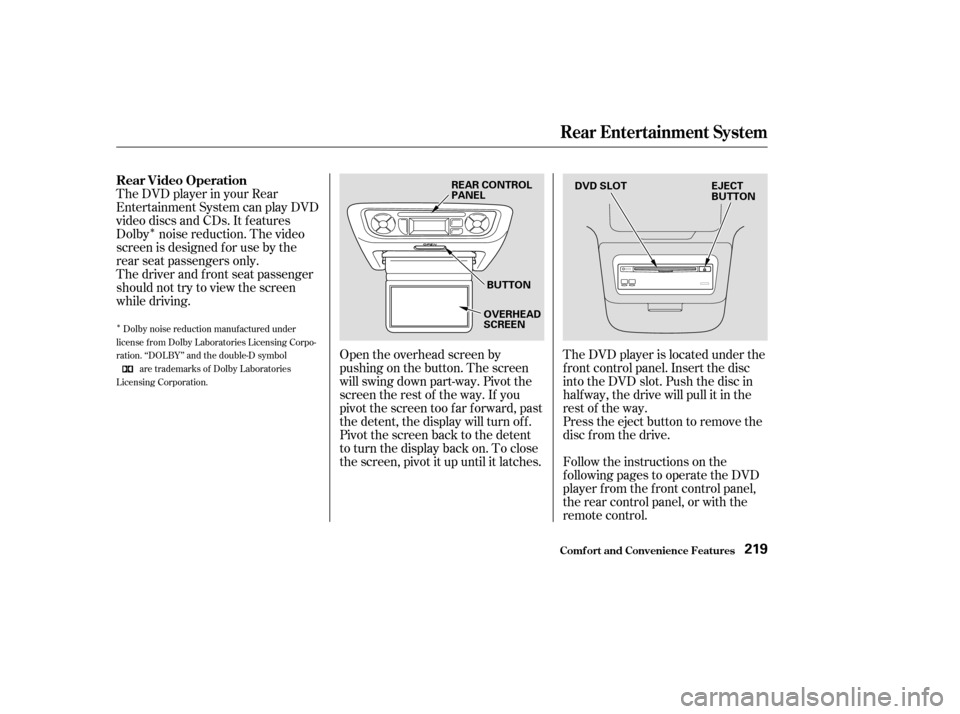
while driving.Open the overhead screen by
pushingonthebutton.Thescreen
will swing down part-way. Pivot the
screen the rest of the way. If you
pivot the screen too far forward, past
the detent, the display will turn off.
Pivot the screen back to the detent
to turn the display back on. To close
the screen, pivot it up until it latches.The DVD player is located under the
f ront control panel. Insert the disc
into the DVD slot. Push the disc in
half way, the drive will pull it in the
rest of the way.
Press the eject button to remove the
disc f rom the drive.
Follow the instructions on the
f ollowing pages to operate the DVD
player f rom the f ront control panel,
the rear control panel, or with the
remote control.
Dolby noise reduction manuf actured under
license from Dolby Laboratories Licensing Corpo-
ration. ‘‘DOLBY’’ and the double-D symbol are trademarks of Dolby Laboratories
Licensing Corporation.
Rear Entertainment System
Comf ort and Convenience Feat ures
Rear Video Operation
219
REAR CONTROL
PANEL
BUTTON
OVERHEAD
SCREEN DVD SLOT
EJECT
BUTTON
Page 226 of 415
CONT INUED
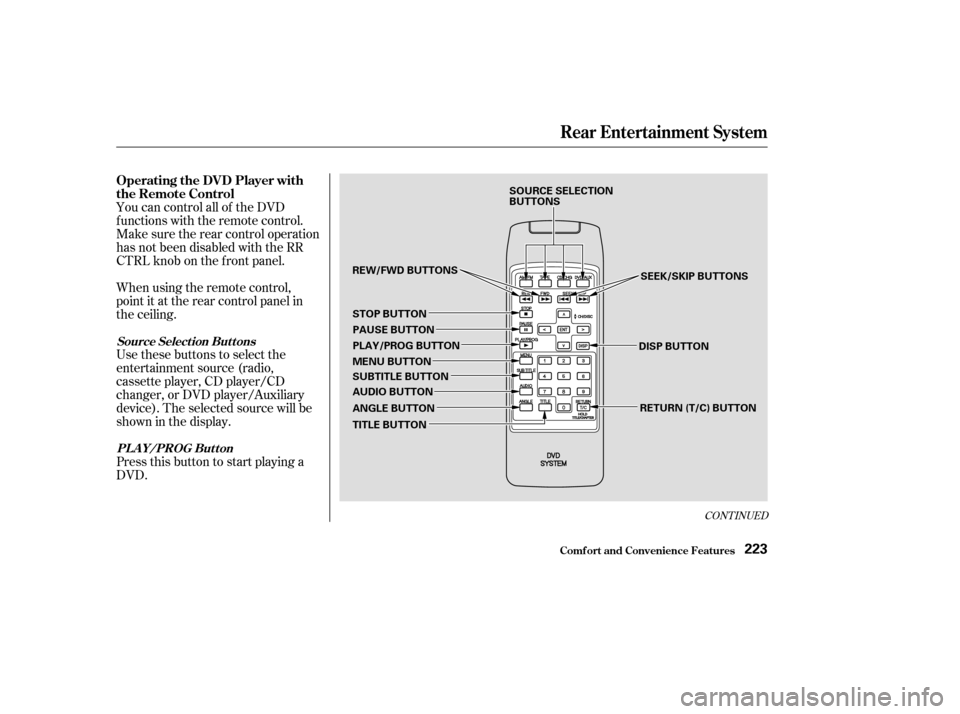
You can control all of the DVD
functions with the remote control.
Make sure the rear control operation
has not been disabled with the RR
CTRL knob on the f ront panel.
When using the remote control,
point it at the rear control panel in
the ceiling.
Press this button to start playing a
DVD. Use these buttons to select the
entertainment source (radio,
cassette player, CD player/CD
changer, or DVD player/Auxiliary
device). The selected source will be
showninthedisplay.
Comf ort and Convenience Feat ures
Rear Entertainment System
Operating the DVD Player with
the Remote Control
Source Select ion But t onsPL A Y/PROG Button
223
SOURCE SELECTION
BUTTONS SEEK/SKIP BUTTONS
DISP BUTTON RETURN (T/C) BUTTON
REW/FWD BUTTONS
STOP BUTTON PAUSE BUTTON
PLAY/PROG BUTTON
MENU BUTTON
SUBTITLE BUTTON
AUDIO BUTTON
ANGLE BUTTON
TITLE BUTTON
Page 232 of 415

�Û
�Ý
Select the radio with the AM/FM
buttononthefrontpanel,therear
control panel, or the remote control.
From the front panel, after selecting
the rear system with the RR CTRL
knob, use the TUNE, SEEK, or
SCAN f unctions or the Preset
buttons to select a station.
From the rear control panel in the
ceiling, use the and buttons to select the stations
that are set into the Preset buttons.
Pressing the or button will
cause the system to search up or
down the band for a station with a
strong signal. You will see SEEK in
the display.
To change Preset stations with the
remote control, press the or button. To search for strong
stations, press the or button.
After loading the cassette, select the
cassette player with the TAPE
buttononthefrontpanel,therear
control panel, or the remote control.
On the rear control panel, use the
PROG/PLAY button to reverse the
tape’s direction. Use the and buttons to skip. Press the
button to skip forward to the
beginning of the next song or
passage. You will see FF f lashing in
the display. Press the button to
skip backward to the beginning of
the current song or passage. You will
seeREVflashinginthedisplay. To operate the cassette player from
the f ront panel, ref er to page .
Make sure you have selected the
rear system with the RR CTRL knob
first. On the remote control, use the
PROG/PLAY button to reverse the
tape’s direction. Press the FWD or
REW button to f ast f orward or
rewind the tape. Press either of
those buttons or the PROG/PLAY
button to return to playing the tape.
To skip to the beginning of the next
song or passage, press the
button. You will see FF
flashinginthedisplay.Toskiptothe
beginning of the current song or
passage, press the button. You
will see REW f lashing in the display.
209
Playing the Radio With the Rear
Entertainment SystemPlaying a Cassette With the Rear
Entertainment System
Rear Entertainment System
Comf ort and Convenience Feat ures229
Page 233 of 415
As required by the FCC:This device complies with Part 15 of theFCC rules. Operation is subject to thef ollowing two conditions: (1) This devicemay not cause harmf ul interf erence, and(2) this device must accept anyinterf erence received, includinginterf erence that may cause undesiredoperation.
Changes or modif ications not expresslyapproved by the party responsible f orcompliance could void the user’sauthority to operate the equipment.
This device complies with IndustryCanada Standard RSS-210.Operation is subject to the f ollowing twoconditions: (1) this device may not causeinterf erence, and (2) this device mustaccept any interf erence that may causeundesired operation of the device.
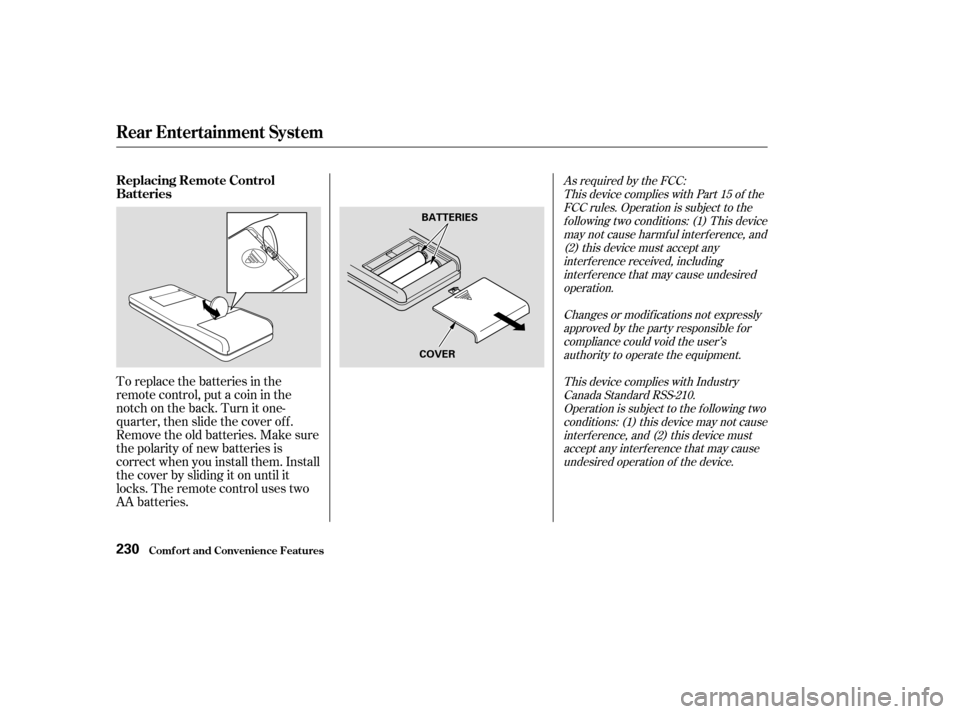
To replace the batteries in the
remote control, put a coin in the
notch on the back. Turn it one-
quarter, then slide the cover of f .
Remove the old batteries. Make sure
the polarity of new batteries is
correct when you install them. Install
the cover by sliding it on until it
locks. The remote control uses two
AA batteries.
Rear Entertainment System
Comf ort and Convenience Feat ures
Replacing Remote Control
Batteries
230
BATTERIES
COVER
Page 234 of 415
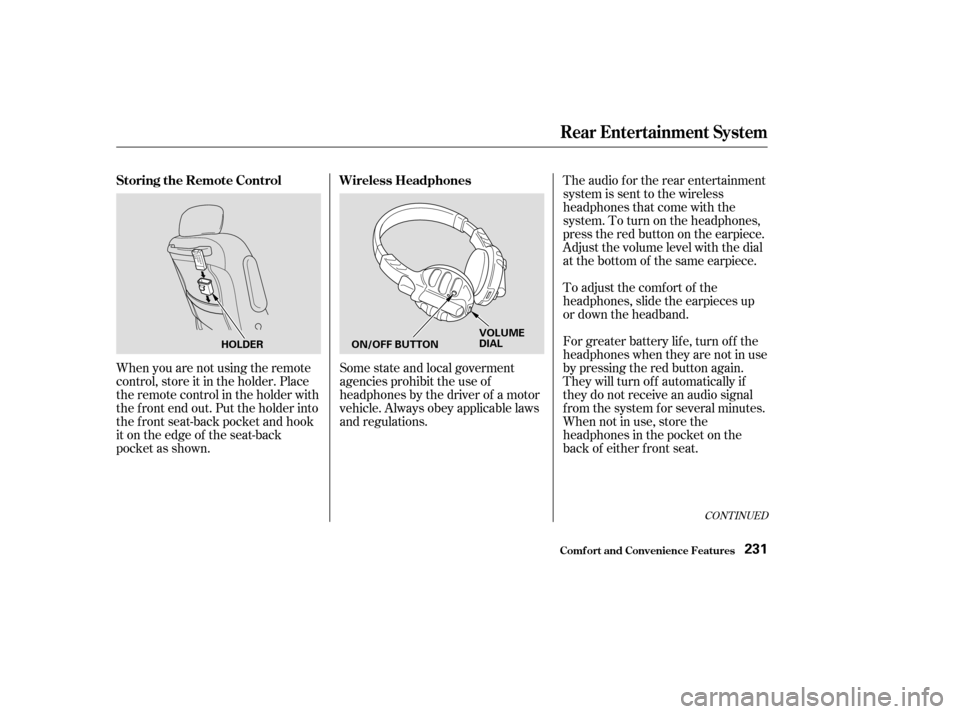
The audio f or the rear entertainment
system is sent to the wireless
headphones that come with the
system. To turn on the headphones,
presstheredbuttonontheearpiece.
Adjust the volume level with the dial
at the bottom of the same earpiece.
To adjust the comf ort of the
headphones, slide the earpieces up
or down the headband.
For greater battery lif e, turn of f the
headphones when they are not in use
by pressing the red button again.
They will turn of f automatically if
they do not receive an audio signal
f rom the system f or several minutes.
When not in use, store the
headphones in the pocket on the
back of either f ront seat.
Some state and local goverment
agencies prohibit the use of
headphones by the driver of a motor
vehicle. Always obey applicable laws
and regulations.
When you are not using the remote
control, store it in the holder. Place
the remote control in the holder with
the f ront end out. Put the holder into
the f ront seat-back pocket and hook
it on the edge of the seat-back
pocket as shown.
CONT INUED
Rear Entertainment System
Comf ort and Convenience Feat ures
Wireless Headphones
Storing the Remote Control
231
ON/OFF BUTTON VOLUME
DIAL
HOLDER
Page 241 of 415

Always ref er to the operating
instructions and saf ety inf ormation
that came with your garage door
opener or other equipment you
intend to operate with the HomeLink
Universal Transceiver. If you do not
have this inf ormation, you should
contact the manuf acturer of the
equipment.
While training or using HomeLink,
make sure you have a clear view of
the garage door or gate, and that no
one will be injured by its movement.If your garage door opener was
manuf actured bef ore April 1982, you
may not be able to program
HomeLink to operate it. Garage door
openers manuf actured bef ore that
date do not have a safety feature that
causes them to stop and reverse if an
obstacle is detected during closing,
increasing the risk of injury. If you
have questions, call (800) 355-3515.
If you are training HomeLink to
operate a garage door or gate, it is
recommended that you unplug the
motor f or that device during training.
Repeatedly pressing the remote
control button could burn out the
motor.
If you have problems with training
the HomeLink Universal Transceiver,
or would like inf ormation on home
products that can be operated by the
transmitter, call (800) 355-3515. On
the Internet, go to www.homelink.
com. The HomeLink Universal
Transceiver built into your vehicle
canbeprogrammedtooperate
remotely-controlled devices around
your home, such as garage doors,
lighting, or home security systems. It
can replace up to three remote
transmitters.
The HomeLink transmitter stores
the code in a permanent memory.
There should be no need to retrain
the transmitter if your vehicle’s
battery goes dead or is disconnected.
On EX and EX-L modelsImportant Saf ety Precautions
General Inf ormation
Customer Assistance
HomeL ink Universal T ransceiver
Comf ort and Convenience Feat ures238