Page 237 of 415
The security system helps to protect
your vehicle and valuables f rom thef t.
The horn sounds and a combination
of headlights, parking lights, side
marker lights and taillights f lashes if
someone attempts to break into your
vehicleorremovetheradio.This
alarm continues f or two minutes,
then the alarm stops. To reset an
alarming system before the two
minutes have elapsed, unlock either
f ront door with the key or the
remote transmitter.
The security system sets
automatically fifteen seconds after
you lock the doors, hood, and
tailgate. For the system to activate,
you must lock the doors f rom the
outside with the key, the lock tab,
the door lock switch, or the remote
transmitter. The security system
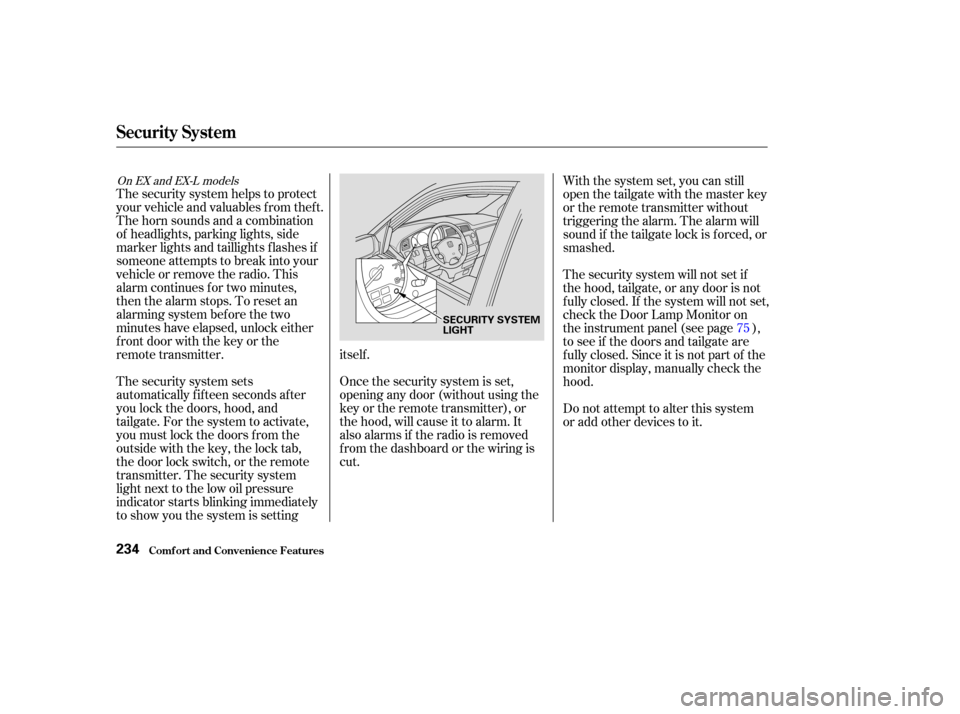
light next to the low oil pressure
indicator starts blinking immediately
to show you the system is settingitself .
Once the security system is set,
opening any door (without using the
key or the remote transmitter), or
the hood, will cause it to alarm. It
also alarms if the radio is removed
f rom the dashboard or the wiring is
cut.With the system set, you can still
open the tailgate with the master key
or the remote transmitter without
triggering the alarm. The alarm will
sound if the tailgate lock is f orced, or
smashed.
The security system will not set if
the hood, tailgate, or any door is not
f ully closed. If the system will not set,
check the Door Lamp Monitor on
the instrument panel (see page ),
to see if the doors and tailgate are
f ully closed. Since it is not part of the
monitor display, manually check the
hood.
Do not attempt to alter this system
or add other devices to it.
75
On EX and EX-L models
Security System
Comf ort and Convenience Feat ures234
SECURITY SYSTEM
LIGHT
Page 275 of 415
�µ�µAlways drive
slower than you would in dry
weather. It takes your vehicle longer
to react, even in conditions that may
seem just barely damp. Apply
smooth, even pressure to all the
controls. Abrupt steering wheel
movements or sudden, hard appli-
cation of the brakes can cause loss of
control in wet weather. Be extra
cautious f or the f irst f ew miles
(kilometers) of driving while you
adjust to the change in driving
conditions. This is especially true in
snow. A person can f orget some
snow-driving techniques during the
summer months. Practice is needed
to relearn those skills.
Exercise extra caution when driving
in rain af ter a long dry spell. Af ter
months of dry weather, the f irst
rains bring oil to the surf ace of the
roadway, making it slippery.
Rain, f og, and snow conditions re-
quire a dif f erent driving technique
because of reduced traction and
visibility. Keep your vehicle well-
maintained and exercise greater
caution when you need to drive in
bad weather. The cruise control
should not be used in these condi-
tions. Being able to see
clearly in all directions and being
visible to other drivers are important
in all weather conditions. This is
more dif f icult in bad weather. To be
seen more clearly during daylight
hours, turn on your headlights.
Inspect your windshield wipers and
washers f requently. Keep the
windshield washer reservoir f ull of
the proper f luid. Have the windshield
wiper blades replaced if they start to
streak the windshield or leave parts
unwiped. Use the def roster and air
conditioning to keep the windows
f rom f ogging up on the inside (see
pages and ). 149 159/ 164
Driving
Driving in Bad Weather
Driving T echnique Visibility
272
Page 298 of 415
�µ�µ �µ
�µ
�µ
�µ �µ
Youshouldcheckthefollowing
items at the specif ied intervals. If
you are unsure of how to perf orm
any check, turn to the page given.
Engine oil level Check every
time you fill the fuel tank. See
page .
Engine coolant level Check the
radiator reserve tank every time
you f ill the f uel tank. See page .Tires Check the tire pressure
monthly. Examine the tread f or
wear and foreign objects. See page
.
Windshield washer f luid Check
the level in the reservoir monthly.
If weather conditions cause you to
use the washers f requently, check
the reservoir each time you stop
f or f uel. See page .
Automatic transmission Check
the f luid level monthly. See page .
Brakes Check the f luid level
monthly. See page . Lights Check the operation of
the headlights, parking lights,
taillights, high-mount brake light,
turn signals, brake lights, and
license plate light monthly. See
page .
248
249
306
307 309 323
330
Owner Maintenance Checks
Maint enance295
Page 334 of 415
Check the f ollowing:Headlights (low and high beam)
Parking lights
Taillights
Brake lights
High-mount brake light
Turn signals
Back-up lights
Hazard light f unction
License plate light
Side marker lights
Daytime running lights
(Canadian models)
If you f ind any bulbs are burned out,
replace them as soon as possible.
Refer to the chart on page to
determine what type of replacement
bulb is needed. 387
Lights
Maint enance331
STOP/TAILLIGHTS/
SIDE MARKER LIGHTS
TAILLIGHT
HIGH-MOUNT BRAKE LIGHT
TURN SIGNAL LIGHT BACK-UP LIGHTLICENSE PLATE LIGHT
Page 335 of 415
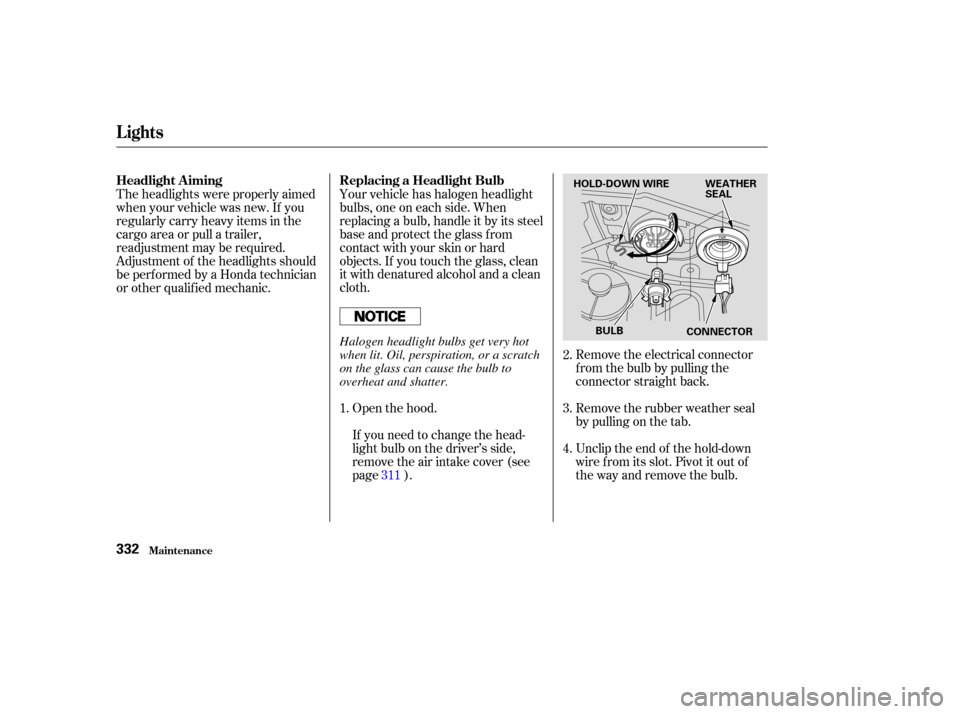
Unclip the end of the hold-down
wire f rom its slot. Pivot it out of
the way and remove the bulb. Remove the rubber weather seal
by pulling on the tab. Remove the electrical connector
f rom the bulb by pulling the
connector straight back.
Your vehicle has halogen headlight
bulbs, one on each side. When
replacing a bulb, handle it by its steel
base and protect the glass from
contactwithyourskinorhard
objects. If you touch the glass, clean
it with denatured alcohol and a clean
cloth.
Open the hood.
If you need to change the head-
light bulb on the driver’s side,
remove the air intake cover (see
page ).
Theheadlightswereproperlyaimed
when your vehicle was new. If you
regularly carry heavy items in the
cargo area or pull a trailer,
readjustment may be required.
Adjustment of the headlights should
be perf ormed by a Honda technician
or other qualif ied mechanic.
1.2.
3.
4.
311
Lights
Maint enance
Replacing a Headlight Bulb
Headlight A iming
332
HOLD-DOWN WIRE WEATHER
SEAL
BULB CONNECTOR
Halogen headlight bulbs get very hot
when lit. Oil, perspiration, or a scratch
on the glass can cause the bulb to
overheat and shatter.
Page 336 of 415
Use a f lat-tipped screwdriver to
remove the two holding clips f rom
the inner f ender.
Pull the inner f ender cover away
f rom the f ender and bumper.
If you are changing the bulb on
the driver’s side, start the engine,
turn the steering wheel all the way
to the right, and turn off the
engine. If you are changing the
bulb on the passenger’s side, turn
the steering wheel to the left.
Insert the new bulb into the hole,
making sure the tabs are in their
slots. Pivot the hold-down wire
back in place and clip the end into
the slot.
Install the rubber seal over the
back of the headlight assembly.
Make sure it is right side up; it is
marked ‘‘TOP.’’
Push the electrical connector onto
the new bulb. Make sure it is
connected securely.
Reinstall the air intake cover. (Driver’s side) Turn on the headlights to test the
new bulb.
1. 2.
3.
5.
6.
7.
8.
CONT INUED
Lights
Maint enance
Replacing the Front Side Marker/
Turn Signal and Parking L ight
Bulb
333
HOLDING CLIP
Page 365 of 415

Diagnosing why your engine won’t
start f alls into two areas, depending
on what you hear when you turn the
key to START (III):You hear nothing, or almost
nothing. The engine’s starter
motor does not operate at all, or
operates very slowly.
You can hear the starter motor
operating normally, or the starter
motor sounds like it is spinning
f aster than normal, but the engine
does not start up and run. Turn the ignition switch to START
(III). If the headlights do not dim,
check the condition of the f uses. If
the f uses are OK, there is proba-
bly something wrong with the
electrical circuit f or the ignition
switch or starter motor. You will
need a qualif ied technician to
determine the problem. (See
on page .)
When you turn the ignition switch to
START (III), you do not hear the
normal noise of the engine trying to
start. You may hear a clicking sound
or series of clicks, or nothing at all.
Check these things:
Check the transmission interlock.
The transmission must be in Park
orNeutralorthestarterwillnot
operate.
Turn the ignition switch to ON (II).
Turn on the headlights and check
their brightness. If the headlights
are very dim or don’t light at all,
the battery is discharged. See on page . 380
364
T aking Care of t he Unexpect ed
If Your Engine Won’t Start
Emergency T owing
Nothing Happens or the Starter
Motor Operates Very Slowly
Jump Starting
362
Page 366 of 415

If the headlights dim noticeably or
go out when you try to start the
engine, either the battery is dis-
charged or the connections are
corroded. Check the condition of the
battery and terminal connections
(see page ). You can then try
jump starting the vehicle from a
booster battery (see page ).In this case, the starter motor’s
speed sounds normal, or even f aster
than normal, when you turn the
ignition switch to START (III), but
the engine does not run.
Are you using the proper starting
procedure? Ref er to on page . There may be an electrical
problem, such as no power to the
f uel pump. Check all the f uses
(see page ).
If youfindnothingwrong,youwill
need a qualif ied technician to f ind
the problem. See on page .
Your vehicle has the Immobilizer
System. You should use a
properly-coded master or valet key
to start the engine (see page ).
A key that is not properly coded
will cause the immobilizer system
indicator in the dash panel to blink
rapidly. Do you have f uel? Turn the
ignition switch to ON (II) for a
minute and watch the f uel gauge.
The low f uel level warning light
may not be working, so you were
not reminded to f ill the tank.
317
364
259 374
380
90
T he Starter Operates Normally
Starting the
Engine Emergency
Towing
If Your Engine Won’t Start
T aking Care of t he Unexpect ed363