Page 225 of 411
The alarm also activates if a
passenger inside the locked vehicle
turns the ignition switch on.Do not attempt to alter this system
or add other devices to it.
Once the security system is sets,
opening any door, the hatch, or the
hood without using the key or the
remote transmitter, will cause the
alarm to activate. It also activates if
the audio unit is removed f rom the
dashboard or the wiring is cut.
The security system helps to protect
your vehicle and valuables f rom thef t.
The horn sounds and a combination
of headlights, parking lights, side
marker lights and taillights f lashes if
someone attempts to break into your
vehicle or remove the audio unit.
This alarm continues for two
minutes, then the system resets. To
deactivate the system before the two
minutes have elapsed, unlock the
driver’s door with the key or the
remote transmitter.
The security system sets
automatically 15 seconds after you
lock the doors, hood, and the hatch.
For the system to activate, you must
lock the doors and the hatch f rom
the outside with the key, or use
driver’s lock tab, door lock master
switch, or remote transmitter. The
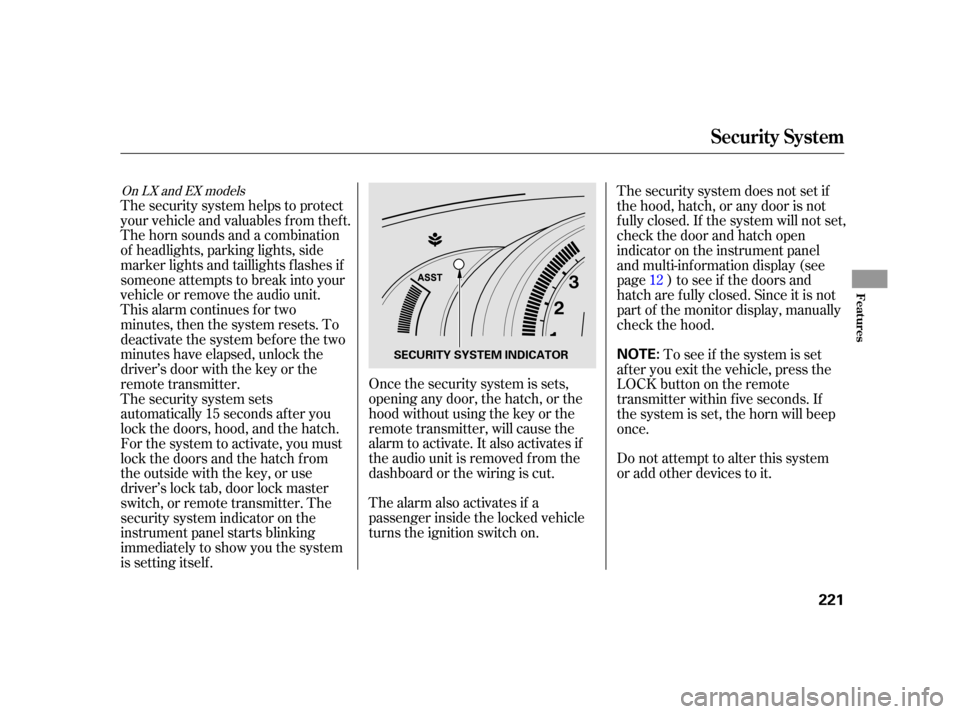
security system indicator on the
instrument panel starts blinking
immediately to show you the system
is setting itself .
To see if the system is set
af ter you exit the vehicle, press the
LOCK button on the remote
transmitter within five seconds. If
the system is set, the horn will beep
once. The security system does not set if
the hood, hatch, or any door is not
f ully closed. If the system will not set,
check the door and hatch open
indicator on the instrument panel
and multi-inf ormation display (see
page ) to see if the doors and
hatch are f ully closed. Since it is not
part of the monitor display, manually
check the hood. 12
On LX and EX models
Security System
Features
221
NOTE:SECURITY SYSTEM INDICATOR
Page 232 of 411
�Ì�Ì�Ì�Ì
How to Use HFL
BluetoothHandsFreeL ink(Models wit hout navigat ion syst em)
228
‘‘Phone Setup’’
‘‘Call’’ or ‘‘Dial’’‘‘Pair’’
‘‘Edit’’
‘‘Delete’’
‘‘Jim Smith’’
‘‘Set Pairing
Code’’
The ignition switch must be in the ACCESSORY (I) or ON (II) position.
‘‘List’’‘‘Status’’
‘‘Next Phone’’
‘‘123-555- ’’
Press HFL
Talk button
Press and release the HFL Talk button each time you give a command. Edit the name of a paired phone
Delete a paired phone from the system
Hear a list of all phones paired to the system
Hear which paired phone is currently linked to the system
Search for another previously paired phone to link to
Set the pairing code to a ‘‘Fixed’’ or ‘‘Random’’ number Pair a phone to the system
Enter desired phone number
Once a phonebook entry is stored, you can say a name here. (See page
231)
(See page 232)
(See page 232)
(See page 232)
(See page 233)
(See page
233)
(See page 233)
(See page234)
(See page 234)
Page 238 of 411

HFLusesaClass2Bluetooth,which
means, the maximum range between
yourphoneandvehicleis30feet(10
meters).
During a call, HFL allows you to talk
up to 30 minutes af ter you remove
the key from the ignition switch.
However, this may weaken the
vehicle’s battery. You can make calls using a name in
the HFL phonebook or any phone
number. You can also redial the last
number called.Once connected, you will hear the
person you called through the audio
speakers.
Say ‘‘ ’’ or ‘‘ .’’
Follow the HFL prompts and say
thenamestoredintheHFL
phonebook that you want to call.
Follow the HFL prompts to
conf irm the name and make the
call.
Say ‘‘ ’’ or ‘‘ .’’
Follow the HFL prompts and say
the phone number you want to dial.
Follow the HFL prompts to
conf irm the number and say
‘‘ ’’ or ‘‘ .’’
Press and release the HFL Talk
button bef ore a command.
Press and release the HFL Talk
button bef ore a command.
1.
2.
3.
1.
2.
3.
Making a Call
Call DialCall Dial
Call Dial
Tomakeacallusinganameinthe HFL phonebook: T o make a call using a phone
number:
BluetoothHandsFreeL ink(Models wit hout navigat ion syst em)
234
Page 244 of 411

�Î
�ÎIf you get into the vehicle while you
are on the phone, the call can be
automatically transferred to HFL
with the ignition switch in the
ACCESSORY (I) or ON (II) position.
Press and release the HFL Talk
button bef ore a command.
Say ‘‘ .’’
Press and release the HFL Talk
button bef ore a command.
Say ‘‘ .’’Press and release the HFL Talk
button bef ore a command.
Say ‘‘ .’’
Follow the HFL prompts to
conf irm the number. Follow the HFL prompts and say
the new 4-digit passcode. Say ‘‘ ’’ af ter the
prompts.
The def ault setting is a ring tone.
Follow the HFL prompts and say
‘‘ ’’ or ‘‘ .’’ You
can also say ‘‘ ’’ f or no audible
incoming call notif ication. Say ‘‘
’’ af ter the
prompts.
HFL will let you know if auto
transf er is on or of f , depending on
the previous setting. Follow the
HFL prompts to change the
setting. Say ‘‘’’ af ter the
prompts.
2.
3.
4. 1.
2.
3.
1.
2.
3.
1.
: System setup
System setup
System setup
Change passcode
Ring tone PromptOf f
Call notif ication
Auto transf er
T o change your securit y passcode: T o select eit her a ring t one or a prompt as t he incoming callnotification : To activate or deactivate the auto
transfer function:
BluetoothHandsFreeL ink(Models wit hout navigat ion syst em)
240
Page 267 of 411
Apply the parking brake.
In cold weather, turn of f all
electrical accessories to reduce
the drain on the battery.In cold weather, the conventional
starter is used instead of the IMA
system starter. This is normal.
Make sure the shif t lever is in
Park. Press on the brake pedal.
Without touching the accelerator
pedal, turn the ignition key to the
START (III) position. Do not hold
the key in the START (III)
position f or more than 15 seconds
at a time. If the engine does not
start right away, pause for at least
10 seconds bef ore trying again.
1.
2.
3.
4.
Starting the Engine
Starting in Cold Weather
Driving
263
The engine is harder to start in cold
weather. Also, the thinner air f ound at
altitudes above 8,000 f eet (2,400
meters) adds to this problem.
T he immobilizer system protects your
vehicle f rom thef t. If an improperly
coded key (or other device) is used, the
engine’s f uel system is disabled. For
more inf ormation, see page .
130
Page 271 of 411
�µ
CONT INUED
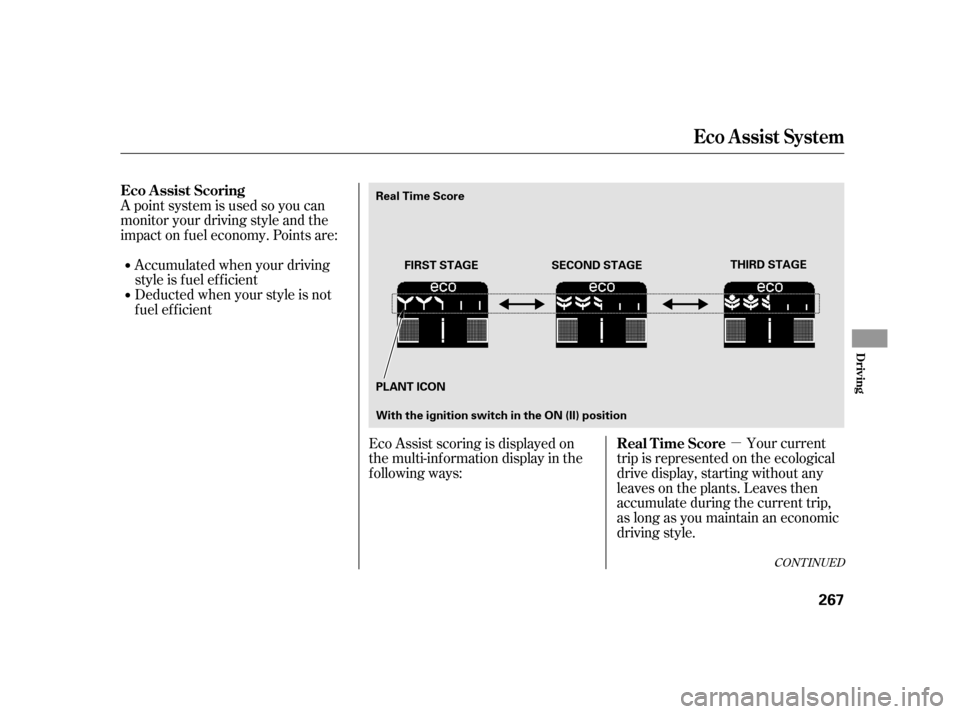
A point system is used so you can
monitor your driving style and the
impact on f uel economy. Points are:Accumulatedwhenyourdriving
style is f uel ef f icient
Deducted when your style is not
f uel ef f icient
Your current
trip is represented on the ecological
drive display, starting without any
leaves on the plants. Leaves then
accumulate during the current trip,
as long as you maintain an economic
driving style.
Eco Assist scoring is displayed on
the multi-information display in the
following ways:
Eco A ssist Scoring
Real Time Score
Eco A ssist Syst em
Driving
267
FIRST STAGETHIRD STAGE
PLANT ICON SECOND STAGE
Real Time Score
With the ignition switch in the ON (II) position
Page 272 of 411
�µ
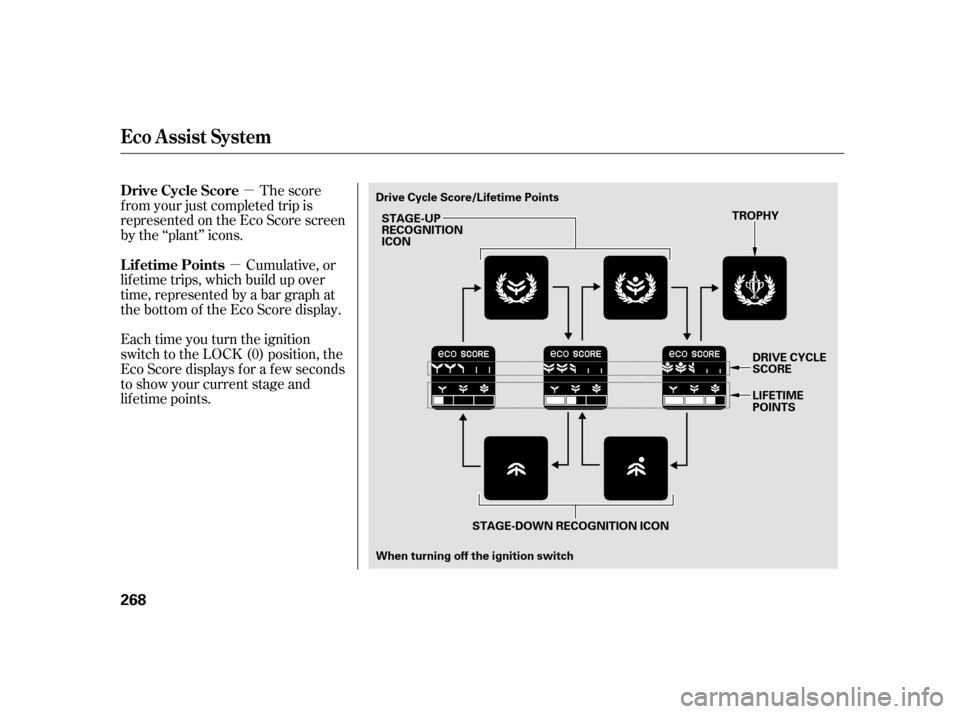
�µ The score
f rom your just completed trip is
represented on the Eco Score screen
by the ‘‘plant’’ icons.
Cumulative, or
lif etime trips, which build up over
time, represented by a bar graph at
the bottom of the Eco Score display.
Each time you turn the ignition
switch to the LOCK (0) position, the
Eco Score displays f or a f ew seconds
to show your current stage and
lif etime points. Drive Cycle Score
Lif etime Points
Eco A ssist Syst em
268
STAGE-UP
RECOGNITION
ICON
When turning off the ignition switch TROPHY
STAGE-DOWN RECOGNITION ICON
Drive Cycle Score/Lifetime Points
DRIVE CYCLE
SCORE
LIFETIME
POINTS
Page 273 of 411
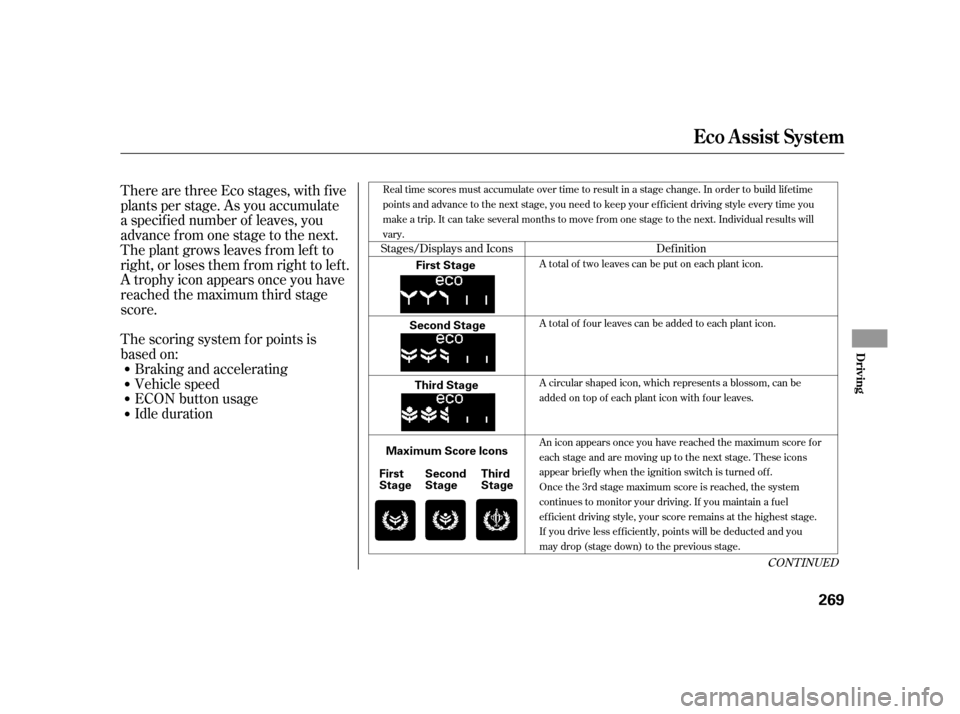
There are three Eco stages, with f ive
plants per stage. As you accumulate
a specif ied number of leaves, you
advance from one stage to the next.
The plant grows leaves f rom lef t to
right, or loses them f rom right to lef t.
A trophy icon appears once you have
reached the maximum third stage
score.Idle duration ECON button usage
Vehicle speed
Braking and accelerating
The scoring system f or points is
based on:
Stages/Displays and Icons
Def inition
CONT INUED
A total of two leaves can be put on each plant icon.
A total of four leaves can be added to each plant icon.
A circular shaped icon, which represents a blossom, can be
added on top of each plant icon with four leaves.
An icon appears once you have reached the maximum score f or
each stage and are moving up to the next stage. These icons
appear briefly when the ignition switch is turned off.
Oncethe3rdstagemaximumscoreisreached,thesystem
continues to monitor your driving. If you maintain a f uel
efficient driving style, your score remains at the highest stage.
If you drive less ef f iciently, points will be deducted and you
maydrop(stagedown)tothepreviousstage.
Real time scores must accumulate over time to result in a stage change. In order to build lif etime
points and advance to the next stage, you need to keep your efficient driving style every time you
make a trip. It can take several months to move f rom one stage to the next. Individual results will
vary.
Eco A ssist Syst em
Driving
269
First Stage
Second Stage Third Stage
Maximum Score Icons Second
Stage
First
Stage Third
Stage