Page 213 of 411

�µ
�µ
�µ
Each time you press and release the
SCAN button, the mode changes
f rom f ile scan to f older scan, then to
normal play.This feature
samples the f irst f ile in each f older in
the order they are stored. To
activate the folder scan feature,
press the SCAN button repeatedly.
You will see ‘‘F-SCAN’’ in the display.
You will get a 10 second sampling of
the f irst f ile in each f older. Press and
hold the SCAN button to get out of
the f older scan mode and play the
last f ile sampled.
This feature samples all
f iles in the current f older in the
order they are stored. To activate
the scan feature, press the SCAN
button. You will see ‘‘SCAN’’ in the
display. You will get a 10 second
sampling of each f ile in the f older.
Press and hold the SCAN button to
get out of the scan mode and play
the last f ile sampled.
This
f eature plays the f iles in the current
f older in random order. To activate
the folder random feature, press the
RDM button repeatedly. You will see
‘‘F-RDM’’ in the display. To turn it
of f , press and hold the RDM button.
Each time you press the RDM
button, the mode changes f rom track
random, play to f older random play,
then to normal play. FOLDER SCAN
SCAN
FOLDER RANDOM
Playing a USB Flash Memory Device (U.S. L X model and EX model without navigation system)
Features
209
Page 221 of 411
�Û�Ý�´
�µ �´�µ �´
�µ
The VOL button adjusts the volume
up ( ) or down ( ). Press the top
or bottom of the button and hold it
until the desired volume is reached,
then release it.
The MODE button changes the
mode. Pressing the button
repeatedly selects FM1, FM2, AM,
discoraPCcard(ifadiscoraPC
card is loaded), or an audio unit
connected to the auxiliary input jack
or the USB adapter cable.
If you are listening to the radio, use
the CH button to change stations.
Each time you press the top ( ) of
the button, the system goes to the
next preset station on the band you
are listening to. Press the bottom
( ) to go back to the previous
station.If youpressandholdtheCH
button ( ) or ( ), the system goes
into the seek mode. It finds a station
with a strong signal. If youareplayingadisc,iPodorUSB
f lash memory device, the system
skips to the beginning of the next
track (file in MP3, WMA or AAC
format) each time you press the top
( ) of the CH button. Press the
bottom ( ) to return to the
beginning of the current track/f ile.
Press it twice to return to the
previous track/f ile.
You will see the track/f ile number
and the elapsed time. If the disc has
text data or is compressed in MP3 or
WMA, you can also see any other
inf ormation (track title, f ile name,
f older name, etc.).
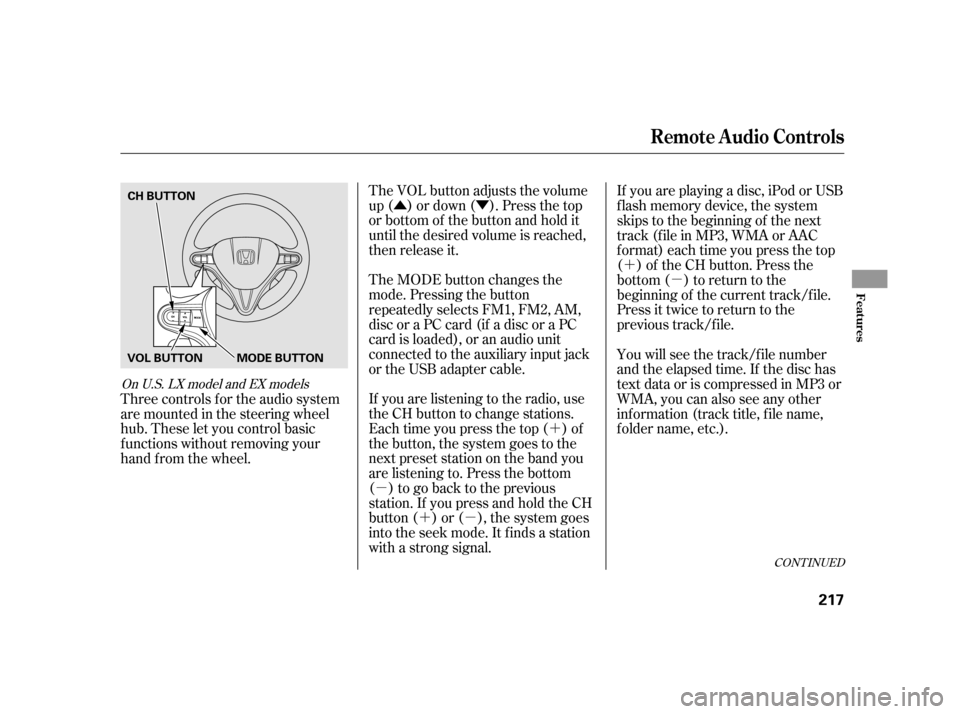
Three controls f or the audio system
are mounted in the steering wheel
hub. These let you control basic
f unctions without removing your
hand f rom the wheel.
CONT INUED
On U.S. LX model and EX models
Remote Audio Controls
Features
217
CH BUTTON
MODE BUTTON
VOL BUTTON
Page 224 of 411

For example: 1:06 will reset to 1:001:52 will reset to 2:00
When you set the time, the ignition
switch must be ACCESSORY (I) or
ON (II) position.
To set the time, press the CLOCK
button until you hear a beep. The
displayed time begins to blink.
Change the hours by pressing the H
(hour) button until the numbers
advance to the desired time. Change
the minutes by pressing the M
(minute) button until the numbers
advance to the desired time.
Press the CLOCK button again to
enter the set time.
You can quickly set the time to the
nearest hour. If the displayed time is
bef ore the half hour, press and hold
the CLOCK button, then press the R
(reset) button to set the time back to
the previous hour. If the displayed
time is af ter the half hour, the same
procedure sets the time f orward to
the beginning of the next hour.
Setting the Clock (Models without navigation system)
220
CLOCK BUTTON
(A.SEL side of the A.SEL/SCAN bar)
HOUR BUTTON
(PRESET 4) HOUR BUTTON
(PRESET 1)
RESET BUTTON
(PRESET 6) EX model without navigation system
and LX model
MINUTE BUTTON
(PRESET 5) CLOCK BUTTON
(FM/AM button)
MINUTE BUTTON
(PRESET 2)RESET BUTTON
(PRESET 3)
Insight model
Page 230 of 411
�Ì�Ì�Ì�Ì
Try to reduce all background
noise. If the microphone picks up
voices other than yours,
commands may be misinterpreted. Many commands can be spoken
together. For example, you can
say ‘‘Call 123-456- ’’ or
‘‘Dial Peter.’’
Press and release the HFL Talk
button each time you want to
make a command. Af ter the beep,
speak in a clear, natural tone.
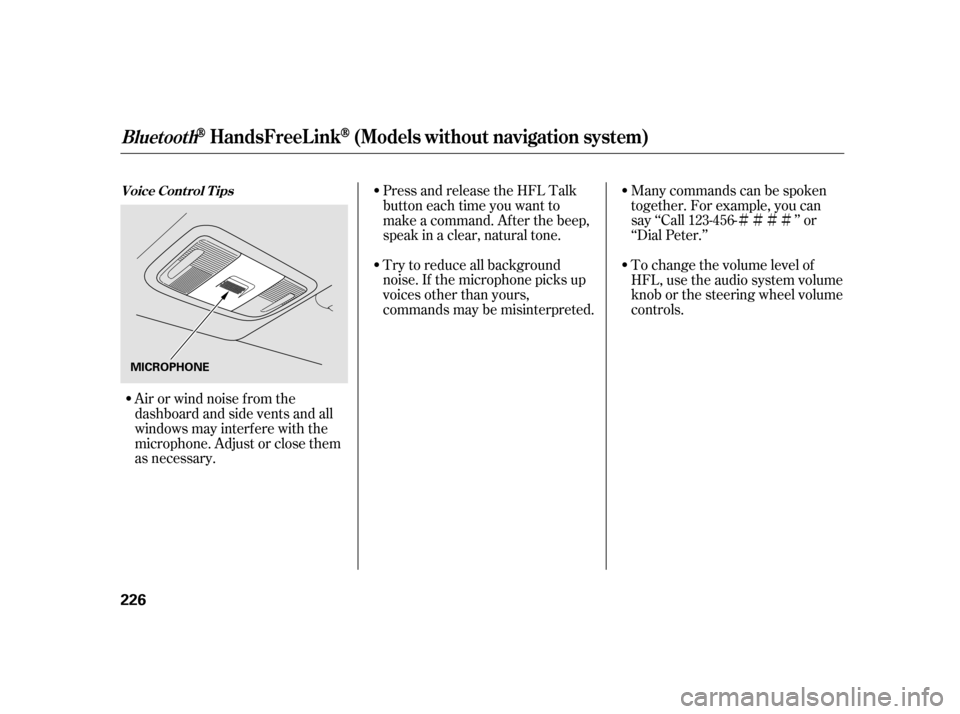
Airorwindnoisefromthe
dashboard and side vents and all
windows may interfere with the
microphone. Adjust or close them
as necessary. To change the volume level of
HFL, use the audio system volume
knob or the steering wheel volume
controls.
Voice Cont rol T ips
BluetoothHandsFreeL ink(Models wit hout navigat ion syst em)
226
MICROPHONE
Page 234 of 411
�Î
�Î
BluetoothHandsFreeL ink(Models wit hout navigat ion syst em)
230
‘‘Change Language’’‘‘Hands Free Help’’
‘‘System
Set up’’
‘‘Tutorial’’ ‘‘Clear’’
‘‘Auto Transfer’’ ‘‘Call Notification’’ ‘‘Security’’
‘‘Change Passcode’’
Press HFL
Talk button
Press and release the HFL Talk button each time you give a command. Apply a security passcode to the system that must be input at each key
cycle to access the system
Change your security passcode
Set how you would like to be notified of an incoming call
Set calls to automatically transfer from your phone to HFL when you
enter the vehicle
Hear a list of available commands and additional information describing each command Clear the system of all paired phones, phonebook entries and security
passcode
Change language from English to French
Hear a tutorial for general rules on using the system
Canadian models
: (See page
239)
(See page 240)
(See page 240)
(See page 240)
(See page 241)
(See page 242)
(See page 227)
(See page 227)
Page 237 of 411

Press and release the HFL Talk
button bef ore a command.Say ‘‘ .’’
Say‘‘ ’’aftertheprompts.
HFL will tell you which phone is
linked to the system. Press and release the HFL Talk
button bef ore a command.
Say ‘‘ .’’ Say ‘‘
.’’
Press and release the HFL Talk
button bef ore a command.
Say ‘‘ ’’ af ter the
prompts.
HFL disconnects the linked phone
and searches for another paired
phone.
Once another phone is f ound, it is
linked to the system. HFL will
inf orm you which phone is now
linked.
If no other phones are f ound or
paired, HFL will inf orm you that the
original phone is linked again. Say ‘‘
’’ af ter the
prompts.
If you want HFL to create a
random code each time you pair a
phone, say ‘‘ .’’ If you want
to choose your own 4-digit code to
be used each time, say ‘‘ ’’
and f ollow the HFL prompts.
1.
2.
3.
1.
2.
3.1.
2.
3.
4.
T o hear which paired phone is current ly linked: To change f rom the currently linked
phone t o anot her paired phone: T o change t he pairing code set t ing:
Phone setup
StatusPhone setup
Phone setup
Next phone Set pairing code
Random Fixed
BluetoothHandsFreeL ink(Models wit hout navigat ion syst em)
Features
233
Page 243 of 411
This command group allows you to
change or customize HFL basic
settings.Press and release the HFL Talk
button bef ore a command.
Say ‘‘ .’’ Once a passcode is set, you
will need to enter it to use HFL each
time you start the vehicle. If you
f orget the code, your dealer will have
toresetitforyou,oryouwillhaveto
clear the entire system (see page ).
Follow the HFL prompts to
conf irm the number. Follow the HFL prompts and say
the 4-digit passcode you want to
set. Say‘‘ ’’aftertheprompts.
1.
2.
3.
4. 241
CONT INUED
System Setup
System setup
SecurityT o set a 4-digit passcode t o lock t heHFL syst em f or securit y purposes:
BluetoothHandsFreeL ink(Models wit hout navigat ion syst em)
Features
239
NOTE:
Page 248 of 411

Help assure your vehicle’s f uture
reliability and perf ormance by paying
extra attention to how you drive
during the f irst 600 miles (1,000 km).
During this period:Avoid full-throttle starts and rapid
acceleration.
You should also f ollow these
recommendations with an
overhauled or exchanged engine, or
when the brakes are replaced. Your vehicle is designed to operate
on unleaded gasoline with a pump
octane number of 87 or higher. Use
of a lower octane gasoline can cause
a persistent, heavy metallic rapping
noise that can lead to engine damage.
Do not change the oil until the
scheduled maintenance time.
Avoidhardbrakingforthefirst
200 miles (300 km). Use of gasoline with these additives
may adversely af f ect perf ormance,
and cause the malfunction indicator
lamp on your instrument panel to
come on. If this happens, contact
your dealer f or service. Some
gasoline today is blended with
oxygenates such as ethanol. Your
vehicle is designed to operate on
oxygenated gasoline containing up to
10% ethanol by volume. Do not use
gasoline containing methanol. If you
notice any undesirable operating
symptoms, try another service
station or switch to another brand of
gasoline.
Break-in Period
Fuel Recommendation
Break-in Period, Fuel Recommendation
244
T o help prevent harmf ul f uel system
and engine deposits, use high quality
f uel containing detergent and additives.
In addition, in order to maintain good
perf ormance, f uel economy, and
emissions control, we strongly
recommend the use of gasoline that
does NOT contain harmf ul manganese-
based f uel additives such as MMT , if
such gasoline is available.