Page 246 of 411
Press and release the HFL Talk
button bef ore a command.Say ‘‘ .’’
Follow the HFL prompts to
change the language to English or
French.
If you have not named your paired
phone in the language you just
selected, HFL will ask you to name it
in the current language.
When French is your currently
selected language, you can give voice
commands in French. The
word mark and logos
are registered trademarks owned by
Bluetooth SIG, Inc. and any use of
such marks by Honda Motor Co.,
Ltd. is under license. Other
trademarks and trade names are
those of their respective owners. This device complies with the
appropriate requirements or the
required standards. See page f or
more inf ormation.
1.
2. 392Bluetooth
Canadian models only Bluet oot h
To change the system language bet ween English and French:
Wireless Technology
Change Language
Change language
BluetoothHandsFreeL ink(Models wit hout navigat ion syst em)
242
Page 270 of 411
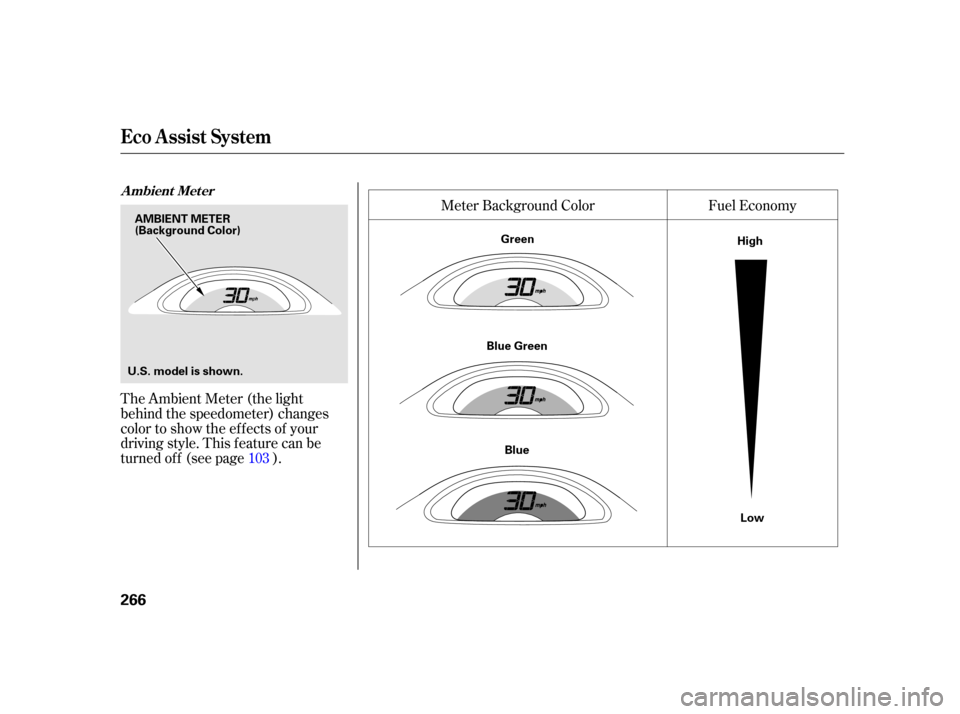
The Ambient Meter (the light
behind the speedometer) changes
color to show the ef f ects of your
driving style. This f eature can be
turned of f (see page ).Fuel Economy
Meter Background Color
103
A mbient Met er
Eco A ssist Syst em
266
AMBIENT METER
U.S. model is shown. (Background Color)
Green
Blue Green Blue High
Low
Page 274 of 411

�Î
�Î
The f ollowing procedure clears all
leaves and your lif etime points. This
procedure must be f ollowed exactly.
As you progress to a higher level, the
system monitors your driving style
more strictly. As a result, you must
f urther ref ine your driving style to
continue to move up to the next level.
Turn the ignition switch to the ON
(II) position. Conf irm that the ECON
mode is OFF. If it is OFF, proceed to
step 1. Do run the engine.
Thefollowingaresomeof the
conditions that may af f ect your
score:
Extremely high or low ambient
temperature
Inconsistent acceleration use, such
as pumping the pedal repeatedly
within a short period of time
Frequent use of the climate
control system
Short distance trips If theECONmodeison,pressand
releasetheECONbuttontoturnit
off. You also need to turn the ignition
switch off.
Turn the ignition switch to the ON
(II) position again. Do run the
engine. Press and release the brake pedal
at least two times. The ambient
meter color changes f rom blue to
green .
Complete the following steps within
30 seconds:
The ambient meter color
changes only if the multi-
inf ormation display’s meter
color change setting is on. (See
page .)
Press and release the ECON
button two times (ECON mode
comes on, then goes of f ). The
ambient meter color goes of f , and
the accumulated data is cleared.
Turn the ignition switch to the
LOCK (0) position. :
1.
2.
3. 103
Reset the System
not not
Eco A ssist Syst em
270
Page 313 of 411
Fluid Locations
Maint enance
309
RADIATOR CAP
ENGINE OIL DIPSTICK
(Orange loop)
AUTOMATIC
TRANSMISSION (CVT)
FLUID DIPSTICK
(Yellow loop) BRAKE FLUID
(Black cap)
ENGINE OIL FILL CAP
ENGINE COOLANT
RESERVOIR
WASHER FLUID
(Blue cap)
Page 396 of 411

The f ollowing products and systems
on your vehicle emit radio waves
when in operation.
HandsFreeLink
Immobilizer System
Remote Transmitter
Tire Pressure Monitoring
System (TPMS)
Each of the above complies with the
appropriate requirements or the
required standards of FCC (Federal
Communications Commission) and
Industry Canada Standard, described
as f ollows:
Bluetooth As required by the FCC:
This device complies with Part 15 of theFCC rules. Operation is subject to thef ollowing two conditions: (1) This devicemay not cause harmf ul interf erence, and(2) this device must accept anyinterf erence received, includinginterf erence that may cause undesiredoperation.
Changes or modif ications not expresslyapproved by the party responsible f orcompliance could void the user’sauthority to operate the equipment.
This device complies with IndustryCanada Standard RSS-Gen/210/310.Operation is subject to the f ollowing twoconditions: (1) this device may not causeinterf erence, and (2) this device mustaccept any interf erence, includinginterf erence that may cause undesiredoperation of the device.
DevicesthatEmitRadioWaves
392
Page 402 of 411

CONT INUED
BatteryCharging System ...........................
Indicator .63, 364
............................
Jump Starting .358
..............................
Maintenance .344
............................
Specif ications .381
..............................
Bef ore Driving .243
....................................
Belts,Seat .9,21
...........................
Beverage Holder .154
.......
Bluetooth
HandsFreeLink. 225
Brakes ...........
Anti-lock System (ABS) . 287
.............
Break-in, New Linings . 244
....................
Bulb Replacement .330
...........................................
Fluid .319
...................
Pad Wear Indicator . 286
.......................................
Parking .151
...........
System Indicator . 63,64,366
....................................
Accessories .254
ACCESSORY (Ignition Key .....................................
Position) .131
.............
Accessory Power Socket . 155
................
Active Head Restraints . 144
....................
Additives, Engine Oil . 311
.............................
Airbag (SRS) .10, 25
...
Airbags, Additional Information . 25
...
Additional Safety Precautions . 37
..........
AdvancedAirbagSystem . 30
.............................
Airbag Service .36
How the Passenger Airbag Of f ......................
Indicator Works .35
How the Side Airbag Of f ......................
Indicator Works .34
..
How the SRS Indicator Works . 34
How Your Front Airbags .........................................
Work .28
...
How Your Side Airbags Work . 32
How Your Side Curtain Airbags .........................................
Work .33
........................
SRS Components .25
..............
Air Conditioning System . 162
.......................
Air Pressure, Tires .339 ................................
Ambient Meter .72
......................................
Antif reeze .315
Anti-lock Brakes (ABS) ...............................
Indicator .64, 287
...................................
Operation .287
..............
Anti-thef t, Audio System . 219
Anti-thef t Steering Column ............................................
Lock .131
..........................................
Armrest .146
................................
Audio System .168
.......................
Auto Door Locking .109
...................
Auto Door Unlocking . 110
................................
Auto Idle Stop .281
...
Automatic Seat Belt Tensioners . 23
.............
Automatic Speed Control . 222
.
Automatic Transmission (CVT) . 271
..........................
Capacity,Fluid .380
...............
Checking Fluid Level . 318
Paddle Shif ters in the ..............................
D Position .276
Paddle Shif ters in the ...............................
S Position .279
.....
Recommended Shif t Points . 280
.......................................
Shif ting .272
Shif t Lever Position ...............................
Indicators .271 ................
Shif t Lever Positions . 273
....................
Shif t Lock Release . 275
......................
Auxiliary Input Jack .218
Index
A
B
INDEX
I