Page 135 of 411

�µ
�µ
The ignition switch has f our
positions: LOCK (0), ACCESSORY
(I), ON (II), and START (III). You can
operate the audio system and the
accessory power sockets in this
position.
If you leave the key in the ignition
switch in the ACCESSORY (I)
position and open the driver’s door,
you will see a ‘‘RETURN IGNITION
SWITCH TO LOCK (0) POSITION’’
message on the multi-inf ormation
display and hear a reminder beeper.
If you turn the ignition key to the
ACCESSORY (I) position with the
driver’s door closed, you will see an
‘‘ACCESSORY (I) POSITION’’
message on the multi-inf ormation
display to inf orm you of the key
position.
You can insert or
remove the key only in this position.
To turn the key, the shift lever must
be in Park, and you must push the
key in slightly.
If the f ront wheels are turned, the
anti-thef t lock may make it dif f icult
to turn the key. Firmly turn the
steering wheel to the lef t or right as
you turn the key.
CONT INUED
A CCESSORY (I)
LOCK (0)
Ignition Switch
Inst rument s and Cont rols
131
Page 171 of 411
To regulate the interior temperature
and humidity, the climate control
system has two sensors. A sunlight
sensor is located in the top of the
dashboard and a temperature/
humidity sensor is next to the
steering column. Do not cover the
sensors or spill any liquid on them.
Climat e Cont rol Syst em
Sunlight, T emperature, and
Humidity Sensors
Features
167
TEMPERATURE/HUMIDITY SENSOR
SUNLIGHT SENSOR
SUNLIGHT SENSOR
EX models
Insight model and LX model
Page 221 of 411
�Û�Ý�´
�µ �´�µ �´
�µ
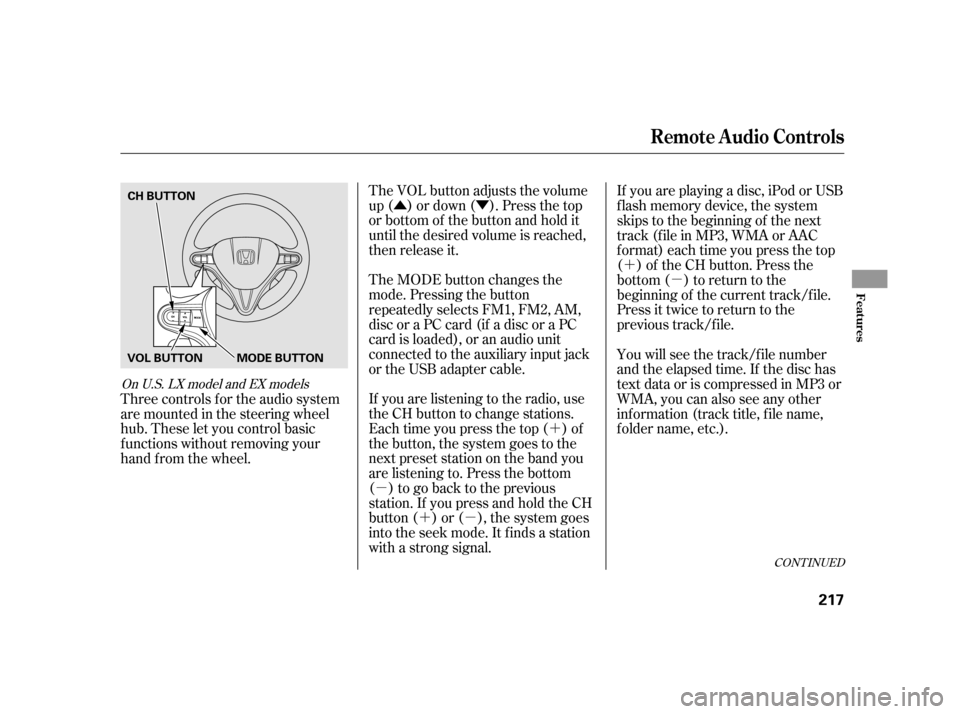
The VOL button adjusts the volume
up ( ) or down ( ). Press the top
or bottom of the button and hold it
until the desired volume is reached,
then release it.
The MODE button changes the
mode. Pressing the button
repeatedly selects FM1, FM2, AM,
discoraPCcard(ifadiscoraPC
card is loaded), or an audio unit
connected to the auxiliary input jack
or the USB adapter cable.
If you are listening to the radio, use
the CH button to change stations.
Each time you press the top ( ) of
the button, the system goes to the
next preset station on the band you
are listening to. Press the bottom
( ) to go back to the previous
station.If youpressandholdtheCH
button ( ) or ( ), the system goes
into the seek mode. It finds a station
with a strong signal. If youareplayingadisc,iPodorUSB
f lash memory device, the system
skips to the beginning of the next
track (file in MP3, WMA or AAC
format) each time you press the top
( ) of the CH button. Press the
bottom ( ) to return to the
beginning of the current track/f ile.
Press it twice to return to the
previous track/f ile.
You will see the track/f ile number
and the elapsed time. If the disc has
text data or is compressed in MP3 or
WMA, you can also see any other
inf ormation (track title, f ile name,
f older name, etc.).
Three controls f or the audio system
are mounted in the steering wheel
hub. These let you control basic
f unctions without removing your
hand f rom the wheel.
CONT INUED
On U.S. LX model and EX models
Remote Audio Controls
Features
217
CH BUTTON
MODE BUTTON
VOL BUTTON
Page 226 of 411

Push the CRUISE button on the
steering wheel. The CRUISE
MAIN indicator on the instrument
panel comes on.
Accelerate to the desired cruising
speedabove25mph(40km/h).Press and release the SET/
DECELbuttononthesteering
wheel. The CRUISE CONTROL
indicator on the instrument panel
comes on to show the system is
now activated.
Cruise control allows you to maintain
asetspeedabove25mph(40km/h)
without keeping your f oot on the
accelerator pedal. It should be used
f or cruising on straight, open
highways. It is not recommended f or
city driving, winding roads, slippery
roads, heavy rain, or bad weather.
Cruise control may not hold the set
speed when you are going up and
down hills. If your vehicle speed
increases going down a hill, use the
brakes to slow down. This will cancel
thecruisecontrol.Toresumetheset
speed, press the RES/ACCEL button.
The CRUISE CONTROL indicator
on the instrument panel will come
back on.
1.
2. 3.
On LX and EX modelsUsing the Cruise Control
Cruise Control
222
CANCEL
BUTTON
CRUISE BUTTON
RES/ACCEL
BUTTON
SET/DECEL
BUTTON
Improper use of the cruise
control can lead to a crash.
Use the cruise control only
when traveling on open
highways in good weather.
Page 228 of 411
You can cancel cruise control in any
of these ways:Push the CANCEL button on the
steering wheel.
Push the CRUISE button on the
steering wheel. Tap the brake pedal. Pressing the CRUISE button turns
the system off and erases the
previous cruising speed. When you push the CANCEL button,
or tap the brake pedal, the system
will remember the previously-set
cruising speed. To return to that
speed, accelerate to above 25 mph
(40 km/h) and then press and
release the RES/ACCEL button. The
CRUISE CONTROL indicator comes
on. The vehicle will accelerate to the
same cruising speed as bef ore.
Tapping either of the paddle shif ters
shif ts the speed up or down, but does
not cancel the cruise control. For
more inf ormation on driving with
paddle shif ters, see page .
276
EX models onlyCanceling Cruise Control Resuming the Set Speed
Cruise Control
224
CRUISE BUTTON
CANCEL
BUTTON
RES/ACCEL
BUTTON
SET/DECEL
BUTTON
Page 230 of 411
�Ì�Ì�Ì�Ì
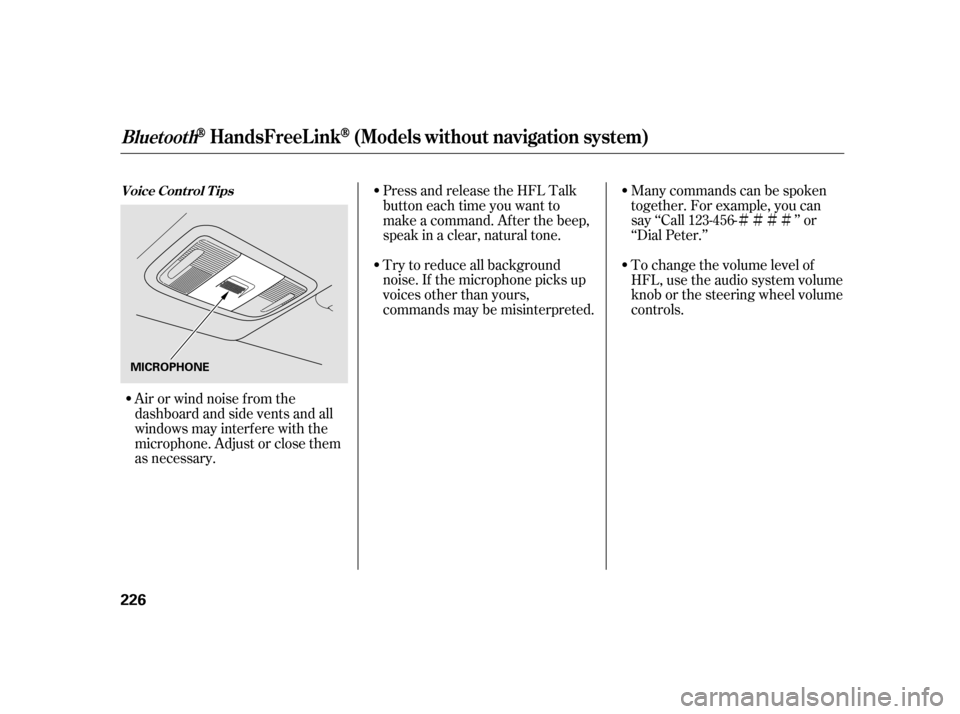
Try to reduce all background
noise. If the microphone picks up
voices other than yours,
commands may be misinterpreted. Many commands can be spoken
together. For example, you can
say ‘‘Call 123-456- ’’ or
‘‘Dial Peter.’’
Press and release the HFL Talk
button each time you want to
make a command. Af ter the beep,
speak in a clear, natural tone.
Airorwindnoisefromthe
dashboard and side vents and all
windows may interfere with the
microphone. Adjust or close them
as necessary. To change the volume level of
HFL, use the audio system volume
knob or the steering wheel volume
controls.
Voice Cont rol T ips
BluetoothHandsFreeL ink(Models wit hout navigat ion syst em)
226
MICROPHONE
Page 259 of 411

�Î
�Î
Some examples are: Removing parts f rom your vehicle,
or replacing components with
non-Honda components could
seriously af f ect your vehicle’s
handling, stability, and reliability.
If you plan to modif y your vehicle,
consult your dealer.Modif ying your steering wheel or
any other part of your vehicle’s
safety features can make the
systems inef f ective. Larger or smaller wheels and tires
can interf ere with the operation of
your vehicle’s anti-lock brakes and
other systems. Non-Honda wheels, because they
are a universal design, can cause
excessive stress on suspension
components and will not be
compatible with the tire pressure
monitoring system (TPMS) .
Raising your vehicle with a
non-Honda suspension kit can
af f ect the handling, stability, and
reliability. Lowering your vehicle with a
non-Honda suspension kit that
signif icantly reduces ground
clearance can allow the
undercarriage to hit speed bumps
or other raised objects, which
could cause the airbags to deploy. : U.S. models
Modif ying Your Vehicle
A ccessories and Modif ications
Bef ore Driving
255
Page 266 of 411
Make sure all windows, mirrors,
and outside lights are clean and
unobstructed. Remove f rost, snow,
or ice.Check that any items you may be
carrying are stored properly or
f astened down securely.
Check the seat adjustment (see
page ).
Check the adjustment of the
inside and outside mirrors (see
page ).
Check the steering wheel
adjustment (see page ).
Make sure the doors are securely
closed and locked.Fasten your seat belt. Check that
your passengers have f astened
their seat belts (see page ).
Youshoulddothefollowingchecks
and adjustments bef ore you drive
your vehicle.
Visually check the tires. If a tire
looks low, use a gauge to check its
pressure (see page ). Check that the hood and hatch are
f ully closed. When you start the engine, check
the gauges and indicators in the
instrument panel, and the
messages on the multi-inf ormation
display (see pages , and
).
1.
2.
3.
8. 7. 6.9.
4.
5.
61 7217
10.
141
147
128 89
338
Preparing to Drive
262