Page 296 of 374
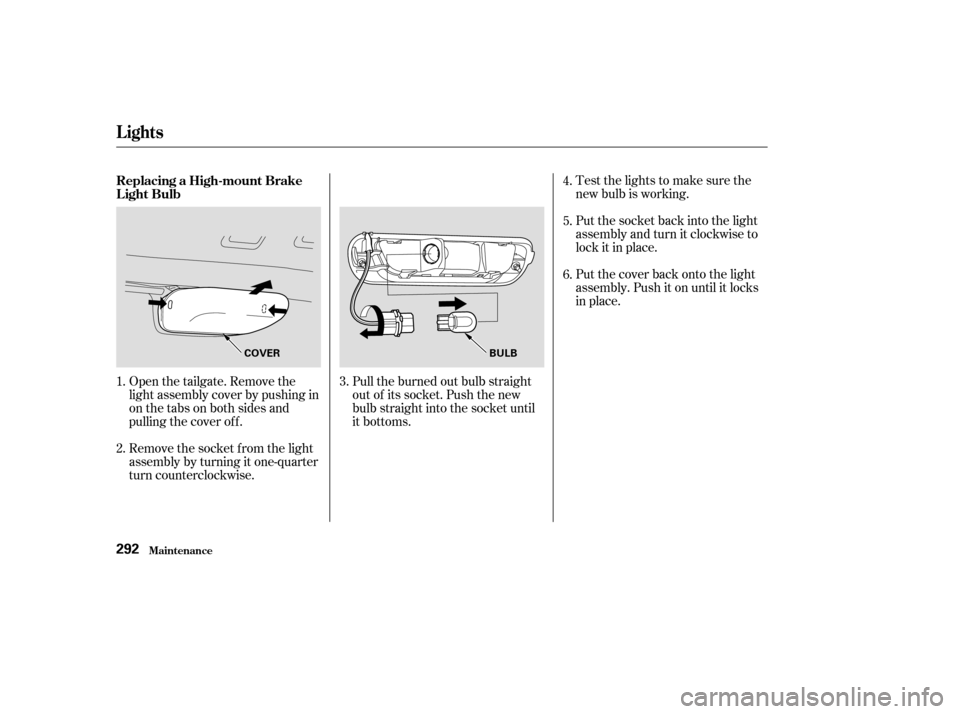
Testthelightstomakesurethe
new bulb is working.
Put the socket back into the light
assembly and turn it clockwise to
lock it in place.
Put the cover back onto the light
assembly. Push it on until it locks
in place.
Open the tailgate. Remove the
light assembly cover by pushing in
on the tabs on both sides and
pulling the cover of f .
Remove the socket f rom the light
assembly by turning it one-quarter
turn counterclockwise. Pull the burned out bulb straight
out of its socket. Push the new
bulb straight into the socket until
it bottoms.
1.
2. 3.4.
5.
6.
Replacing a High-mount Brake
Light Bulb
Lights
Maint enance292
COVER
BULB
Page 297 of 374
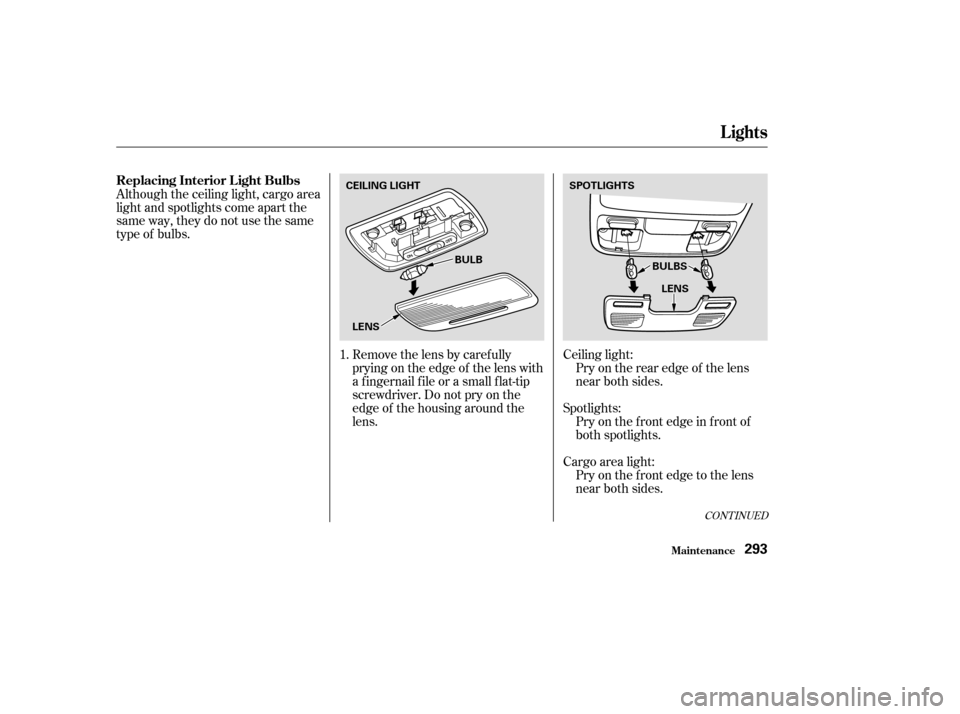
Removethelensbycarefully
prying on the edge of the lens with
a f ingernail f ile or a small f lat-tip
screwdriver. Do not pry on the
edge of the housing around the
lens.
Although the ceiling light, cargo area
light and spotlights come apart the
same way, they do not use the same
type of bulbs.
Ceiling light:Pry on the rear edge of the lens
near both sides.
Spotlights: Pryonthefrontedgeinfrontof
both spotlights.
Cargo area light: Pryonthefrontedgetothelens
near both sides.
1.
CONT INUED
Lights
Maint enance
Replacing Interior L ight Bulbs
293
CEILING LIGHT
SPOTLIGHTS
BULB
LENS BULBS
LENS
Page 298 of 374
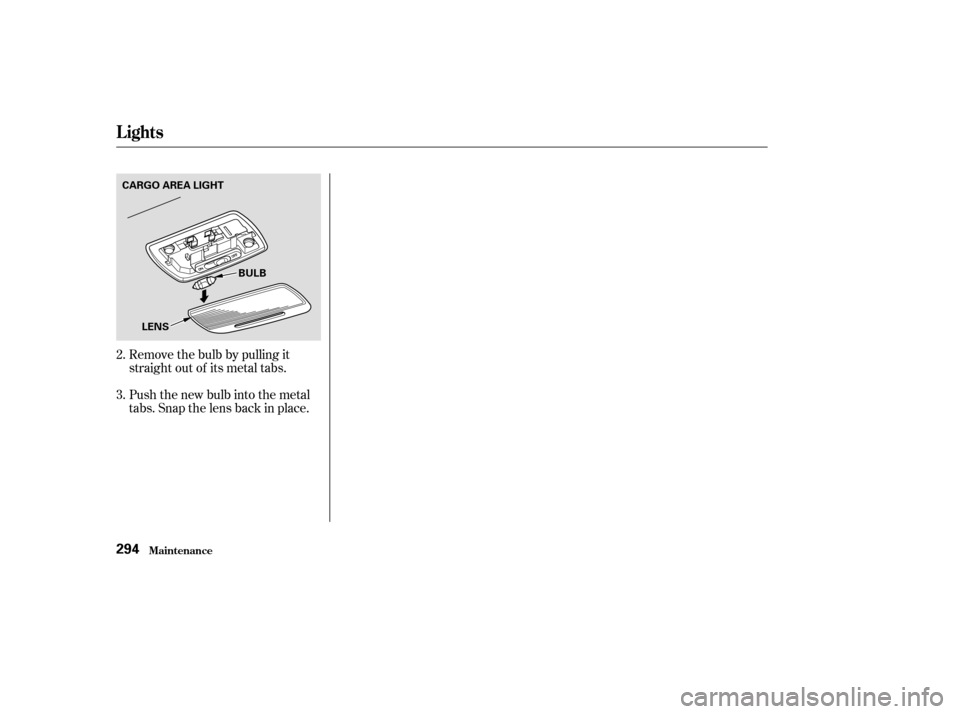
Remove the bulb by pulling it
straight out of its metal tabs.
Push the new bulb into the metal
tabs. Snap the lens back in place.
3. 2.
Lights
Maint enance294
CARGO AREA LIGHT
BULB
LENS
Page 312 of 374
If you have a f lat tire while driving,
stop in a saf e place to change it.
Stopping in traf f ic or on the shoulder
of a busy road is dangerous. Drive
slowly along the shoulder until you
gettoanexitoranareatostopthat
is far away from the traffic lanes.Park the vehicle on f irm, level and
non-slippery ground away f rom
traffic. Put the transmission in
Park (automatic) or Reverse
(manual). Apply the parking brake.
Turn on the hazard warning lights,
and turn the ignition switch to
LOCK (0). Have all the
passengers get out of the vehicle
while you change the tire. If you are towing a trailer, unhitch
the trailer.Open the tailgate.
1.
2. 3.
T aking Care of t he Unexpect ed
Changing a Flat T ire
308
JACK SPARE TIRE
The vehicle can easily roll off
the jack, seriously injuring
anyone underneath.
Follow the directions for
changing a tire exactly, and
never get under the vehicle
when it is supported only by the
jack.
Page 322 of 374

Diagnosing why your engine won’t
start f alls into two areas, depending
on what you hear when you turn the
key to START (III):You hear nothing, or almost
nothing. The engine’s starter
motor does not operate at all, or
operates very slowly.
You can hear the starter motor
operating normally, or the starter
motor sounds like it is spinning
f aster than normal, but the engine
does not start up and run. Turn the ignition switch to ON (II).
Turn on the headlights and check
their brightness. If the headlights
are very dim or don’t light at all,
the battery is discharged. See
on page .
When you turn the ignition switch to
START (III), you do not hear the
normal noise of the engine trying to
start. You may hear a clicking sound
or series of clicks, or nothing at all.
Check these things:
Turn the ignition switch to START
(III). If the headlights do not dim,
check the condition of the f uses. If
the f uses are OK, there is proba-
bly something wrong with the
electrical circuit f or the ignition
switch or starter motor. You will
need a qualif ied technician to
determine the problem. (See on page .)
Check the transmission interlock.
If you have a manual transmission,
the clutch pedal must be pushed
all the way to the f loor or the
starter will not operate. With an
automatic transmission, it must be
in Park or Neutral. 320
337
Nothing Happens or the Starter
Motor Operates Very Slowly
Jump Starting
Emergency T owing
If Your Engine Won’t Start
T aking Care of t he Unexpect ed318
Page 323 of 374

If the headlights dim noticeably or
go out when you try to start the
engine, either the battery is dis-
charged or the connections are
corroded. Check the condition of the
battery and terminal connections
(see page ). You can then try
jump starting the vehicle from a
booster battery (see page ).In this case, the starter motor’s
speed sounds normal, or even f aster
than normal, when you turn the
ignition switch to START (III), but
the engine does not run.
Are you using the proper starting
procedure? Ref er to on page . There may be an electrical
problem, such as no power to the
f uel pump. Check all the f uses
(see page ).
If youfindnothingwrong,youwill
need a qualif ied technician to f ind
the problem. See on page .
Your vehicle has the Immobilizer
System. You should use a
properly-coded master or valet key
to start the engine (see page ).
A key that is not properly coded
will cause the immobilizer system
indicator in the dash panel to blink
rapidly. Do you have f uel? Turn the
ignition switch to ON (II) for a
minute and watch the f uel gauge.
The low f uel level warning light
may not be working, so you were
not reminded to f ill the tank.
269
320
200 331
337
85
T he Starter Operates Normally
Starting the
Engine Emergency
Towing
If Your Engine Won’t Start
T aking Care of t he Unexpect ed319
Page 324 of 374
If your vehicle’s battery has run
down,youmaybeabletostartthe
engine by using a booster battery.
Although this seems like a simple
procedure, you should take several
precautions.To jump start your vehicle, f ollow
these directions closely:
Open the hood and check the
physical condition of the battery
(see page ). In very cold
weather, check the condition of
the electrolyte. If it seems slushy
or like ice, do not try jump starting
until it thaws.
Turn of f all the electrical acces-
sories: heater, A/C, stereo system,
lights, etc.
Put the transmission in Neutral or
Park, and set the parking brake.
You cannot start a Honda with an
automatic transmission by pushing
or pulling it. 1.
2.269
Jump Starting
T aking Care of t he Unexpect ed320
A battery can explode if you do
not follow the correct procedure,
seriously injuring anyone
nearby.
Keep all sparks, open flames,
and smoking materials away
from the battery.
If a battery sits in extreme cold, the
electrolyte inside can f reeze.
Attempting to jump start with a f rozen
battery can cause it to rupture.
Page 336 of 374
If something electrical in your
vehicle stops working, the first thing
youshouldcheckforisablownfuse.
Determine f rom the chart on pagesand , or the diagram on the
fuse box lid, which fuse or fuses
control that component. Check those
f uses f irst, but check all the f uses
bef ore deciding that a blown f use is
not the cause. Replace any blown
f uses and check the component’s
operation. Check each of the large f uses in
the under-hood f use box by
looking through the top at the wire
inside. Removing these f uses
requires a Phillips-head screw-
driver.
Remove the cover f rom the f use
box. Turn the ignition switch to LOCK
(0). Make sure the headlights and
all other accessories are off.
3.
1.
2.
335 336
Checking and Replacing Fuses
Fuses
T aking Care of t he Unexpect ed332
FUSE
BLOWN