Page 173 of 374
To load CDs or operate the CD
changer, the ignition switch must be
in ACCESSORY (I) or ON (II).
Load and play only standard round
discs. Odd-shaped CDs may jam in
the drive or cause other problems.
You cannot load and play 3-inch
(8-cm)discsinthissystem. Your Honda’s audio system has an
in-dash CD changer that holds up to
six discs, providing several hours of
continuous entertainment. You
operate this CD changer with the
same controls used f or the radio and
cassette player.
For best results when using CD-R
discs, use only high quality discs
labeled f or audio use. When
recording a CD-R, the recording
must be closed in order f or the disc
to be used by CD players. CD-RW
discs will not work in this unit.
CONT INUED
Operating the CD Changer
Audio System
Comf ort and Convenience Feat ures169
LOAD BUTTONCD SLOT
PWR/VOL
KNOB REPEAT BUTTONRDM BUTTON
SKIP BUTTONSCD EJECT
BUTTON
CD BUTTON
Page 175 of 374
You can also load a CD into an empty
position while a CD is playing by
pressing the appropriate preset
button. Select an empty position (the
disc number indicator is of f ), and
press the preset button f or that
position (1 to 6). The system will
stop playing the current CD and start
the loading sequence. It will then
play the CD just loaded. If you press the LOAD button while
a CD is playing, the system will stop
playing that CD and start the loading
sequence. It will then play the CD
just loaded.
CONT INUED
Audio System
Comf ort and Convenience Feat ures171
LOAD BUTTONDISC NUMBER
CD SLOT CD LOADED INDICATOR
AM
BUTTON
FM
BUTTON PRESET BUTTONS TAPE BUTTON
Page 176 of 374

�µ�µ
�µ
�Ó
�Ó
�Ó
�Ó
�´
�µ
�´
�µ
When that disc ends, the next disc in
the CD changer is loaded and played.
Af ter the last disc f inishes, the
system returns to disc 1.
To select a dif f erent disc, press the
appropriate Preset button (1 6). If
youselectanemptypositioninthe
CD changer, the system will go into
the loading sequence (see page ).
You can use the SKIP buttons while
a disc is playing to select passages
and change tracks. To activate the Repeat
f eature, press and release the RPT
button. You will see RPT in the
display as a reminder. The system
continuously replays the current
track. Press the RPT button again to
turn it off. Pressing either of the
SKIP buttons also turns off the
repeat feature.
This feature,
when activated, plays the tracks
within a CD in random order, rather
than in the order they are recorded
on the CD. To activate Random Play,
press the RDM button. You will see
RDM in the display. The system will
then select and play tracks randomly.
This continues until you deactivate
RandomPlaybypressingtheRDM
button again, or you select a
dif f erent CD with a preset button.
Each time you press the button
and release it, the system skips
f orward to the beginning of the next
track. Press and release the
buttontoskipbackwardtothe
beginning of the current track. Press
and release it again to skip to the
beginning of the previous track.
Select the CD changer by pressing
the CD button. You will see ‘‘CD’’ in
the display. The system will begin
playing the last selected disc in the
CD changer. You will see the disc
and track numbers displayed.
To move rapidly within a track, press
and hold the appropriate SKIP
button. Press the button to move
f orward. You will see CUE displayed.
To move backward, press the
button. You will see REW displayed.
Release the button when the system
reaches the point you want.
170
Operat ionREPEAT
RANDOM PLAY
Audio System
Comf ort and Convenience Feat ures172
Page 177 of 374
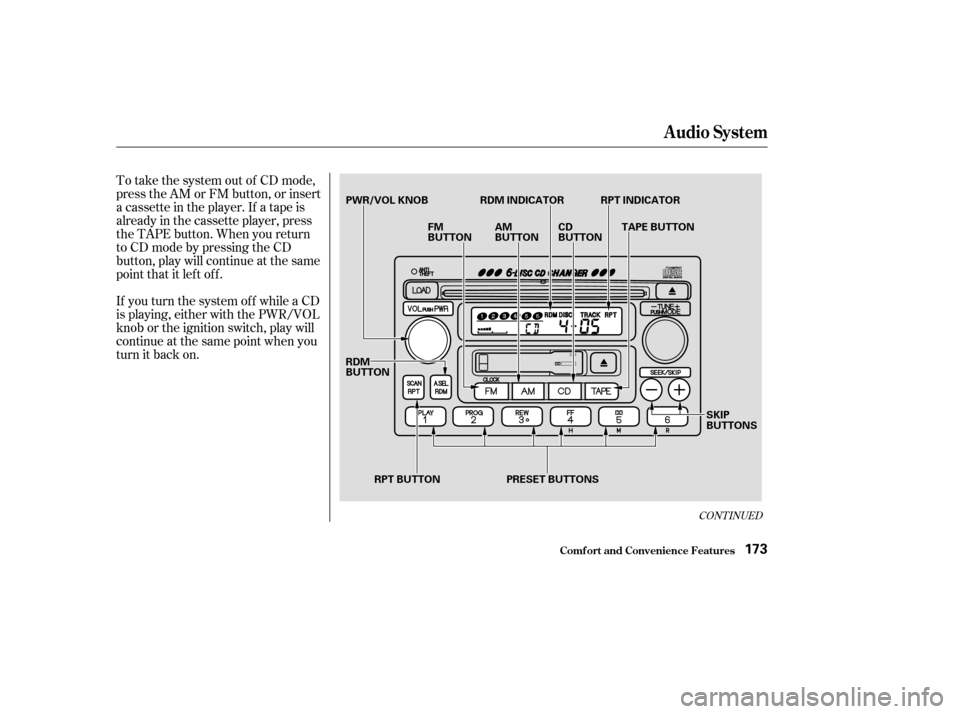
To take the system out of CD mode,
press the AM or FM button, or insert
a cassette in the player. If a tape is
already in the cassette player, press
the TAPE button. When you return
to CD mode by pressing the CD
button, play will continue at the same
point that it left off.
If you turn the system of f while a CD
is playing, either with the PWR/VOL
knob or the ignition switch, play will
continue at the same point when you
turn it back on.
CONT INUED
Audio System
Comf ort and Convenience Feat ures173
PWR/VOL KNOB RDM INDICATOR RPT INDICATORFM
BUTTONAM
BUTTONCD
BUTTON
RDM
BUTTON RPT BUTTON PRESET BUTTONS SKIP
BUTTONS
TAPE BUTTON
Page 182 of 374

You will have to store your favorite
stations in the Preset buttons after
the system begins working. Your
original settings were lost when
power was disconnected.
If your vehicle’s battery is discon-
nected or goes dead, or the radio
f use is removed, the audio system
will disable itself . If this happens,
youwillsee‘‘ ’’inthe
frequencydisplaythenexttimeyou
turn on the system. Use the Preset
buttons to enter the five-digit code. If
it is entered correctly, the radio will
start playing.
If you make a mistake entering the
code, do not start over or try to
correct your mistake. Complete the
f ive-digit sequence, then enter the
correct code. You have ten tries to
enter the correct code. If you are
unsuccessful in ten attempts, you
must then leave the system on for
one hour bef ore trying again.
Your vehicle’s audio system will
disable itself if it is disconnected
f rom electrical power f or any reason.
To make it work again, the user
must enter a specif ic f ive-digit code
in the Preset buttons. Because there
are hundreds of number
combinations possible f rom f ive
digits, making the system work
without knowing the exact code is
nearly impossible.
Youshouldhavereceivedacardthat
lists your audio system’s code
number and serial number. It is best
tostorethiscardinasafeplaceat
home. In addition, you should write
the audio system’s serial number in
this Owner’s Manual. If you should
happen to lose the card, you must
obtain the code number f rom your
Honda dealer. To do this, you will
need the system’s serial number. Thef t Protection
Audio System
Comf ort and Convenience Feat ures178
Page 274 of 374

�µIf you need to connect the battery to
a charger, disconnect both cables to
prevent damage to the vehicle’s
electrical system.
If the terminals are severely cor-
roded, clean them with baking soda
and water. Then use a wrench to
loosen and remove the cables f rom
the terminals. Always disconnect the
negative ( ) cable f irst and recon-
nect it last. Clean the battery termi-
nals with a terminal cleaning tool or
wire brush. Reconnect and tighten
the cables, then coat the terminals
with grease. If your vehicle’s battery is
disconnected or goes dead, the audio
system will disable itself . The next
timeyouturnontheradioyouwill
see ‘‘ ’’ in the f requency
display. Use the Preset buttons to
enter the f ive-digit code (see page
). You will then have to set the
clock and enter your station presets. 178
Battery
Maint enance270
The battery gives off explosive
hydrogen gas during normal
operation.
A spark or flame can cause the
battery to explode with enough
force to kill or seriously hurt you.
Wear protective clothing and a
face shield, or have a skilled
mechanic do the battery
maintenance. Charging the battery with the cables
connected can seriously damage your
vehicle’s electronic controls. Detach
the battery cables bef ore connecting
the battery to a charger.
Page:
< prev 1-8 9-16 17-24