Page 1 of 317

2003 Civic Hybrid Online Reference Owner's Manual Use these links (and links throughout this manual) to navigate through this reference.
For a printed owner's manual, click on authorized manuals or go to www.helminc.com.
Contents
Owner's Identification Form
Introduction ........................................................................\
............................................................................. i
A Few Words About Safety ........................................................................\
.................................................. ii
Your Car at a Glance ........................................................................\
.............................................................. 2
Driver and Passenger Safety ........................................................................\
............................................... 5
Proper use and care of your car's seat belts, and Supplemental Restraint System.
Instruments and Controls........................................................................\
.................................................. .57
Instrument panel indicator and gauge, and how to use dashboard and steering column controls.
Comfort and Convenience Features........................................................................\
...............................107
How to operate the climate control system, the audio system, and other convenience features.
Before Driving ........................................................................\
.....................................................................143
What gasoline to use, how to break-in your new car, and how to load luggage and other cargo.
Driving........................................................................\
...................................................... .............................159
The proper way to start the engine, shift the tr ansmission, and park, plus towing a trailer.
Maintenance........................................................................\
...................................................... ...................181
The Maintenance Schedule shows you when you need to take your car to the dealer.
Appearance Care........................................................................\
.................................................................245
Tips on cleaning and protecting your car. Things to look for if your car ever needs body repairs.
Taking Care of the Unexpected........................................................................\
.......................................255
This section covers several problems motorists someti mes experience, and how to handle them.
Technical Information........................................................................\
...................................................... .285
ID numbers, dimensions, capaciti es, and technical information.
Warranty and Customer Relations (U.S. and Canada)......................................................................299
A summary of the warranties covering your new Honda, and how to contact us.
Authorized Manuals (U.S. only)........................................................................\
.......................................303
How to order manuals and other technical literature.
Index ........................................................................\
......................................................................................... I
Service Information Summary
A summary of information you need wh en you pull up to the fuel pump.
Page 10 of 317
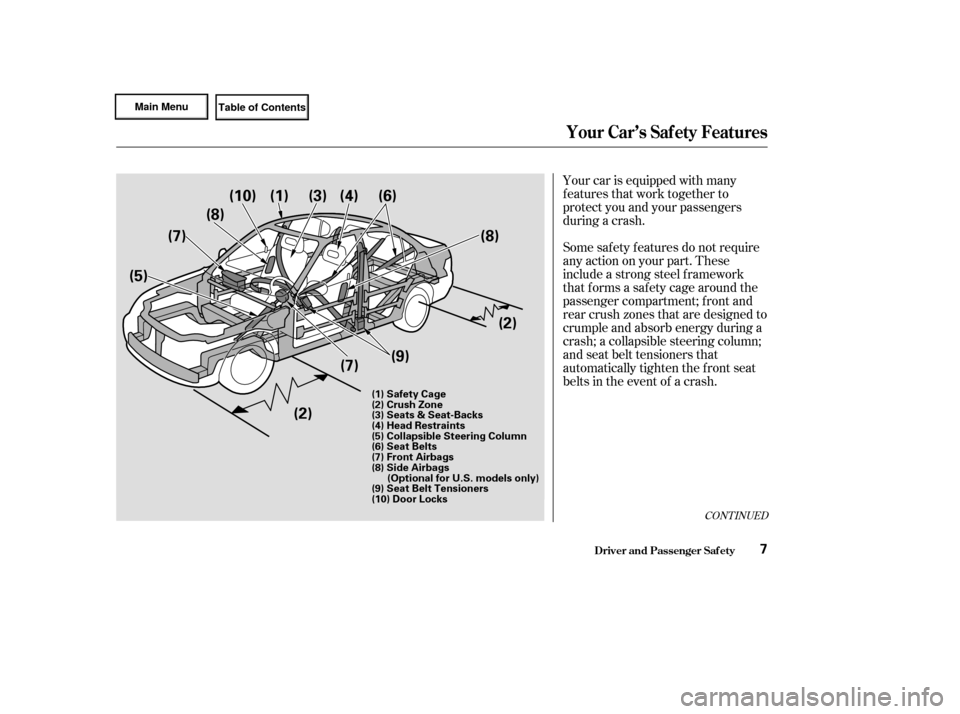
Your car is equipped with many
features that work together to
protect you and your passengers
during a crash.
Some saf ety f eatures do not require
anyactiononyourpart.These
include a strong steel f ramework
that forms a safety cage around the
passenger compartment; f ront and
rear crush zones that are designed to
crumple and absorb energy during a
crash; a collapsible steering column;
and seat belt tensioners that
automatically tighten the front seat
belts in the event of a crash.
CONT INUED
Driver and Passenger Saf ety
Your Car’s Saf ety Features
7
(1) Safety Cage
(2) Crush Zone
(3) Seats & Seat-Backs
(4) Head Restraints
(5) Collapsible Steering Column
(6) Seat Belts
(7) Front Airbags
(8) Side Airbags(Optional for U.S. models only)
(9) Seat Belt Tensioners
(10) Door Locks
(1)
(10)
(8)
(7)
(5)
(2)(7)
(9) (2)
(8)
(6)(4)(3)
Page 77 of 317
�Î�Î
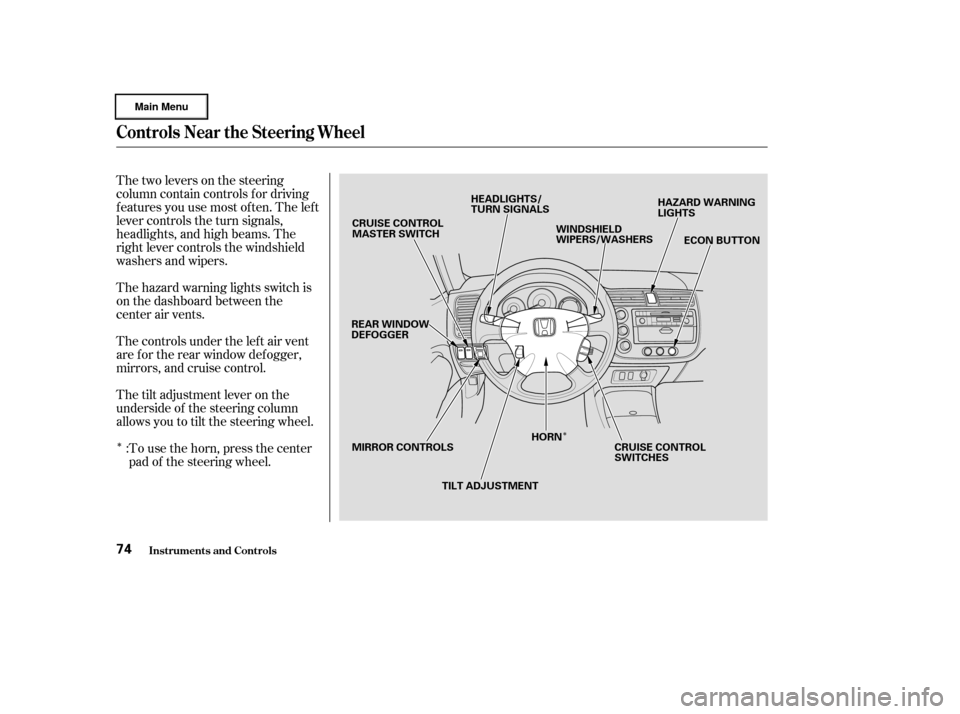
Thetwoleversonthesteering
column contain controls f or driving
f eatures you use most of ten. The lef t
lever controls the turn signals,
headlights, and high beams. The
right lever controls the windshield
washers and wipers.
The hazard warning lights switch is
on the dashboard between the
center air vents.
The controls under the lef t air vent
are f or the rear window def ogger,
mirrors, and cruise control.
The tilt adjustment lever on the
underside of the steering column
allows you to tilt the steering wheel.To use the horn, press the center
pad of the steering wheel.
:
Controls Near the Steering Wheel
Inst rument s and Cont rols74
CRUISE CONTROL
MASTER SWITCH
REAR WINDOW
DEFOGGER
MIRROR CONTROLS TILT ADJUSTMENTHORN
CRUISE CONTROL
SWITCHESECON BUTTON
HAZARD WARNING
LIGHTS
WINDSHIELD
WIPERS/WASHERS
HEADLIGHTS/
TURN SIGNALS
Page 85 of 317
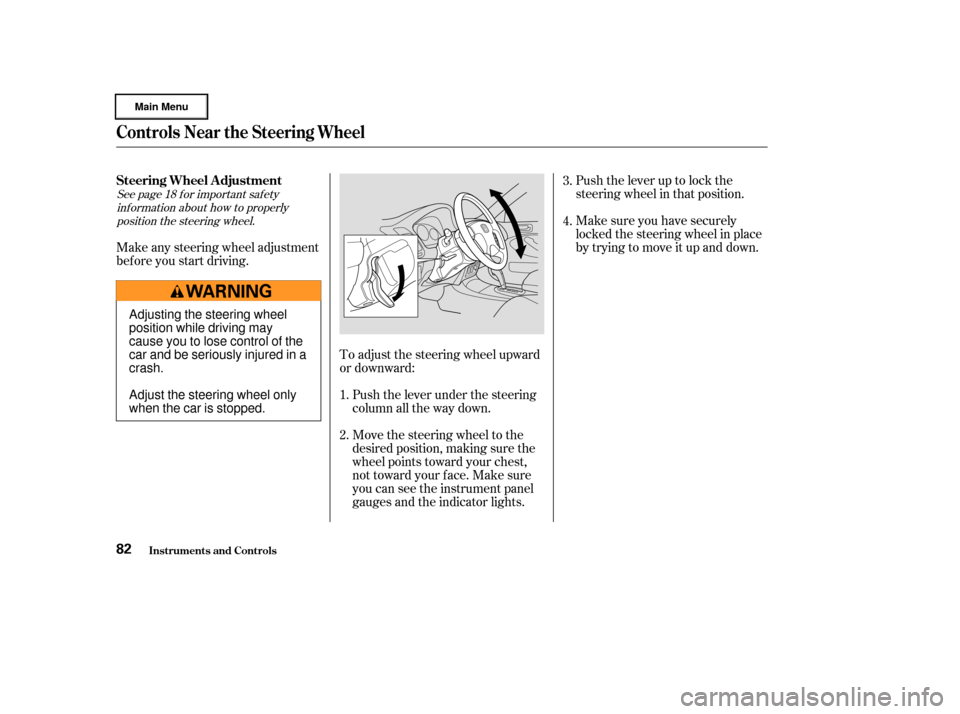
Push the lever up to lock the
steering wheel in that position.
Make sure you have securely
locked the steering wheel in place
by trying to move it up and down.
Move the steering wheel to the
desired position, making sure the
wheel points toward your chest,
not toward your f ace. Make sure
you can see the instrument panel
gauges and the indicator lights. Push the lever under the steering
column all the way down.
To adjust the steering wheel upward
or downward:
Make any steering wheel adjustment
bef ore you start driving.
1.4. 3.
2.
See page f or important saf ety inf ormation about how to properlyposition the steering wheel. 18
Steering Wheel A djustment
Controls Near the Steering Wheel
Inst rument s and Cont rols82
Adjusting the steering wheel
position while driving may
cause you to lose control of the
car and be seriously injured in a
crash.
Adjust the steering wheel only
when the car is stopped.
Page 89 of 317
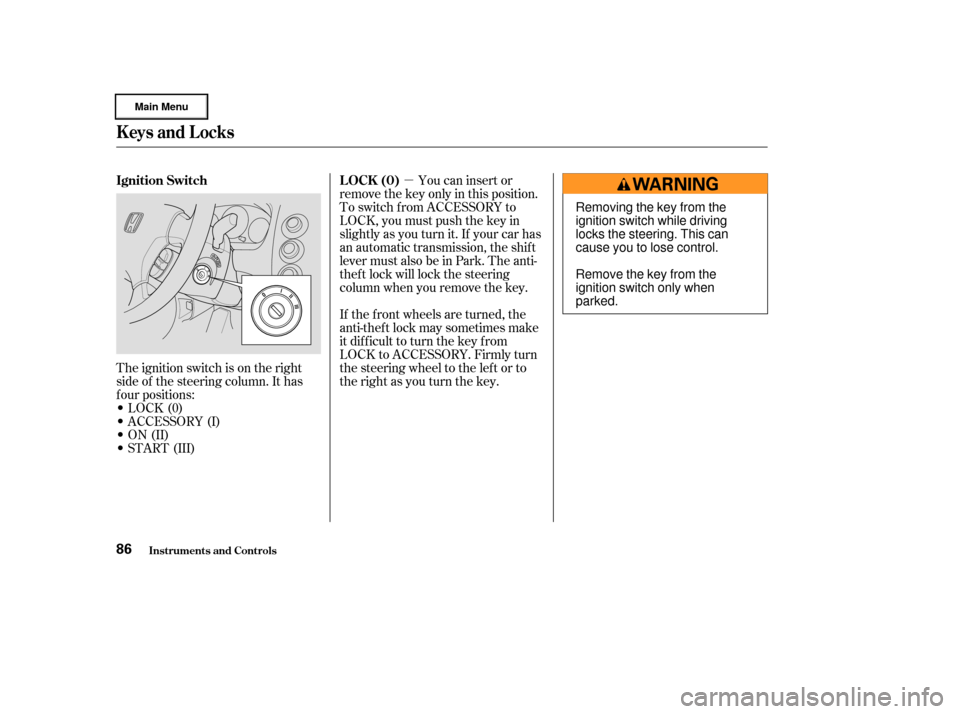
�µYou can insert or
remove the key only in this position.
To switch f rom ACCESSORY to
LOCK, you must push the key in
slightly as you turn it. If your car has
an automatic transmission, the shif t
lever must also be in Park. The anti-
thef t lock will lock the steering
column when you remove the key.
If the f ront wheels are turned, the
anti-thef t lock may sometimes make
it difficult to turn the key from
LOCK to ACCESSORY. Firmly turn
the steering wheel to the lef t or to
the right as you turn the key.
The ignition switch is on the right
side of the steering column. It has
f our positions:
LOCK(0)
ACCESSORY (I)
ON (II)
START (III)
Inst rument s and Cont rols
Keys and Locks
LOCK (0)
Ignition Switch
86
Removing the key from the
ignition switch while driving
locks the steering. This can
cause you to lose control.
Remove the key from the
ignition switch only when
parked.
Page 120 of 317
When you select or ,
the Auto Idle Stop f unction will not
activate.To regulate the interior temperature,
the system has two sensors. A sun-
light sensor is located in the top of
the dashboard and a temperature
sensor is next to the steering column.
Do not cover the sensors or spill any
liquidonthem.
Heating and Cooling (Automatic System)
Comf ort and Convenience Feat ures
Sunlight Sensor/T emperature
Sensor
117
SULIGHT SENSOR TEMPERATURE SENSOR
Page 142 of 317
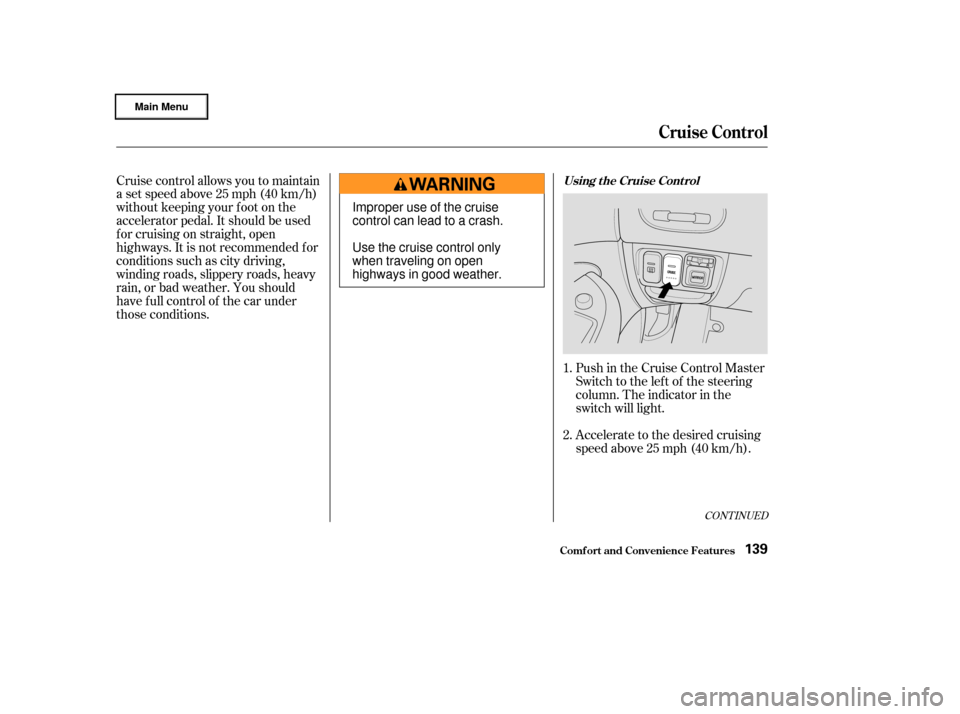
Accelerate to the desired cruising
speedabove25mph(40km/h). Push in the Cruise Control Master
Switch to the lef t of the steering
column. The indicator in the
switch will light.
Cruise control allows you to maintain
asetspeedabove25mph(40km/h)
without keeping your f oot on the
accelerator pedal. It should be used
f or cruising on straight, open
highways. It is not recommended f or
conditions such as city driving,
winding roads, slippery roads, heavy
rain, or bad weather. You should
have f ull control of the car under
those conditions.
1.
2.
CONT INUED
Using t he Cruise Cont rol
Cruise Control
Comf ort and Convenience Feat ures139
Improper use of the cruise
control can lead to a crash.
Use the cruise control only
when traveling on open
highways in good weather.
Page 189 of 317
�µ
�Î
�Ì
�Î
�Ì
�Ì
Maint enance186
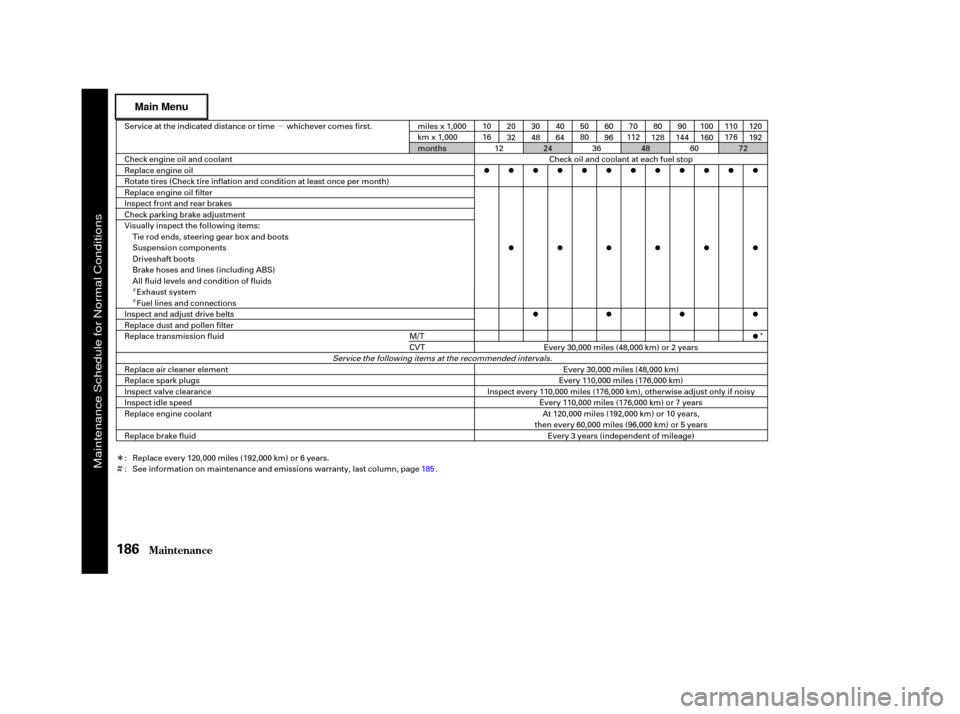
Service at the indicated distance or time whichever comes first.
miles x 1,000
km x 1,000
months 10
16
50
8070
112 110
176
Check oil and coolant at each fuel stop
Service the following items at the recommended intervals.
Every 110,000 miles (176,000 km) or 7 years
Inspect every 110,000 miles (176,000 km), otherwise adjust only if noisy Every 110,000 miles (176,000 km)Every 30,000 miles (48,000 km)
20
32
30
4840
64 60
9680
128 90
144 100
160 120
192
Every 30,000 miles (48,000 km) or 2 years
Check engine oil and coolant
Replace engine oil
Rotate tires (Check tire inflation and condition at least once per month)
Replace engine oil filter
Inspect front and rear brakes
Check parking brake adjustment
Visually inspect the following items:
Tie rod ends, steering gear box and boots
Suspension components
Driveshaft boots
Brake hoses and lines (including ABS)
All fluid levels and condition of fluidsExhaust system
Fuel lines and connections
Inspect and adjust drive belts
Replace dust and pollen filter
Replace transmission fluid
Replace air cleaner element
Replace spark plugs
Inspect valve clearance
Inspect idle speed
Replace engine coolant
Replace brake fluid At 120,000 miles (192,000 km) or 10 years,
then every 60,000 miles (96,000 km) or 5 years Every 3 years (independent of mileage)
Replace every 120,000 miles (192,000 km) or 6 years.
See information on maintenance and emissions warranty, last column, page . 24
4872
12 3660
M/T
CVT
:
: 185
Maintenance Schedule for Normal Conditions