Page 131 of 302
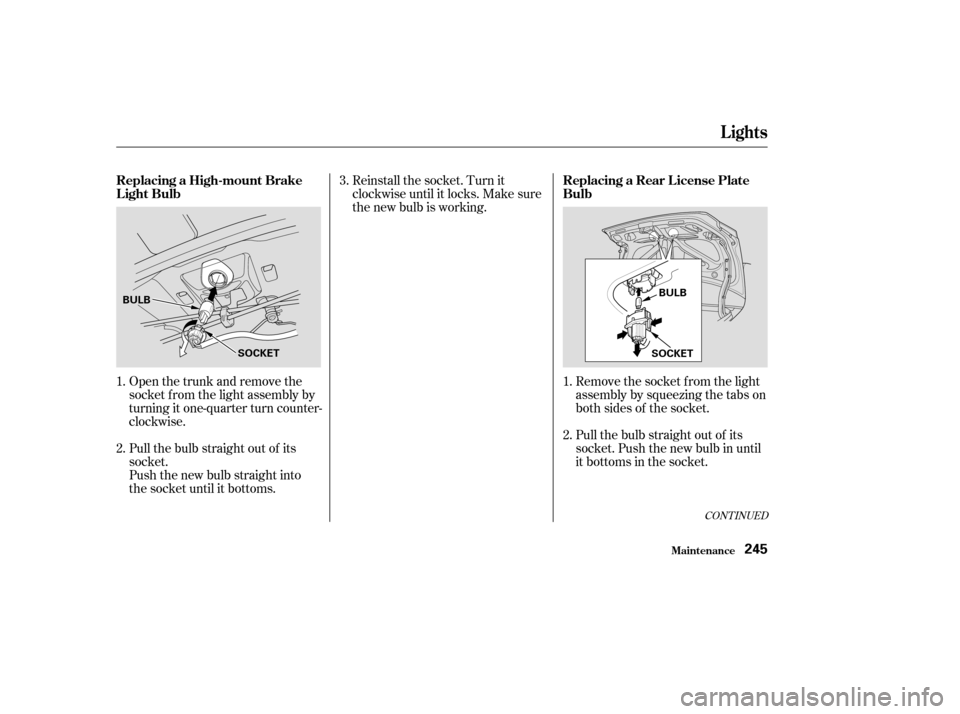
You can use the instrument panel
brightness control dial to adjust the il-
lumination of the audio system (see
page ). The audio system
illuminates when the parking lights
are on, even if the radio is turned of f .
The display of your audio system
usually shows the time when the
ignition switch is in ACCESSORY (I)
or ON (II). It shows the operation
mode of the radio, CD player, or
optional CD changer/cassette player
when you operate them, and goes
back to the time display after five
seconds.You can set the time only when the
clock is displayed.
If an error occurs while operating
the CD player or optional CD
changer, the display will show the
error code and will not switch to the
time display until the error is
corrected (see pages and ). Adjust the hours by pressing and
holding the CLOCK (SCAN/RPT)
button, then pressing the H (Preset
4) button.
Adjust the minutes by pressing and
holding the CLOCK (SCAN/RPT)
button, then pressing the M (Preset
5) button.
74
143 144
CONT INUED
A udio System L ighting
Digital Clock
Audio System
Comf ort and Convenience Feat ures135
H BUTTONM BUTTON R BUTTON
CLOCK (SCAN/RPT) BUTTON
�����—�����—�����y�
�������������y���
�(���%�������y���
�����y
Page 132 of 302

Your Honda’s radio can receive the
complete AM and FM bands.
Those bands cover these f requen-
cies:
AM band:
530 to 1,710 kilohertz
FM band:
87.7 to 107.9 megahertz
Radio stations on the AM band are
assigned f requencies at least ten
kilohertz apart (530, 540, 550).
Stations on the FM band are
assigned f requencies at least 0.2
megahertz apart (87.9, 88.1, 88.3).Stations must use these exact
f requencies. It is f airly common f or
stations to round-of f the f requency in
their advertising, so your radio could
display a f requency of 100.9 even
though the announcer may identif y
the station as ‘‘FM101.’’
1:06 would RESET to 1:00.
1:52 would RESET to 2:00.
For example:
You can quickly set the time to the
nearest hour. If the displayed time is
bef ore the half hour, the clock is set
back to the previous hour by
pressing and holding the CLOCK
(SCAN/RPT) button, then pressing
the R (Preset 6) button. If the
displayed time is af ter the half hour,
the clock is set forward to the
beginning of the next hour.
Audio System
Comf ort and Convenience Feat ures
Radio Frequencies
136
�����—�����—�����y�
�������������y���
�(���%�������y���
�����y
Page 201 of 302
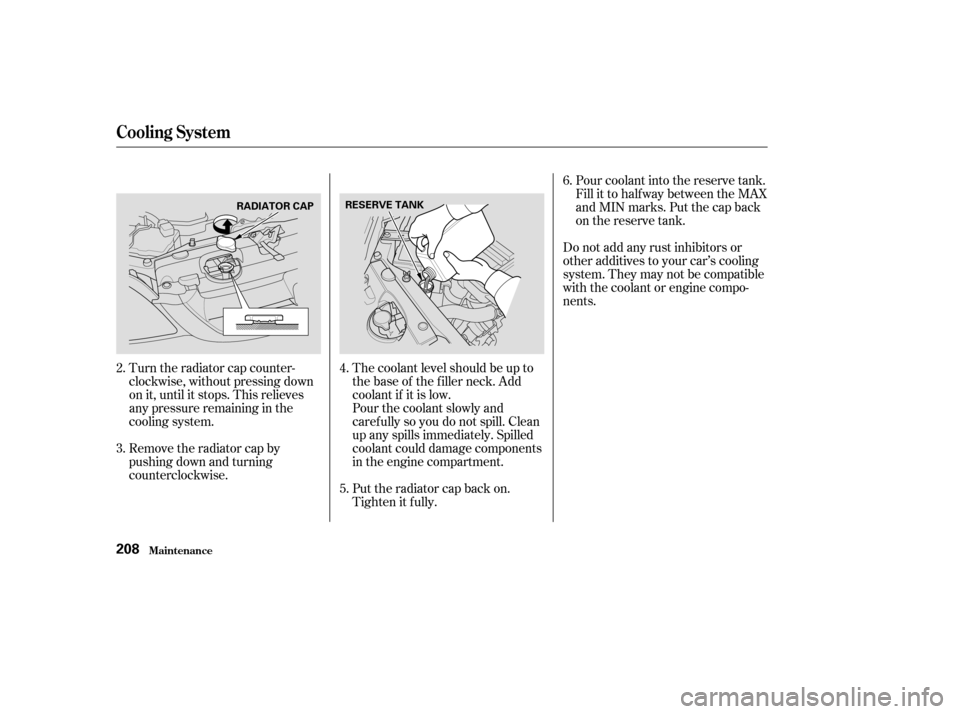
Remove the radiator cap by
pushing down and turning
counterclockwise.
Turn the radiator cap counter-
clockwise, without pressing down
on it, until it stops. This relieves
any pressure remaining in the
cooling system.
The coolant level should be up to
the base of the f iller neck. Add
coolant if it is low.Do not add any rust inhibitors or
other additives to your car’s cooling
system. They may not be compatible
with the coolant or engine compo-
nents.
Pour coolant into the reserve tank.
Fill it to half way between the MAX
and MIN marks. Put the cap back
on the reserve tank.
Put the radiator cap back on.
Tighten it f ully.
Pourthecoolantslowlyand
caref ully so you do not spill. Clean
up any spills immediately. Spilled
coolant could damage components
in the engine compartment.
2. 3.
4. 5.6.
Cooling Syst em
Maint enance208
RESERVE TANK
RADIATOR CAP
�����—�����—�����y�
���������
�
�y���
�(���%�������y�����
�
�y
Page 214 of 302
CONT INUED
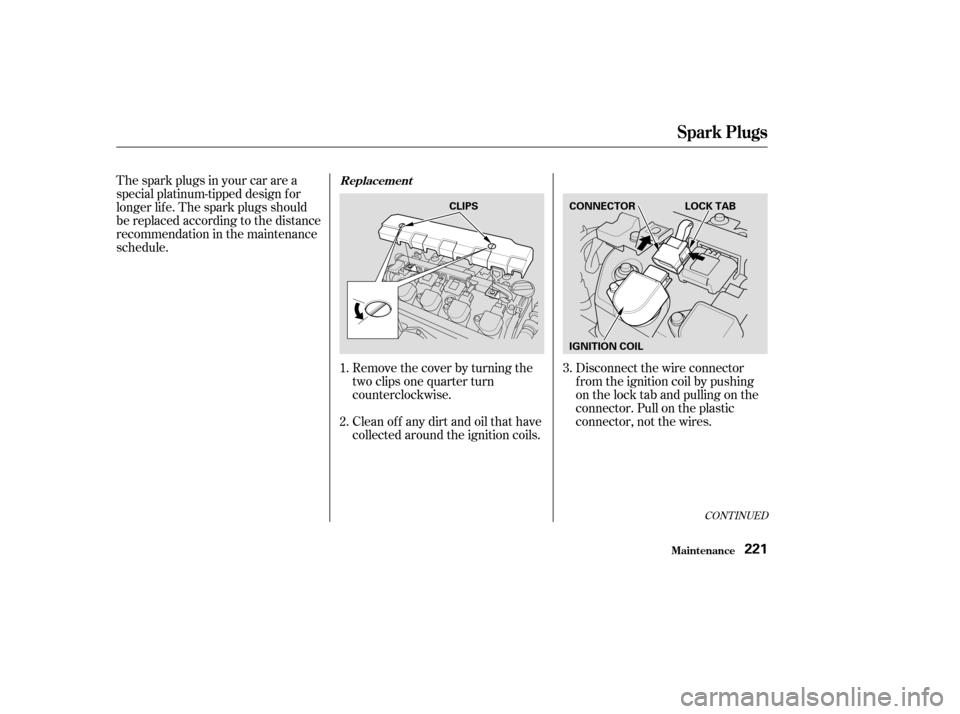
Remove the cover by turning the
two clips one quarter turn
counterclockwise.
Clean off any dirt and oil that have
collected around the ignition coils.
The spark plugs in your car are a
special platinum-tipped design f or
longer lif e. The spark plugs should
be replaced according to the distance
recommendation in the maintenance
schedule.
Disconnect the wire connector
f rom the ignition coil by pushing
on the lock tab and pulling on the
connector. Pull on the plastic
connector, not the wires.
1. 2. 3.
Maint enance
Spark Plugs
Replacement
221
LOCK TAB
CONNECTOR
CLIPS
IGNITION COIL
�����—�����—�����y�
�������������y���
�(���%�������y���������y
Page 236 of 302
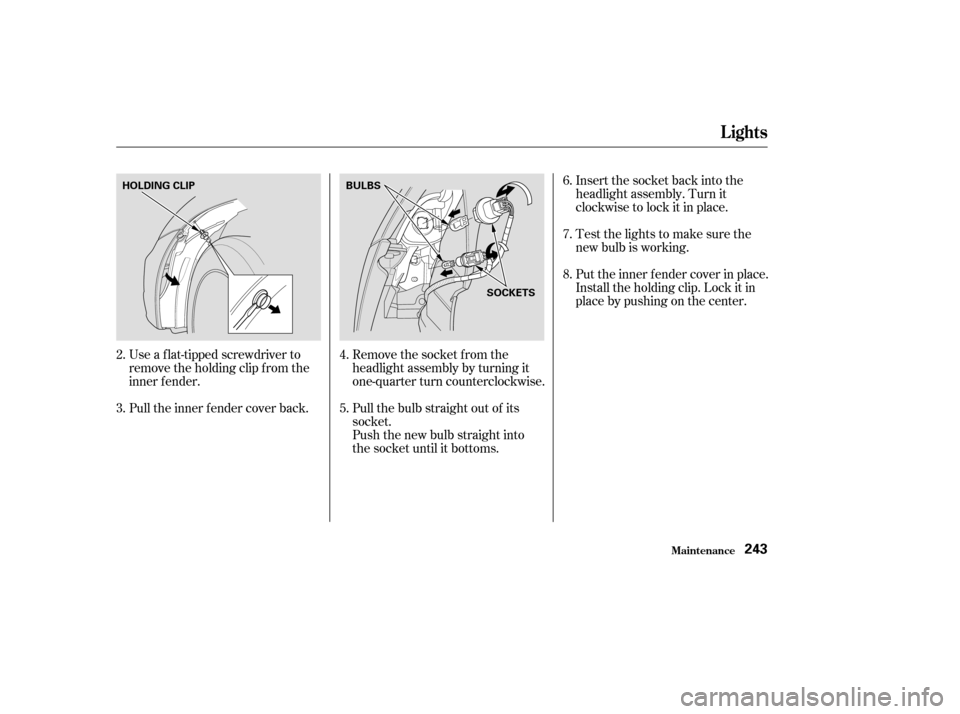
Use a f lat-tipped screwdriver to
remove the holding clip f rom the
inner f ender.
Pull the inner f ender cover back.Remove the socket from the
headlight assembly by turning it
one-quarter turn counterclockwise.
Pull the bulb straight out of its
socket.
Push the new bulb straight into
the socket until it bottoms.Insert the socket back into the
headlight assembly. Turn it
clockwise to lock it in place.
Testthelightstomakesurethe
new bulb is working.
Put the inner f ender cover in place.
Install the holding clip. Lock it in
place by pushing on the center.
3.
2.
4. 5.6.7. 8.
Lights
Maint enance243
HOLDING CLIP
BULBS
SOCKETS
�����—�����—�����y�
�������������y���
�(���%�������y���������y
Page 237 of 302
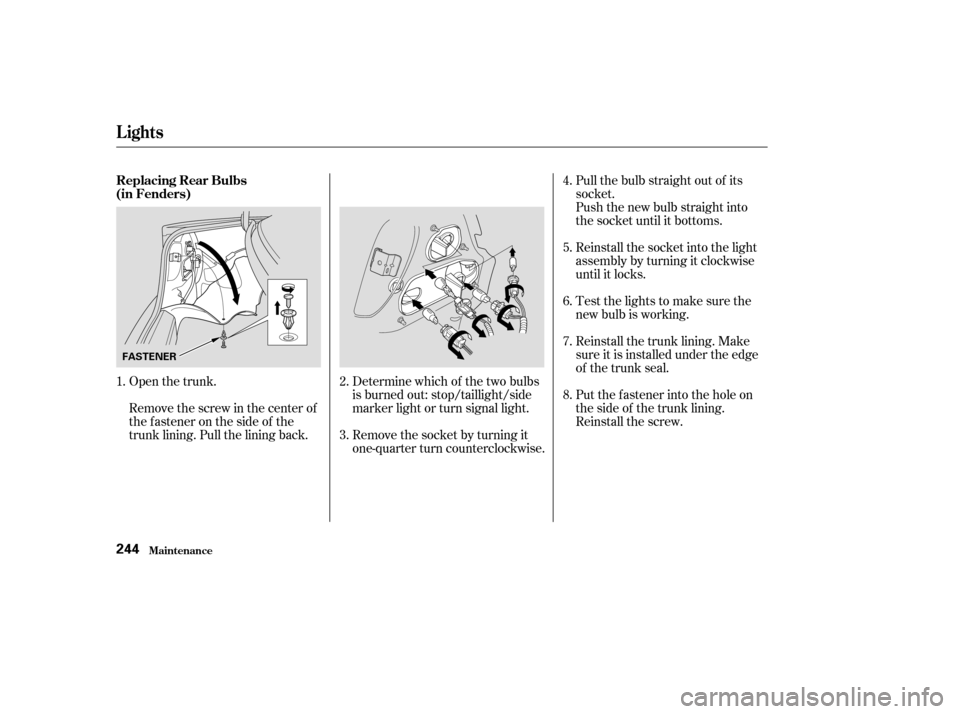
Open the trunk. Determine which of the two bulbsis burned out: stop/taillight/side
marker light or turn signal light.Pull the bulb straight out of its
socket.
Push the new bulb straight into
the socket until it bottoms.
Reinstall the socket into the light
assembly by turning it clockwise
until it locks.
Testthelightstomakesurethe
new bulb is working.
Remove the socket by turning it
one-quarter turn counterclockwise. Reinstall the trunk lining. Make
sure it is installed under the edge
of the trunk seal.
Remove the screw in the center of
the fastener on the side of the
trunk lining. Pull the lining back. Put the f astener into the hole on
the side of the trunk lining.
Reinstall the screw.
1.
2. 3.4. 5. 6. 7. 8.
Replacing Rear Bulbs
(in Fenders)
Lights
Maint enance244
FASTENER
�����—�����—�����y�
�������������y���
�(���%�������y���������y
Page 238 of 302
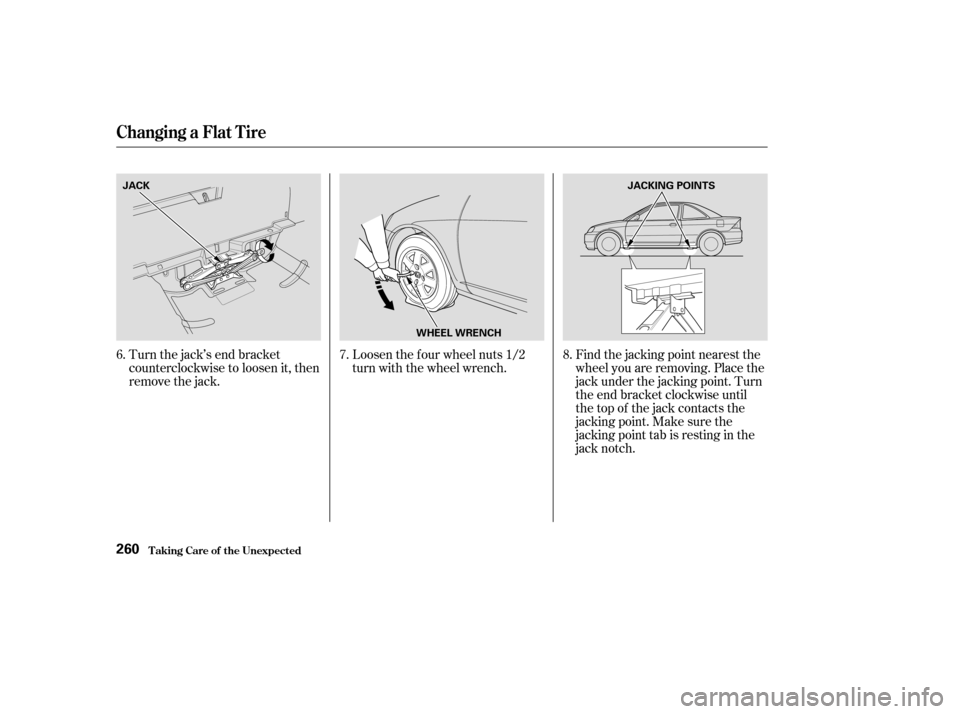
Remove the socket f rom the light
assembly by squeezing the tabs on
both sides of the socket.
Pull the bulb straight out of its
socket. Push the new bulb in until
it bottoms in the socket.
Reinstall the socket. Turn it
clockwise until it locks. Make sure
the new bulb is working.
Open the trunk and remove the
socket f rom the light assembly by
turning it one-quarter turn counter-
clockwise.
Push the new bulb straight into
the socket until it bottoms.
Pull the bulb straight out of its
socket.
2.
1.
3.
2.
1.
CONT INUED
Replacing a Rear L icense PlateBulb
Replacing a High-mount Brake
Light Bulb
Lights
Maint enance245
SOCKET
BULB
BULB
SOCKET
�����—�����—�����y�
������
��
�
�y���
�(���%�������y���������y
Page 251 of 302
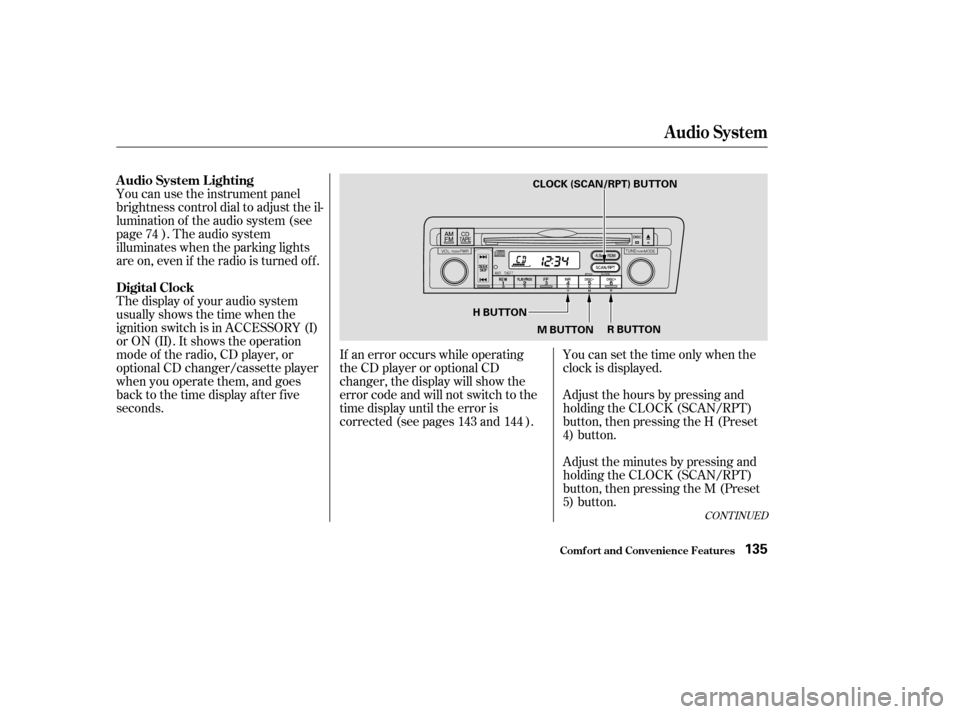
Turn the jack’s end bracket
counterclockwise to loosen it, then
remove the jack.Loosen the f our wheel nuts 1/2
turn with the wheel wrench.
Find the jacking point nearest the
wheel you are removing. Place the
jack under the jacking point. Turn
the end bracket clockwise until
the top of the jack contacts the
jacking point. Make sure the
jacking point tab is resting in the
jack notch.
6.
7.8.
T aking Care of t he Unexpect ed
Changing a Flat T ire
260
JACK
WHEEL WRENCHJACKING POINTS
�����—�����—�����y�
�������������y���
�(���%�������y���������y