Page 143 of 395
For best results when using CD-R
discs, use only high quality discs
labeled f or audio use. When
recording a CD-R, the recording
must be closed in order f or the disc
to be used by CD players. CD-RW
discs will not work in this unit.
For inf ormation, see page .
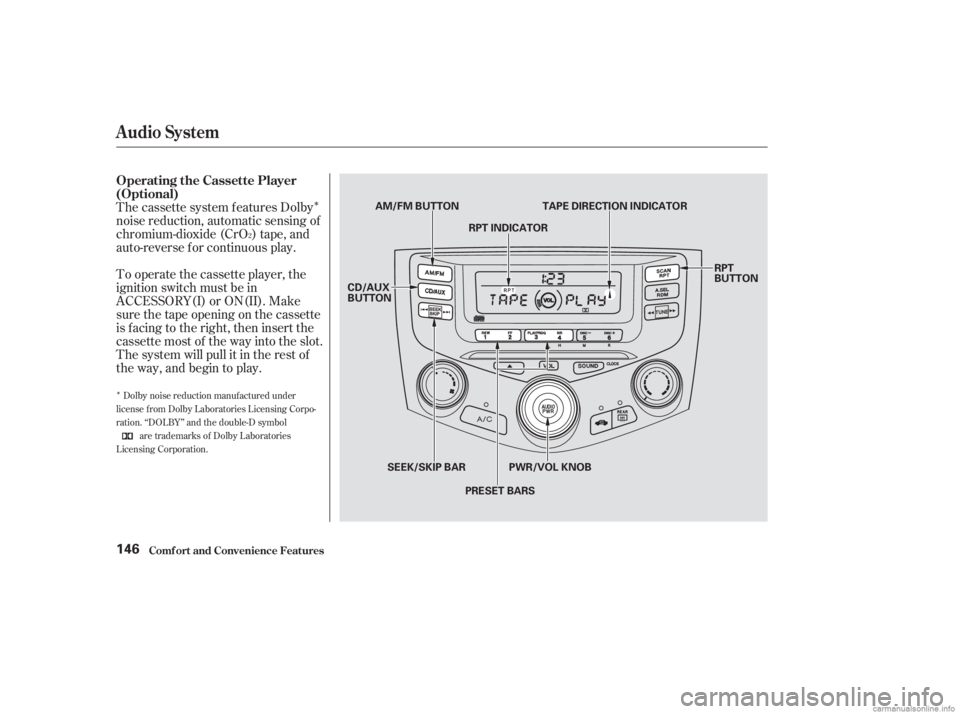
You operate the CD player with the
same controls used f or the radio.
Play only standard round discs. Odd-
shaped CDs may jam in the drive or
cause other problems. You can also
play 3-inch (8-cm) discs without
using an adapter ring. Avoid using
CDs that have adhesive-type labels.
The edges can curl up and cause the
CD to jam in the drive.
Examine the CD f or any labels or
other contamination on it that could
causeittojaminthedrive.Withthe
ignition switch in ACCESSORY (I)
or ON (II), insert the disc into the
CD slot. Push the disc in half way;
the drive will pull it in the rest of the
way and begin to play. The number
of the track that is playing is shown
in the display.
175
Audio System
Comf ort and Convenience Feat ures
Radio Frequencies and Reception
Operating the CD Player
140
CD SLOT
AM/FM BUTTON
CD/AUX BUTTON
SEEK/SKIP BAR
EJECT BUTTON RPT BUTTON
RDM BUTTON
PWR/VOL KNOB
Page 149 of 395
�Î
�Î
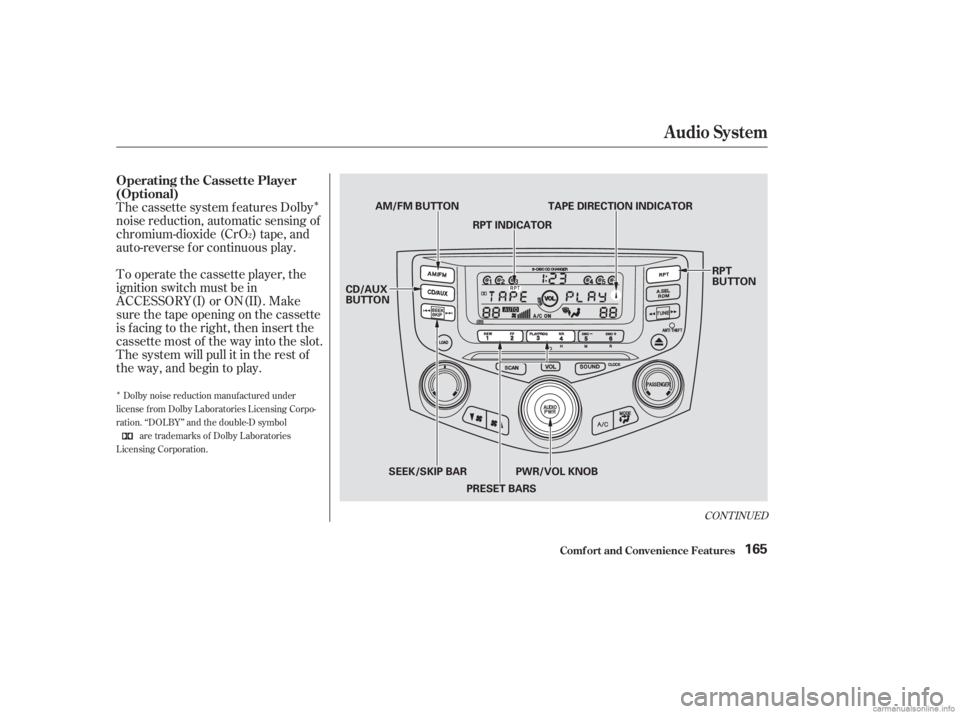
The cassette system f eatures Dolby
noise reduction, automatic sensing of
chromium-dioxide (CrO ) tape, and
auto-reverse f or continuous play.
To operate the cassette player, the
ignition switch must be in
ACCESSORY(I) or ON(II). Make
sure the tape opening on the cassette
is f acing to the right, then insert the
cassette most of the way into the slot.
The system will pull it in the rest of
the way, and begin to play.
2
Dolby noise reduction manuf actured under
license from Dolby Laboratories Licensing Corpo-
ration. ‘‘DOLBY’’ and the double-D symbol are trademarks of Dolby Laboratories
Licensing Corporation.
Operating the Cassette Player
(Optional)
Audio System
Comf ort and Convenience Feat ures146
RPT
BUTTON
PWR/VOL KNOB
AM/FM BUTTON
CD/AUX
BUTTON TAPE DIRECTION INDICATOR
RPT INDICATOR
SEEK/SKIP BAR PRESET BARS
Page 150 of 395
�Û
The tape direction indicator will light
to show you which side of the
cassette is playing. The indicates
thesideyouinsertedfacingupward
is now playing. If you want to play
the other side, press the Preset 3
(PLAY/PROG) side of the preset
bar. Dolby noise reduction turns on when
you insert a cassette. The indi-
cator will light in the display. If the
tape was not recorded with Dolby
noise reduction, turn it of f by
pressing the Preset 4 (NR) side of
the preset bar.
Noise reduction remains of f until you
turn it on by pressing the button
again.If you turn the system of f while a
tape is playing, either with the PWR/
VOL knob or by turning of f the
ignition, the cassette will remain in
the drive. When you turn the system
back on, the cassette player will be in
pause mode. To begin playing, press
thePreset3(PLAY/PROG)sideof
the preset bar.
To switch to the radio or CD player
while a tape is playing, press the
AM/FM, or CD/AUX button. To
change back to the cassette player,
push the CD/AUX button.
When the system reaches the end of
the tape, it will automatically reverse
direction and play the other side. If
you want to remove the cassette
from the drive, press the eject button
on the cassette player.
Audio System
Comf ort and Convenience Feat ures147
Page 168 of 395
�Î
�Î
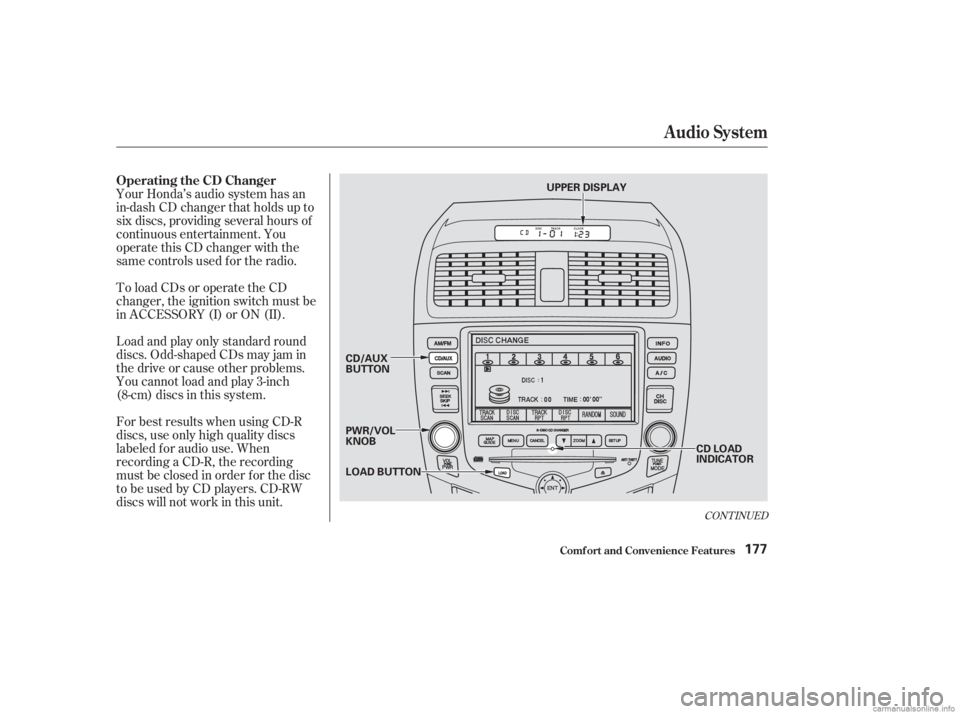
The cassette system f eatures Dolby
noise reduction, automatic sensing of
chromium-dioxide (CrO ) tape, and
auto-reverse f or continuous play.
To operate the cassette player, the
ignition switch must be in
ACCESSORY(I) or ON(II). Make
sure the tape opening on the cassette
is f acing to the right, then insert the
cassette most of the way into the slot.
The system will pull it in the rest of
the way, and begin to play.
2
Dolby noise reduction manuf actured under
license from Dolby Laboratories Licensing Corpo-
ration. ‘‘DOLBY’’ and the double-D symbol are trademarks of Dolby Laboratories
Licensing Corporation.
CONT INUED
Operating the Cassette Player
(Optional)
Audio System
Comf ort and Convenience Feat ures165
RPT
BUTTON
CD/AUX
BUTTON AM/FM BUTTON
TAPE DIRECTION INDICATOR
RPT INDICATOR
PWR/VOL KNOB
SEEK/SKIP BAR
PRESET BARS
Page 169 of 395
�Û
The tape direction indicator will light
to show you which side of the
cassette is playing. The indicates
thesideyouinsertedfacingupward
is now playing. If you want to play
the other side, press the Preset 3
(PLAY/PROG) side of the preset
bar. Dolby noise reduction turns on when
you insert a cassette. The indi-
cator will light in the display. If the
tape was not recorded with Dolby
noise reduction, turn it of f by
pressing the Preset 4 (NR) side of
the preset bar.
Noise reduction remains of f until you
turn it on by pressing the button
again.If you turn the system of f while a
tape is playing, either with the PWR/
VOL knob or by turning of f the
ignition, the cassette will remain in
the drive. When you turn the system
back on, the cassette player will be in
pause mode. To begin playing, press
thePreset3(PLAY/PROG)sideof
the preset bar.
When the system reaches the end of
the tape, it will automatically reverse
direction and play the other side. If
you want to remove the cassette
from the drive, press the eject button
on the cassette player. To switch to the radio or CD player
while a tape is playing, press the
AM/FM, or CD/AUX button. To
change back to the cassette player,
push the CD/AUX button.
Audio System
Comf ort and Convenience Feat ures166
Page 180 of 395
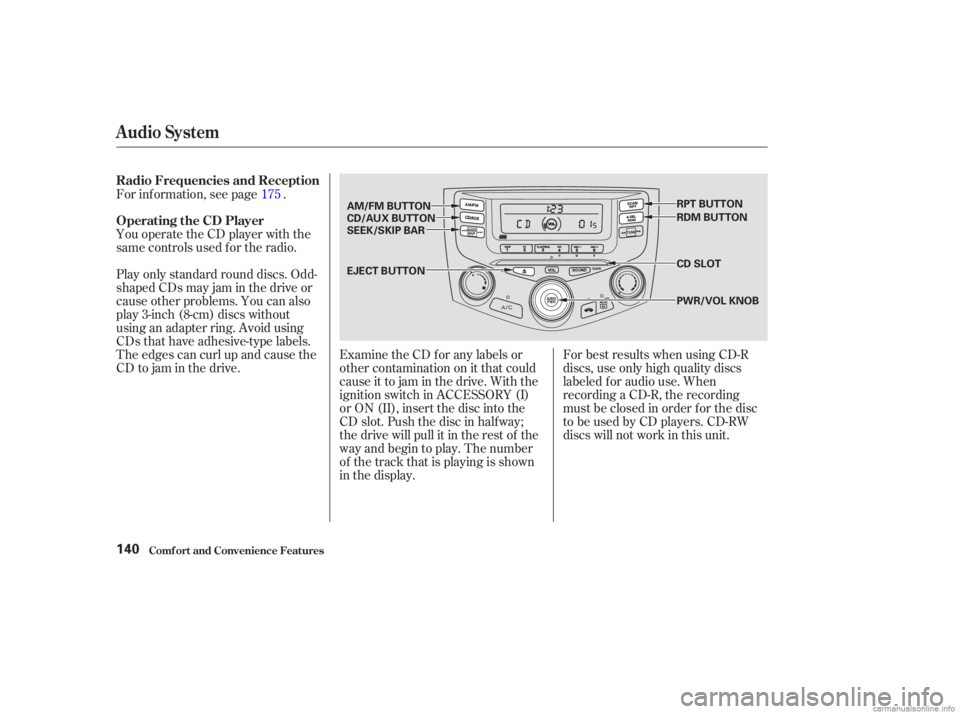
Your Honda’s audio system has an
in-dash CD changer that holds up to
six discs, providing several hours of
continuous entertainment. You
operate this CD changer with the
same controls used f or the radio.
To load CDs or operate the CD
changer, the ignition switch must be
in ACCESSORY (I) or ON (II).
Load and play only standard round
discs. Odd-shaped CDs may jam in
the drive or cause other problems.
You cannot load and play 3-inch
(8-cm)discsinthissystem.
For best results when using CD-R
discs, use only high quality discs
labeled f or audio use. When
recording a CD-R, the recording
must be closed in order f or the disc
to be used by CD players. CD-RW
discs will not work in this unit.
CONT INUED
Operating the CD Changer
Audio System
Comf ort and Convenience Feat ures177
LOAD BUTTON CD/AUX
BUTTON
PWR/VOL
KNOBCD LOAD
INDICATOR
UPPER DISPLAY
Page 182 of 395
�µ
If you press the LOAD button while
a CD is playing, the system will stop
playing that CD and start the loading
sequence. It will then play the CD
just loaded.
You can also load a CD into an empty
position while a CD is playing by
touching the appropriate disc icon.
Select an empty position (the disc
icon below the disc number is dark),
and touch the icon f or that position
(1 6). The system will stop playing
the current CD and start the loading
sequence. It will then play the CD
just loaded.
CONT INUED
Audio System
Comf ort and Convenience Feat ures179
DISC NUMBER
CD LOAD INDICATOR EJECT
BUTTONDISC BAR AUDIO
DISPLAY
BUTTON
LOAD
BUTTON
CD SLOT CD/AUX
BUTTON
SEEK/SKIP
BAR DISC ICONS
Page 183 of 395
�µ
Select the CD changer by pressing
the CD/AUX button. You will see
‘‘CD’’ in the upper display. The
system will begin playing the last
selected disc in the CD changer. You
will see the disc and track numbers
displayed.
When that disc ends, the next disc in
the CD changer is loaded and played.
Af ter the last disc f inishes, the
system returns to disc 1.
To select a dif f erent disc, touch the
appropriate disc icon (1 6) or
press the DISC bar next to the audio
display. If you select an empty
position in the CD changer, the
system will go into the loading
sequence (see page ).
You can use the SKIP bar while a
disc is playing to select passages and
change tracks. Each time you press and release the
top of the SKIP bar, the system
skips forward to the beginning of the
next track. Press and release the
bottom toskipbackwardtothe
beginning of the current track. Press
it again to skip to the beginning of
the previous track. To move rapidly within a track, press
and hold the top or bottom of the
SKIP bar. You will hear a beep and
the system will continue to move
through the track. Press to
move forward, or to move
backward. Release the bar when the
system reaches the point you want.
178
Operat ion
Audio System
Comf ort and Convenience Feat ures180