Page 154 of 380

To load multiple CDs in one
operation:To load a single CD:
Press and hold the LOAD button
until you hear a beep and see
‘‘LOAd’’ in the display, then
release the button. Press and release the LOAD
button.
The system will load the CD, and
begin playing it.
Ontheupperleftsideof the
display, the disc number f or an
empty position will begin blinking
and the green CD load indicator
will come on.
Insert the disc into the CD slot.
Insert it only about halfway; the
drive will pull it in the rest of the
way. You will see ‘‘BUSY’’ in the
display. The CD load indicator
turns red and blinks as the CD is
loaded. The disc number f or an empty
position starts to blink and the
green CD load indicator comes on.
When you see ‘‘LOAd’’ in the
display, insert the disc into the CD
slot. Insert it only about half way;
the drive will pull it in the rest of
the way.
When the CD load indicator turns
green, press the LOAD button
again. When ‘‘LOAd’’ appears in
the display, insert the next disc
into the CD slot.
Repeat this until all six positions
are loaded. The system will then
begin playing the last CD loaded.
If you are not loading CDs into all six
positions, the system will begin
playing the last CD loaded.
If you stop loading CDs bef ore all six
positions are f illed, and you do not
press the LOAD button, the system
will wait f or ten seconds, then stop
the load operation and begin playing
the last CD loaded.
1. 2. 3. 4.5.
1. 2. 3.
L oading CDs in t he Changer
Audio System
Comf ort and Convenience Feat ures158
�����—�����—�����y������
����
���y���
�(�����������y���
���
�y
Page 155 of 380
You can also load a CD into an empty
position while a CD is playing by
pressing the appropriate side of a
preset bar. Select an empty position
(the disc number indicator is of f ),
and press the lef t or right side of the
preset bar f or that position (1 to 6).
The system will stop playing the
current CD and start the loading
sequence. It will then play the CD
just loaded.
If you press the LOAD button while
a CD is playing, the system will stop
playing that CD and start the loading
sequence. It will then play the CD
just loaded.
CONT INUED
Audio System
Comf ort and Convenience Feat ures159
RDM BUTTON
SCAN BUTTON
LOAD BUTTON PRESET BARS
CD BUTTON
SCAN INDICATOR
RPT BUTTON
RDM INDICATOR
RPT INDICATOR
SKIP BAR
�����—�����—�����y������
��������y���
�(�����������y���
�����y
Page 156 of 380

�µ�µ
�µ
When that disc ends, the next disc in
the CD changer is loaded and played.
Af ter the last disc f inishes, the
system returns to disc 1.
To select a dif f erent disc, press the
appropriate side of a preset bar (1
6). If you select an empty position in
the CD changer, the system will go
into the loading sequence (see page
). Each time you press and
release it, the system skips forward
to the beginning of the next track.
Press and release to skip
backward to the beginning of the
current track. Press and release it
again to skip to the beginning of the
previous track. To activate the Repeat
f eature, press and release the RPT
button. You will see RPT in the
display as a reminder. The system
continuously replays the current
track. Press the RPT button again to
turn it off. Pressing either side of the
SKIP bar also turns of f the repeat
feature.
This feature,
when activated, plays the tracks
within a CD in random order, rather
than in the order they are recorded
on the CD. To activate Random Play,
press the RDM button. You will see
RDM in the display. The system will
then select and play tracks randomly.
This continues until you deactivate
RandomPlaybypressingtheRDM
button again, or you select a
dif f erent CD with a preset bar.
You can use the SKIP bar while a
disc is playing to select passages and
change tracks. To move rapidly within a track, press
andholdtheleftorrightsideof the
SKIP bar. You will hear a beep and
the system will continue to move.
Press to move f orward, or
to move backward. Release the
bar when the system reaches the
point you want.
Select the CD changer by pressing
the CD button. You will see ‘‘CD’’ in
the display. The system will begin
playing the last selected disc in the
CD changer. You will see the disc
and track numbers displayed.
158
Operat ionREPEAT
RANDOM PLAY
Audio System
Comf ort and Convenience Feat ures160
�����—�����—�����y������
��������y���
�(�����������y���
�����y
Page 158 of 380
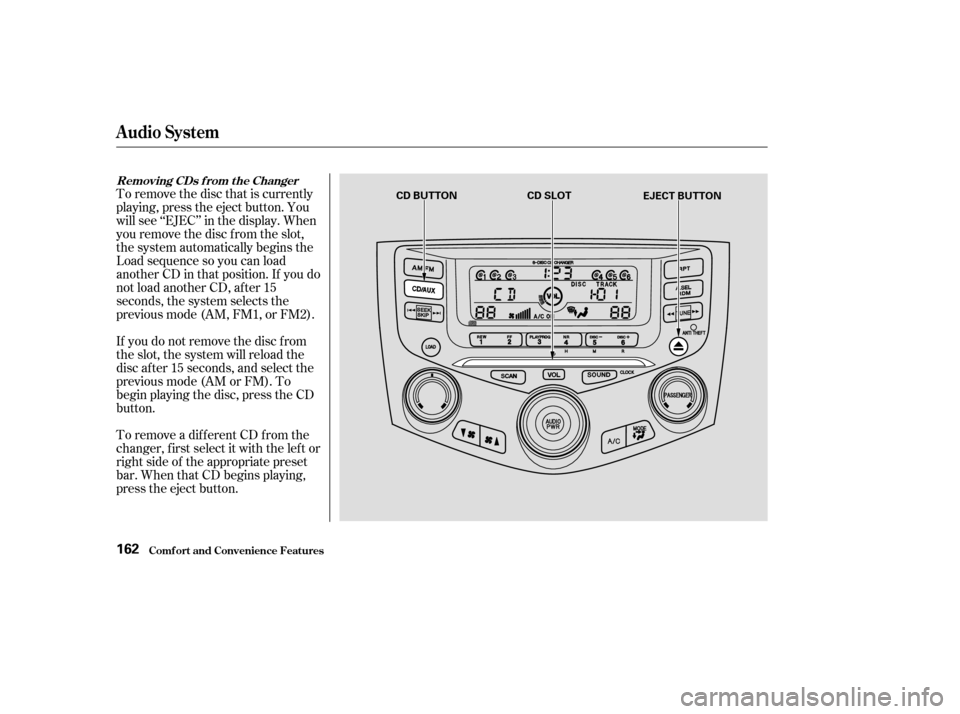
To remove the disc that is currently
playing, press the eject button. You
will see ‘‘EJEC’’ in the display. When
you remove the disc f rom the slot,
the system automatically begins the
Load sequence so you can load
another CD in that position. If you do
not load another CD, af ter 15
seconds, the system selects the
previous mode (AM, FM1, or FM2).
If you do not remove the disc f rom
the slot, the system will reload the
disc af ter 15 seconds, and select the
previous mode (AM or FM). To
begin playing the disc, press the CD
button.
To remove a different CD from the
changer,firstselectitwiththeleftor
right side of the appropriate preset
bar. When that CD begins playing,
press the eject button.
Removing CDs f rom t he Changer
Audio System
Comf ort and Convenience Feat ures162
CD BUTTONCD SLOT
EJECT BUTTON
�����—�����—�����y������
��������y���
�(�����������y���
�����y
Page 159 of 380
For inf ormation on how to handle
and protect compact discs, see page.
In any mode, if you press the eject
button and hold it until you hear a
beep, the system will eject all of the
discs in the changer.
You can also eject discs when the
ignition switch is of f by pressing the
eject button. The disc that was last
selected is ejected f irst. You can
eject up to f ive discs, one at a time.
If you press the eject button while
listening to the radio, or with the
audio system turned of f , the disc
that was last selected is ejected.
Af ter that disc is ejected, pressing
the eject button again will eject the
next disc in numerical order. By
doing this six times, you can remove
all the CDs f rom the changer.
186
Protecting Compact Discs
Audio System
Comf ort and Convenience Feat ures163
�����—�����—�����y������
��������y���
�(�����������y���
�����y
Page 165 of 380
The in-dash CD changer holds up to
six discs. You operate the CD
changer with the same controls used
f or the radio. See page f or CD
changer operation.
The anti-thef t f eature will disable the
system if it is disconnected f rom the
car’s battery. To get the system
working again, you must enter a
code number (see page ).
Your Honda’s audio system provides
clear reception on both AM and FM
bands, while the preset icons in the
audio display allow you to easily
select your favorite stations.
193
177
A M/FM/CD Changer
Audio System
With Navigation System
Audio System
Comf ort and Convenience Feat ures169
AM/FM BUTTON
TUNE/
MODEKNOB
SEEK BAR
SCAN
BUTTON
PWR/VOL KNOB UPPER
DISPLAY
AUDIO
DISPLAY
BUTTON
PRESET ICONS
�����—�����—�����y������
��������y���
�(�����������y���
�����y
Page 167 of 380

�µ�µTo store a f requency:
UsetheTUNE,SEEK,orSCAN
function to tune the radio to a
desired station. Repeat steps 2 to 4 to store a total
of six stations on AM and twelve
on FM.
The preset f requencies will be lost if
your car’s battery goes dead, is
disconnected, or the radio f use is
removed.
The SCAN f unction
samples all the stations with strong
signals on the selected band. To
activate it, push and release the
SCAN button on the driver’s side of
the audio display or touch the SCAN
icon at the bottom of the display.
You will see SCAN in the display.
The system will scan up the band for
a station with a strong signal. When
it f inds one, it will stop and play that
station f or approximately f ive
seconds. If you do nothing, the
system will then scan f or the next
strong station and play that for five
seconds. When it plays a station that
you want to continue listening to,
press the SCAN button or touch the
SCAN icon again. Push the AUDIO DISPLAY button
to view the audio display. You will
see the six preset icons.
Select the desired band, AM or
FM. FM1 and FM2 let you store
two f requencies with each preset
icon.
Pick the preset icon you want f or
that station. Touch the icon, and
hold it until you hear a beep.Once a station’s frequency is stored,
simply touch the proper preset icon
to tune to it.
You can store the
f requencies of your f avorite radio
stations in the six preset icons. Each
icon will store one f requency on the
AM band, and two f requencies on
the FM band. 1. 2. 3. 4. 5.
CONT INUED
Audio System
Comf ort and Convenience Feat ures
SCA N Preset
171
�����—�����—�����y������
��������y���
�(�����������y���
�����y
Page 173 of 380
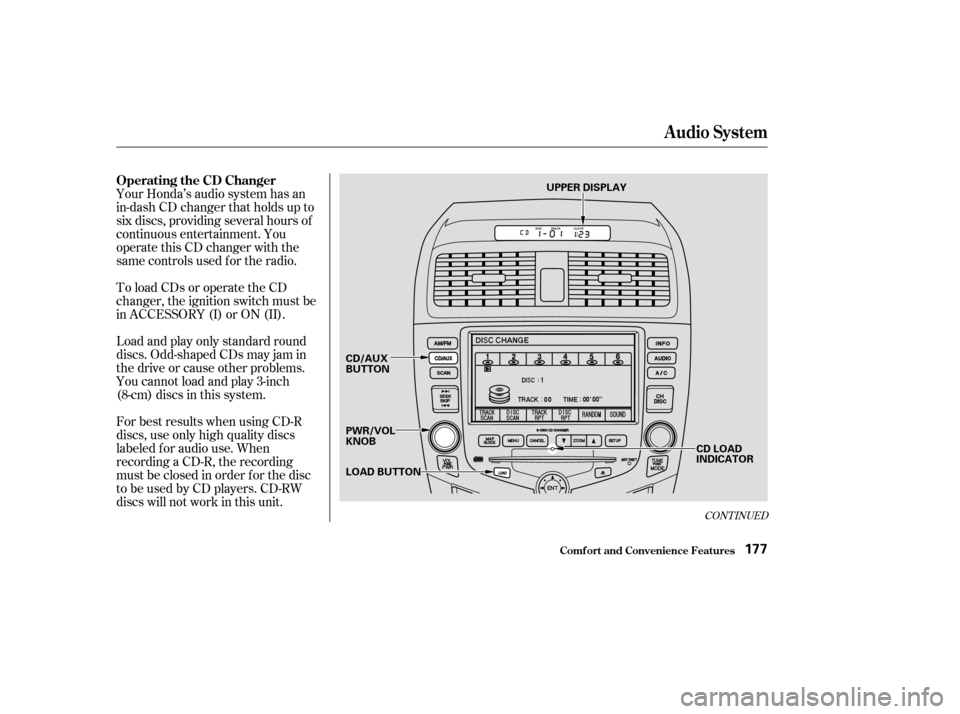
Your Honda’s audio system has an
in-dash CD changer that holds up to
six discs, providing several hours of
continuous entertainment. You
operate this CD changer with the
same controls used f or the radio.
To load CDs or operate the CD
changer, the ignition switch must be
in ACCESSORY (I) or ON (II).
Load and play only standard round
discs. Odd-shaped CDs may jam in
the drive or cause other problems.
You cannot load and play 3-inch
(8-cm)discsinthissystem.
For best results when using CD-R
discs, use only high quality discs
labeled f or audio use. When
recording a CD-R, the recording
must be closed in order f or the disc
to be used by CD players. CD-RW
discs will not work in this unit.
CONT INUED
Operating the CD Changer
Audio System
Comf ort and Convenience Feat ures177
LOAD BUTTON
CD/AUX
BUTTON
PWR/VOL KNOB
CD LOAD
INDICATOR
UPPER DISPLAY
�����—�����—�����y���������������y���
�(�����������y���
�����y