Page 87 of 429

�µYou can insert or
remove the key only in this position.
To switch f rom ACCESSORY to
LOCK, you must push the key in
slightly as you turn it. If your car has
an automatic transmission, the shif t
lever must also be in Park. The anti-
thef t lock will lock the steering
column when you remove the key.
If the f ront wheels are turned, the
anti-thef t lock may sometimes make
it difficult to turn the key from
LOCK to ACCESSORY. Firmly turn
the steering wheel to the lef t or to
the right as you turn the key.
The ignition switch is on the right
side of the steering column. It has
f our positions:
LOCK(0)
ACCESSORY (I)
ON (II)
START (III)As required by the FCC:
This device complies with Part 15 of theFCC rules. Operation is subject to thef ollowing two conditions: (1) This devicemay not cause harmf ul interf erence, and(2) this device must accept anyinterf erence received, includinginterf erence that may cause undesiredoperation.
Changes or modif ications not expresslyapproved by the party responsible f orcompliance could void the user’sauthority to operate the equipment.
This device complies with IndustryCanada Standard RSS-210.Operation is subject to the f ollowing twoconditions: (1) this device may not causeinterf erence, and (2) this device mustaccept any interf erence that may causeundesired operation of the device.LOCK (0)
Ignition Switch
Keys and Locks
Inst rument s and Cont rols84
Page 88 of 429
�µ
�µ
�µ The engine will not start if the
Immobilizer System does not
recognize the key’s coding (see page
).
You will hear a reminder beeper if
you leave the key in the ignition
switch in the LOCK (0) or
ACCESSORY (I) position and open
the driver’s door. Remove the key to
turn of f the beeper.
In this position,
you can operate the audio system
and the accessory power sockets.
This is the normal key
position when driving. All f eatures
and accessories on the car are usable.
Several of the lights on the instru-
ment panel come on as a test when
you turn the ignition switch f rom
ACCESSORY to ON.
Use this position
only to start the engine. The switch
returns to ON (II) when you let go of
the key. 83
A CCESSORY (I)
ON (II)
ST A RT (III)
Keys and Locks
Inst rument s and Cont rols85
Removing the key from the
ignition switch while driving
locks the steering. This can
cause you to lose control.
Remove the key from the
ignition switch only when
parked.
Page 90 of 429

If you f orget and leave the key in the
ignition switch, Lockout Prevention
will not allow you to lock the driver’s
door. With the driver’s door open
andthekeyintheignition,both
master door lock switches are
disabled. However, if the driver’s
door is not open, the master door
lock switches are not disabled.
Pushing the top of the switch on the
open passenger’s door will lock both
doors. If you try to lock an open
driver’s door by pushing down the
lock tab, the tabs on both doors pop
up. Pushing down the lock tab on the
passenger’s door only locks that door.You can lock and unlock your car
with the remote transmitter. When
you push the LOCK button, both
doors lock. The parking lights, side
marker lights, taillights and lights on
indicator f lash once.When you push the LOCK button a
second time within 5 seconds after
you have locked the doors, you will
hear a beep to verify that the doors
are locked and (if equipped) that the
security system has set.
When you push the UNLOCK button
once, only the driver’s door unlocks.
The passenger’s door unlocks when
you push the button a second time.
The parking lights, side marker
lights, taillights and lights on
indicator f lash twice each time you
push the button.
You can also open both power
windows from outside the car with
theremotetransmitter(seepage
).
106
CONT INUED
L ockout Prevent ionRemote Transmitter
Keys and Locks
Inst rument s and Cont rols87
UNLOCK
BUTTON
LOCK
BUTTON
TRUNK
RELEASE
BUTTON
PANIC
BUTTON LED
Page 91 of 429

The ceiling light (if the ceiling light
switch is in the center position) and
the spotlights (if the switch is in the
Door position) will come on when
you press the UNLOCK button. If
you do not open either door, the
lights stay on f or about 30 seconds,
then f ade out. If you relock the doors
with the remote transmitter before
30 seconds have elapsed, the lights
will go of f immediately.
You cannot lock the doors with the
remote transmitter if either door is
not f ully closed or the key is in the
ignition switch. You cannot unlock
the doors with the key in the ignition
switch.If you unlock the doors with the
remote transmitter, but do not open
either door within 30 seconds, the
doors automatically relock and the
security system sets (except f or
4-cylinder LX model).
To open the trunk, push the Trunk
Release button f or approximately
one second.
The trunk will not open if the key is
in the ignition switch.
Panic mode allows you to remotely
activate your car’s horn and exterior
lights to attract attention. The horn
sounds and the exterior lights f lash
f or about 30 seconds. To activate
panic mode, press and hold the
PANIC button f or about two seconds.
To cancel Panic mode bef ore 30
seconds, press any button on the
remote transmitter. You can also
turn the ignition switch to ON (II).
Panic mode will not activate if the
ignition switch is in the ON (II)
position.Panic Mode
Keys and Locks
Inst rument s and Cont rols88
Page 92 of 429
When the remote transmitter’s
battery begins to get weak, it may
take several pushes on the button to
lock or unlock the doors, and the
LED will not light. Replace the
battery as soon as possible.
Battery type: CR1616To replace the battery:Remove the screw at the base of
the transmitter with a small
Phillips-head screwdriver.
Separate the transmitter by prying
its middle seam with your
f ingernail. Inside the transmitter, separate
the inner cover f rom the keypad
by releasing the two tabs on the
cover.
1.
2. 3.
CONT INUED
Replacing the Battery
Keys and Locks
Inst rument s and Cont rols89
SCREWBATTERY
TAB
Page 96 of 429
Open the glove box by pulling the
handle to the lef t. Close it with a f irm
push. Lock or unlock the glove box
with the master key.
The glove box light comes on when
the parking lights are on. Glove Box
Keys and Locks
Inst rument s and Cont rols93
GLOVE BOX
An open glove box can cause
serious injury to your passenger
inacrash,evenifthe
passenger is wearing the seat
belt.
Always keep the glove box
closed while driving.
Page 105 of 429
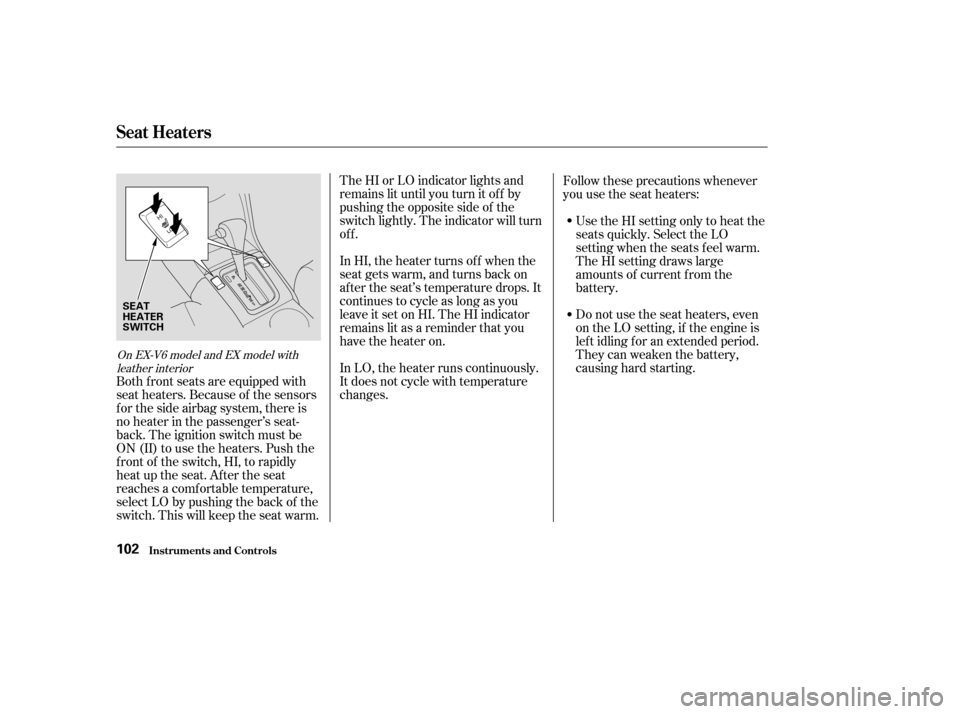
The HI or LO indicator lights and
remains lit until you turn it of f by
pushing the opposite side of the
switch lightly. The indicator will turn
off.
In HI, the heater turns of f when the
seat gets warm, and turns back on
after the seat’s temperature drops. It
continues to cycle as long as you
leave it set on HI. The HI indicator
remains lit as a reminder that you
have the heater on.
In LO, the heater runs continuously.
It does not cycle with temperature
changes.Do not use the seat heaters, even
on the LO setting, if the engine is
lef t idling f or an extended period.
They can weaken the battery,
causing hard starting. Use the HI setting only to heat the
seats quickly. Select the LO
setting when the seats f eel warm.
The HI setting draws large
amounts of current f rom the
battery.
Follow these precautions whenever
you use the seat heaters:
Both f ront seats are equipped with
seat heaters. Because of the sensors
f or the side airbag system, there is
no heater in the passenger’s seat-
back. The ignition switch must be
ON (II) to use the heaters. Push the
f ront of the switch, HI, to rapidly
heat up the seat. After the seat
reaches a comf ortable temperature,
select LO by pushing the back of the
switch. This will keep the seat warm.
On EX-V6 model and EX model with leather interior
Seat Heaters
Inst rument s and Cont rols102
SEAT
HEATER
SWITCH
Page 107 of 429

�µ
The master control panel also con-
tains these extra features:
To open the driver’s
window f ully, push the window
switch f irmly down, then release it.
The window automatically goes
down all the way. To stop the
window f rom going all the way down,
pull back on the window switch
brief ly.
To open or close the driver’s window
partially, push down or pull back on
the window switch lightly and hold it.
The window will stop when you
release the switch. To close the driver’s window f ully,
pull back the window switch f irmly,
then release it. The window
automatically goes all the way up. To
stop the window f rom going all the
way up, push down on the window
switch brief ly. If the driver’s window runs into any
obstacle while it is closing
automatically, it will reverse
direction, and then stop. To close the
window, remove the obstacle, then
use the window switch again.
Auto reverse stops sensing when the
window is almost closed. You should
always check that all passengers and
objects are away from the window
bef ore closing it.
The MAIN switch controls power to
the passenger’s window. When you
push in the MAIN switch, the
passenger’s window cannot be raised
or lowered. The MAIN switch does
not af f ect the driver’s window. To
cancel this f eature, push on the
switch again to get it to pop out.
Keep the MAIN switch of f when you
have children in the car so they do
not injure themselves by operating
the window unintentionally.
AUTO
Auto Reverse
Power Windows
Inst rument s and Cont rols104


