Page 15 of 216
AM/FM STEREO
1.Clock:To set the hour, press and
hold the H control. When the
desired hour appears, release the
control.
To set the minute, press and hold
the M control. When the desired
minute appears, release the control.
2.Bass:Press
/to
decrease/increase the bass output.
3.Treble:Press
/to
decrease/increase the treble output.
4.Balance:Press
/to shift
sound to the left/right speakers.
5.Fade:Press
/to shift
sound to the rear/front speakers.
6.Scan:Press SCAN to hear a brief
sampling of all listenable radio
stations. Press again to stop.
BASS
TREB
BAL
FADE
Entertainment Systems
15
Page 17 of 216
2.Clock:To set the hour, press and
hold the H control. When the
desired hour appears, release the
control.
To set the minute, press and hold
the M control. When the desired
minute appears, release the control.
3.CD:Press to play the CD (if
equipped).
Note:All cassette ICPs are CDDJ
compatible, but CDDJ is an option with limited availability as defined in
the order guide.
4.Bass:Press
/to
decrease/increase the bass output.
5.Treble:Press
/to
decrease/increase the treble output.
6.Balance:Press
/to shift
sound to the left/right speakers.
7.Fade:Press
/to shift
sound to the rear/front speakers.
8.Scan:Press SCAN to hear a brief
sampling of all listenable radio
stations, tape or CD selections.
Press again to stop.
9.Shuffle:Press to play CD tracks
in random order.
10.COMP (compression):While
playing a CD, press to bring soft and
loud passages together for a more
consistent listening level.
BASS
TREB
BAL
FADE
Entertainment Systems
17
Page 19 of 216
AUDIO SYSTEM WITH AM/FM STEREO/SINGLE CD PLAYER
1.Clock:To set the hour, press and
hold the H control. When the
desired hour appears, release the
control.
To set the minute, press and hold
the M control. When the desired
minute appears, release the control.
2.Bass:Press
/to
decrease/increase the bass output.
3.Treble:Press
/to
decrease/increase the treble output.
4.Balance:Press
/to shift
sound to the left/right speakers.
5.Fade:Press
/to shift
sound to the rear/front speakers.
BASS
TREB
BAL
FADE
Entertainment Systems
19
Page 30 of 216

HEADLAMP CONTROL
Turns the lamps off.
Turns on the parking
lamps, instrument panel lamps,
license plate lamps and tail lamps.
Turns the headlamps on.
Autolamp control (if equipped)
The autolamp system provides light
sensitive automatic on-off control of
the exterior lights normally
controlled by the headlamp control.
The autolamp system also keeps the
lights on for a fixed period of time
after the ignition switch is turned to
OFF.
•To turn autolamps on, rotate the control counterclockwise.
•To turn autolamps off, rotate the control clockwise to OFF.
Daytime running lamps (DRL) (if equipped)
Turns the headlamps on with a reduced output.
To activate:
•the ignition must be in the ON position and
•the headlamp control is in the OFF, parking lamp or autolamp
position.
Always remember to turn on your headlamps at dusk or during
inclement weather. The Daytime Running Lamp (DRL) system
does not activate with your tail lamps and generally may not provide
adequate lighting during these conditions. Failure to activate your
headlamps under these conditions may result in a collision.
A
A
Lights
30
Page 33 of 216
To see a clearer light pattern for
adjusting, you may want to block
the light from one headlamp while
adjusting the other.
5. Locate the vertical adjuster on
each headlamp. Using a 4 mm
wrench, turn the adjuster either
clockwise (to adjust down) or
counterclockwise (to adjust up).
The horizontal edge of the brighter
light should touch the horizontal
reference line.
6. HORIZONTAL AIM IS NOT
REQUIRED FOR THIS VEHICLE
AND IS NON-ADJUSTABLE.
7. Close the hood and turn off the
lamps.
TURN SIGNAL CONTROL
•Push down to activate the left
turn signal.
•Push up to activate the right turn
signal.
Lights
33
Page 37 of 216
Replacing headlamp bulbs
To remove the headlamp bulb:
1. Make sure headlamp switch is in
OFF position.
2. Remove the bolt from the
headlamp housing.
3. At the back of the headlamp, pry
up and remove the two retainer pins
to release the headlamp assembly
from the vehicle and pull headlamp
forward.
4. Remove the protective dust shield
from the housing by turning the
dust shield counterclockwise (when
viewed from the rear).
Lights
37
Page 38 of 216
5. Disconnect the electrical
connector from the bulb by pulling
rearward.
6. Remove the bulb retaining ring by
rotating it counterclockwise.
7. Remove the old bulb from the
lamp assembly by pulling it straight
out of the lamp assembly.
To install the new bulb:
Handle a halogen headlamp bulb carefully and keep out of
children’s reach. Grasp the bulb only by its plastic base and do
not touch the glass. The oil from your hand could cause the bulb to
break the next time the headlamps are operated.
1. Install the new bulb in lamp assembly by pushing straight in with the
flat surface of the bulb’s plastic base facing upward. You may need to
turn the bulb slightly to align the grooves in the plastic base with the
tabs in the lamp assembly.
Lights
38
Page 39 of 216
2. Install the bulb retaining ring over the plastic base and lock the ring
by rotating clockwise until it snaps into place.
3. Connect the electrical connector to the bulb.
4. Install the protective dust shield and lock the shield by rotating it
clockwise until it locks into position.
5. Carefully position the headlamp assembly onto the vehicle.
6. Hold the headlamp assembly snugly against the vehicle and install the
retainer pins straight down to lock the lamp into place.
7. Before reinstalling the bolt, make sure the retainer pins are fully
seated, and install bolt on headlamp housing.
8. Turn the headlamps on and make sure they work properly. If the
headlamp was correctly aligned before you changed the bulb, you should
not need to align it again.
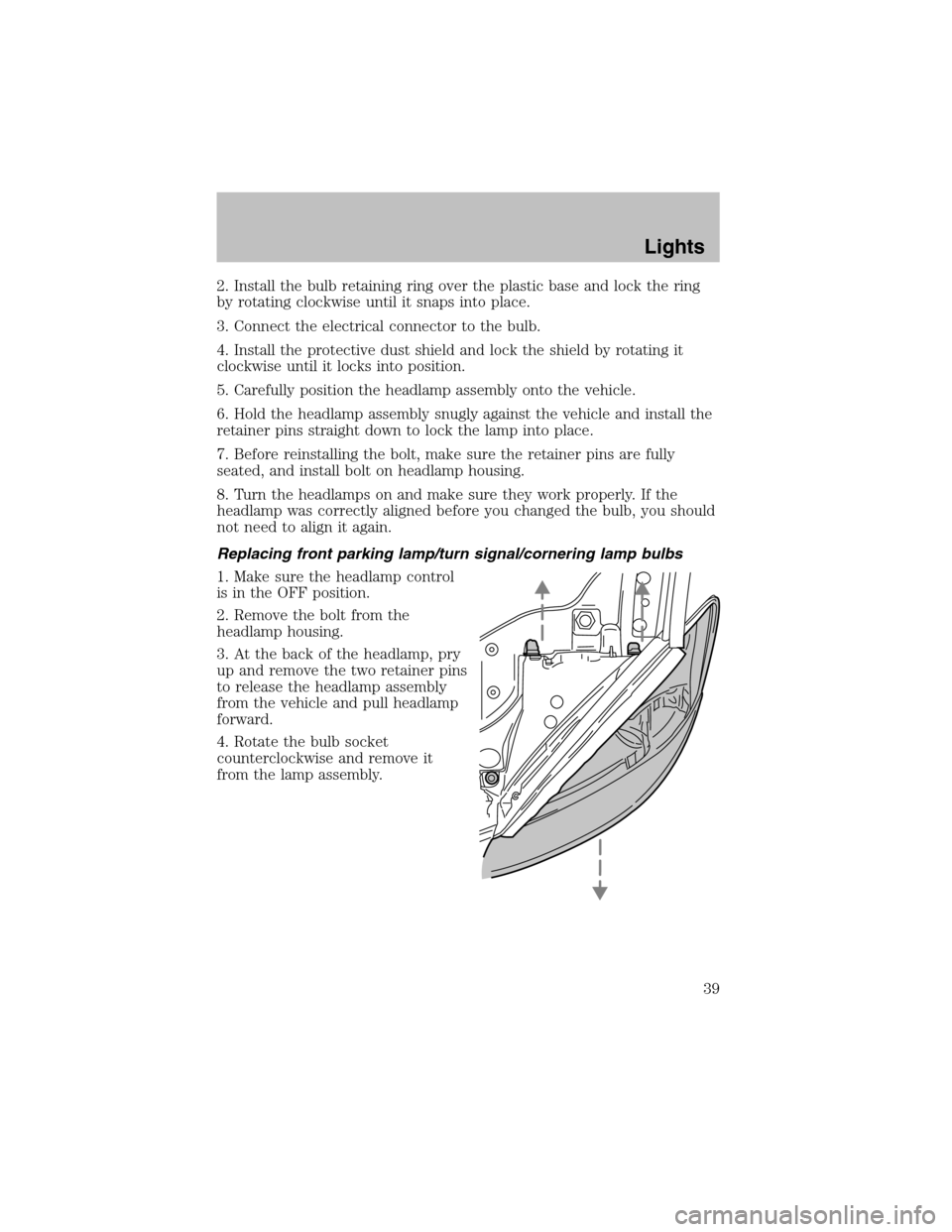
Replacing front parking lamp/turn signal/cornering lamp bulbs
1. Make sure the headlamp control
is in the OFF position.
2. Remove the bolt from the
headlamp housing.
3. At the back of the headlamp, pry
up and remove the two retainer pins
to release the headlamp assembly
from the vehicle and pull headlamp
forward.
4. Rotate the bulb socket
counterclockwise and remove it
from the lamp assembly.
Lights
39


