Page 6 of 216

SPECIAL NOTICES
Emission warranty
The New Vehicle Limited Warranty includes Bumper-to-Bumper
Coverage, Safety Restraint Coverage, Corrosion Coverage, and 7.3L
Power Stroke Diesel Engine Coverage. In addition, your vehicle is eligible
for Emissions Defect and Emissions Performance Warranties. For a
detailed description of what is covered and what is not covered, refer to
theWarranty Guidethat is provided to you along with your Owner’s
Guide.
Special instructions
For your added safety, your vehicle is fitted with sophisticated electronic
controls.
Please read the sectionSupplemental Restraint System (SRS)
in theSeating and safety restraintschapter. Failure to follow
the specific warnings and instructions could result in personal injury.
Front seat mounted rear facing child or infant seats should
NEVERbe used in front of a passenger side air bag unless the
air bag can be and is turned OFF.
Data Recording
Computers in your vehicle are capable of recording detailed data
potentially including but not limited to information such as:
•the use of restraint systems including seat belts by the driver and
passengers,
•information about the performance of various systems and modules in
the vehicle, and
•information related to engine, throttle, steering, brake or other system
status.
Introduction
6
Page 27 of 216
11.Scan:Press SCAN to move up
the radio frequency band. SCAN
automatically finds a station, plays it
for five seconds, then moves to the next station. Press again to stop.
CD:Press SCAN to sample CD selections for eight seconds. Press again
to stop.
DSP:
Press once to enter occupancy mode and use the volume control to
optimize sound for ALL seats, DRIVER or REAR. Press twice to select one
of the settings: DSP OFF, NEWS, JAZZ, CONCERT, CHURCH or STADIUM.
12.Clock:Press CLK to access
clock mode. Press and release
SEEK
/to select
hours/minutes. Turn the volume control to set both hours and minutes.
13.Menu:Press MENU to access
main menu functions. Use
SEEK
/for adjustments.
Tune adjust:Press MENU until MAN appears in the display. Press
orto manually move up/down the radio frequency band.
Compression:Press MENU until COMP appears in the display. Press
SEEK to engage/disengage the feature. Compression adjust brings soft
and loud CD passages together for a more consistent listening level.
Shuffle:Press MENU until SHUF appears in the display. Press SEEK to
engage/disengage the feature.
Audio distortion reduction (CLIP):Press and hold MENU until the
display changes. Then, press MENU until the CLIP menu displays. Press
SEEK to engage/disengage the feature. The feature automatically detects
sound distortions and reduces the volume level until the distortion has
been eliminated.
Automatic volume control (AVC) (if equipped):With this feature,
radio volume changes automatically with vehicle speed to compensate for
road and wind noise. Press MENU until AVC is displayed, then use the
SEEK
/control to adjust the volume.
SCAN
CLK
MENU
Entertainment Systems
27
Page 35 of 216
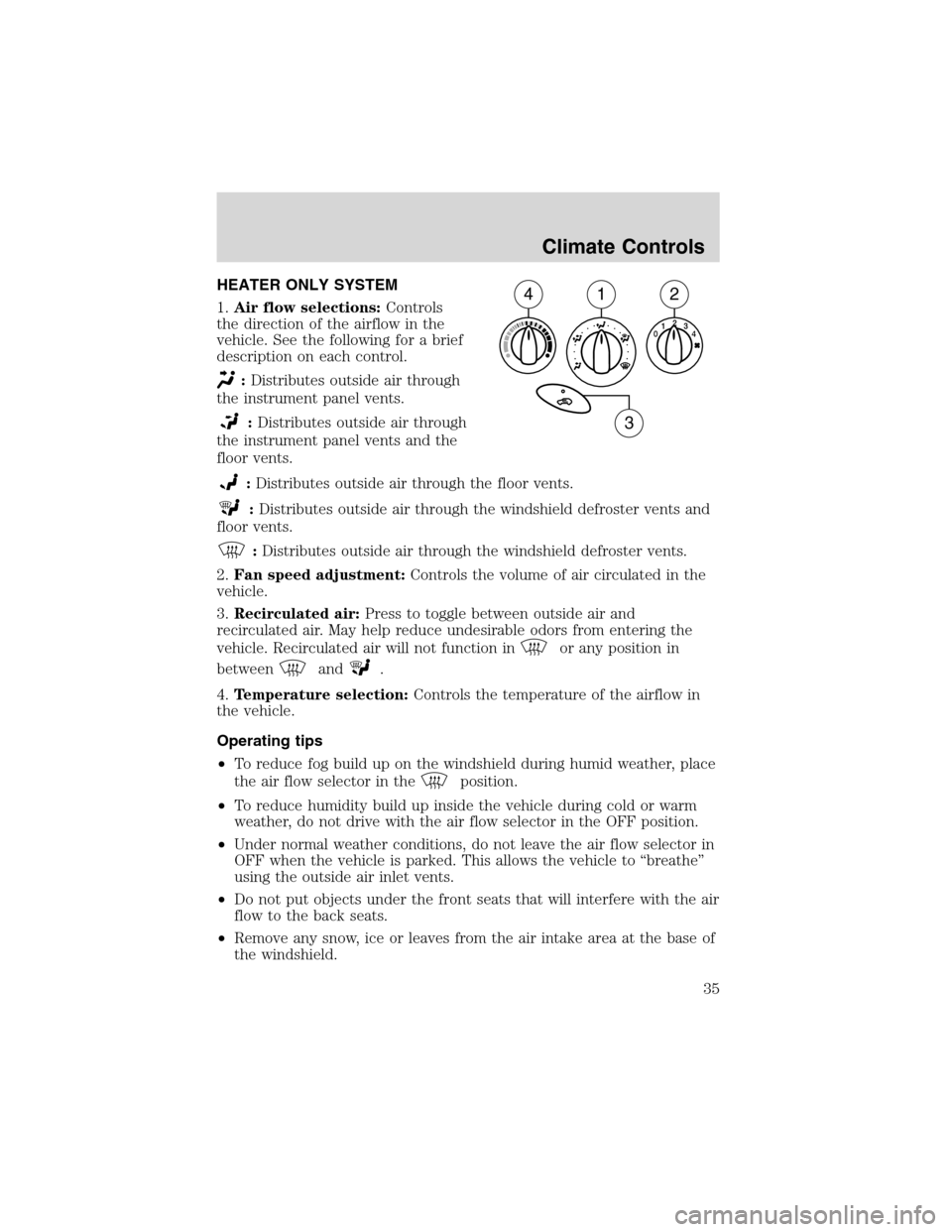
Climate ControlsHEATER ONLY SYSTEM
1.Air flow selections:Controls
the direction of the airflow in the
vehicle. See the following for a brief
description on each control.
:Distributes outside air through
the instrument panel vents.
:Distributes outside air through
the instrument panel vents and the
floor vents.
:Distributes outside air through the floor vents.
:Distributes outside air through the windshield defroster vents and
floor vents.
:Distributes outside air through the windshield defroster vents.
2.Fan speed adjustment:Controls the volume of air circulated in the
vehicle.
3.Recirculated air:Press to toggle between outside air and
recirculated air. May help reduce undesirable odors from entering the
vehicle. Recirculated air will not function in
or any position in
between
and.
4.Temperature selection:Controls the temperature of the airflow in
the vehicle.
Operating tips
•To reduce fog build up on the windshield during humid weather, place
the air flow selector in the
position.
•To reduce humidity build up inside the vehicle during cold or warm
weather, do not drive with the air flow selector in the OFF position.
•Under normal weather conditions, do not leave the air flow selector in
OFF when the vehicle is parked. This allows the vehicle to“breathe”
using the outside air inlet vents.
•Do not put objects under the front seats that will interfere with the air
flow to the back seats.
•Remove any snow, ice or leaves from the air intake area at the base of
the windshield.
124
3
Climate Controls
35
Page 37 of 216
Operating tips
•To reduce fog build up on the windshield during humid weather, place
the air flow selector in the
position.
•To reduce humidity build up inside the vehicle: do not drive with the
air flow selector in the OFF or MAX A/C position.
•Under normal weather conditions, do not leave the air flow selector in
MAX A/C or OFF when the vehicle is parked. This allows the vehicle
to“breathe”using the outside air inlet vents.
•Do not put objects under the front seats that will interfere with the
airflow to the back seats.
•Remove any snow, ice or leaves from the air intake area at the base of
the windshield.
To aid in side window defogging/demisting in cold weather:
1. Select
2. Select A/C
3. Modulate the temperature control to maintain comfort.
4. Set the fan speed to HI
5. Direct the outer instrument panel vents towards the side windows
To increase airflow to the outer instrument panel vents, close the vents
located in the middle of the instrument panel.
Do not place objects on top of the instrument panel as these
objects may become projectiles in a collision or sudden stop.
REAR WINDOW DEFROSTER
The rear defroster control is located on the instrument panel.
Press the rear defroster control to clear the rear window of thin ice and
fog.
•A small LED will illuminate when the rear defroster is activated.
The ignition must be in the ON position to operate the rear window
defroster.
The defroster turns off automatically after 14 minutes or when the
ignition is turned to the OFF position. To manually turn off the defroster
before 14 minutes have passed, push the control again.
Climate Controls
37
Page 72 of 216
Seating and Safety RestraintsSEATING
Notes:
Reclining the seatback can cause an occupant to slide under the
seat’s safety belt, resulting in severe personal injuries in the
event of a collision.
Do not pile cargo higher than the seatbacks to reduce the risk of
injury in a collision or sudden stop.
Adjustable head restraints (if equipped)
Your vehicle’s seats may be equipped with head restraints which are
vertically adjustable. The purpose of these head restraints is to help limit
head motion in the event of a rear collision. To properly adjust your head
restraints, lift the head restraint so that it is located directly behind your
head or as close to that position as possible. Refer to the following to
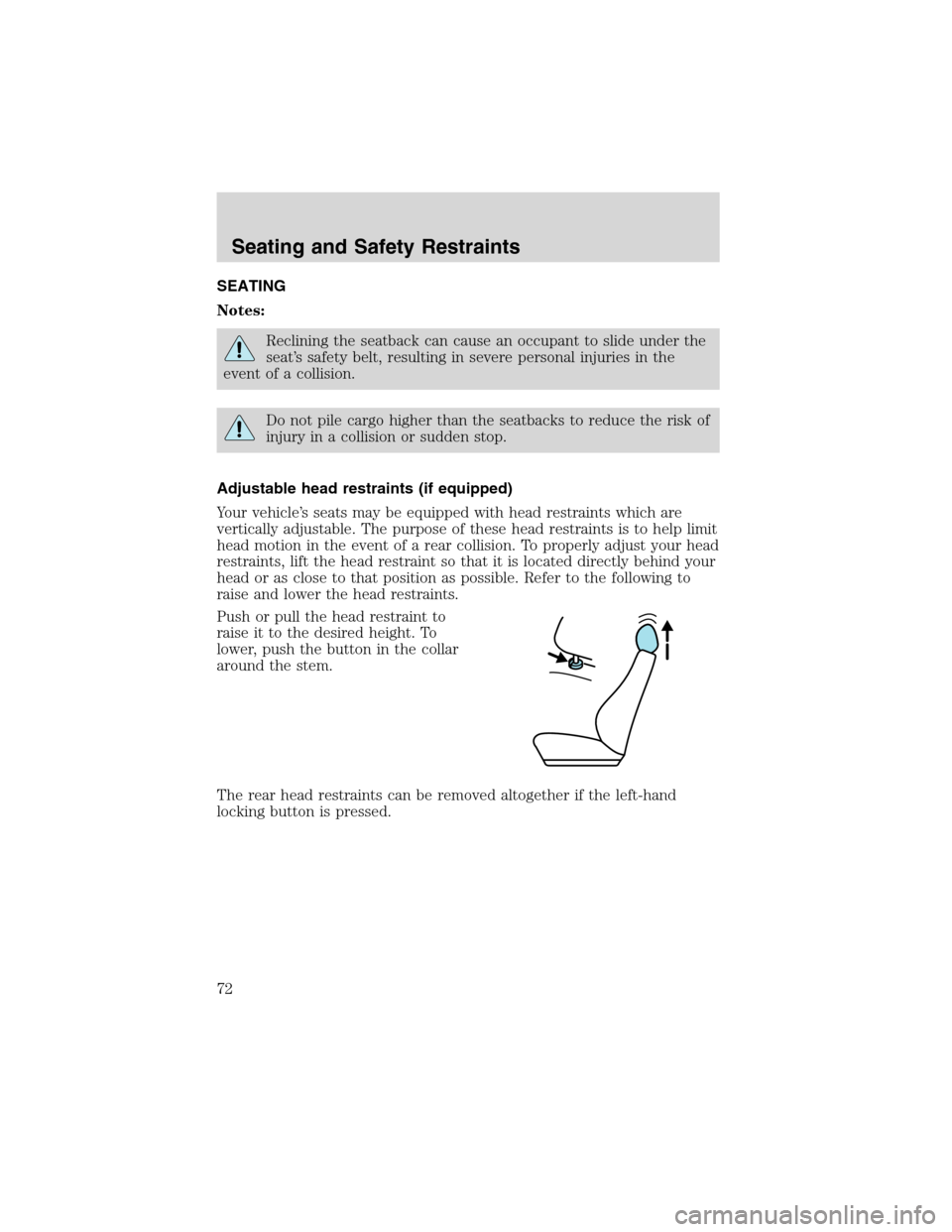
raise and lower the head restraints.
Push or pull the head restraint to
raise it to the desired height. To
lower, push the button in the collar
around the stem.
The rear head restraints can be removed altogether if the left-hand
locking button is pressed.
Seating and Safety Restraints
72
Page 73 of 216
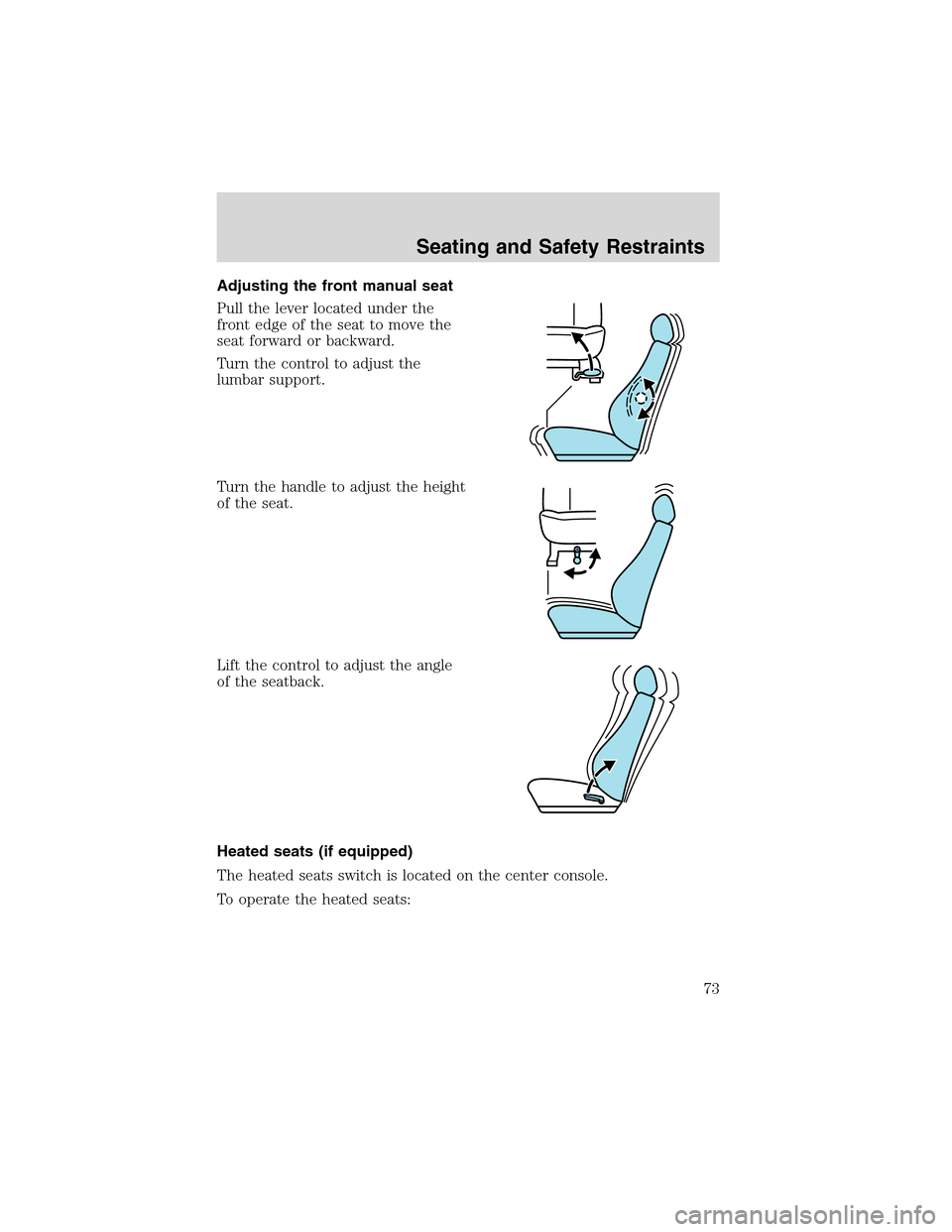
Adjusting the front manual seat
Pull the lever located under the
front edge of the seat to move the
seat forward or backward.
Turn the control to adjust the
lumbar support.
Turn the handle to adjust the height
of the seat.
Lift the control to adjust the angle
of the seatback.
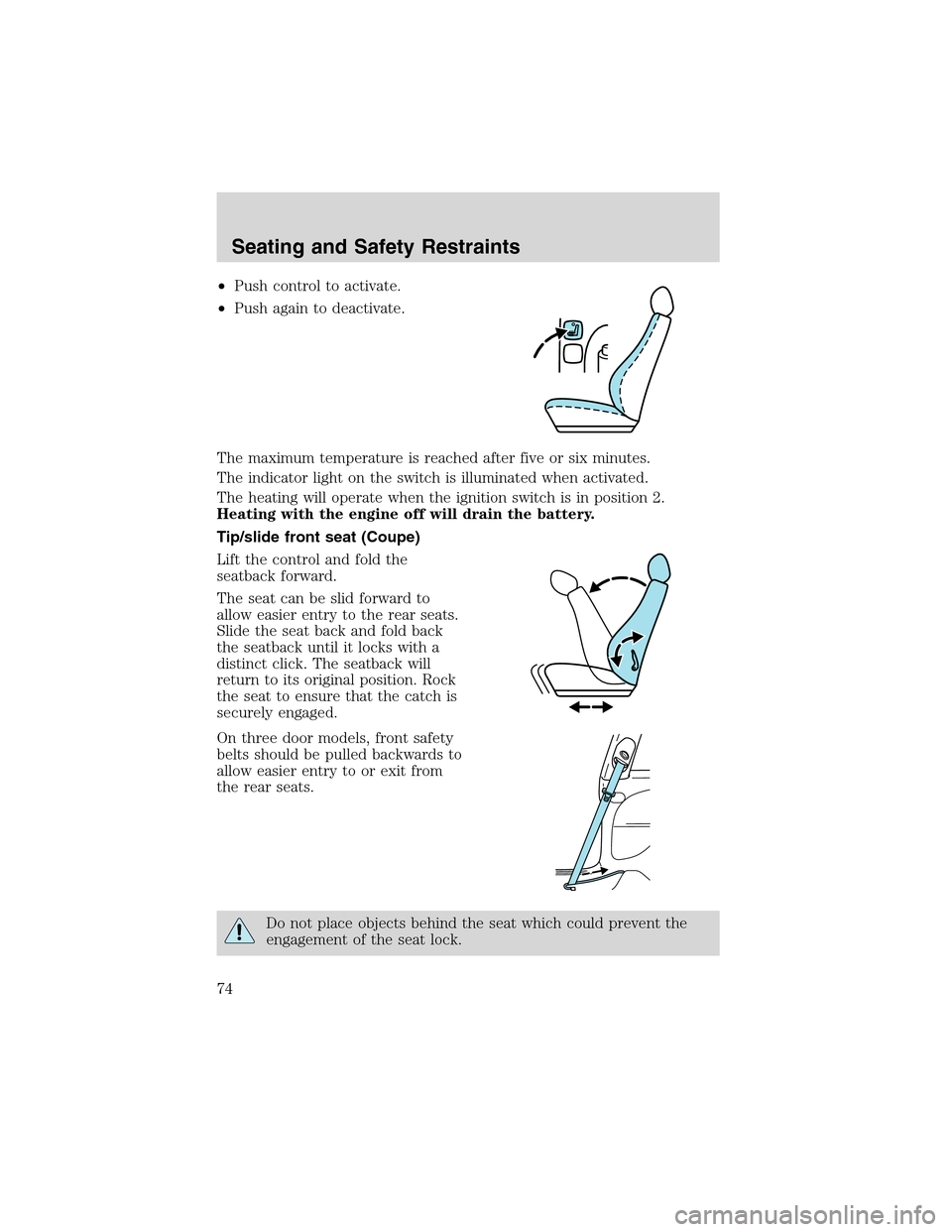
Heated seats (if equipped)
The heated seats switch is located on the center console.
To operate the heated seats:
Seating and Safety Restraints
73
Page 74 of 216
•Push control to activate.
•Push again to deactivate.
The maximum temperature is reached after five or six minutes.
The indicator light on the switch is illuminated when activated.
The heating will operate when the ignition switch is in position 2.
Heating with the engine off will drain the battery.
Tip/slide front seat (Coupe)
Lift the control and fold the
seatback forward.
The seat can be slid forward to
allow easier entry to the rear seats.
Slide the seat back and fold back
the seatback until it locks with a
distinct click. The seatback will
return to its original position. Rock
the seat to ensure that the catch is
securely engaged.
On three door models, front safety
belts should be pulled backwards to
allow easier entry to or exit from
the rear seats.
Do not place objects behind the seat which could prevent the
engagement of the seat lock.
Seating and Safety Restraints
74
Page 75 of 216
REAR SEATS
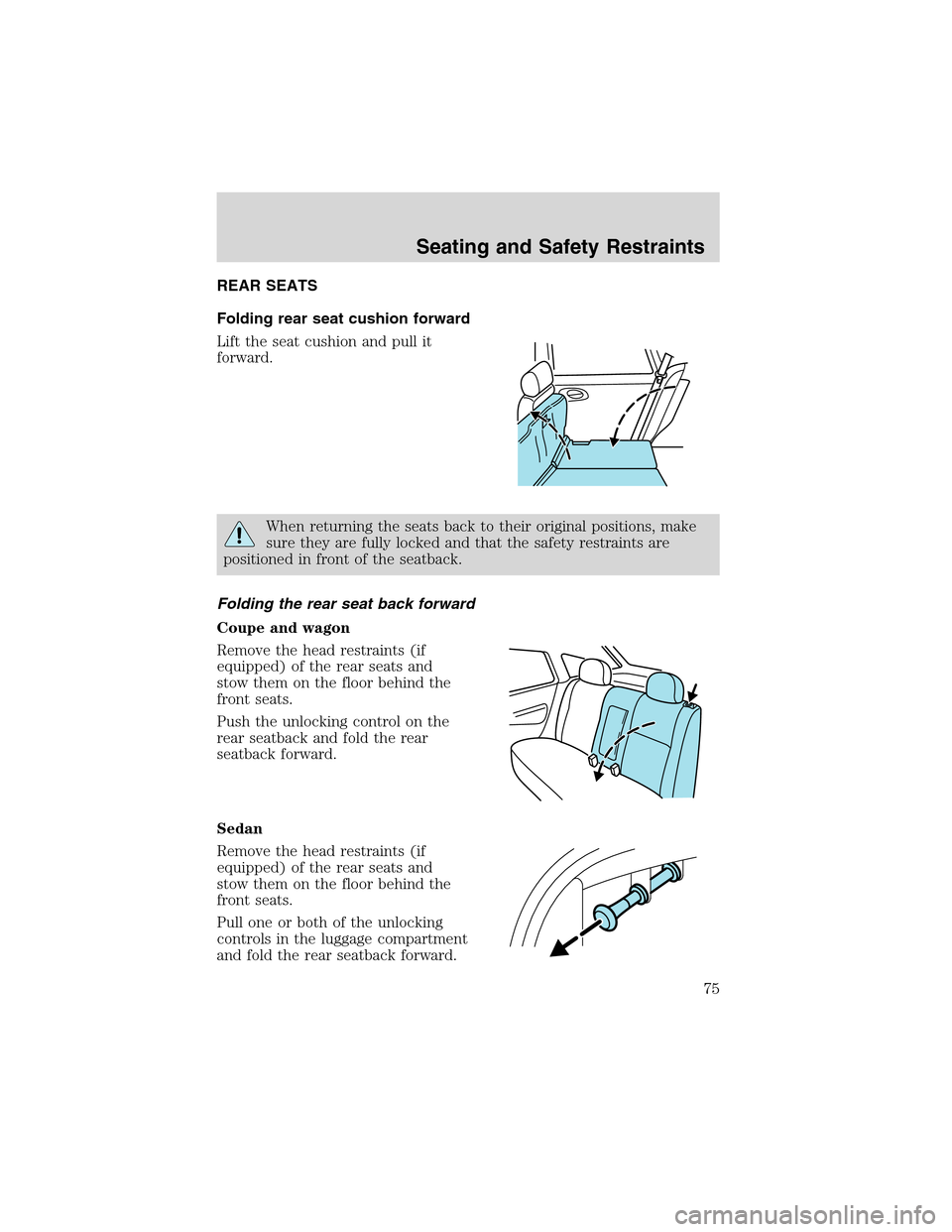
Folding rear seat cushion forward
Lift the seat cushion and pull it
forward.
When returning the seats back to their original positions, make
sure they are fully locked and that the safety restraints are
positioned in front of the seatback.
Folding the rear seat back forward
Coupe and wagon
Remove the head restraints (if
equipped) of the rear seats and
stow them on the floor behind the
front seats.
Push the unlocking control on the
rear seatback and fold the rear
seatback forward.
Sedan
Remove the head restraints (if
equipped) of the rear seats and
stow them on the floor behind the
front seats.
Pull one or both of the unlocking
controls in the luggage compartment
and fold the rear seatback forward.
Seating and Safety Restraints
75