Page 45 of 240
TILT STEERING WHEEL (IF EQUIPPED)
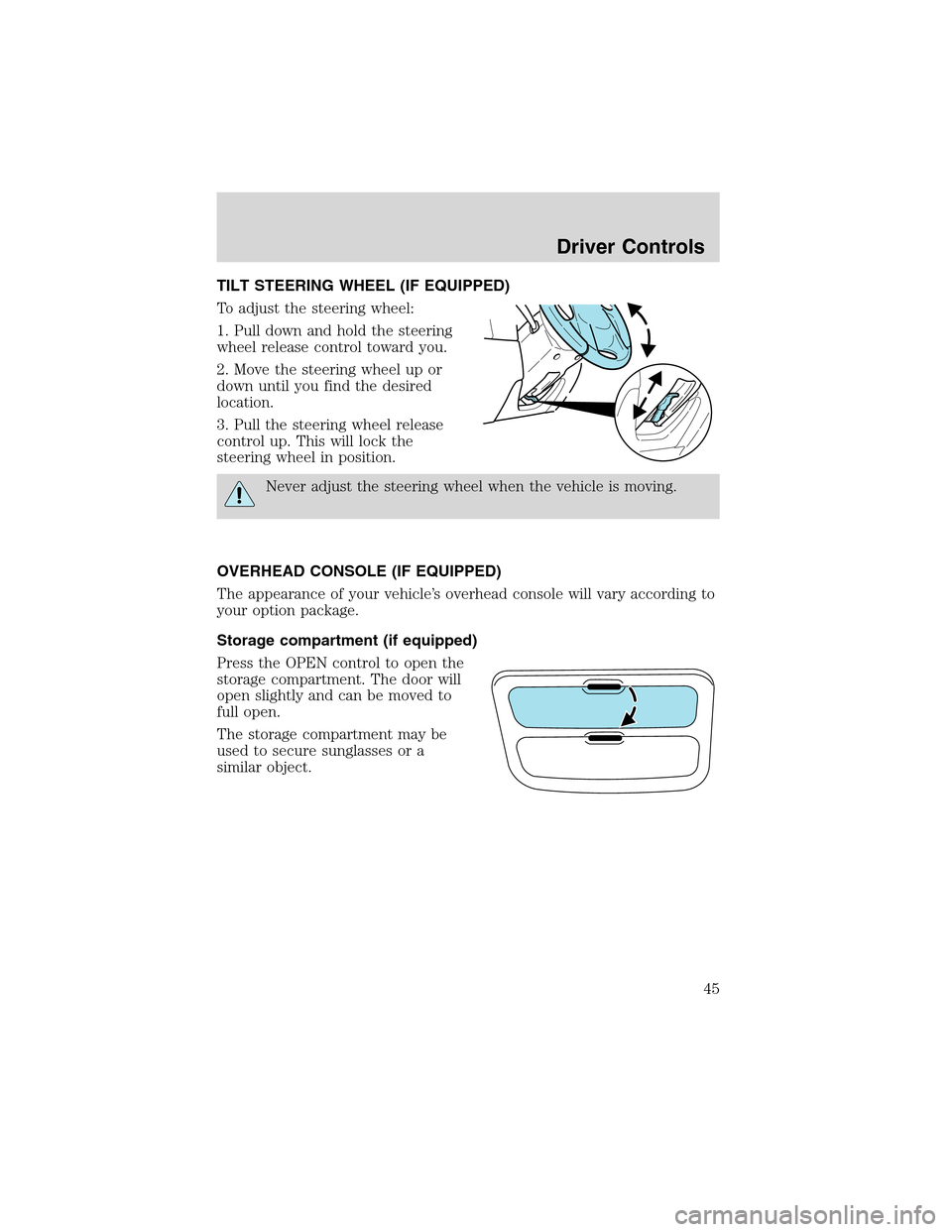
To adjust the steering wheel:
1. Pull down and hold the steering
wheel release control toward you.
2. Move the steering wheel up or
down until you find the desired
location.
3. Pull the steering wheel release
control up. This will lock the
steering wheel in position.
Never adjust the steering wheel when the vehicle is moving.
OVERHEAD CONSOLE (IF EQUIPPED)
The appearance of your vehicle’s overhead console will vary according to
your option package.
Storage compartment (if equipped)
Press the OPEN control to open the
storage compartment. The door will
open slightly and can be moved to
full open.
The storage compartment may be
used to secure sunglasses or a
similar object.
Driver Controls
45
Page 56 of 240
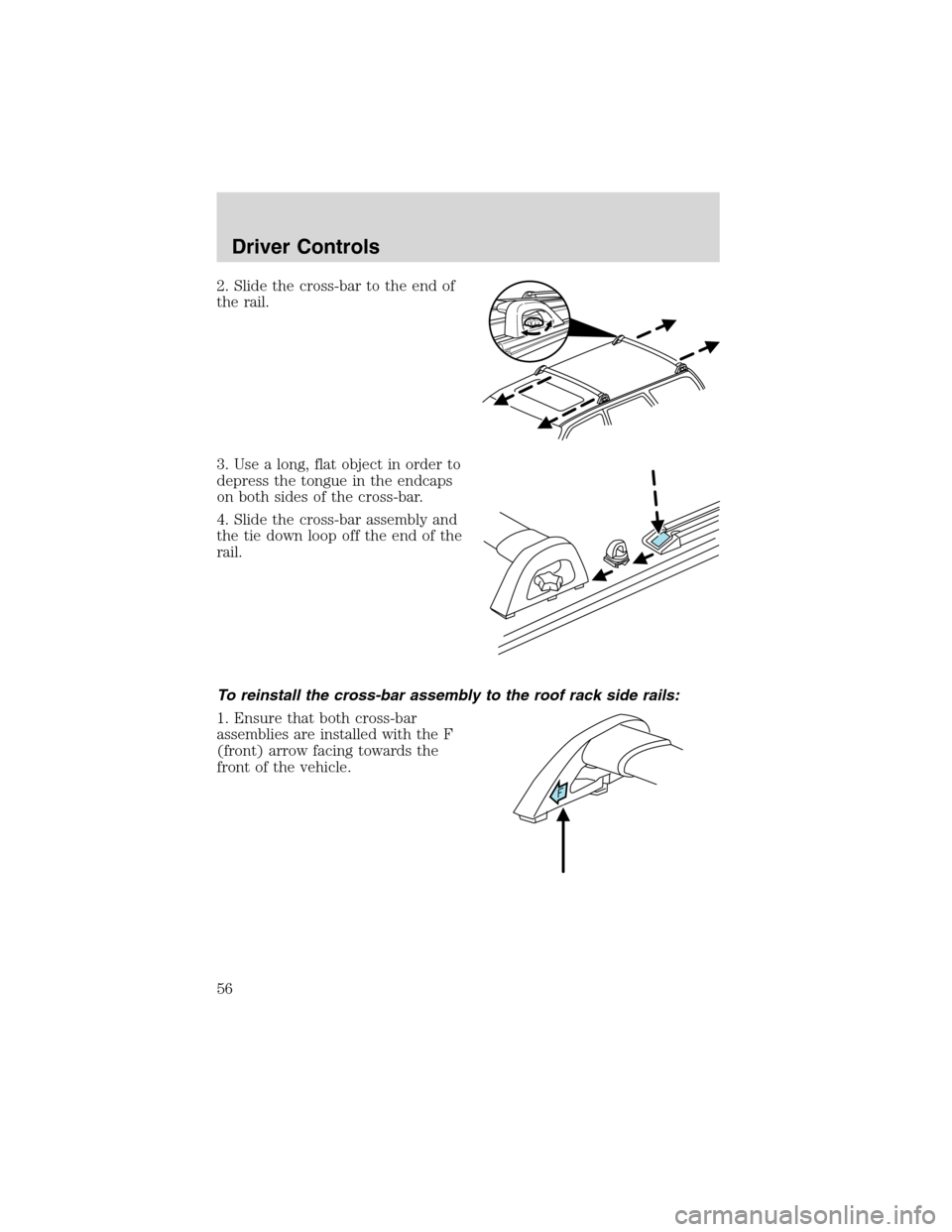
2. Slide the cross-bar to the end of
the rail.
3. Use a long, flat object in order to
depress the tongue in the endcaps
on both sides of the cross-bar.
4. Slide the cross-bar assembly and
the tie down loop off the end of the
rail.
To reinstall the cross-bar assembly to the roof rack side rails:
1. Ensure that both cross-bar
assemblies are installed with the F
(front) arrow facing towards the
front of the vehicle.
Driver Controls
56
Page 57 of 240
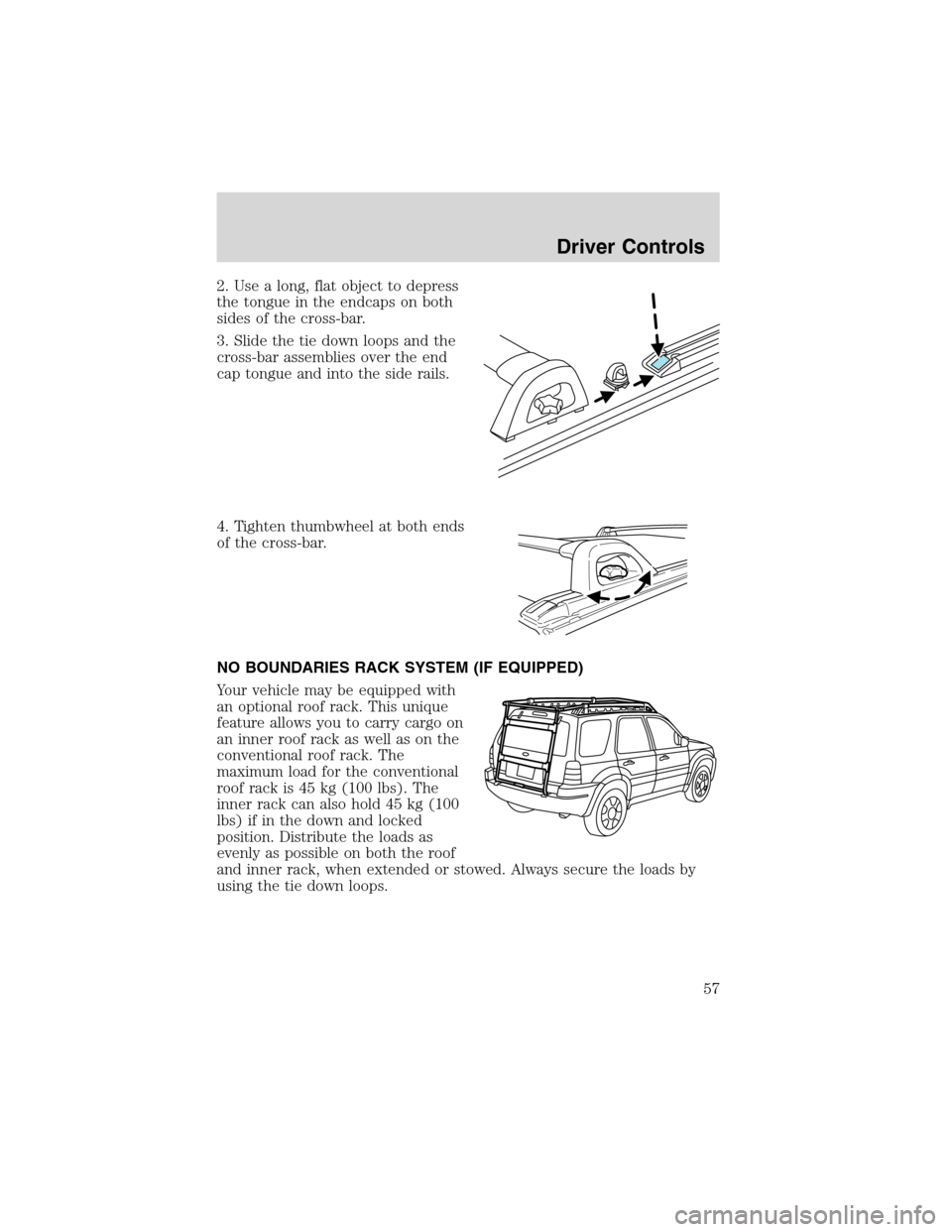
2. Use a long, flat object to depress
the tongue in the endcaps on both
sides of the cross-bar.
3. Slide the tie down loops and the
cross-bar assemblies over the end
cap tongue and into the side rails.
4. Tighten thumbwheel at both ends
of the cross-bar.
NO BOUNDARIES RACK SYSTEM (IF EQUIPPED)
Your vehicle may be equipped with
an optional roof rack. This unique
feature allows you to carry cargo on
an inner roof rack as well as on the
conventional roof rack. The
maximum load for the conventional
roof rack is 45 kg (100 lbs). The
inner rack can also hold 45 kg (100
lbs) if in the down and locked
position. Distribute the loads as
evenly as possible on both the roof
and inner rack, when extended or stowed. Always secure the loads by
using the tie down loops.
Driver Controls
57
Page 58 of 240
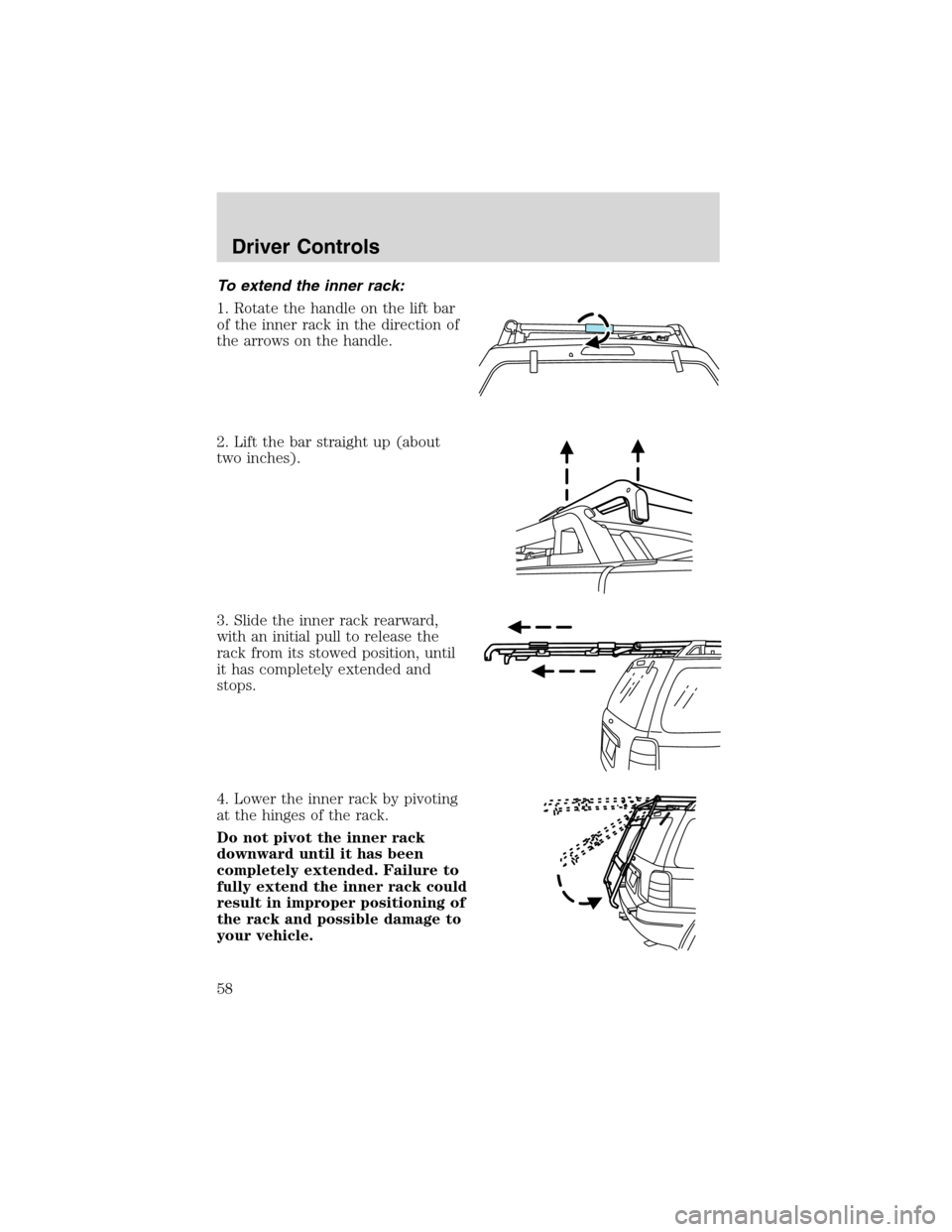
To extend the inner rack:
1. Rotate the handle on the lift bar
of the inner rack in the direction of
the arrows on the handle.
2. Lift the bar straight up (about
two inches).
3. Slide the inner rack rearward,
with an initial pull to release the
rack from its stowed position, until
it has completely extended and
stops.
4. Lower the inner rack by pivoting
at the hinges of the rack.
Do not pivot the inner rack
downward until it has been
completely extended. Failure to
fully extend the inner rack could
result in improper positioning of
the rack and possible damage to
your vehicle.
Driver Controls
58
Page 60 of 240
Do not use the inner rack as a ladder. This could result in
personal injury and damage to your roof rack.
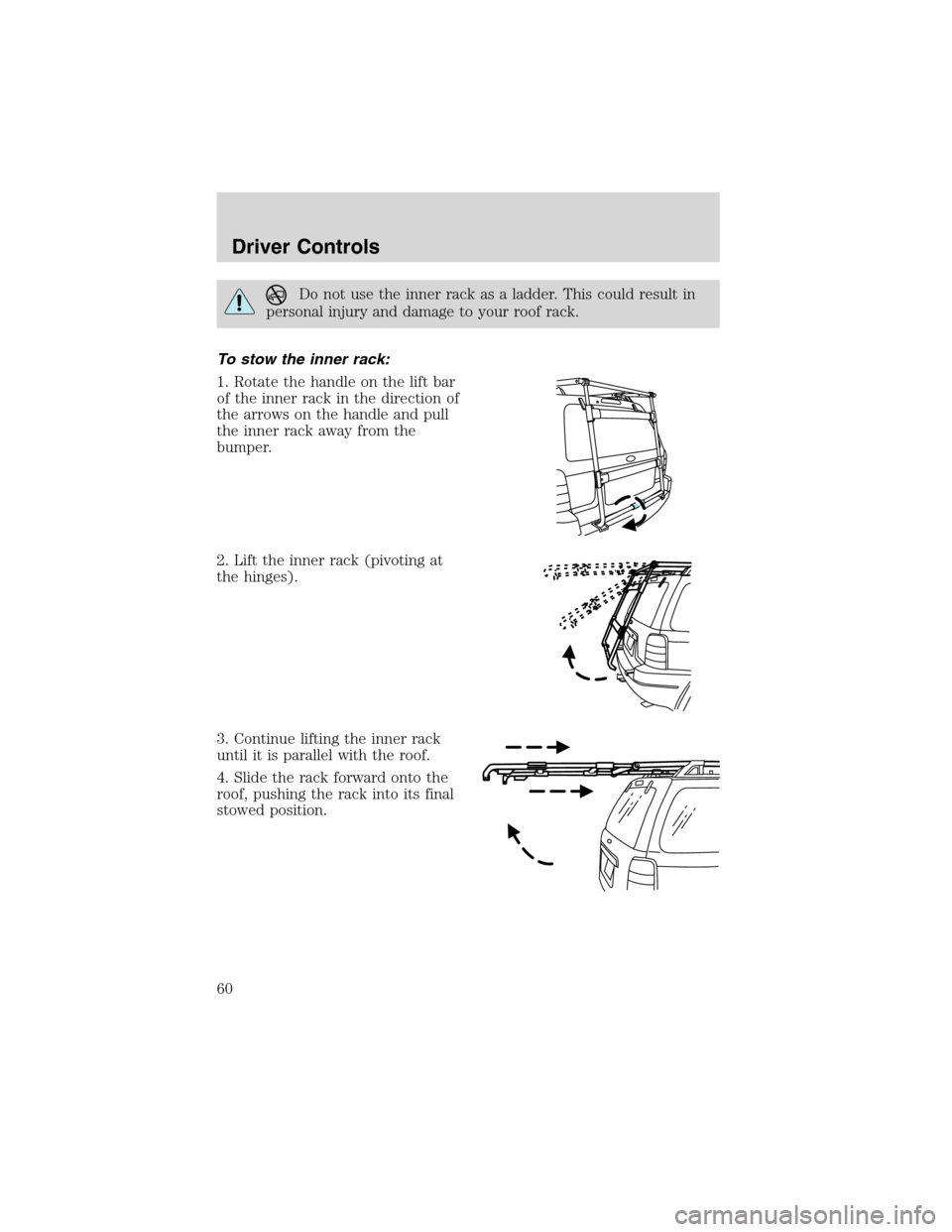
To stow the inner rack:
1. Rotate the handle on the lift bar
of the inner rack in the direction of
the arrows on the handle and pull
the inner rack away from the
bumper.
2. Lift the inner rack (pivoting at
the hinges).
3. Continue lifting the inner rack
until it is parallel with the roof.
4. Slide the rack forward onto the
roof, pushing the rack into its final
stowed position.
Driver Controls
60
Page 62 of 240
Always stow the inner rack on the roof when using an automated
car wash.
Do not attempt to open the liftgate or rear window when the rack
is in the down position. This may damage the rack or your
vehicle.
To ensure proper sliding function of your rack, keep the rack
clear of debris. If debris is visible inside the roof c-channels or
side rails, spray the items clear with a water hose.
Do not load large or bulky items (i.e., plywood, mattresses) on
the rear of the vehicle so that they extend above the roof line. In
addition to blocking your rear view, they can also cause dangerous
driving situations and possibly cause damage to your vehicle. Use
additional care when driving with reduced visibility.
Only load cargo in the designated area. Loading outside of the
approved area could result in personal injury as well as vehicle
damage that may not be covered by warranty.
Vehicles with a higher center of gravity such as utility and
four-wheel drive vehicles handle differently than vehicles with a
lower center of gravity. Utility and four-wheel drive vehicles are not
designed for cornering at speeds as high as passenger cars any more
than low-slung sport cars are designed to perform satisfactorily under
off-road conditions. Avoid sharp turns, excessive speed and abrupt
maneuvers in these vehicles. Failure to drive cautiously could result in
an increase risk of loss of vehicle control, vehicle rollover, personal
injury and death.
Driver Controls
62
Page 67 of 240

Locking the doors
1. Pressand release to lock all the doors. The park lamps will flash
once and the perimeter alarm (if equipped) will start the arming process.
For more information concerning the perimeter alarm, refer to
Perimeter alarm system (if equipped)later in this chapter.
2. Press
and release again within three seconds to confirm that all the
doors are closed and locked.Note:the doors will lock again, the horn
will chirp once, and the park lamps will flash.
If any of the doors or the hood are not properly closed the horn will not
sound and the park lamps will not flash.
Sounding a panic alarm
Press
to activate the alarm. To deactivate the feature, press the
control again or wait for the alarm to time out in approximately 3
minutes.
Note:The panic alarm will only operate when the ignition is in the OFF
or ACC position.
Replacing the battery
The remote entry transmitter uses one coin type three-volt lithium
battery CR2032 or equivalent. The typical operating range for your
remote entry transmitter is approximately 10 meters (33 feet). A
decrease in the operating range could be caused by:
•weather conditions,
•nearby radio towers,
•structures around the vehicle and
•other vehicles parked next to the vehicle.
To replace the battery:
1. Twist a thin coin between the two
halves of the remote entry
transmitter near the key ring. DO
NOT TAKE THE FRONT PART OF
THE REMOTE ENTRY
TRANSMITTER APART.
2. Remove the old battery.
Locks and Security
67
Page 71 of 240
Replacement keys
If your keys are lost or stolen and you don’t have an extra coded key,
you will need to have your vehicle towed to a dealership. The key codes
need to be erased from your vehicle and new coded keys and key codes
will need to be programmed.
Replacing coded keys can be very costly. Store an extra programmed key
away from the vehicle in a safe place to help prevent any
inconveniences. Please visit an authorized dealer to purchase additional
spare or replacement keys.
Programming spare keys
You can program your own coded keys to your vehicle. Please read and
understand the entire procedure before you begin.
Tips:
•A maximum of eight keys can be coded to your vehicle.
•Only use Securilock�keys.
•You must have two previously programmed coded keys (keys that
already operate your vehicle’s engine) and the new unprogrammed
key(s) readily accessible.
•If no previously programmed coded keys are available, you must take
your vehicle to your dealer to have the spare key(s) programmed.
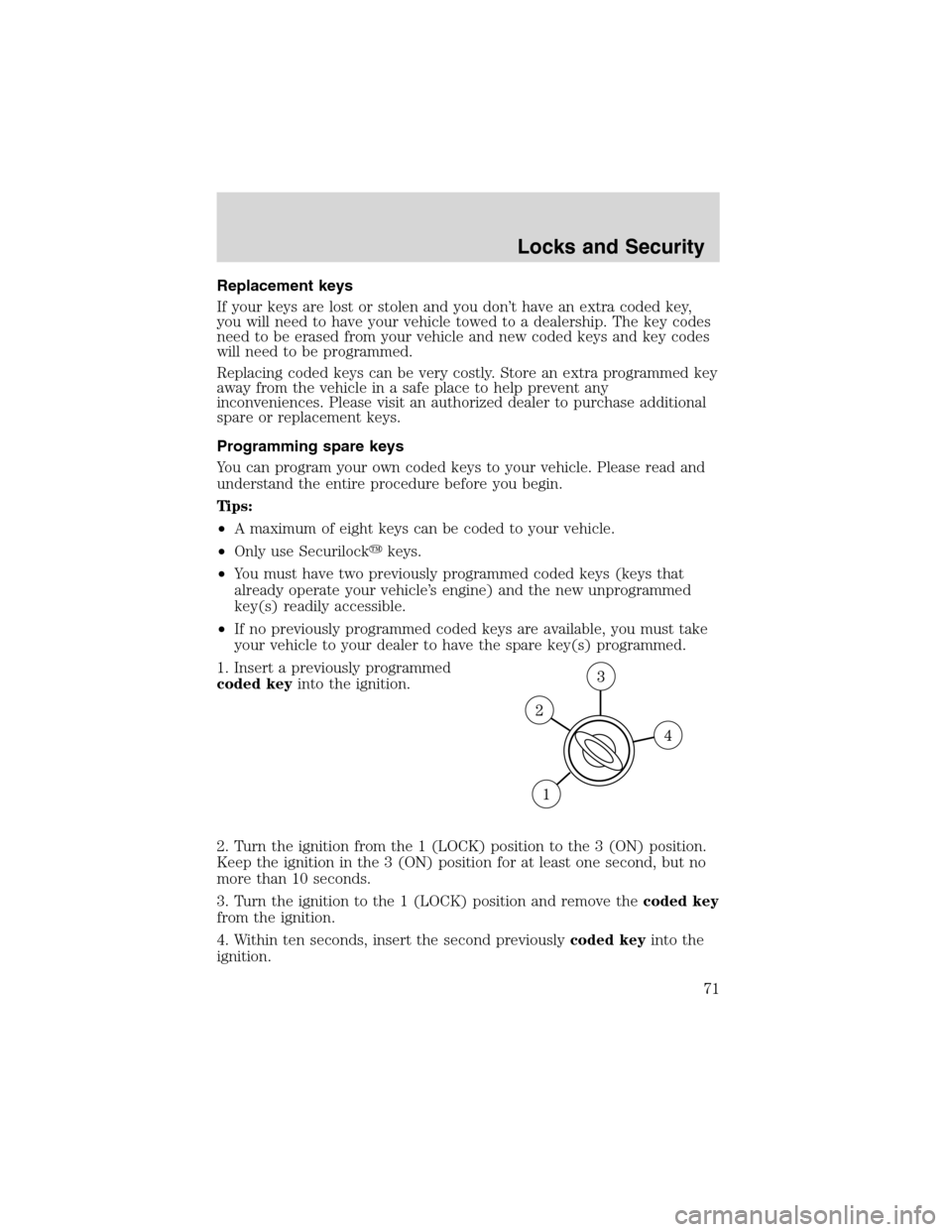
1. Insert a previously programmed
coded keyinto the ignition.
2. Turn the ignition from the 1 (LOCK) position to the 3 (ON) position.
Keep the ignition in the 3 (ON) position for at least one second, but no
more than 10 seconds.
3. Turn the ignition to the 1 (LOCK) position and remove thecoded key
from the ignition.
4. Within ten seconds, insert the second previouslycoded keyinto the
ignition.
Locks and Security
71