2003 CHEVROLET VENTURE transmission
[x] Cancel search: transmissionPage 142 of 486

B (LOCK):This is the only position from which you can
remove the key. This position locks your ignition,
steering wheel and transaxle.
Notice:If your key seems stuck in LOCK and you
can't turn it, be sure you are using the correct key; if
so, is it all the way in? If it is, then turn the steering
wheel left and right while you turn the key hard.
Turn the key only with your hand. Using a tool
to force it could break the key or the ignition switch.
If none of these works, then your vehicle needs
service.
C (OFF):This position unlocks the ignition, steering
wheel and transaxle but, does not send power to
any accessories. Use this position if your vehicle must
be pushed or towed, but never try to push-start your
vehicle.
D (RUN):This is the position to which the switch
returns after you start your engine and release the
ignition key. This is the position for driving. Even when
the engine is not running, you can use RUN to
operate your electrical accessories and to display some
instrument panel warning lights.
E (START):This position starts the engine. When the
engine starts, release the ignition key. The switch
will return to RUN for normal driving.If the engine is not running, ACCESSORY and RUN are
positions that allow you to operate your electrical
accessories, such as the radio.Retained Accessory Power (RAP)
With RAP, the power windows, power rear quarter
windows, audio system and the automatic level control
will continue to work up to 10 minutes after the
ignition key is turned to OFF and none of the doors are
opened.
Starting Your Engine
Move your shift lever to PARK (P) or NEUTRAL (N).
Your engine won't start in any other position ± that's a
safety feature. To restart when you're already moving,
use NEUTRAL (N) only.
Notice:Shifting into PARK (P) with the vehicle
moving could damage the transmission. Shift
to PARK (P) only when your vehicle is stopped.
1. With your foot off the accelerator pedal, turn your
ignition key to START. When the engine starts, let
go of the key. The idle speed will go down as
your engine warms up.
2-32
Page 158 of 486

Programming the HomeLinkž
Transmitter
Do not use the HomeLinkžTransmitter with any garage
door opener that does not have the ªstop and reverseº
feature. This includes any garage door opener model
manufactured before April 1, 1982. If you have a newer
garage door opener with rolling codes, please be
sure to follow steps 6 through 8 to complete the
programming of your HomeLink
žTransmitter.
Read the instructions completely before attempting to
program the HomeLink
žTransmitter. Because of
the steps involved, it may be helpful to have another
person available to assist you in programming the
transmitter.
Keep the original transmitter for use in other vehicles as
well as for future HomeLink
žprogramming. It is also
recommended that upon the sale of the vehicle,
the programmed HomeLink
žbuttons should be erased
for security purposes. Refer to ªErasing HomeLinkž
Buttonsº or, for assistance, contact HomeLinkžon the
internet at: www.homelink.com or by calling
1-800-355-3515.
Be sure that people and objects are clear of the garage
door or gate operator you are programming. When
programming a garage door, it is advised to park outside
of the garage.It is recommended that a new battery be installed in
your hand-held transmitter for quicker and more
accurate transmission of the radio frequency.
Your vehicle's engine should be turned off while
programming the transmitter. Follow these steps to
program up to three channels:
1. Press and hold down the two outside buttons,
releasing only when the indicator light begins to
¯ash, after 20 seconds. Do not hold down the
buttons for longer than 30 seconds and do not
repeat this step to program a second and/or third
transmitter to the remaining two HomeLink
žbuttons.
2. Position the end of your hand-held transmitter about
1 to 3 inches (3 to 8 cm) away from the HomeLink
ž
buttons while keeping the indicator light in view.
3. Simultaneously press and hold both the desired
button on HomeLink
žand the hand-held transmitter
button. Do not release the buttons until Step 4
has been completed.
Some entry gates and garage door openers may
require you to substitute Step 3 with the procedure
noted in ªGate Operator and Canadian
Programmingº later in this section.
4. The indicator light will ¯ash slowly at ®rst and then
rapidly after HomeLink
žsuccessfully receives the
frequency signal from the hand-held transmitter.
Release both buttons.
2-48
Page 160 of 486

Gate Operator and Canadian
Programming
Canadian radio-frequency laws require transmitter
signals to ªtime outº or quit after several seconds of
transmission. This may not be long enough for
HomeLink
žto pick up the signal during programming.
Similarly, some U.S. gate operators are manufactured to
ªtime outº in the same manner.
If you live in Canada, or you are having difficulty
programming a gate operator by using the
ªProgramming HomeLink
žº procedures (regardless of
where you live), replace Step 3 under ªProgramming
HomeLink
žº with the following:
Continue to press and hold the HomeLink
žbutton while
you press and release every two seconds (cycle)
your hand-held transmitter until the frequency signal has
been successfully accepted by HomeLink
ž. The
indicator light will ¯ash slowly at ®rst and then rapidly.
Proceed with Step 4 under ªProgramming HomeLink
žº
to complete.
Using HomeLinkž
Press and hold the appropriate HomeLinkžbutton for at
least half of a second. The indicator light will come
on while the signal is being transmitted.
Erasing HomeLinkžButtons
To erase programming from the three buttons do the
following:
1. Press and hold down the two outside buttons until
the indicator light begins to ¯ash, after 20 seconds.
2. Release both buttons. Do not hold for longer than
30 seconds.
HomeLink
žis now in the train (learning) mode and can
be programmed at any time beginning with Step 2
under ªProgramming HomeLink
ž.º
Individual buttons can not be erased, but they can be
reprogrammed. See ªReprogramming a Single
HomeLink
žButtonº next.
2-50
Page 451 of 486
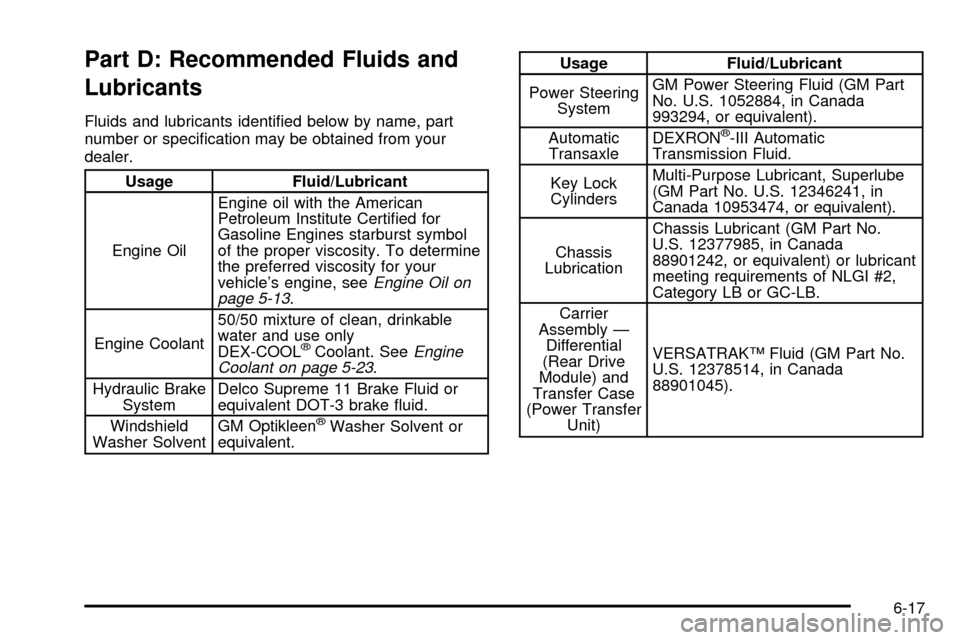
Part D: Recommended Fluids and
Lubricants
Fluids and lubricants identi®ed below by name, part
number or speci®cation may be obtained from your
dealer.
Usage Fluid/Lubricant
Engine OilEngine oil with the American
Petroleum Institute Certi®ed for
Gasoline Engines starburst symbol
of the proper viscosity. To determine
the preferred viscosity for your
vehicle's engine, see
Engine Oil on
page 5-13.
Engine Coolant50/50 mixture of clean, drinkable
water and use only
DEX-COOL
žCoolant. SeeEngine
Coolant on page 5-23.
Hydraulic Brake
SystemDelco Supreme 11 Brake Fluid or
equivalent DOT-3 brake ¯uid.
Windshield
Washer SolventGM Optikleen
žWasher Solvent or
equivalent.
Usage Fluid/Lubricant
Power Steering
SystemGM Power Steering Fluid (GM Part
No. U.S. 1052884, in Canada
993294, or equivalent).
Automatic
TransaxleDEXRON
ž-III Automatic
Transmission Fluid.
Key Lock
CylindersMulti-Purpose Lubricant, Superlube
(GM Part No. U.S. 12346241, in
Canada 10953474, or equivalent).
Chassis
LubricationChassis Lubricant (GM Part No.
U.S. 12377985, in Canada
88901242, or equivalent) or lubricant
meeting requirements of NLGI #2,
Category LB or GC-LB.
Carrier
Assembly Ð
Differential
(Rear Drive
Module) and
Transfer Case
(Power Transfer
Unit)VERSATRAKŸ Fluid (GM Part No.
U.S. 12378514, in Canada
88901045).
6-17
Page 466 of 486

Reporting Safety Defects to the
Canadian Government
If you live in Canada, and you believe that your vehicle
has a safety defect, you should immediately notify
Transport Canada, in addition to notifying General
Motors of Canada Limited. You may write to:
Transport Canada
330 Sparks Street
Tower C
Ottawa, Ontario K1A 0N5
Reporting Safety Defects to
General Motors
In addition to notifying NHTSA (or Transport Canada) in
a situation like this, we certainly hope you'll notify us.
Please call us at 1-800-222-1020, or write:
Chevrolet Motor Division
Chevrolet Customer Assistance Center
P.O. Box 33170
Detroit, MI 48232-5170
In Canada, please call us at 1-800-263-3777 (English)
or 1-800-263-7854 (French). Or, write:
General Motors of Canada Limited
Customer Communication Centre, 163-005
1908 Colonel Sam Drive
Oshawa, Ontario L1H 8P7
Service Publications Ordering
Information
Service Manuals
Service Manuals have the diagnosis and repair
information on engines, transmission, axle, suspension,
brakes, electrical, steering, body, etc.
RETAIL SELL PRICE: $120.00
Transmission, Transaxle, Transfer
Case Unit Repair Manual
This manual provides information on unit repair service
procedures, adjustments, and speci®cations for GM
transmissions, transaxles, and transfer cases.
RETAIL SELL PRICE: $50.00
Service Bulletins
Service Bulletins give technical service information
needed to knowledgeably service General Motors cars
and trucks. Each bulletin contains instructions to
assist in the diagnosis and service of your vehicle.
In Canada, information pertaining to Product Service
Bulletins can be obtained by contacting your General
Motors dealer or by calling 1-800-GM-DRIVE
(1-800-463-7483).
7-10
Page 484 of 486

T
Tachometer....................................................3-39
Taillamps.......................................................5-56
Turn Signal, Stoplamps and Back-up Lamps....5-56
TCS Warning Light..........................................3-43
Theft-Deterrent, Radio....................................3-103
Theft-Deterrent Systems...................................2-27
Content Theft-Deterrent................................2-27
PASS-Key
žIII Operation..............................2-29
PASS-KeyžIII .............................................2-29
Throttle System Inspection...............................6-16
Tilt Wheel........................................................ 3-7
Tire In¯ation Check.........................................6-10
Tires.............................................................5-60
Buying New Tires........................................5-64
Chains.......................................................5-67
Changing a Flat Tire....................................5-71
Compact Spare Tire.....................................5-86
If a Tire Goes Flat.......................................5-70
In¯ation -- Tire Pressure...............................5-61
Inspection and Rotation................................5-62
Uniform Tire Quality Grading.........................5-65
Wheel Alignment and Tire Balance.................5-66
Wheel Replacement.....................................5-66
When It Is Time for New Tires......................5-63
To Use the Engine Coolant Heater....................2-34
Top Strap Anchor Location...............................1-67
Top Strap......................................................1-66
Torque Lock...................................................2-41Total Weight on Your Vehicle's Tires..................4-38
Towing..........................................................4-32
Recreational Vehicle.....................................4-32
Towing a Trailer..........................................4-36
Your Vehicle...............................................4-32
Traction.........................................................3-51
Active Message...........................................3-51
Control System (TCS).................................... 4-8
Control System Warning Light.......................3-43
Service Traction System Warning Message.....3-50
Trailer Brakes.................................................4-39
Trailer Wiring Harness.....................................4-43
Transaxle Operation, Automatic.........................2-34
Transaxle.......................................................5-20
Fluid, Automatic...........................................5-20
Transfer Case (Power Transfer Unit)..................5-50
Transmission, Transaxle, Transfer Case Unit
Repair Manual............................................7-10
Transportation Options...................................... 7-8
Trip Computer................................................3-60
Turn and Lane-Change Signals.......................... 3-8
Turn Signal/Multifunction Lever........................... 3-7
Turn Signals When Towing a Trailer..................4-41
U
Ultrasonic Rear Parking Assist (URPA)...............3-22
Underbody Flushing Service.............................6-14
Underhood Fuse Block...................................5-100
16