2003 CHEVROLET VENTURE door lock
[x] Cancel search: door lockPage 157 of 486
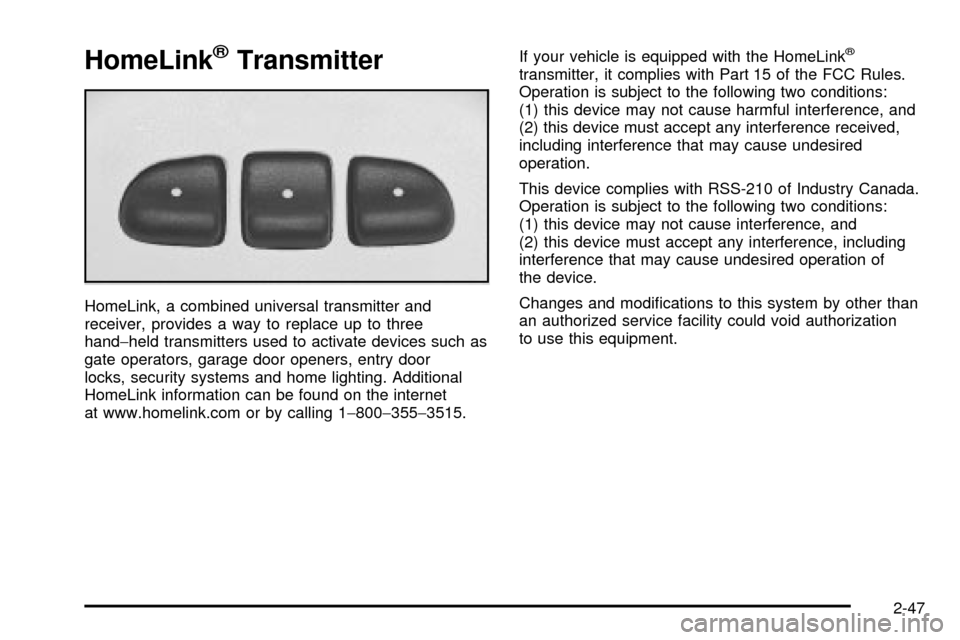
HomeLinkžTransmitter
HomeLink, a combined universal transmitter and
receiver, provides a way to replace up to three
hand-held transmitters used to activate devices such as
gate operators, garage door openers, entry door
locks, security systems and home lighting. Additional
HomeLink information can be found on the internet
at www.homelink.com or by calling 1-800-355-3515.If your vehicle is equipped with the HomeLink
ž
transmitter, it complies with Part 15 of the FCC Rules.
Operation is subject to the following two conditions:
(1) this device may not cause harmful interference, and
(2) this device must accept any interference received,
including interference that may cause undesired
operation.
This device complies with RSS-210 of Industry Canada.
Operation is subject to the following two conditions:
(1) this device may not cause interference, and
(2) this device must accept any interference, including
interference that may cause undesired operation of
the device.
Changes and modi®cations to this system by other than
an authorized service facility could void authorization
to use this equipment.
2-47
Page 171 of 486
Vehicle Personalization
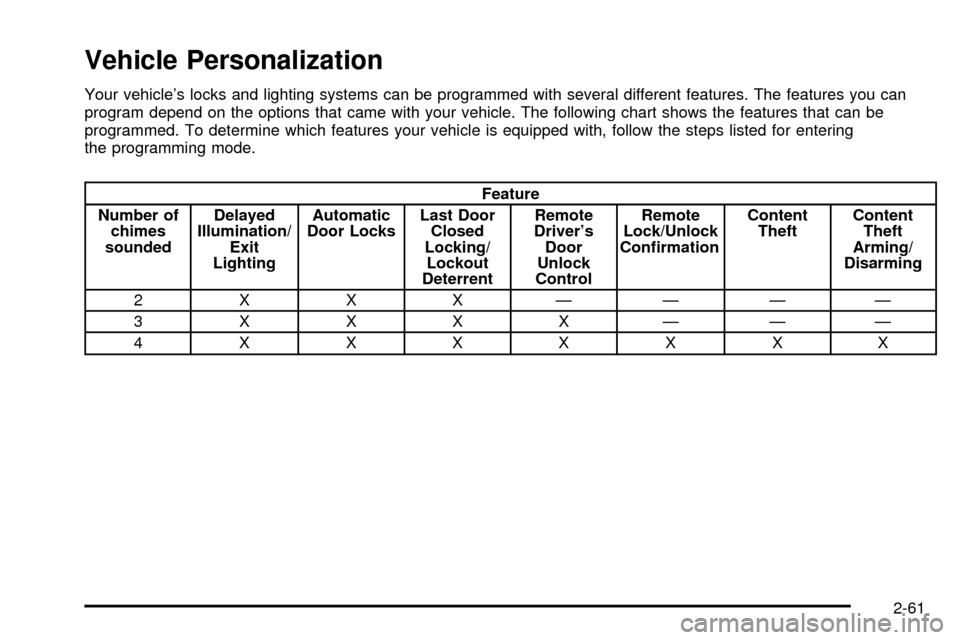
Your vehicle's locks and lighting systems can be programmed with several different features. The features you can
program depend on the options that came with your vehicle. The following chart shows the features that can be
programmed. To determine which features your vehicle is equipped with, follow the steps listed for entering
the programming mode.
Feature
Number of
chimes
soundedDelayed
Illumination/
Exit
LightingAutomatic
Door LocksLast Door
Closed
Locking/
Lockout
DeterrentRemote
Driver's
Door
Unlock
ControlRemote
Lock/Unlock
Con®rmationContent
TheftContent
Theft
Arming/
Disarming
2 X X X ÐÐÐÐ
3XXXXÐÐÐ
4XXXXXXX
2-61
Page 172 of 486

Entering Programming Mode
To program features, your vehicle must be in the
programming mode. Follow these steps:
1. The content theft-deterrent system must be
disarmed. See
Content Theft-Deterrent on
page 2-27.
2. Remove the BCM PRGRM fuse from the instrument
panel fuse block, located to the right of the glove
box. See
Fuses and Circuit Breakers on page 5-96.
3. Close the driver's door.
4. Turn the ignition key to ACCESSORY.
5. Count the number of chimes you hear. You will
hear two to four chimes depending on the features
your vehicle is equipped with. Refer to the chart
shown previously.
You can now program your choices.
To exit the programming mode, follow the steps listed
under
Exiting Programming Mode on page 2-70.
Delayed Illumination and Exit
Lighting
This feature allows you to customize the interior lamps
when entering and exiting the vehicle.
Programmable Modes
Mode 1:Both Features Off (The interior lamps will turn
on or off at the same instant that a door is opened or
closed.)
Mode 2:Delayed Illumination Only (The interior lamps
will stay on for about 25 seconds after all the doors
and liftgate are closed, or until you lock the doors.)
Mode 3:Exit Lighting Only (The interior lamps will come
on whenever you remove the key from the ignition
and stay on for about 25 seconds, or until you lock
the doors.)
Mode 4:Both Features On (This combines
Modes 2 and 3.)
2-62
Page 173 of 486

Your vehicle was originally programmed to Mode 4. The
mode may have been changed since then. To
determine the current mode, or to change the mode, do
the following:
1. Follow the instructions for ªEntering Programming
Modeº earlier in this section.
2. Turn the interior lamps on by turning the instrument
panel brightness control all the way up.
3. Count the number of chimes you hear. The number
of chimes indicates the vehicle's current
programmed mode. (If you do not wish to change
the current mode, you can either exit the
programming mode by following the instructions
later in this section or program the next feature
available on your vehicle.)
4. Turn the interior lamps off to change the current
mode.
5. Turn the interior lamps from on to off until you hear
the number of chimes corresponding to the mode
selection you want.
The mode you selected is now set. You can either exit
the programming mode by following the instructions
later in this section or program the next feature available
on your vehicle.Automatic Door Locks
This feature allows you to customize the automatic
locking and unlocking of the doors when using the
shift lever.
Programmable Modes
Mode 1:Both Features Off (Automatic door locking and
unlocking is disabled. You will always need to lock your
doors manually before driving to increase occupant
safety.)
Mode 2:Automatic Door Locking Only
·The automatic door unlock feature is turned off.
·Shift out of PARK (P) with the ignition on and the
driver's door closed; all doors will lock automatically.
Mode 3:Automatic Unlocking with the Ignition Off
·Turn off the ignition with the transaxle in PARK (P);
all doors will unlock automatically.
·Shift out of PARK (P) with the ignition on and the
driver's door closed; all doors will lock automatically.
Mode 4:Automatic Unlocking with Transaxle in
PARK (P)
·Shift into PARK (P) with the ignition on; all doors
will unlock automatically.
·Shift out of PARK (P) with the ignition on and the
driver's door closed; all doors will lock automatically.
2-63
Page 174 of 486

Your vehicle was originally programmed to Mode 3. The
mode may have been changed since then. To
determine the current mode, or to change the mode, do
the following:
1. Follow the instructions for
Entering Programming
Mode on page 2-62.
2. Press LOCK on the power door lock switch.
3. Count the number of chimes you hear. The number
of chimes indicates the vehicle's current
programmed mode. (If you do not wish to change
the current mode, you can either exit the
programming mode by following the instructions
later in this section or program the next feature
available on your vehicle.)
4. Press LOCK to change the current mode.
5. Press LOCK until you hear the number of chimes
corresponding to the mode selection you want.
The mode you selected is now set. You can either exit
the programming mode by following the instructions
later in this section or program the next feature available
on your vehicle.
Last Door Locking and Lockout
Deterrent
This feature allows you to customize the automatic
locking of the doors when exiting the vehicle.
Programmable Modes
Mode 1:Both Features Off (Doors will always lock
immediately when you press LOCK on the power door
lock switch or the remote keyless entry transmitter.)
Mode 2:Lockout Deterrent Only (If you leave your key
in the ignition with the driver's door open, you won't
be able to lock the doors with the power door locks.)
Mode 3:Last Door Closed Locking Only (If the power
door lock switch or the remote keyless entry transmitter
is used to lock the vehicle while any door or the
liftgate is open, you will hear three chimes. The doors
will not lock. Five seconds after the last door is
closed, all doors and the liftgate will lock.)
Mode 4:Both Features On (This combines
Modes 2 and 3.)
2-64
Page 175 of 486

Your vehicle was originally programmed to Mode 4. The
mode may have been changed since then. To
determine the current mode, or to change the mode, do
the following:
1. Follow the instructions for
Entering Programming
Mode on page 2-62.
2. Press UNLOCK on the power door lock switch.
3. Count the number of chimes you hear. The number
of chimes indicates the vehicle's current
programmed mode. (If you do not wish to change
the current mode, you can either exit the
programming mode by following the instructions
later in this section or program the next feature
available on your vehicle.)
4. Press UNLOCK to change the current mode.
5. Press UNLOCK until you hear the number of chimes
corresponding to the mode selection you want.
The mode you selected is now set. You can either exit
the programming mode by following the instructions
later in this section or program the next feature available
on your vehicle.
Remote Driver Unlock Control
This feature allows you to customize the UNLOCK
button on the remote keyless entry transmitter.
Programmable Modes
Mode 1:Remote All Doors Unlock (When you press
UNLOCK on your remote keyless entry transmitter,
all doors and the liftgate will unlock.)
Mode 2:Remote Driver's Door Unlock Only (When you
press UNLOCK on your remote keyless entry
transmitter once, the driver's door will unlock. When you
press UNLOCK on your remote keyless entry
transmitter again within ®ve seconds, all doors and the
liftgate will unlock.)
Your vehicle was originally programmed to Mode 2. The
mode may have been changed since then. To
determine the current mode, or to change the mode, do
the following:
1. Follow the instructions for
Entering Programming
Mode on page 2-62.
2. Press UNLOCK on the remote keyless entry
transmitter.
2-65
Page 176 of 486

3. Count the number of chimes you hear. The number
of chimes indicates the vehicle's current
programmed mode. (If you do not wish to change
the current mode, you can either exit the
programming mode by following the instructions
later in this section or program the next feature
available on your vehicle.)
4. Press UNLOCK to change the current mode.
5. Press UNLOCK until you hear the number of chimes
corresponding to the mode selection you want.
The mode you selected is now set. You can either exit
the programming mode by following the instructions
later in this section or program the next feature available
on your vehicle.
Remote Lock and Unlock
Con®rmation
If your vehicle has this feature, it allows you to
customize the feedback received when locking or
unlocking your vehicle with the remote keyless entry
transmitter.
Programmable Modes
Mode 1:Both Features Off (Remote lock and unlock
con®rmation are disabled.)
Mode 2:Exterior Lamps Flash Only
·When you use the remote keyless entry transmitter
to lock your vehicle, your parking lamps will ¯ash to
let you know the command has been received.
·When you use the remote keyless entry transmitter
to unlock your vehicle or operate your optional
power sliding door(s), your parking lamps will ¯ash
to let you know the command has been received.
Mode 3:Exterior Lamps Flash and Horn Sounds
·When you use the remote keyless entry transmitter
to lock your vehicle, the horn will sound and your
parking lamps will ¯ash to let you know the
command has been received.
·When you use the remote keyless entry transmitter
to unlock your vehicle or operate your optional
power sliding door(s), your parking lamps will ¯ash
to let you know the command has been received.
2-66
Page 177 of 486

Mode 4:Exterior Lamps Flash and Horn Sounds (on
second LOCK press)
·When you use the remote keyless entry transmitter
to lock your vehicle, your parking lamps will ¯ash to
let you know the command has been received.
The horn will sound and your parking lamps
will ¯ash if you press the LOCK button again within
®ve seconds.
·When you use the remote keyless entry transmitter
to unlock your vehicle or operate your optional
power sliding door(s), your parking lamps will ¯ash
to let you know the command has been received.
Your vehicle was originally programmed to Mode 4. The
mode may have been changed since then. To
determine the current mode, or to change the mode, do
the following:
1. Follow the instructions for
Entering Programming
Mode on page 2-62.
2. Press LOCK on the remote keyless entry
transmitter.
3. Count the number of chimes you hear. The number
of chimes indicates the vehicle's current
programmed mode. (If you do not wish to change
the current mode, you can either exit the
programming mode by following the instructions
later in this section or program the next feature
available on your vehicle.)4. Press LOCK to change the current mode.
5. Press LOCK until you hear the number of chimes
corresponding to the mode selection you want.
The mode you selected is now set. You can either exit
the programming mode by following the instructions
later in this section or program the next feature available
on your vehicle.
Content Theft-Deterrent System
This feature allows you to turn the content theft deterrent
on and off.
Programmable Modes
Mode 1, Mode 2 and Mode 4:Feature On (If anyone
opens a door or the liftgate while your content
theft-deterrent system is armed, an alarm will sound and
your parking lamps will ¯ash for up to two minutes.)
Mode 3:Feature Off (Your content theft-deterrent
system is always disarmed.)
Your vehicle was originally programmed to Mode 4. The
mode may have been changed since then. To
determine the current mode, or to change the mode, do
the following:
1. Follow the instructions for
Entering Programming
Mode on page 2-62.
2. Turn the parking lamps on, then off.
2-67