Page 130 of 552

Shifting Out of NEUTRAL
To shift out of NEUTRAL:
1. Set the parking brake and apply the regular brake
pedal.
2. Shift the transmission to NEUTRAL (N) and turn the
ignition to RUN with the engine off.
3. Press the button for the desired transfer case shift
position (2HI, 4HI, AUTO 4WD OR 4 LO).
4. After the transfer case has shifted out of NEUTRAL
the red light will go out.
5. Release the parking brake.
6. You may start the engine and shift the transmission
to the desired position.
Excessively shifting the transfer case into or out of the
different modes may cause the transfer case to
enter the shift protection mode. This will protect the
transfer case from possible damage and will only allow
the transfer case to respond to one shift per 10
seconds. The transfer case may stay in this mode for
up to three minutes.
All-Wheel Drive with Stabilitrakž
With this feature, engine power is sent to all four wheels
all the time.
This is like four-wheel drive, but there is no separate
lever or switch to engage or disengage the front axle.
It is fully automatic, and adjust itself as needed for road
conditions.
The transfer case buttons
are located to the left
of the instrument panel
cluster.
Use these switches to shift into and out of four-wheel
drive.
2-34
Page 131 of 552

You can choose among three driving settings:
d(Stabilitrakž):This button is used with the
Stabilitrakžsystem and is also used to shift the transfer
case into Neutral. For more information on using
Stabilitrak
žseeStabilitrakžSystem on page 4-12.
f(All-Wheel Drive):This setting delivers power to
all four wheels as needed depending on road and driving
conditions.
g(4LO):This setting delivers extra torque. You may
never need this setting. It sends maximum power to
all four wheels. You might choose 4LO if you are driving
off-road in deep sand, deep mud, deep snow and
climbing or descending steep hills.
{CAUTION:
Shifting the transfer case to NEUTRAL can
cause your vehicle to roll even if the
transmission is in PARK (P). You or someone
else could be seriously injured. Be sure to set
the parking brake before placing the transfer
case in NEUTRAL. See
Parking Brake on
page 2-38
.NEUTRAL:Shift the vehicle's transfer case to
NEUTRAL only when towing your vehicle. See
Recreational Vehicle Towing on page 4-59orTowing
Your Vehicle on page 4-59for more information.
Indicator lights in the switches show which setting you are
in. The indicator lights will come on brie¯y when you turn
on the ignition and one will stay on. If the lights do not
come on, you should take your vehicle to your dealer for
service. An indicator light will ¯ash while shifting the
transfer case. It will remain illuminated when the shift is
complete. If for some reason the transfer case cannot
make a requested shift, it will return to the last chosen
setting.
If the SERVICE 4WD message stays on, you should
take your vehicle to your dealer for service. See
SERVICE 4WD under
Driver Information Center (DIC)
on page 3-53.
2-35
Page 133 of 552

Shifting into NEUTRAL
To shift the transfer case to NEUTRAL do the following:
1. Make sure the vehicle is parked so that it will
not roll
2. Set the parking brake.
3. Start the vehicle or turn the ignition to RUN.
4. Connect the vehicle to the towing vehicle.
5. Put the transmission in NEUTRAL (N).
6. Shift the transfer case to AWD.
7. Simultaneously press and hold the Stabilitrak
žand
4LO buttons for 10 seconds. The red NEUTRAL
light will come on when the transfer case shift
to NEUTRAL is complete.
8. Shift the transmission to REVERSE (R) for one
second, then shift the transmission to DRIVE (D)
for one second.
9. Turn the ignition to LOCK.
10. Place the transmission shift lever in PARK (P).
11. Release the parking brake prior to towing.
Shifting Out of NEUTRAL
To shift out of NEUTRAL:
1. Set the parking brake and apply the regular
brake pedal.
2. Shift the transmission to NEUTRAL (N) and turn the
ignition to RUN with the engine off.
3. Press the button for the desired transfer case shift
position (All-Wheel Drive or 4LO).
4. After the transfer case has shifted out of NEUTRAL
the red light will go out.
5. Release the parking brake.
6. You may start the engine and shift the transmission
to the desired position.
2-37
Page 135 of 552
Shifting Into Park (P)
{CAUTION:
It can be dangerous to get out of your vehicle
if the shift lever is not fully in PARK (P) with
the parking brake ®rmly set. Your vehicle can
roll. If you have left the engine running, the
vehicle can move suddenly. You or others
could be injured. To be sure your vehicle won't
move, even when you're on fairly level ground,
use the steps that follow. With four-wheel
drive, if your transfer case is in NEUTRAL,
your vehicle will be free to roll, even if your
shift lever is in PARK (P). So, be sure the
transfer case is in a drive gear Ð not in
NEUTRAL. If you're pulling a trailer, see
ªTowing a Trailerº in the Index.
1. Hold the brake pedal down with your right foot and
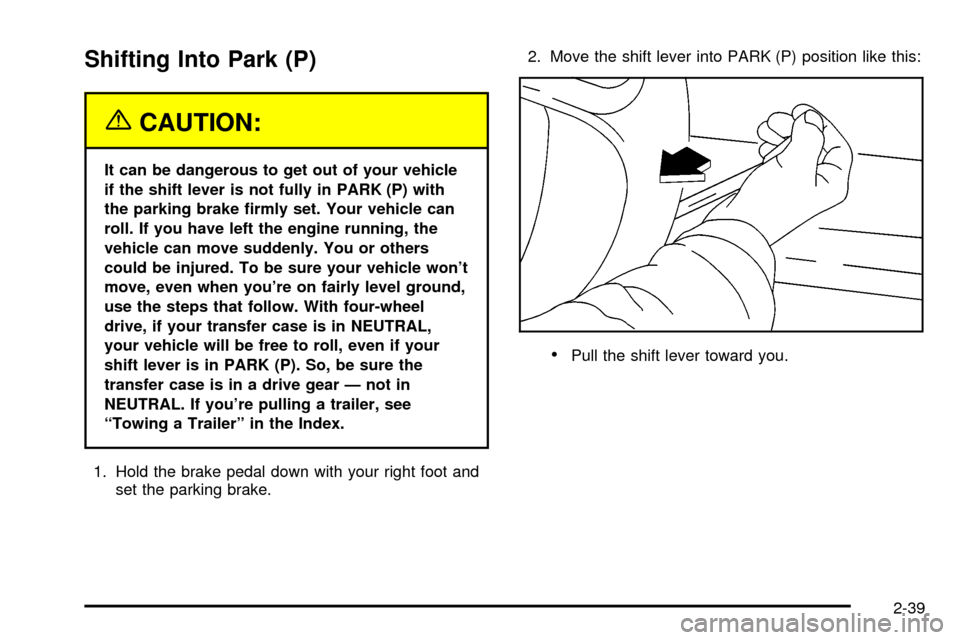
set the parking brake.2. Move the shift lever into PARK (P) position like this:
·Pull the shift lever toward you.
2-39
Page 136 of 552
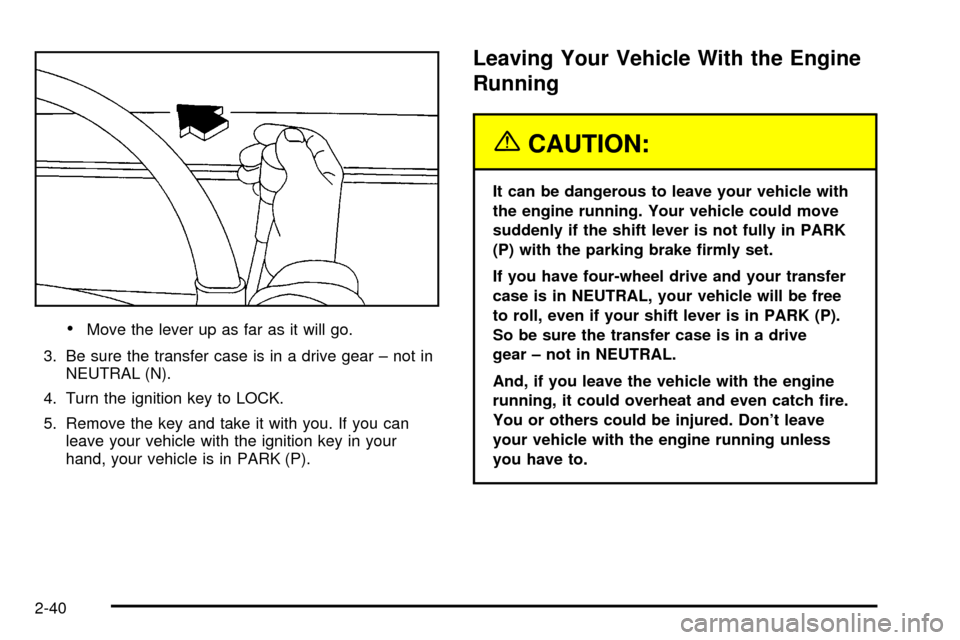
·Move the lever up as far as it will go.
3. Be sure the transfer case is in a drive gear ± not in
NEUTRAL (N).
4. Turn the ignition key to LOCK.
5. Remove the key and take it with you. If you can
leave your vehicle with the ignition key in your
hand, your vehicle is in PARK (P).
Leaving Your Vehicle With the Engine
Running
{CAUTION:
It can be dangerous to leave your vehicle with
the engine running. Your vehicle could move
suddenly if the shift lever is not fully in PARK
(P) with the parking brake ®rmly set.
If you have four-wheel drive and your transfer
case is in NEUTRAL, your vehicle will be free
to roll, even if your shift lever is in PARK (P).
So be sure the transfer case is in a drive
gear ± not in NEUTRAL.
And, if you leave the vehicle with the engine
running, it could overheat and even catch ®re.
You or others could be injured. Don't leave
your vehicle with the engine running unless
you have to.
2-40
Page 141 of 552

{CAUTION:
Four-wheel drive vehicles with the transfer
case in NEUTRAL will allow the vehicle to roll,
even if your shift lever is in PARK (P). So, be
sure the transfer case is in a drive gear Ð not
in NEUTRAL. Always set your parking brake.
Follow the proper steps to be sure your vehicle will not
move. See
Shifting Into Park (P) on page 2-39.
If you are pulling a trailer, see
Towing a Trailer on
page 4-65.
Mirrors
Manual Rearview Mirror
Pull the tab under the mirror toward you to reduce glare
from headlamps behind you after dark. Push the tab
away from you for normal daytime operation.
Automatic Dimming Rearview Mirror
with OnStar
ž, Compass and
Temperature Display
Your vehicle may have this feature. When on, an
electrochromic mirror automatically dims to the proper
level to minimize glare from lights behind you after dark.
The mirror also includes a duel display in the upper
right corner of the mirror face. The compass reading and
the outside temperature will both appear in the display
at the same time.
P(On/Off):This is the on/off button.
2-45
Page 152 of 552

Luxury and Leisure Plan
·
All Directions and Connections Plan services
·Personal Concierge
OnStaržPersonal Calling
With OnStaržPersonal Calling, you have a safer way to
stay connected while driving. It's a hands-free wireless
phone that's integrated into your vehicle. You can place
calls nationwide using voice-activated dialing with no
contracts and no additional roaming charges. To ®nd out
more about OnStar
žPersonal Calling, refer to the
OnStaržowner's guide in your vehicle's glove box, or
call OnStaržat 1-888-4-ONSTAR (1-888-466-7827).
OnStaržVirtual Advisor
With OnStaržVirtual Advisor you can listen to your
favorite news, entertainment and information topics,
such as traffic and weather reports, stock quotes
and sports scores. You listen to your e-mail through
your vehicle's speakers, and reply with your hands on
the wheel and your eyes on the road.
OnStaržSteering Wheel Controls
g
: If your vehicle is
equipped with the steering
wheel control buttons
you can use them
to interact with the OnStar
ž
system.
See the OnStar
žmanual provided with your vehicle for
more information.
2-56
Page 158 of 552

Center Console Storage Area
Your vehicle may be equipped with a console
compartment between the bucket seats.
To open it, press the button and swing the console
lid open.
The console has a place to store coins.
Your console has a cupholder that swings down for the
rear seat passengers to use.
Luggage Carrier
If you have the luggage carrier, you can load things on
top of your vehicle.
The luggage carrier has slats and siderails attached to
the roof and crossrails which can be moved back
and forth to help secure cargo. Tie the load to the
siderails or siderail supports.
Notice:Loading cargo that weighs more than 200
lbs. (91 kg) on the luggage carrier may damage your
vehicle. When you carry large things, never let
them hang over the rear or the sides of your vehicle.
Load your cargo so that it rests on the slats and
does not scratch or damage the vehicle. Put
the cargo against the side rails and fasten it
securely to the luggage carrier. Put the main weight
as far forward as you can.
Don't exceed the maximum vehicle capacity when
loading your vehicle. For more information on vehicle
capacity and loading, see²Loading Your Vehicle².
To prevent damage or loss of cargo as you're leaving,
check now and then to make sure the luggage and
cargo are still securely fastened.
Be sure the cargo is properly loaded.
·If small heavy objects are placed on the roof, place
the load in the area over the rear wheels (behind
the rear side door on Suburban/Yukon XL Models).
If you need to, cut a piece of 3/8 inch plywood to
®t inside the crossrails and siderails to spread
the load. If plywood is used, tie it to the siderail
supports.
2-62