2003 CHEVROLET SILVERADO mirror
[x] Cancel search: mirrorPage 142 of 556

Temperature and Compass Display
Press the on/off button, located to the far left, brie¯y to
turn the comp/temp display on or off.
If the display reads CAL, you will need to calibrate the
compass. For more information on calibration, see
below.
To adjust between Fahrenheit and Celsius do the
following:
1. Press and hold the on/off button for approximately
four seconds until either a ¯ashing ÉF, or ÉC
appears.
2. Press the button again to change the display to the
desired unit of measurement. After approximately
four seconds of inactivity, the new unit will be locked
in and the compass/temperature display will
return.
If an abnormal temperature reading is displayed for an
extended period of time, please consult your dealer.
Under certain circumstances, a delay in updating
the temperature is normal.
Electrochromic Mirror Operation
The electrochromic (self dimming) mirror function is
turned on automatically each time the ignition is started.
To operate the electrochromic mirror do the following:
1. Make sure the green indicator light, located to
the left of the on/off button, is lit. If it's not, press
and hold the on/off button for approximately
six seconds until the green light comes on,
indicating that the mirror is in electrochromic (self
dimming) mode.
2. Turn off the electrochromic mirror function by
pressing and holding the on/off button for
approximately six seconds until the green indicator
light turns off.
2-54
Page 143 of 556

Compass Variance
The mirror is set in zone eight upon leaving the factory.
It will be necessary to adjust the compass to
compensate for compass variance if you live outside of
zone eight. Under certain circumstances, as during a
long distance cross-country trip, it will be necessary to
adjust for compass variance. Compass variance is
the difference between earth's magnetic north and true
geographic north. If not adjusted to account for
compass variance, your compass could give false
readings.
To adjust for compass variance do the following:
1. Find your current location and variance zone
number on the following zone map.
2. Press and hold the on/off button until a Z and a
zone number appears in the display. The compass
is now in zone mode.
3. Keep pressing the on/off button until the desired
zone number appears in the display. Release the
button. After approximately four seconds of
inactivity, the new zone number will be locked in
and the comp/temp display will return.
4. Calibrate the compass as described below.
2-55
Page 144 of 556

Compass Calibration
The compass may need calibration if one of the
following occurs:
·After approximately ®ve seconds, the display does
not show a compass heading (N for North, for
example), there may be a strong magnetic ®eld
interfering with the compass. Such interference may
be caused by a magnetic antenna mount, magnetic
note pad holder or a similar magnetic item.
·The compass does not display the correct heading
and the compass zone variance is set correctly.
In order to calibrate, CAL must be displayed in the
mirror compass windows. If CAL is not displayed, push
the on/off button for approximately 12 seconds or
until CAL is displayed.
The compass can be calibrated by driving the vehicle in
circles at 5 mph (8 km/h) or less until the display
reads a direction.
Passenger Air Bag Indicator
Your vehicle may be equipped with a passenger air bag
indicator, on the mirror glass, just above the buttons.
If your vehicle has this feature, the mirror will display the
word ON, or an air bag symbol in Canada, when the
passenger air bag is enabled. For more information, see
Passenger Sensing System on page 1-76.
Cleaning the Mirror
When cleaning the mirror, use a paper towel or similar
material dampened with glass cleaner. Do not spray
glass cleaner directly on the mirror as that may cause
the liquid cleaner to enter the mirror housing.
Automatic Dimming Rearview Mirror
with Compass and Temperature
Display
If your vehicle is equipped with an electrochromic mirror,
it will, when on, automatically dim to the proper level to
minimize glare from lights behind you after dark.
The mirror also includes a display in the upper right
corner of the mirror face. The compass reading and the
outside temperature will both appear in the display at
the same time. The dual display can be turned on or off
by brie¯y pressing either the TEMP or the COMP
button.
Temperature Display
The temperature can be displayed by pressing the
TEMP button. Pressing the TEMP button once brie¯y,
will toggle the temperature reading on and off. To
alternate the temperature reading between Fahrenheit
and Celsius, press and hold the TEMP button for
approximately four seconds until the display blinks ÉF
2-56
Page 145 of 556

and ÉC. Press and release the TEMP button to toggle
between the Fahrenheit and Celsius readings. After
approximately four seconds of inactivity, the display will
stop blinking and display the last selection made.
Press and release the TEMP button to toggle the
temperature display between Fahrenheit or Celsius.
If an abnormal reading is displayed, for an extended
period of time, please consult your dealer. Under certain
circumstances, a delay in updating the temperature is
normal.
Electrochromic Mirror Operation
The time period you need to press and hold the TEMP
button to turn the electrochromic feature on or off is
approximately eight seconds. The indicator light to the
left of the TEMP button will still turn on or off to
show you when the electrochromic feature is activated.
Once the mirror is turned off, it will remain off until it
is turned back on, or until the vehicle is restarted.
Compass Operation
Press the COMP button once brie¯y to turn the compass
on or off.
When the ignition and the compass feature are on, the
compass will show two character boxes for
approximately two seconds. After two seconds, the
mirror will display the compass heading.When cleaning the mirror, use a paper towel or similar
material dampened with glass cleaner. Do not spray
glass cleaner directly on the mirror as that may cause
the liquid cleaner to enter the mirror housing.
Compass Calibration
The compass may need calibration if one of the
following occurs:
·If CAL is displayed while driving in the vehicle.
·After approximately ®ve seconds, the display does
not show a compass heading (N for North, for
example), there may be a strong magnetic ®eld
interfering with the compass. Such interference may
be caused by a magnetic antenna mount, magnetic
note pad holder or a similar magnetic item.
·The compass does not display the correct heading
and the compass zone variance is set correctly.
In order to calibrate, CAL must be displayed in the
mirror compass windows. If CAL is not displayed, push
in the COMP button for approximately eight seconds
or until CAL is displayed.
The compass can be calibrated by driving the vehicle in
circles at ®ve mph (8 km/h) or less until the display
reads a direction.
2-57
Page 146 of 556

Compass Variance
The mirror is set in zone eight upon leaving the factory.
It will be necessary to adjust the compass to
compensate for compass variance if you live outside
zone eight. Under certain circumstances, as during
a long distance cross-country trip, it will be necessary to
adjust for compass variance. Compass variance is
the difference between earth's magnetic north and true
geographic north. If not adjusted to account for
compass variance, your compass could give false
readings.
To adjust for compass variance:
1. Find your current location and variance zone
number on the following zone map.
2. Press and hold the COMP button for ®ve seconds
until a zone number appears in the display.
3. Press the COMP button on the bottom of the mirror
until the new zone number appears in the display.
After you stop pressing the button, the display
will show a compass direction within a few seconds.
Passenger Air Bag Indicator
Your mirror may be equipped with a passenger air bag
indicator on the mirror glass, just above the buttons.
If you have this feature the mirror will display the word
ON, or an airbag symbol in Canada, when the
passenger air bag is enabled. For more information see
Passenger Sensing System on page 1-76
2-58
Page 147 of 556
Outside Manual Mirrors
Adjust your outside mirrors so you can just see the side
of your vehicle and have a clear view of objects
behind you. The mirrors can be folded in to enter narrow
areas.
The use of hood-mounted air de¯ectors and add-on
convex mirror attachments may adversely affect mirror
performance.
Outside Camper-Type Mirrors
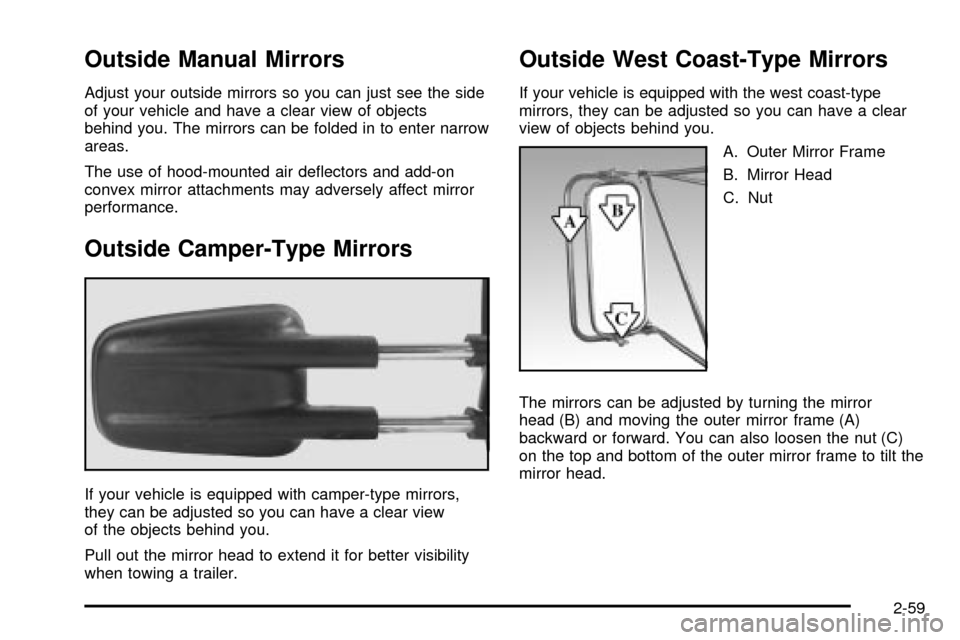
If your vehicle is equipped with camper-type mirrors,
they can be adjusted so you can have a clear view
of the objects behind you.
Pull out the mirror head to extend it for better visibility
when towing a trailer.
Outside West Coast-Type Mirrors
If your vehicle is equipped with the west coast-type
mirrors, they can be adjusted so you can have a clear
view of objects behind you.
A. Outer Mirror Frame
B. Mirror Head
C. Nut
The mirrors can be adjusted by turning the mirror
head (B) and moving the outer mirror frame (A)
backward or forward. You can also loosen the nut (C)
on the top and bottom of the outer mirror frame to tilt the
mirror head.
2-59
Page 148 of 556
Outside Power Mirrors
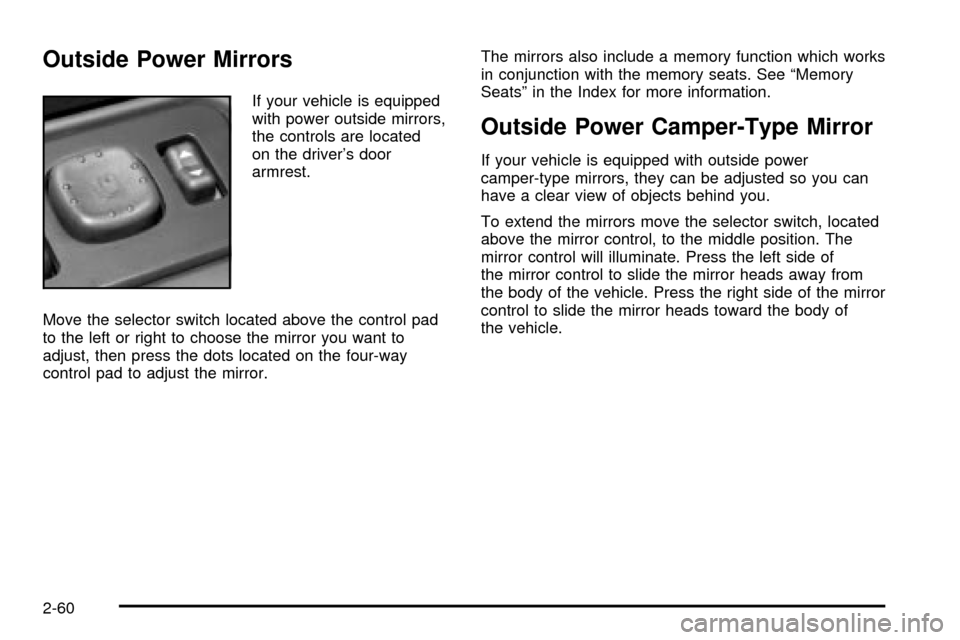
If your vehicle is equipped
with power outside mirrors,
the controls are located
on the driver's door
armrest.
Move the selector switch located above the control pad
to the left or right to choose the mirror you want to
adjust, then press the dots located on the four-way
control pad to adjust the mirror.The mirrors also include a memory function which works
in conjunction with the memory seats. See ªMemory
Seatsº in the Index for more information.
Outside Power Camper-Type Mirror
If your vehicle is equipped with outside power
camper-type mirrors, they can be adjusted so you can
have a clear view of objects behind you.
To extend the mirrors move the selector switch, located
above the mirror control, to the middle position. The
mirror control will illuminate. Press the left side of
the mirror control to slide the mirror heads away from
the body of the vehicle. Press the right side of the mirror
control to slide the mirror heads toward the body of
the vehicle.
2-60
Page 149 of 556

Outside Power Foldaway Mirrors
If your vehicle is equipped with outside power foldaway
mirrors the mirrors can be folded in toward the body
of the vehicle.
To fold in the mirrors, move the upper selector switch,
located above the mirror control, to the middle position.
Press the right side of the mirror control to fold the
mirrors toward the body of the vehicle. The mirror glass
on one or both sides of the vehicle may automatically
adjust before the mirror folds inward. When the
mirror glass or mirror starts moving, you can release the
mirror control.
To return the mirrors and the mirror glass to their
normal position press the left side of the mirror control.
If the mirrors are manually folded, unfold and fold
them atleast twice using the mirror controls. Do not
unfold them manually. They may not stay in place
otherwise.
Outside Automatic Dimming Mirror
If your vehicle is equipped with this feature, the
driver's side outside mirror will adjust for the glare of
headlamps behind you. This feature is controlled by the
on and off settings found on the electrochromic
mirror. See
Automatic Dimming Rearview Mirror with
Compass and Temperature Display on page 2-56.
Outside Curb View Assist Mirrors
If your vehicle has the optional memory package
you may have this feature.
The vehicle's mirrors are capable of performing the curb
view assist mirror function. This feature will cause the
passenger's and/or driver's mirror to tilt to a preselected
position when the vehicle is in REVERSE (R). This
feature may be useful in allowing you to view the curb
when you are parallel parking. When the vehicle is
shifted out of REVERSE (R) and a short delay
has occurred, the passenger's and/or driver's mirror will
return to its original position.
To change the preselected tilt position, adjust the
mirrors to the desired position while the vehicle is in
REVERSE (R). When the vehicle is shifted out of
REVERSE (R), this new position is saved in memory as
the tilt position.
You may be able to enabled/disable this feature through
the Driver Information Center. See
Driver Information
Center (DIC) on page 3-54.
2-61