2003 CHEVROLET SILVERADO Transmission
[x] Cancel search: TransmissionPage 114 of 556
REVERSE (R):Use this gear to back up. If your vehicle
is equipped with the Allison Transmissionž, the R
may blink on the PRNDL if the shift inhibitor is active.
Notice:Shifting to REVERSE (R) while your vehicle
is moving forward could damage your transmission.
Shift to REVERSE (R) only after your vehicle is
stopped.
To rock your vehicle back and forth to get out of snow,
ice or sand without damaging your transmission,
see If You Are Stuck: In Sand, Mud, Ice or Snow on
page 4-52.
NEUTRAL (N):In this position, your engine doesn't
connect with the wheels. To restart when you're already
moving, use NEUTRAL (N) only. Also, use
NEUTRAL (N) when your vehicle is being towed.
{CAUTION:
Shifting into a drive gear while your engine is
running at high speed is dangerous. Unless
your foot is ®rmly on the brake pedal, your
vehicle could move very rapidly. You could
lose control and hit people or objects. Do not
shift into a drive gear while your engine is
running at high speed.
Notice:Damage to your transmission caused by
shifting out of PARK (P) or NEUTRAL (N) with
the engine racing isn't covered by your warranty.
DRIVE (D):This position is for normal driving. If
you need more power for passing, and you're:
·Going less than about 35 mph (55 km/h), push your
accelerator pedal about halfway down.
·Going about 35 mph (55 km/h) or more, push the
accelerator all the way down.
You'll shift down to the next gear and have more power.
2-26
Page 115 of 556

Drive (D) can be used when towing a trailer, carrying a
heavy load, driving on steep hills or for off-road
driving. You may want to shift the transmission to
THIRD (3) or, if necessary, a lower gear selection if the
transmission shifts too often.
Notice:If your vehicle is equipped with the
AllisionžTransmission, do not idle in DRIVE (D) for
more than ®ve minutes. Extended idling in
DRIVE (D) may cause transmission overheating and
damage. Always select PARK (P) if idle time is
longer than ®ve minutes.
If your vehicle is equipped with the Allison
ž
Transmission, it will initially attain ®rst range when
DRIVE (D) is selected. As vehicle speed increases, the
transmission will upshift automatically through each
available range up to FIFTH (5). As the vehicle slows,
the transmission will downshift automatically.
THIRD (3):This position is also used for normal driving,
however it offers more power and lower fuel economy
than DRIVE (D).
SECOND (2):This position gives you more power but
lower fuel economy. You can use SECOND (2) on
hills. It can help control your speed as you go down
steep mountain roads, but then you would also want to
use your brakes off and on.If you manually select SECOND (2) in a light duty
automatic transmission, the transmission will drive in
second gear. You may use this feature for reducing the
speed of the rear wheels when you are trying to start
your vehicle from a stop on slippery road surfaces.
FIRST (1):This position gives you even more power
(but lower fuel economy) than SECOND (2). You
can use it on very steep hills, or in deep snow or mud.
If the selector lever is put in FIRST (1) while the
vehicle is moving forward, the transmission won't shift
into ®rst gear until the vehicle is going slowly enough.Notice:If your wheels won't turn, don't try to drive.
This might happen if you were stuck in very deep
sand or mud or were up against a solid object. You
could damage your transmission. Also, if you
stop when going uphill, don't hold your vehicle there
with only the accelerator pedal. This could overheat
and damage the transmission. Use your brakes
or shift into PARK (P) to hold your vehicle in
position on a hill.
On cold days, approximately 32ÉF (0ÉC) or colder, your
transmission is designed to shift differently until the
engine reaches normal operating temperature. This is
intended to improve heater performance.
2-27
Page 116 of 556
Tow/Haul Mode
(Automatic Transmission)
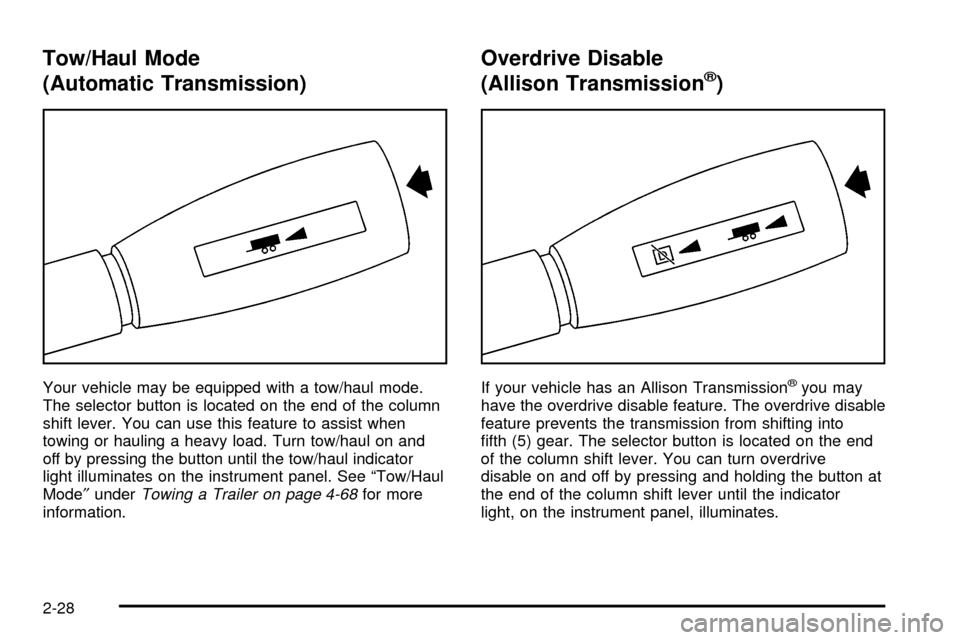
Your vehicle may be equipped with a tow/haul mode.
The selector button is located on the end of the column
shift lever. You can use this feature to assist when
towing or hauling a heavy load. Turn tow/haul on and
off by pressing the button until the tow/haul indicator
light illuminates on the instrument panel. See ªTow/Haul
Mode²under
Towing a Trailer on page 4-68for more
information.
Overdrive Disable
(Allison Transmissionž)
If your vehicle has an Allison Transmissionžyou may
have the overdrive disable feature. The overdrive disable
feature prevents the transmission from shifting into
®fth (5) gear. The selector button is located on the end
of the column shift lever. You can turn overdrive
disable on and off by pressing and holding the button at
the end of the column shift lever until the indicator
light, on the instrument panel, illuminates.
2-28
Page 117 of 556
If your vehicle has both tow/haul and overdrive disable
tap the button once to enable or disable tow/haul,
and press and hold the button to enable or disable
overdrive disable.
Manual Transmission Operation
Five-Speed
(VORTECŸ 6000 V8 Engine)
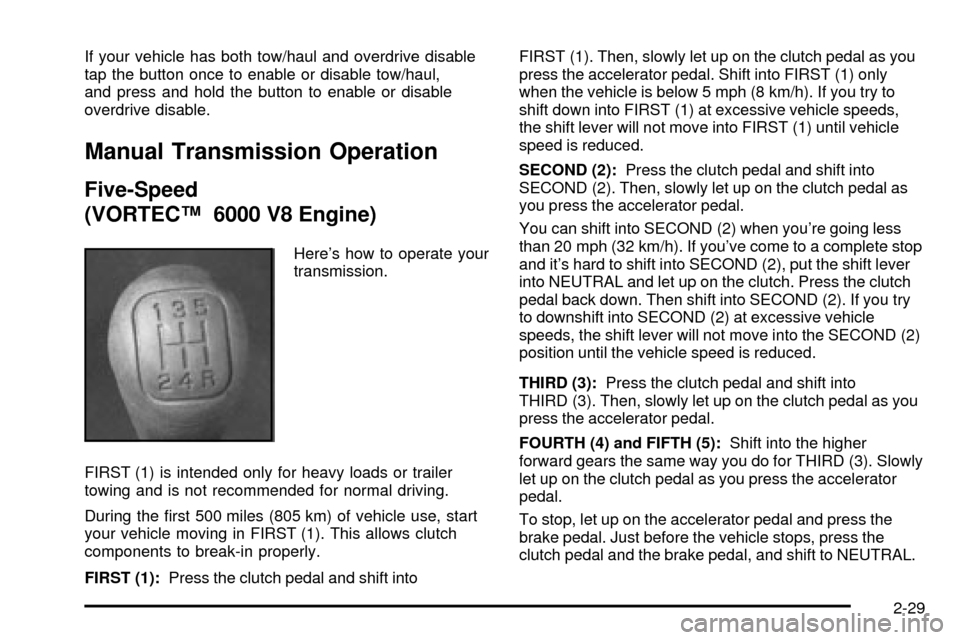
Here's how to operate your
transmission.
FIRST (1) is intended only for heavy loads or trailer
towing and is not recommended for normal driving.
During the ®rst 500 miles (805 km) of vehicle use, start
your vehicle moving in FIRST (1). This allows clutch
components to break-in properly.
FIRST (1):Press the clutch pedal and shift intoFIRST (1). Then, slowly let up on the clutch pedal as you
press the accelerator pedal. Shift into FIRST (1) only
when the vehicle is below 5 mph (8 km/h). If you try to
shift down into FIRST (1) at excessive vehicle speeds,
the shift lever will not move into FIRST (1) until vehicle
speed is reduced.
SECOND (2):Press the clutch pedal and shift into
SECOND (2). Then, slowly let up on the clutch pedal as
you press the accelerator pedal.
You can shift into SECOND (2) when you're going less
than 20 mph (32 km/h). If you've come to a complete stop
and it's hard to shift into SECOND (2), put the shift lever
into NEUTRAL and let up on the clutch. Press the clutch
pedal back down. Then shift into SECOND (2). If you try
to downshift into SECOND (2) at excessive vehicle
speeds, the shift lever will not move into the SECOND (2)
position until the vehicle speed is reduced.
THIRD (3):Press the clutch pedal and shift into
THIRD (3). Then, slowly let up on the clutch pedal as you
press the accelerator pedal.
FOURTH (4) and FIFTH (5):Shift into the higher
forward gears the same way you do for THIRD (3). Slowly
let up on the clutch pedal as you press the accelerator
pedal.
To stop, let up on the accelerator pedal and press the
brake pedal. Just before the vehicle stops, press the
clutch pedal and the brake pedal, and shift to NEUTRAL.
2-29
Page 118 of 556

NEUTRAL:Use this position when you start or idle
your engine.
REVERSE (R):To back up, ®rst press down the clutch
pedal. Wait for the vehicle to stop moving and then,
shift into REVERSE (R). Let up on the clutch pedal
slowly while pressing the accelerator pedal.
Notice:Shift into REVERSE (R) only after your
vehicle is stopped. Shifting into REVERSE (R) while
your vehicle is moving could damage your
transmission. The repairs would not be covered by
your warranty.
Also, use REVERSE (R), along with the parking brake,
when turning off your engine and parking your
vehicle.
Five-Speed (VORTECŸ 4300 V6 and
4800 V8 Engines)
Here's how to operate your transmission:
FIRST (1):Press the clutch pedal and shift into
FIRST (1). Then, slowly let up on the clutch pedal as you
press the accelerator pedal.
You can shift into FIRST (1) when you're going less than
20 mph (32 km/h). If you've come to a complete stop and
it's hard to shift into FIRST (1), put the shift lever into
NEUTRAL and let up on the clutch. Press the clutch
pedal back down. Then shift into FIRST (1).SECOND (2):Press the clutch pedal as you let up on
the accelerator pedal and shift into SECOND (2).
Then, slowly let up on the clutch pedal as you press the
accelerator pedal.
THIRD (3), FOURTH (4) and FIFTH (5):Shift into
THIRD (3), FOURTH (4) and FIFTH (5) the same way
you do for SECOND (2). Slowly let up on the clutch
pedal as you press the accelerator pedal.
To stop, let up on the accelerator pedal and press the
brake pedal. Just before the vehicle stops, press
the clutch pedal and the brake pedal, and shift to
NEUTRAL.
NEUTRAL:Use this position when you start or idle
your engine.
REVERSE (R):To back up, ®rst press down the clutch
pedal. Wait for the vehicle to stop moving and then,
shift into REVERSE (R). Let up on the clutch pedal
slowly while pressing the accelerator pedal.
Notice:Shift into REVERSE (R) only after your
vehicle is stopped. Shifting into REVERSE (R) while
your vehicle is moving could damage your
transmission. The repairs would not be covered by
your warranty.
Also, use REVERSE (R), along with the parking brake,
when turning off your engine and parking your
vehicle.
2-30
Page 119 of 556
Six-Speed (VORTECŸ 8100 V8 and
DURAMAXŸ 6600 V8 Engines)
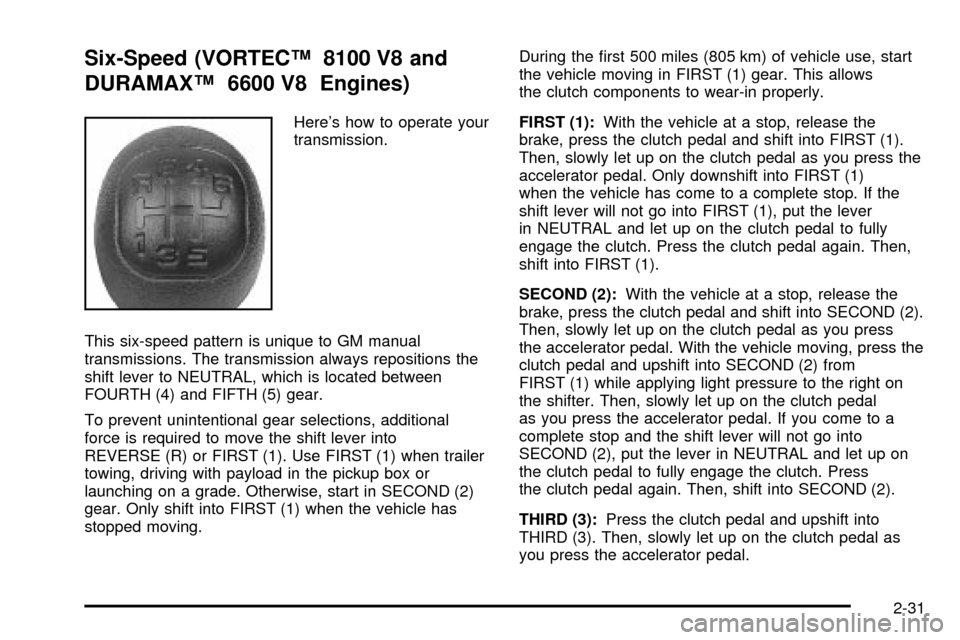
Here's how to operate your
transmission.
This six-speed pattern is unique to GM manual
transmissions. The transmission always repositions the
shift lever to NEUTRAL, which is located between
FOURTH (4) and FIFTH (5) gear.
To prevent unintentional gear selections, additional
force is required to move the shift lever into
REVERSE (R) or FIRST (1). Use FIRST (1) when trailer
towing, driving with payload in the pickup box or
launching on a grade. Otherwise, start in SECOND (2)
gear. Only shift into FIRST (1) when the vehicle has
stopped moving.During the ®rst 500 miles (805 km) of vehicle use, start
the vehicle moving in FIRST (1) gear. This allows
the clutch components to wear-in properly.
FIRST (1):With the vehicle at a stop, release the
brake, press the clutch pedal and shift into FIRST (1).
Then, slowly let up on the clutch pedal as you press the
accelerator pedal. Only downshift into FIRST (1)
when the vehicle has come to a complete stop. If the
shift lever will not go into FIRST (1), put the lever
in NEUTRAL and let up on the clutch pedal to fully
engage the clutch. Press the clutch pedal again. Then,
shift into FIRST (1).
SECOND (2):With the vehicle at a stop, release the
brake, press the clutch pedal and shift into SECOND (2).
Then, slowly let up on the clutch pedal as you press
the accelerator pedal. With the vehicle moving, press the
clutch pedal and upshift into SECOND (2) from
FIRST (1) while applying light pressure to the right on
the shifter. Then, slowly let up on the clutch pedal
as you press the accelerator pedal. If you come to a
complete stop and the shift lever will not go into
SECOND (2), put the lever in NEUTRAL and let up on
the clutch pedal to fully engage the clutch. Press
the clutch pedal again. Then, shift into SECOND (2).
THIRD (3):Press the clutch pedal and upshift into
THIRD (3). Then, slowly let up on the clutch pedal as
you press the accelerator pedal.
2-31
Page 121 of 556

Shift Light
If you have a manual
transmission, you may
have a shift light. This light
will show you when to
shift to the next higher gear
for best fuel economy.
When this light comes on,
you can shift to the next higher gear if weather, road
and traffic conditions allow. For the best fuel
economy, accelerate slowly and shift when the light
comes on.
While you accelerate, it is normal for the light to go
on and off if you quickly change the position of
the accelerator.
If your vehicle has four-wheel drive and is equipped
with a manual transmission, disregard the SHIFT
light when the transfer case is in 4-Wheel Low.
Ignore the SHIFT light when you downshift.
Four-Wheel Drive
If your vehicle has four-wheel drive, you can send your
engine's driving power to all four wheels for extra
traction. To get the most satisfaction out of four-wheel
drive, you must be familiar with its operation. Read
the part that follows before using four-wheel drive. See
the appropriate text for the transfer case in your
vehicle.
Notice:Driving in the 4-WHEEL HIGH (4HI) or
4-WHEEL LOW (4LO) positions for a long time on
dry or wet pavement could shorten the life of
your vehicle's drivetrain.
Front Axle Locking Feature
The front axle locks and unlocks automatically when
you shift the transfer case. Some delay for the axle to
lock or unlock is normal.
2-33
Page 123 of 556
An indicator on the bezel near the lever shows you the
transfer case settings:
2-Wheel High (2HI):This setting is used for driving in
most street and highway situations. Your front axle
is not engaged in two-wheel drive. This setting
also provides the best fuel economy.
4-Wheel High (4HI):Use 4HI when you need extra
traction, such as on snowy or icy roads or in most
off-road situations. This setting also engages your front
axle to help drive your vehicle. This is the best setting
to use when plowing snow.
{CAUTION:
Shifting the transfer case to NEUTRAL can
cause your vehicle to roll even if the
transmission is in PARK (P), or if you have a
manual transmission, even if you are in gear.
You or someone else could be seriously
injured. Be sure to set the parking brake
before placing the transfer case in NEUTRAL.
See ªParking Brakeº in the Index.NEUTRAL (N):Shift to this setting only when your
vehicle needs to be towed. See
Recreational Vehicle
Towing on page 4-55orTowing Your Vehicle on
page 4-55.
4-Wheel Low (4L0):This setting also engages your
front axle and delivers extra torque. You may never
need 4LO. It sends maximum power to all four wheels.
You might choose 4LO if you are driving off-road in
deep sand, deep mud, deep snow and climbing
or descending steep hills.
You can shift from 2-Wheel High (2HI) to 4-Wheel High
(4HI) or from 4-Wheel High (4HI) to 2-Wheel High
(2HI) while the vehicle is moving. Your front axle will
engage faster if you take your foot off of the accelerator
for a couple of seconds after you shift. In extremely
cold weather, it may be necessary to stop or slow the
vehicle to shift into 4-Wheel High (4HI).
2-35