Page 59 of 432
5. Pull the rest of the lap belt all the way out of the
retractor to set the lock.6. To tighten the belt, feed the shoulder belt back into
the retractor while you push down on the child
restraint. If you are using a forward-facing child
restraint, you may ®nd it helpful to use your knee to
push down on the child restraint as you tighten
the belt.
7. Push and pull the child restraint in different
directions to be sure it is secure.
1-53
Page 62 of 432
{CAUTION:
Air bags in¯ate with great force, faster than the
blink of an eye. If you're too close to an
in¯ating air bag, as you would be if you were
leaning forward, it could seriously injure you.
Safety belts help keep you in position before
and during a crash. Always wear your safety
belt, even with air bags. The driver should sit
as far back as possible while still maintaining
control of the vehicle.
{CAUTION:
Anyone who is up against, or very close to,
any air bag when it in¯ates can be seriously
injured or killed. Air bags plus lap-shoulder
belts offer the best protection for adults, but
not for young children and infants. Neither the
vehicle's safety belt system nor its air bag
system is designed for them. Young children
and infants need the protection that a child
restraint system can provide. Always secure
children properly in your vehicle. To read how,
see
Older Children on page 1-30 and Infants
and Young Children on page 1-32.
1-56
Page 69 of 432
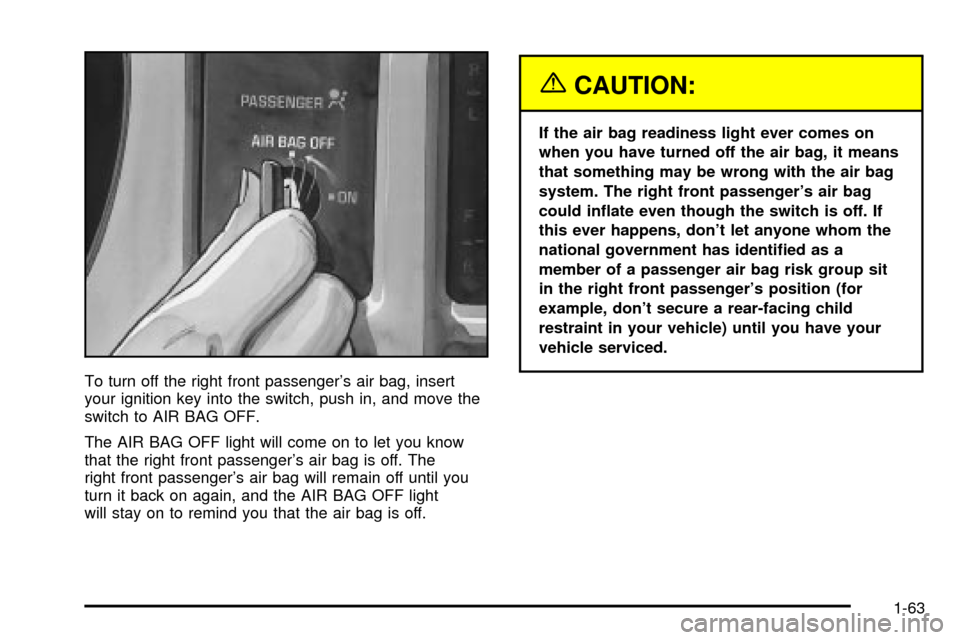
To turn off the right front passenger's air bag, insert
your ignition key into the switch, push in, and move the
switch to AIR BAG OFF.
The AIR BAG OFF light will come on to let you know
that the right front passenger's air bag is off. The
right front passenger's air bag will remain off until you
turn it back on again, and the AIR BAG OFF light
will stay on to remind you that the air bag is off.
{CAUTION:
If the air bag readiness light ever comes on
when you have turned off the air bag, it means
that something may be wrong with the air bag
system. The right front passenger's air bag
could in¯ate even though the switch is off. If
this ever happens, don't let anyone whom the
national government has identi®ed as a
member of a passenger air bag risk group sit
in the right front passenger's position (for
example, don't secure a rear-facing child
restraint in your vehicle) until you have your
vehicle serviced.
1-63
Page 73 of 432

Keys...............................................................2-3
Remote Keyless Entry System.........................2-5
Remote Keyless Entry System Operation...........2-6
Doors and Locks.............................................2-8
Door Locks....................................................2-8
Power Door Locks..........................................2-9
Programmable Automatic Door Locks................2-9
Rear Door Security Locks..............................2-11
Lockout Protection........................................2-12
Leaving Your Vehicle....................................2-12
Third Door...................................................2-12
Tailgate.......................................................2-13
Windows........................................................2-14
Manual Windows..........................................2-14
Power Windows............................................2-15
Swing-Out Windows......................................2-16
Sliding Rear Window.....................................2-16
Sun Visors...................................................2-16
Theft-Deterrent Systems..................................2-17
Content Theft-Deterrent.................................2-17
Passlock
ž....................................................2-19Starting and Operating Your Vehicle................2-19
New Vehicle Break-In....................................2-19
Ignition Positions..........................................2-20
Starting Your Engine.....................................2-22
Engine Coolant Heater..................................2-24
Automatic Transmission Operation...................2-25
Manual Transmission Operation......................2-28
Four-Wheel Drive..........................................2-29
Parking Brake..............................................2-32
Shifting Into Park (P).....................................2-33
Shifting Out of Park (P).................................2-35
Parking Your Vehicle.....................................2-35
Parking Over Things That Burn.......................2-36
Engine Exhaust............................................2-37
Running Your Engine While You Are Parked. . . .2-38
Mirrors...........................................................2-39
Manual Rearview Mirror.................................2-39
Automatic Dimming Rearview Mirror................2-39
Outside Manual Mirror...................................2-40
Outside Power Mirrors...................................2-40
Outside Convex Mirror...................................2-40
Outside Heated Mirrors..................................2-41
Section 2 Features and Controls
2-1
Page 83 of 432
Rear Door Security Locks
If you have the Crew Cabžmodel, your vehicle may be
equipped with rear door security locks. With this
feature, you can lock the rear doors so they can't be
opened from the inside by passengers.
The security lock lever is
located on the inside edge
of each rear door.To use the security locks, do the following:
1. Open one of the rear doors.
2. Slide the lever up to the lock symbol to engage the
lock.
3. Close the door.
4. Repeat these steps on the opposite rear door.
If you want to open the rear door when the security lock
is on, unlock the door and open the door from the
outside. To return the rear doors to normal use,
disengage the locks by sliding the lever to the unlock
symbol.
2-11
Page 85 of 432
Tailgate
You can open the tailgate by pulling up on the handle
while pulling the tailgate down.
When you put the tailgate back up, be sure it latches
securely.
Follow these steps if you want to remove the tailgate:
1. Raise the tailgate slightly.
2. Remove both retaining
cables. To remove
each cable, turn it so
the end faces the front.
Then, push forward
so the larger part of the
hole is over the bolt.
Pull the end over
the bolt.3. With the tailgate halfway down, pull the tailgate
toward you at the left side and then move the
tailgate to the left to release the right side.
Reverse the procedure to reinstall the tailgate. Make
sure it is secure.
2-13
Page 89 of 432

Theft-Deterrent Systems
Vehicle theft is big business, especially in some cities.
Although your vehicle has a number of theft-deterrent
features, we know that nothing we put on it can make it
impossible to steal. However, there are ways you
can help.
Content Theft-Deterrent
Your vehicle may be equipped with a Content
Theft-Deterrent alarm system.
With this system, the
SECURITY light will ¯ash
as you open the door
if your ignition is off.This light reminds you to activate the theft-deterrent
system. Here's how to do it:
1. Open the door.
2. Lock the door with the power door lock switch or
the remote keyless entry transmitter. The
SECURITY light should come on and stay on.
3. Close all doors. The SECURITY light should go off
after approximately 30 seconds. The alarm is not
armed until the SECURITY light goes off.
If a door is opened without the key or the remote
keyless entry transmitter, the alarm will go off. Your
vehicle's headlamps will ¯ash and the horn will sound for
110 seconds, then will turn off to save the battery
power.
Remember, the theft-deterrent system won't activate if
you lock the doors with a key or use the manual
door lock. It activates only if you use a power door lock
switch with the door open, or with the remote keyless
entry transmitter. You should also remember that
you can start your vehicle with the correct ignition key if
the alarm has been set off.
2-17
Page 90 of 432

Here's how to avoid setting off the alarm by accident:
·If you don't want to activate the theft-deterrent
system, the vehicle should be locked with the door
key
afterthe doors are closed.
·Always unlock a door with a key, or use the remote
keyless entry transmitter. Unlocking a door any
other way will set off the alarm.
If you set off the alarm by accident, unlock any door
with the key. You can also turn off the alarm by pressing
UNLOCK on the remote keyless entry transmitter.
The alarm won't stop if you try to unlock a door any
other way.
Testing the Alarm
The alarm can be tested by following these steps:
1. From inside the vehicle, lower the driver's window
and open the driver's door.
2. Activate the system by locking the doors with the
power door lock switch while the door is open, or
with the remote keyless entry transmitter.
3. Get out of the vehicle, close the door and wait for
the SECURITY light to go out.
4. Then reach in through the window, unlock the door
with the manual door lock and open the door. This
should set off the alarm.
If the alarm does not sound when it should but the
vehicle's headlamps ¯ash, check to see if the horn
works. The horn fuse may be blown. To replace
the fuse, see
Fuses and Circuit Breakers on page 5-93.
If the alarm does not sound or the vehicle's headlamps
do not ¯ash, the vehicle should be serviced by an
authorized service center.
2-18