2003 CHEVROLET S10 brake
[x] Cancel search: brakePage 105 of 432
Shifting Into Park (P)
{CAUTION:
It can be dangerous to get out of your vehicle if
the shift lever is not fully in PARK (P) with the
parking brake ®rmly set. Your vehicle can roll. If
you have left the engine running, the vehicle
can move suddenly. You or others could be
injured. To be sure your vehicle will not move,
even when you are on fairly level ground, use
the steps that follow. If you are pulling a trailer,
see ªTowing a Trailerº in the Index.
1. Hold the brake pedal down with your right foot and
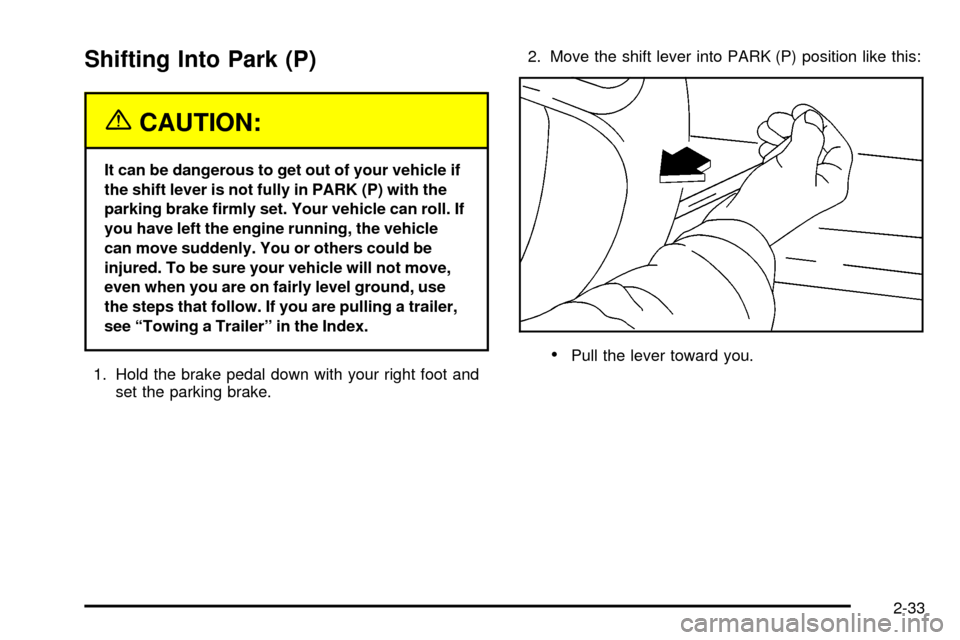
set the parking brake.2. Move the shift lever into PARK (P) position like this:
·Pull the lever toward you.
2-33
Page 106 of 432

·Move the lever up as far as it will go.
3. Turn the ignition key to LOCK.
4. Remove the key and take it with you. If you can
leave your vehicle with the key, your vehicle is in
PARK (P).
Leaving Your Vehicle With the Engine
Running
{CAUTION:
It can be dangerous to leave your vehicle with
the engine running. Your vehicle could move
suddenly if the shift lever is not fully in
PARK (P) with the parking brake ®rmly set.
And, if you leave the vehicle with the engine
running, it could overheat and even catch ®re.
You or others could be injured. Do not leave
your vehicle with the engine running.
If you have to leave your vehicle with the engine
running, be sure your vehicle is in PARK (P) and your
parking brake is ®rmly set before you leave it. After
you've moved the shift lever into PARK (P), hold
the regular brake pedal down. Then, see if you can
move the shift lever away from PARK (P) without ®rst
pulling it toward you. If you can, it means that the
shift lever wasn't fully locked into PARK (P).
2-34
Page 107 of 432

Torque Lock
If you are parking on a hill and you don't shift your
transmission into PARK (P) properly, the weight of the
vehicle may put too much force on the parking pawl in the
transmission. You may ®nd it difficult to pull the shift lever
out of PARK (P). This is called ªtorque lockº To prevent
torque lock, set the parking brake and then shift into
PARK (P) properly before you leave the driver's seat. To
®nd out how, see
Shifting Into Park (P) on page 2-33.
When you are ready to drive, move the shift lever out of
PARK (P) before you release the parking brake.
If torque lock does occur, you may need to have another
vehicle push yours a little uphill to take some of the
pressure from the parking pawl in the transmission, so
you can pull the shift lever out of PARK (P).
Shifting Out of Park (P)
Your vehicle has an automatic transmission shift lock
control system. You have to fully apply the regular
brakes before you can shift from PARK (P) when the
ignition is in RUN. See
Automatic Transmission
Operation on page 2-25.If you cannot shift out of PARK (P), ease pressure on
the shift lever±push the shift lever all the way into
PARK (P) as you maintain brake application. Then move
the shift lever into the gear you want. You must press
the shift lever button on the shift lever.
If you ever hold the brake pedal down but still can't shift
out of PARK (P), try this:
1. Turn the key to OFF.
2. Apply and hold the brake until the end of Step 4.
3. Shift the transmission to NEUTRAL (N).
4. Start the vehicle and then shift to the drive gear
you want.
5. Have the vehicle ®xed as soon as possible.
Parking Your Vehicle
If you have a manual transmission, before you get out
of your vehicle, move the shift lever into REVERSE (R),
and ®rmly apply the parking brake. Once the shift
lever has been placed into REVERSE (R) with the clutch
pedal pressed in, you can turn the ignition key to
OFF, remove the key and release the clutch.
If you are parking on a hill, or if your vehicle is pulling a
trailer, see
Towing a Trailer on page 4-54.
2-35
Page 110 of 432

Running Your Engine While You
Are Parked
It's better not to park with the engine running. But if you
ever have to, here are some things to know.
{CAUTION:
Idling the engine with the climate control
system off could allow dangerous exhaust into
your vehicle. See the earlier Caution under
ªEngine Exhaust.º
Also, idling in a closed-in place can let deadly
carbon monoxide (CO) into your vehicle even if
the climate control fan is at the highest setting.
One place this can happen is a garage.
Exhaust Ð with CO Ð can come in easily.
NEVER park in a garage with the engine
running.
Another closed-in place can be a blizzard. See
ªWinter Drivingº in the Index.
{CAUTION:
It can be dangerous to get out of your vehicle
if the shift lever is not fully in PARK (P) with
the parking brake ®rmly set. Your vehicle can
roll. Do not leave your vehicle when the engine
is running unless you have to. If you have left
the engine running, the vehicle can move
suddenly. You or others could be injured. To
be sure your vehicle will not move, even when
you are on fairly level ground, always set your
parking brake and move the shift lever to
PARK (P).
Follow the proper steps to be sure your vehicle won't
move. See
Shifting Into Park (P) on page 2-33.
If you're pulling a trailer, see
Towing a Trailer on
page 4-54.
2-38
Page 125 of 432

Vehicle Personalization
Memory Seat
If your vehicle has this
feature, the control located
on the outboard side of the
driver's seat looks like this.
Use this memory function to save your seat cushion and
seatback settings by using the following procedure:
1. Adjust the driver's seat to a safe and comfortable
driving position.
2. Press the SET button and then press and hold
button 1 (for Driver 1) for three seconds. A chime will
sound to let you know that the position has been
stored.
A second seating can be programmed by repeating
the procedure with a second driver and pressing
button 2 for three seconds.When your vehicle is in PARK (P) for an automatic
transmission or the parking brake is engaged for
a manual transmission, press and release the numbered
memory button you just stored. The seat will move to
the set position. You will hear one chime.
Pressing the UNLOCK button of a keyless entry
transmitter will adjust the seat to the corresponding
stored memory position. You will hear one chime.
Repeat Steps 1 and 2 to readjust the seat. The
transmitter need not be reprogrammed unless it needs
to correspond to the other numbered memory button.
If there is a third driver, use the seat adjuster switch to
adjust the seat.
Pressing any of the seat adjuster switches, the SET
button or pressing the desired memory button twice will
cause the seat to stop moving.
If you press the numbered button to adjust the seat and
start the vehicle while the seat is still adjusting,
adjustment will pause while the ignition is in START.
Adjustment will resume after the ignition is in RUN.
Setting the seat memory function for a particular driver
will also personalize the radio station presets that
have been selected. Each time the driver sets this
function, the respective radio station presets will also be
retained.
2-53
Page 127 of 432

Instrument Panel Overview...............................3-2
Hazard Warning Flashers................................3-4
Other Warning Devices...................................3-5
Horn.............................................................3-5
Tilt Wheel.....................................................3-5
Turn Signal/Multifunction Lever.........................3-6
Exterior Lamps.............................................3-12
Interior Lamps..............................................3-15
Accessory Power Outlets...............................3-17
Ashtrays and Cigarette Lighter........................3-18
Climate Controls............................................3-18
Climate Control System.................................3-18
Outlet Adjustment.........................................3-21
Warning Lights, Gages and Indicators.............3-22
Instrument Panel Cluster................................3-23
Speedometer and Odometer...........................3-25
Trip Odometer..............................................3-25
Tachometer.................................................3-26
Safety Belt Reminder Light.............................3-26
Air Bag Readiness Light................................3-27
Air Bag Off Light..........................................3-28
Charging System Light..................................3-29
Voltmeter Gage............................................3-30
Up-Shift Light...............................................3-30
Brake System Warning Light..........................3-31
Anti-Lock Brake System Warning Light.............3-32Engine Coolant Temperature Gage..................3-32
Malfunction Indicator Lamp.............................3-33
Oil Pressure Gage........................................3-36
Security Light...............................................3-37
Service Four-Wheel Drive Warning Light..........3-37
Check Gages Warning Light...........................3-38
Fuel Gage...................................................3-38
Low Fuel Warning Light.................................3-39
Audio System(s).............................................3-40
Setting the Time for Radios without Radio
Data Systems (RDS)..................................3-40
Setting the Time for Radios with Radio Data
Systems (RDS).........................................3-41
AM-FM Radio...............................................3-41
Radio with CD..............................................3-44
Radio with Cassette and CD..........................3-52
Radio with Six-Disc CD.................................3-62
Theft-Deterrent Feature
(Non-RDS Radios).....................................3-74
Theft-Deterrent Feature
(RDS Radios)...........................................3-74
Understanding Radio Reception......................3-74
Care of Your Cassette Tape Player.................3-75
Care of Your CDs.........................................3-76
Care of Your CD Player................................3-76
Fixed Mast Antenna......................................3-76
Section 3 Instrument Panel
3-1
Page 129 of 432

The main components of your vehicle's instrument
panel are the following:
A. Air Outlets
B. Instrument Panel Cluster
C. Electronic Transfer Case Switch (If Equipped)
D. Lamp Controls
E. Fog Lamp Button (If Equipped)
F. Brake Release
G. Turn Signal/Multifunction LeverH. Horn
I. Passenger Air Bag Off Switch (If Equipped)
J. Ashtray
K. Climate Controls
L. Accessory Power Outlets (If Equipped)
M. Heated Outside Rearview Mirror Button (If Equipped)
N. Audio System
O. Glove Box
3-3
Page 130 of 432
Hazard Warning Flashers
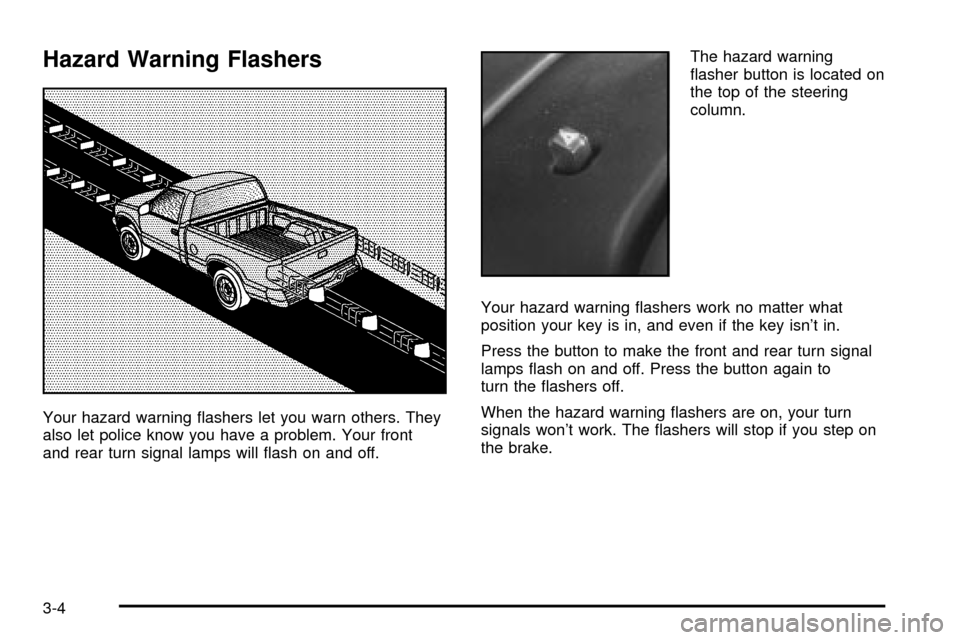
Your hazard warning ¯ashers let you warn others. They
also let police know you have a problem. Your front
and rear turn signal lamps will ¯ash on and off.The hazard warning
¯asher button is located on
the top of the steering
column.
Your hazard warning ¯ashers work no matter what
position your key is in, and even if the key isn't in.
Press the button to make the front and rear turn signal
lamps ¯ash on and off. Press the button again to
turn the ¯ashers off.
When the hazard warning ¯ashers are on, your turn
signals won't work. The ¯ashers will stop if you step on
the brake.
3-4