Page 304 of 420

Replacing Brake System Parts
The braking system on a vehicle is complex. Its many
parts have to be of top quality and work well together if
the vehicle is to have really good braking. Your
vehicle was designed and tested with top-quality GM
brake parts. When you replace parts of your braking
system Ð for example, when your brake linings
wear down and you need new ones put in Ð be sure
you get new approved GM replacement parts. If
you don't, your brakes may no longer work properly. For
example, if someone puts in brake linings that are
wrong for your vehicle, the balance between your front
and rear brakes can change Ð for the worse. The
braking performance you've come to expect can change
in many other ways if someone puts in the wrong
replacement brake parts.
Battery
Your new vehicle comes with a maintenance free
ACDelcožbattery. When it's time for a new battery, get
one that has the replacement number shown on the
original battery's label. We recommend an ACDelco
ž
battery. SeeEngine Compartment Overview on
page 5-10for battery location.
Warning:Battery posts, terminals and related
accessories contain lead and lead compounds,
chemicals known to the State of California to cause
cancer and reproductive harm. Wash hands after
handling.
Vehicle Storage
If you're not going to drive your vehicle for 25 days
or more, remove the black, negative (-) cable from
the battery. This will help keep your battery from
running down.
{CAUTION:
Batteries have acid that can burn you and gas
that can explode. You can be badly hurt if you
aren't careful. See ªJump Startingº next for
tips on working around a battery without
getting hurt.
Contact your dealer to learn how to prepare your
vehicle for longer storage periods.
Also, for your audio system, see
Theft-Deterrent
Feature (Non-RDS Radios) on page 3-68orTheft-Deterrent Feature (RDS Radios) on page 3-68.
5-40
Page 305 of 420

Jump Starting
If your battery has run down, you may want to use
another vehicle and some jumper cables to start your
vehicle. Be sure to follow the steps below to do it safely.
{CAUTION:
Batteries can hurt you. They can be dangerous
because:
·They contain acid that can burn you.
·They contain gas that can explode or
ignite.
·They contain enough electricity to
burn you.
If you don't follow these steps exactly, some
or all of these things can hurt you.
Notice:Ignoring these steps could result in costly
damage to your vehicle that wouldn't be covered
by your warranty.
Trying to start your vehicle by pushing or pulling it
won't work, and it could damage your vehicle.
1. Check the other vehicle. It must have a 12±volt
battery with a negative ground system.
Notice:If the other system isn't a 12-volt system
with a negative ground, both vehicles can be
damaged.
2. Get the vehicles close enough so the jumper cables
can reach, but be sure the vehicles aren't touching
each other. If they are, it could cause a ground
connection you don't want. You wouldn't be able to
start your vehicle, and the bad grounding could
damage the electrical systems.
To avoid the possibility of the vehicles rolling, set
the parking brake ®rmly on both vehicles involved in
the jump start procedure. Put an automatic
transmission in PARK (P) or a manual transmission
in NEUTRAL before setting the parking brake. If
you have a four-wheel-drive vehicle, be sure
the transfer case is not in NEUTRAL (N).
Notice:If you leave your radio on, it could be badly
damaged. The repairs wouldn't be covered by
your warranty.
3. Turn off the ignition on both vehicles. Unplug
unnecessary accessories plugged into the cigarette
lighter or in the accessory power outlets. Turn off
the radio and all lamps that aren't needed. This will
avoid sparks and help save both batteries. And it
could save your radio!
5-41
Page 325 of 420

Each new wheel should have the same load-carrying
capacity, diameter, width, offset and be mounted
the same way as the one it replaces.
If you need to replace any of your wheels, wheel bolts
or wheel nuts, replace them only with new GM
original equipment parts. This way, you will be sure to
have the right wheel, wheel bolts and wheel nuts
for your vehicle.
{CAUTION:
Using the wrong replacement wheels, wheel
bolts or wheel nuts on your vehicle can be
dangerous. It could affect the braking and
handling of your vehicle, make your tires lose
air and make you lose control. You could have
a collision in which you or others could be
injured. Always use the correct wheel, wheel
bolts and wheel nuts for replacement.
Notice:The wrong wheel can also cause problems
with bearing life, brake cooling, speedometer or
odometer calibration, headlamp aim, bumper height,
vehicle ground clearance and tire or tire chain
clearance to the body and chassis.
See
Changing a Flat Tire on page 5-63for more
information.
Used Replacement Wheels
{CAUTION:
Putting a used wheel on your vehicle is
dangerous. You can't know how it's been used
or how far it's been driven. It could fail
suddenly and cause a crash. If you have to
replace a wheel, use a new GM original
equipment wheel.
5-61
Page 326 of 420
Tire Chains
{CAUTION:
Don't use tire chains. There's not enough
clearance. Tire chains used on a vehicle
without the proper amount of clearance can
cause damage to the brakes, suspension or
other vehicle parts. The area damaged by the
tire chains could cause you to lose control of
your vehicle and you or others may be injured
in a crash. Use another type of traction device
only if its manufacturer recommends it for use
on your vehicle and tire size combination and
road conditions. Follow that manufacturer's
instructions. To help avoid damage to your
vehicle, drive slowly, readjust or remove the
device if it's contacting your vehicle, and don't
spin your wheels. If you do ®nd traction
devices that will ®t, install them on the
rear tires.
If a Tire Goes Flat
It's unusual for a tire to ªblowoutº while you're driving,
especially if you maintain your tires properly. If air goes
out of a tire, it's much more likely to leak out slowly.
But if you should ever have a ªblowout,º here are a few
tips about what to expect and what to do:
If a front tire fails, the ¯at tire will create a drag that
pulls the vehicle toward that side. Take your foot off the
accelerator pedal and grip the steering wheel ®rmly.
Steer to maintain lane position, and then gently brake to
a stop well out of the traffic lane.
A rear blowout, particularly on a curve, acts much like a
skid and may require the same correction you'd use
in a skid. In any rear blowout, remove your foot from the
accelerator pedal. Get the vehicle under control by
steering the way you want the vehicle to go. It may be
very bumpy and noisy, but you can still steer. Gently
brake to a stop, well off the road if possible.
If a tire goes ¯at, the next part shows how to use your
jacking equipment to change a ¯at tire safely.
5-62
Page 327 of 420
Changing a Flat Tire
If a tire goes ¯at, avoid further tire and wheel damage
by driving slowly to a level place. Turn on your
hazard warning ¯ashers.
{CAUTION:
Changing a tire can cause an injury. The
vehicle can slip off the jack and roll over you
or other people. You and they could be badly
injured. Find a level place to change your tire.
To help prevent the vehicle from moving:
1. Set the parking brake ®rmly.
2. Put the shift lever in PARK (P).
3. Turn off the engine.
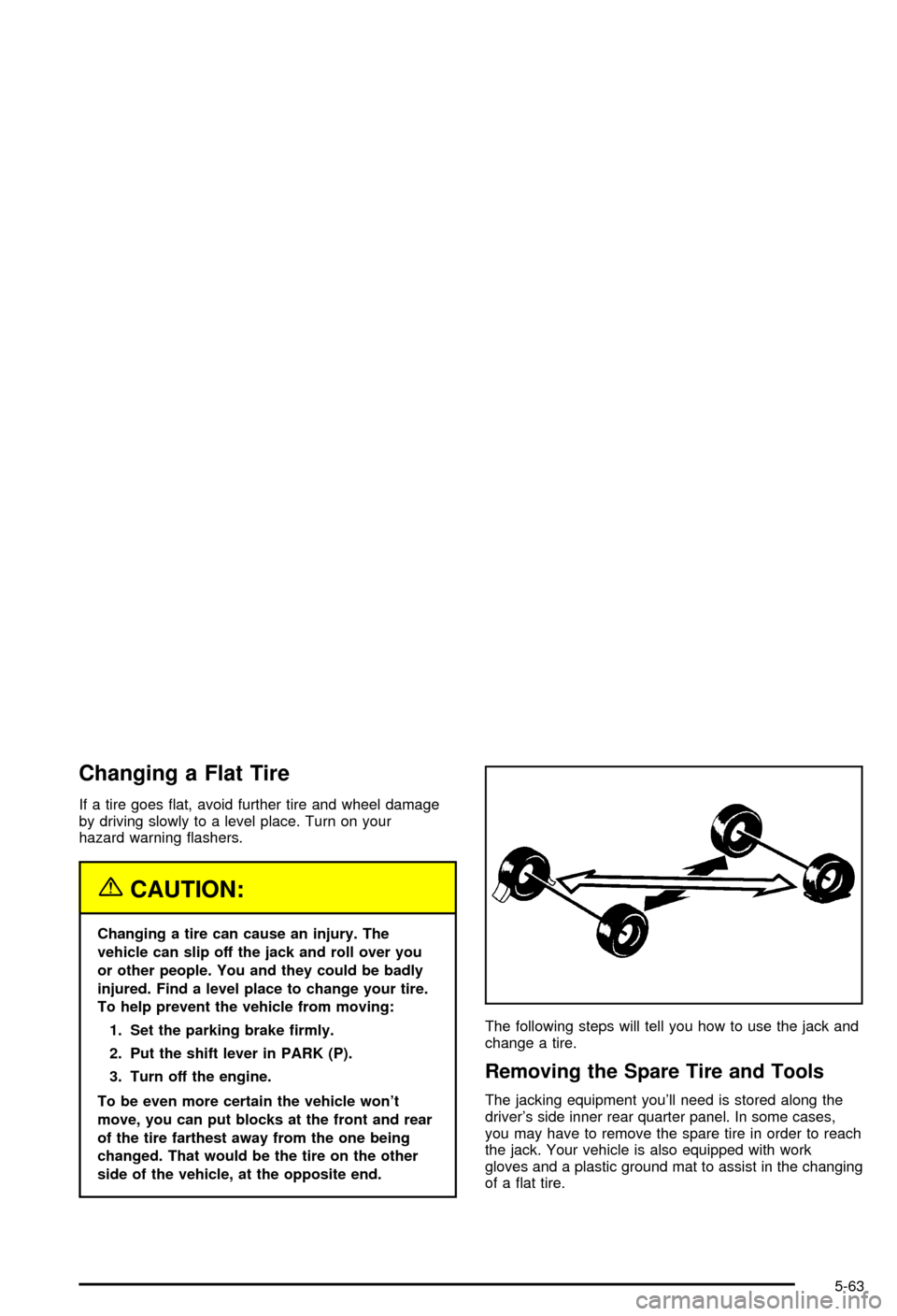
To be even more certain the vehicle won't
move, you can put blocks at the front and rear
of the tire farthest away from the one being
changed. That would be the tire on the other
side of the vehicle, at the opposite end.The following steps will tell you how to use the jack and
change a tire.
Removing the Spare Tire and Tools
The jacking equipment you'll need is stored along the
driver's side inner rear quarter panel. In some cases,
you may have to remove the spare tire in order to reach
the jack. Your vehicle is also equipped with work
gloves and a plastic ground mat to assist in the changing
of a ¯at tire.
5-63
Page 335 of 420
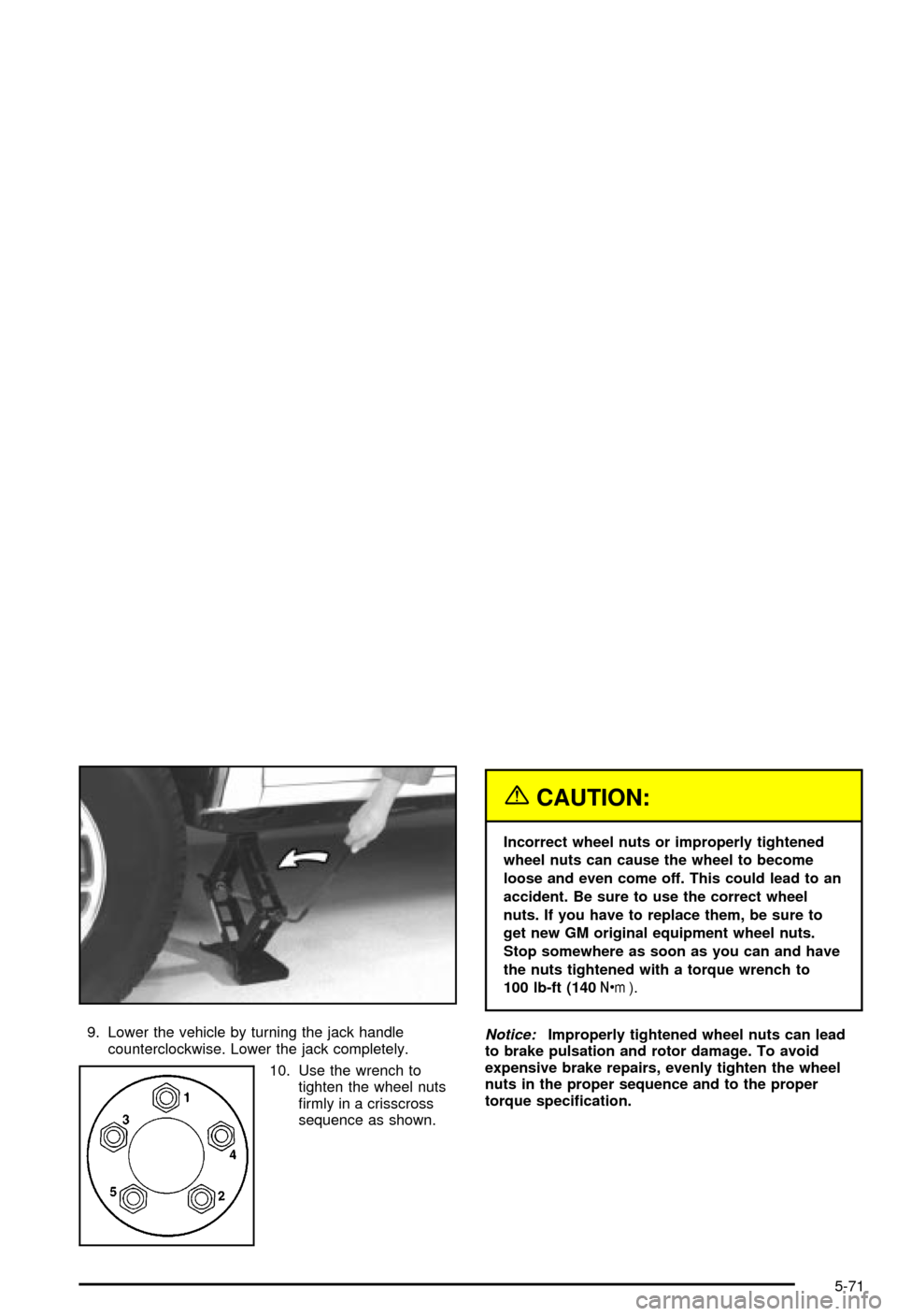
9. Lower the vehicle by turning the jack handle
counterclockwise. Lower the jack completely.
10. Use the wrench to
tighten the wheel nuts
®rmly in a crisscross
sequence as shown.
{CAUTION:
Incorrect wheel nuts or improperly tightened
wheel nuts can cause the wheel to become
loose and even come off. This could lead to an
accident. Be sure to use the correct wheel
nuts. If you have to replace them, be sure to
get new GM original equipment wheel nuts.
Stop somewhere as soon as you can and have
the nuts tightened with a torque wrench to
100 lb-ft (140Y).
Notice:Improperly tightened wheel nuts can lead
to brake pulsation and rotor damage. To avoid
expensive brake repairs, evenly tighten the wheel
nuts in the proper sequence and to the proper
torque speci®cation.
5-71
Page 351 of 420
Fuse Usage
4 Gages, Body Control Module,
Instrument Panel Cluster
5 Parking Lamps, Power Window
Switch, Body Control Module,
Ashtray Lamp
6 Steering Wheel Radio Controls
7 Headlamps Switch, Body Control
Module, Headlamp Relay
8 Courtesy Lamps, Battery Run-Down
Protection
9 Heating, Ventilation, Air Cooling
Control Head (Manual)
10 Turn Signal
11 Cluster, Engine Control Module
12 Interior Lights
13 Auxiliary Power
14 Power Locks MotorFuse Usage
15 4WD Switch, Engine Controls (VCM,
PCM, Transmission)
16 Supplemental In¯atable Restraint
17 Front Wiper
18 Steering Wheel Radio Controls
19 Radio, Battery
20 Ampli®er
21 Heating, Ventilation, Air Cooling
(Manual), Heating,Ventilation, Air
Cooling (Automatic), Heating,
Ventilation, Air Cooling Sensors
(Automatic)
22 Anti-Lock Brakes
23 Rear Wiper
24 Radio, Ignition
5-87
Page 353 of 420
Fuse Usage
RT TURN Right Turn Signal Front
LT TURN Left Turn Signal Front
HDLP W/W Not Used
LT TRN Left Turn Signal Rear
RT TRN Right Turn Signal Rear
RR PRK Right Rear Parking Lamps
TRL PRK Trailer Park Lamps
LTHDLP Left Headlamp
RTHDLP Right Headlamp
FRPRK Front Parking Lamps
INT BAT Instrument Panel Fuse Block Feed
ENG I Engine Sensors/Solenoids, MAF,
CAM, PURGE, VENT
ECM B Engine Control Module, Fuel Pump
Module, Oil Pressure
ABS Anti-Lock Brake System
ECM I Engine Control Module Injectors
F/PUMP Fuel PumpFuse Usage
DRL Daytime Running Lamps
A/C Air Conditioning
HORN Horn
W/W PMP Not Used
HORN Horn
BTSI Automatic Transmission Shift Lock
Control System
B/U LP Back Up Lamps
IGN B Column Feed,Ignition 2, 3, 4
STARTER Starter
RAP Retained Accessory Power
LD LEV Not Used
OXYSEN Oxygen Sensor
IGN E Engine
MIR/LKS Mirrors, Door Locks
FOG LP Fog Lamps
IGN A Starting and Charging Ignition 1
STUD #2 Accessory Feeds, Electric Brake
5-89