2003 CHEVROLET BLAZER weight
[x] Cancel search: weightPage 250 of 420

Notice:Do not exceed the posted speed limit when
towing your vehicle. If you do, your vehicle could
be badly damaged.
5. Turn the ignition to OFF. To prevent your battery
from draining while towing, remove the RDO BATT
and CLSTR fuses from the instrument panel
fuse block. Be sure to replace the fuse when you
reach your destination See
Fuses and Circuit
Breakers on page 5-85.
Loading Your Vehicle
The Certi®cation/Tire label is found on the driver's door
edge, above the door latch.The label shows the size of your original tires and the
in¯ation pressures needed to obtain the gross weight
capacity of your vehicle. This is called the Gross Vehicle
Weight Rating (GVWR). The GVWR includes the
weight of the vehicle, all occupants, fuel, cargo and
trailer tongue weight, if pulling a trailer.
The Certi®cation/Tire label also tells you the maximum
weights for the front and rear axles, called Gross
Axle Weight Rating (GAWR). To ®nd out the actual loads
on your front and rear axles, you need to go to a
weigh station and weigh your vehicle. Your dealer can
help you with this. Be sure to spread out your load
equally on both sides of the centerline.
Never exceed the GVWR for your vehicle, or the GAWR
for either the front or rear axle.
If you do have a heavy load, you should spread it out.
Similar appearing vehicles may have different GVWRs
and payloads. Please note your vehicle's
Certi®cation/Tire label or consult your dealer for
additional details.
4-52
Page 251 of 420
{CAUTION:
Do not load your vehicle any heavier than the
GVWR, or either the maximum front or rear
GAWR. If you do, parts on your vehicle can
break, and it can change the way your vehicle
handles. These could cause you to lose
control and crash. Also, overloading can
shorten the life of your vehicle.
Using heavier suspension components to get added
durability might not change your weight ratings. Ask your
dealer to help you load your vehicle the right way.
Notice:Your warranty does not cover parts
or components that fail because of overloading.
If you put things inside your vehicle±like suitcases, tools,
packages, or anything else±they will go as fast as the
vehicle goes. If you have to stop or turn quickly, or
if there is a crash, they'll keep going.
{CAUTION:
Things you put inside your vehicle can strike
and injure people in a sudden stop or turn, or
in a crash.
·Put things in the cargo area of your
vehicle. Try to spread the weight evenly.
·Never stack heavier things, like suitcases,
inside the vehicle so that some of them
are above the tops of the seats.
·Don't leave an unsecured child restraint in
your vehicle.
·When you carry something inside the
vehicle, secure it whenever you can.
·Don't leave a seat folded down unless you
need to.
There's also important loading information for off-road
driving in this manual. See
ªLoading Your Vehicle
for Off-Road DrivingºunderOff-Road Driving with Your
Four-Wheel-Drive Vehicle on page 4-15.
4-53
Page 252 of 420

Payload
This is the maximum load capacity that your vehicle can
carry. Be sure to include the weight of the occupants
as part of your load. If you added any accessories
or equipment after your vehicle left the factory,
remember to subtract the weight of these things from
the payload. Your dealer can help you with this.
Add-On Equipment
When you carry removable items, you may need to put
a limit on how many people you carry inside your
vehicle. Be sure to weigh your vehicle before you buy
and install the new equipment.
Notice:Your warranty does not cover parts or
components that fail because of overloading.
Towing a Trailer
{CAUTION:
If you don't use the correct equipment and
drive properly, you can lose control when you
pull a trailer. For example, if the trailer is too
heavy, the brakes may not work well Ð or
even at all. You and your passengers could be
seriously injured. Pull a trailer only if you have
followed all the steps in this section. Ask your
dealer for advice and information about towing
a trailer with your vehicle.
Notice:Pulling a trailer improperly can damage
your vehicle and result in costly repairs not covered
by your warranty. To pull a trailer correctly, follow
the advice in this part, and see your dealer for
important information about towing a trailer with
your vehicle. Additional rear axle maintenance
is required for a vehicle used to tow a trailer. See
ªScheduled Maintenance Servicesº in the Index.
To identify what the vehicle trailering capacity is for your
vehicle, you should read the information in ªWeight of
the Trailerº that appears later in this section.
4-54
Page 253 of 420

If yours was built with trailering options, as many are,
it's ready for heavier trailers. But trailering is different
than just driving your vehicle by itself. Trailering means
changes in handling, durability and fuel economy.
Successful, safe trailering takes correct equipment, and
it has to be used properly.
That's the reason for this part. In it are many time-tested,
important trailering tips and safety rules. Many of
these are important for your safety and that of your
passengers. So please read this section carefully before
you pull a trailer.
If You Decide To Pull A Trailer
If you do, here are some important points:
·There are many different laws, including speed limit
restrictions, having to do with trailering. Make sure
your rig will be legal, not only where you live
but also where you'll be driving. A good source for
this information can be state or provincial police.
·Consider using a sway control if your trailer will
weigh 3,500 lbs. (1 589 kg) or less. You should
always use a sway control if your trailer will weigh
more than 3,500 lbs. (1 589 kg). You can ask a
hitch dealer about sway controls.
·Don't tow a trailer at all during the ®rst 500 miles
(800 km) your new vehicle is driven. Your engine,
axle or other parts could be damaged.
·Then, during the ®rst 500 miles (800 km) that you
tow a trailer, don't drive over 50 mph (80 km/h)
and don't make starts at full throttle. This helps your
engine and other parts of your vehicle wear in at
the heavier loads.
·If you have an automatic transmission, you can tow
in DRIVE (D). You may want to shift the
transmission to THIRD (3) or, if necessary, a lower
gear selection if the transmission shifts too often
(e.g., under heavy loads and/or hilly conditions). If
you have a manual transmission and you are
towing a trailer, it's better not to use the highest
gear. See
Tow/Haul Mode Light on page 3-35.
Three important considerations have to do with weight:
·the weight of the trailer,
·the weight of the trailer tongue
·and the weight on your vehicle's tires.
4-55
Page 254 of 420

Tow/Haul Mode
Your vehicle may be equipped with a tow/haul feature.
The tow/haul mode is a feature that assists when
pulling a heavy trailer. The purpose of the tow/haul
mode is:
·Reduce the frequency of shifts when pulling a
heavy trailer,
·provide the same shift feel when pulling a heavy
trailer as when the vehicle is unloaded, and
·reduce the need to change throttle position when
pulling a heavy trailer.
This feature is turned on or off by pressing a button on
the ¯oor console or the shift knob. When the feature
is on, a light located on the instrument panel cluster will
illuminate to indicate that the tow/haul mode has
been selected.
See
Tow/Haul Mode Light on page 3-35. The tow/haul
mode is automatically turned off each time the vehicle is
started.
The tow/haul mode is most effective when the vehicle
and trailer combined weight is at least 75% of the Gross
Combination Weight Rating (GCWR).The tow/haul mode for hauling a heavy trailer is most
useful under the following conditions:
·When driving through hilly terrain at speeds below
55 mph (88 km/h),
·when driving in low speed or stop and go traffic
below 55 mph (88 km/h), and
·when driving in parking lots.
Operating in the tow/haul mode when not pulling a
heavy trailer will not cause damage to the vehicle, but
you may experience reduced fuel economy and
undesirable performance from the engine and
transmission. The tow/haul mode should be used only
when pulling a heavy trailer.
Weight of the Trailer
How heavy can a trailer safely be?
It depends on how you plan to use your rig. For
example, speed, altitude, road grades, outside
temperature and how much your vehicle is used to pull
a trailer are all important. And, it can also depend
on any special equipment that you have on your vehicle.
4-56
Page 255 of 420
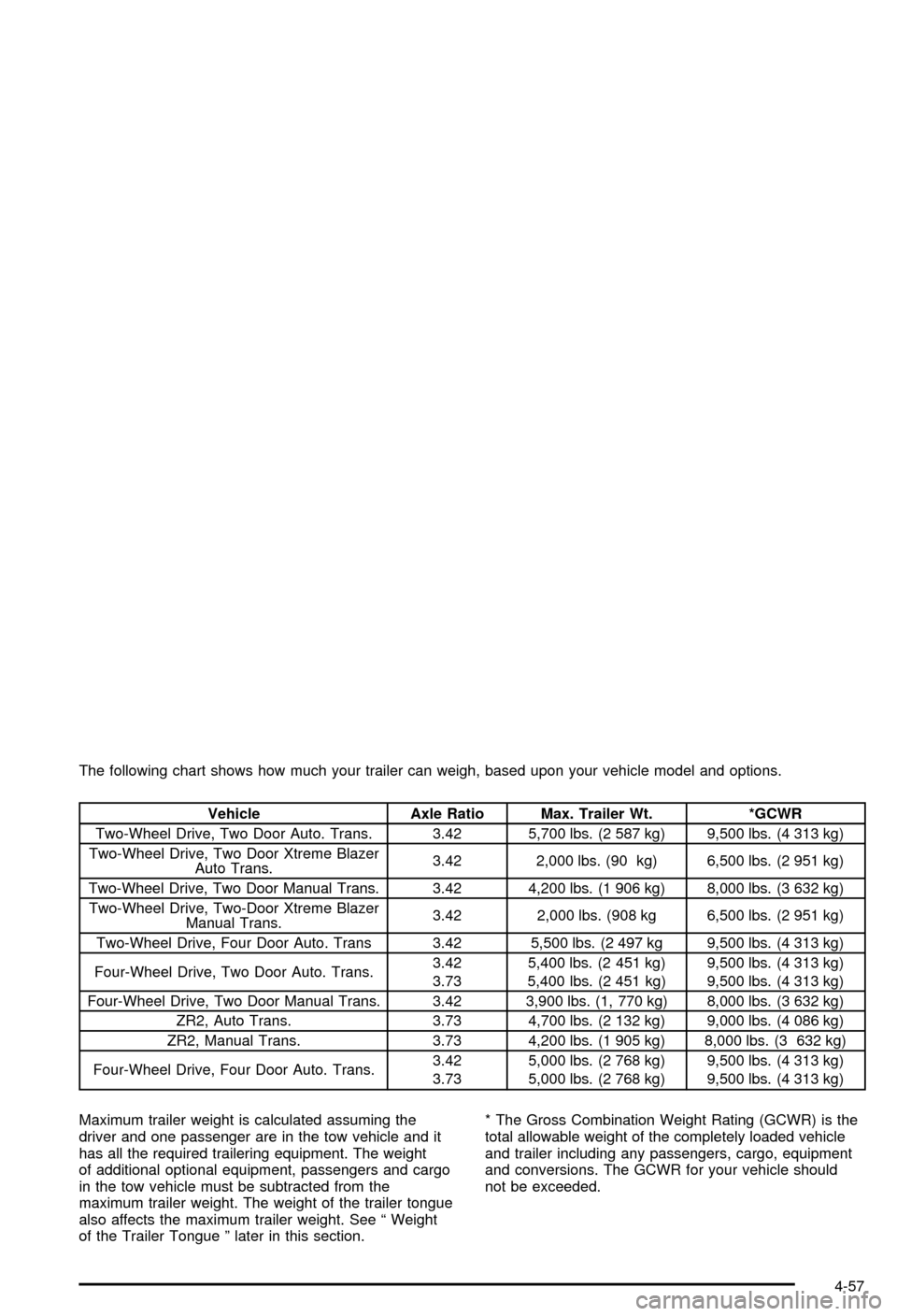
The following chart shows how much your trailer can weigh, based upon your vehicle model and options.
Vehicle Axle Ratio Max. Trailer Wt. *GCWR
Two-Wheel Drive, Two Door Auto. Trans. 3.42 5,700 lbs. (2 587 kg) 9,500 lbs. (4 313 kg)
Two-Wheel Drive, Two Door Xtreme Blazer
Auto Trans.3.42 2,000 lbs. (90 kg) 6,500 lbs. (2 951 kg)
Two-Wheel Drive, Two Door Manual Trans. 3.42 4,200 lbs. (1 906 kg) 8,000 lbs. (3 632 kg)
Two-Wheel Drive, Two-Door Xtreme Blazer
Manual Trans.3.42 2,000 lbs. (908 kg 6,500 lbs. (2 951 kg)
Two-Wheel Drive, Four Door Auto. Trans 3.42 5,500 lbs. (2 497 kg 9,500 lbs. (4 313 kg)
Four-Wheel Drive, Two Door Auto. Trans.3.42
3.735,400 lbs. (2 451 kg)
5,400 lbs. (2 451 kg)9,500 lbs. (4 313 kg)
9,500 lbs. (4 313 kg)
Four-Wheel Drive, Two Door Manual Trans. 3.42 3,900 lbs. (1, 770 kg) 8,000 lbs. (3 632 kg)
ZR2, Auto Trans. 3.73 4,700 lbs. (2 132 kg) 9,000 lbs. (4 086 kg)
ZR2, Manual Trans. 3.73 4,200 lbs. (1 905 kg) 8,000 lbs. (3 632 kg)
Four-Wheel Drive, Four Door Auto. Trans.3.42
3.735,000 lbs. (2 768 kg)
5,000 lbs. (2 768 kg)9,500 lbs. (4 313 kg)
9,500 lbs. (4 313 kg)
Maximum trailer weight is calculated assuming the
driver and one passenger are in the tow vehicle and it
has all the required trailering equipment. The weight
of additional optional equipment, passengers and cargo
in the tow vehicle must be subtracted from the
maximum trailer weight. The weight of the trailer tongue
also affects the maximum trailer weight. See ª Weight
of the Trailer Tongue º later in this section.* The Gross Combination Weight Rating (GCWR) is the
total allowable weight of the completely loaded vehicle
and trailer including any passengers, cargo, equipment
and conversions. The GCWR for your vehicle should
not be exceeded.
4-57
Page 256 of 420

You can ask your dealer for our trailering information or
advice, or you can write us at the address listed in
your Warranty and Owner Assistance Information
Booklet.
In Canada, write to:
General Motors of Canada Limited
Customer Communication Centre, 163-005
1908 Colonel Sam Drive
Oshawa, Ontario L1H 8P7
Weight of the Trailer Tongue
The tongue load (A) of any trailer is an important weight
to measure because it affects the total or gross weight
of your vehicle. The Gross Vehicle Weight (GVW)
includes the curb weight of the vehicle, any cargo you
may carry in it, and the people who will be riding in
the vehicle. And if you will tow a trailer, you must add
the tongue load to the GVW because your vehicle will be
carrying that weight, too. See
Loading Your Vehicle
on page 4-52for more information about your vehicle's
maximum load capacity.If you're using a weight-carrying or a weight-distributing
hitch, the trailer tongue weight (A) should be 10 percent
to 15 percent of the total loaded trailer weight (B).
Do not exceed the maximum allowable tongue weight
for your vehicle.
After you've loaded your trailer, weigh the trailer and
then the tongue, separately, to see if the weights
are proper. If they aren't, you may be able to get them
right simply by moving some items around in the
trailer.
4-58
Page 257 of 420

Total Weight on Your Vehicle's Tires
Be sure your vehicle's tires are in¯ated to the upper limit
for cold tires. You'll ®nd these numbers on the
Certi®cation label at the rear edge of the driver's door or
see
Loading Your Vehicle on page 4-52. Then be
sure you don't go over the GVW limit for your vehicle,
including the weight of the trailer tongue.
Hitches
It's important to have the correct hitch equipment.
Crosswinds, large trucks going by and rough roads are
a few reasons why you'll need the right hitch. Here
are some rules to follow:
·If you'll be pulling a trailer that, when loaded, will
weigh more than 3,500 lbs. (1 589 kg), be sure to
use a properly mounted, weight-distributing
hitch and sway control of the proper size. This
equipment is very important for proper vehicle
loading and good handling when you're driving.
·Will you have to make any holes in the body of
your vehicle when you install a trailer hitch?
If you do, then be sure to seal the holes later when
you remove the hitch. If you don't seal them,
deadly carbon monoxide (CO) from your exhaust
can get into your vehicle. See
Engine Exhaust
on page 2-39andªDriving with a Trailerºlater in this
section. Dirt and water can, too.
Safety Chains
You should always attach chains between your vehicle
and your trailer. Cross the safety chains under the
tongue of the trailer to help prevent the tongue from
contacting the road if it becomes separated from
the hitch. Instructions about safety chains may be
provided by the hitch manufacturer or by the trailer
manufacturer. Follow the manufacturer's
recommendation for attaching safety chains and do not
attach them to the bumper. Always leave just enough
slack so you can turn with your rig. Never allow
safety chains to drag on the ground.
4-59